Introduction
This manual provides essential information for the installation, operation, and maintenance of the ICM282A Furnace Control Board. This fixed speed furnace control board is designed to replace specific Carrier furnace modules, ensuring reliable performance for your HVAC system.
Replaces the following Carrier modules:
- CEBD431012-01A
- CEPL1311012-01
- HK42FZ004, HK42FZ007, HK42FZ008, HK42FZ009, HK42FZ011, HK42FZ013, HK42FZ016, HK42FZ034
- 325878-751
Key Features
- Controls gas valve, ignitor, blower motor, inducer, humidifier, and air cleaner.
- Microprocessor-based design for 100% gas shutoff in case of ignition failure.
- Includes reverse polarity protection.
- Secondary brownout voltage protection.
- Compatible with a 24 VAC standard thermostat.
- Provides diagnostic LED to aid in troubleshooting.
- Software for enhanced controls operation in counterflow and downflow furnace applications.
Safety Considerations
WARNING: Always disconnect power to the furnace at the main electrical panel before attempting any installation, maintenance, or troubleshooting. Failure to do so can result in serious injury or death.
Use caution when installing and servicing the furnace to avoid and control electrostatic discharge (ESD). ESD can damage sensitive electronic components. It is recommended to wear an anti-static wrist strap and work on a grounded surface.
Installation should only be performed by a qualified technician.
Installation Instructions
Before beginning the installation, ensure you have the correct replacement board for your furnace model. Refer to the "Replaces Carrier" list in the Introduction section.
- Power Disconnection: Turn off all power to the furnace at the main electrical panel. Verify power is off using a voltage tester.
- Access the Control Board: Locate and open the furnace access panel to expose the existing control board.
- Document Wiring: Before disconnecting any wires, take clear photographs of the existing wiring connections on the old control board. This will serve as a crucial reference during reinstallation. Pay close attention to the terminals and wire colors.
- Disconnect Wires: Carefully disconnect all wires from the old control board. Label wires if necessary to ensure correct reattachment.
- Remove Old Board: Unmount the old control board from its position. Note how it was secured (screws, clips, etc.).
- Install New Board: Mount the new ICM282A control board in the same location as the old one. Ensure it is securely fastened.
- Connect Wiring: Using your photographs as a guide, carefully reconnect all wires to the corresponding terminals on the new control board. Ensure all connections are secure. Pay particular attention to the 9-pin connector; ensure all pins are fully seated.
- Close Access Panel: Once all connections are verified, close and secure the furnace access panel.
- Restore Power: Turn on the power to the furnace at the main electrical panel.

Image 1: The ICM282A Furnace Control Board shown with its accompanying wiring harness. This image displays the overall layout of the board and the various connection points, along with the included cables for installation.

Image 2: A visual representation listing the specific Carrier furnace control board models that the ICM282A board is designed to replace. This helps confirm compatibility.
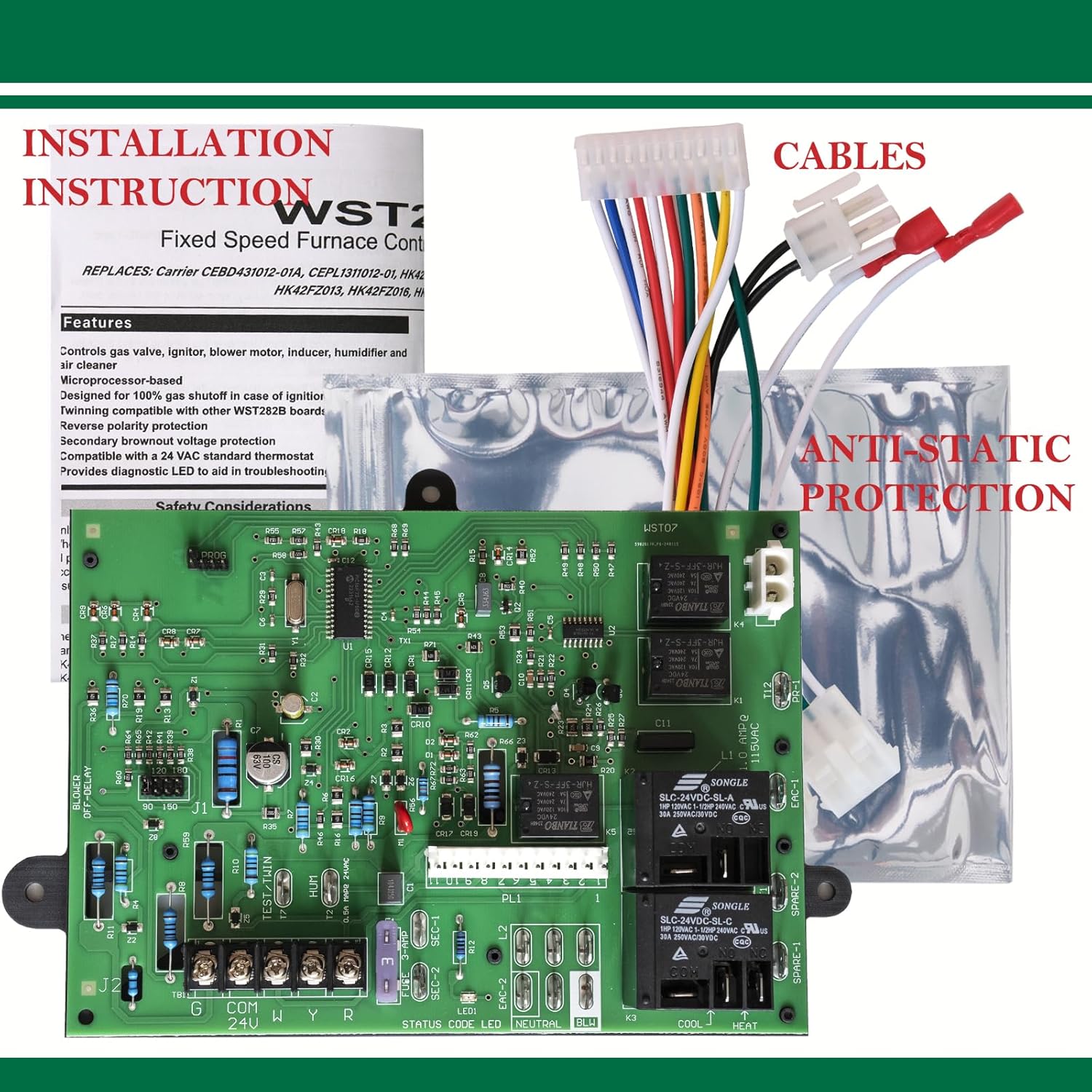
Image 3: The ICM282A board highlighting anti-static protection measures and the included cables. This emphasizes the care taken in handling and the completeness of the package for installation.
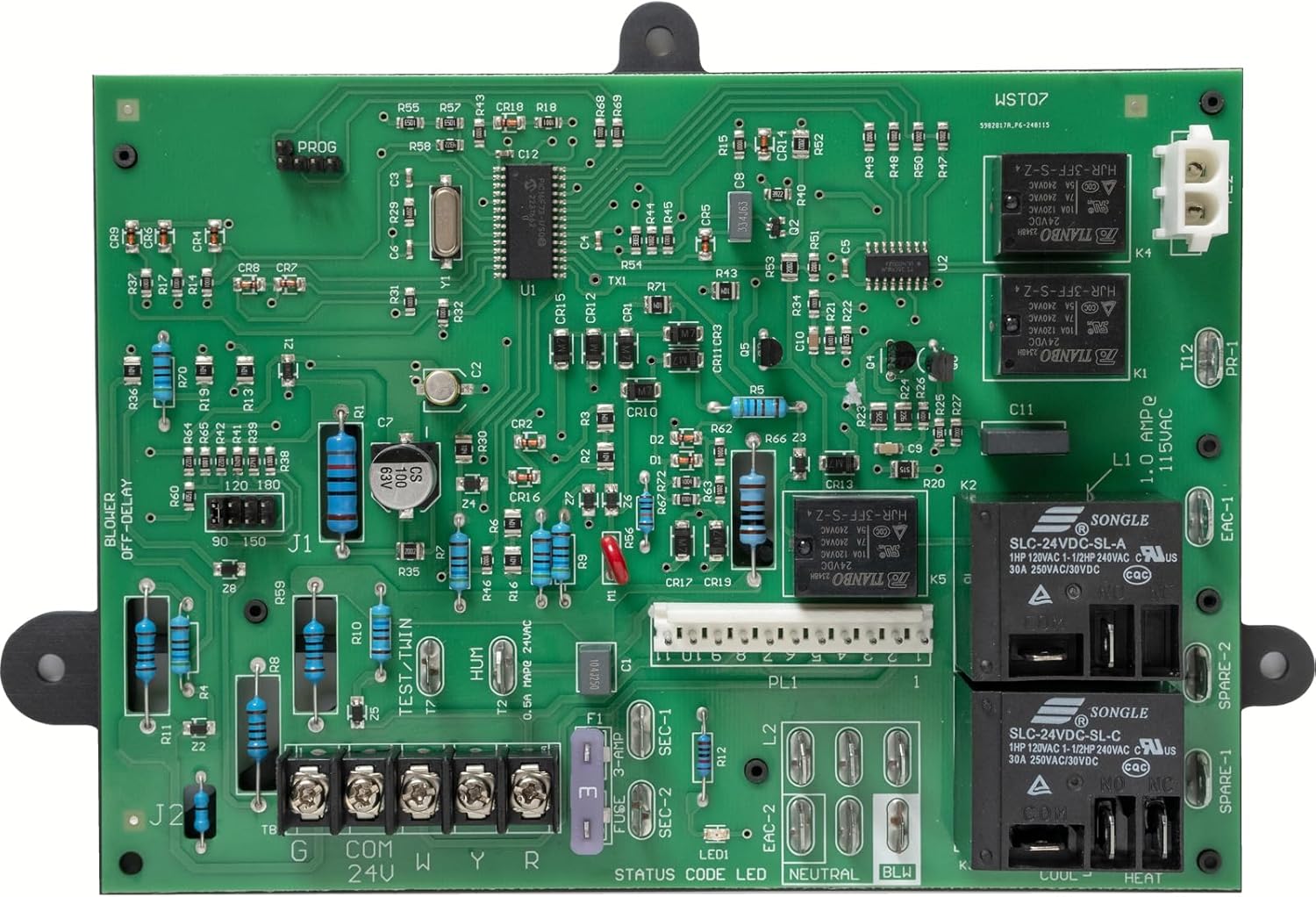
Image 4: A detailed close-up of the ICM282A Furnace Control Board, showing the various electronic components, relays, and connection terminals. This view is useful for identifying specific parts during installation or troubleshooting.

Image 5: This image specifically highlights that all necessary cables are included with the ICM282A Furnace Control Board, ensuring a complete replacement solution.

Image 6: A view of the ICM282A board pointing out key components such as the MicroChip Controller and Littelfuse parts, indicating the use of high-quality, Tier-1 brand components.

Image 7: This image emphasizes the stability and durability of the ICM282A board by highlighting the use of TE/AMP connectors and Songle relays, which are known for their reliability.
Operation
The ICM282A furnace control board is designed for automatic operation of your furnace system. Once installed and power is restored, the board will manage the sequence of operations for heating and cooling cycles based on signals from your 24 VAC standard thermostat.
It controls the ignition sequence, gas valve, blower motor (for both heating and cooling), inducer motor, and can also manage humidifier and air cleaner functions if connected.
The microprocessor-based design ensures precise control and includes safety features such as 100% gas shutoff in the event of ignition failure, and reverse polarity protection.
Maintenance
The ICM282A furnace control board is a sealed electronic component and generally requires no routine maintenance. However, to ensure its longevity and proper function, consider the following:
- Annual System Check: Have your entire HVAC system, including the furnace and its components, inspected annually by a qualified HVAC technician.
- Cleanliness: Ensure the area around the control board within the furnace is kept clean and free of dust and debris, which can impede airflow and component cooling.
- Environmental Conditions: Protect the furnace from excessive moisture or extreme temperature fluctuations outside of its operational range.
Troubleshooting
The ICM282A has incorporated LED diagnostics to assist in troubleshooting. A fault code label is included in this package and must be installed on the furnace for easy reference. Observe the blinking pattern of the LED to identify specific error codes.
Common Issues and Diagnostic Steps:
- No Power to Board:
- Check the main electrical panel for tripped circuit breakers.
- Verify all wiring connections to the board are secure, especially the main power input.
- Ensure the furnace access panel is properly closed, as some furnaces have safety interlocks.
- Furnace Not Igniting:
- Check the diagnostic LED for an ignition failure code.
- Verify the gas supply is on.
- Inspect the ignitor for damage or proper function.
- Ensure the flame sensor is clean and properly positioned.
- Blower Motor Issues (Not running or running continuously):
- Check the diagnostic LED for blower motor related codes.
- Verify thermostat settings are correct.
- Ensure blower motor wiring is correctly connected to the board.
- Intermittent Operation / Faulting Out:
- This can sometimes be caused by loose connections. Re-check all wiring, especially the multi-pin connectors, ensuring all pins are fully seated.
- Refer to the fault code label for specific blinking patterns.
If troubleshooting steps do not resolve the issue, it is recommended to contact a qualified HVAC technician.
Specifications
| Attribute | Value |
|---|---|
| Model Number | ICM282 |
| Manufacturer | Wylstan |
| Input Voltage Range | 98 to 132 VAC at 60 Hz |
| Ignitor Output | 5A at 120 VAC |
| Cool Blower Output | 30A, 2 HP, 240 VAC |
| Heat Blower Output | 5A, 1/2 HP, 240 VAC |
| Inducer Motor Output | 4A, FLA-8.0 LRA at 120 VAC |
| Item Weight | 14.4 ounces |
| Product Dimensions | 8 x 5 x 2 inches |
| Included Components | Frame, furnace control circuit board |
Warranty Information
This product comes with a 1-year warranty from the date of purchase. This warranty covers defects in materials and workmanship under normal use. It does not cover damage resulting from improper installation, misuse, abuse, accident, or unauthorized repairs.
For warranty claims, please retain your proof of purchase and contact customer support.
Customer Support
If you have any questions regarding the installation, operation, or troubleshooting of your ICM282A Furnace Control Board, please do not hesitate to contact our customer support team.
For the most efficient support, please have your product model number and purchase details ready when contacting us.
We are committed to ensuring your satisfaction and providing assistance with our products.