1. Introduction
Thank you for choosing the SAMSICHI Dehumidifier. This compact and efficient appliance is designed to remove excess moisture from the air, creating a more comfortable and healthier environment in spaces up to 800 sq. ft. It is ideal for use in bathrooms, bedrooms, closets, RVs, and other small to medium-sized areas prone to humidity.
This manual provides important information regarding the installation, operation, maintenance, and troubleshooting of your dehumidifier. Please read it thoroughly before use and keep it for future reference.

Figure 1: SAMSICHI Dehumidifier - Front View
2. Important Safety Instructions
WARNING: To reduce the risk of fire, electric shock, or injury, always follow these basic precautions:
- Read all instructions before using this appliance.
- Do not operate the dehumidifier with a damaged cord or plug.
- Ensure the power outlet voltage matches the appliance's requirements.
- Always unplug the dehumidifier before cleaning, performing maintenance, or when not in use.
- Do not immerse the appliance, cord, or plug in water or other liquids.
- Keep the appliance away from heat sources, direct sunlight, and flammable materials.
- Do not block the air inlet or outlet vents. Ensure at least 6 inches of clearance around the unit.
- This appliance is for indoor use only. Do not use outdoors.
- Do not allow children to operate or play with the dehumidifier.
- Empty the water tank regularly to prevent overflow. The unit features an automatic shut-off when the tank is full.
- Use only manufacturer-recommended accessories.
3. Product Overview
3.1 Components
- Dehumidifier Unit (Model YP2318)
- Water Tank (85 OZ capacity)
- Drain Hose (for continuous drainage)
- Power Adapter
- User Manual (this document)
3.2 Control Panel and Indicators

Figure 2: Dehumidifier Features and Control Panel
| Icon | Function | Description |
|---|---|---|
| ⏻ | Power Button | Press to turn the dehumidifier ON or OFF. |
| 💡 | Light Button | Cycles through 7 LED color options or turns the light off. |
| 🕑 | Timer Button | Sets the operating timer for 8, 12, or 24 hours. |
| 🌛 | Sleep Mode Button | Activates quiet sleep mode, turning off lights and reducing fan speed. |
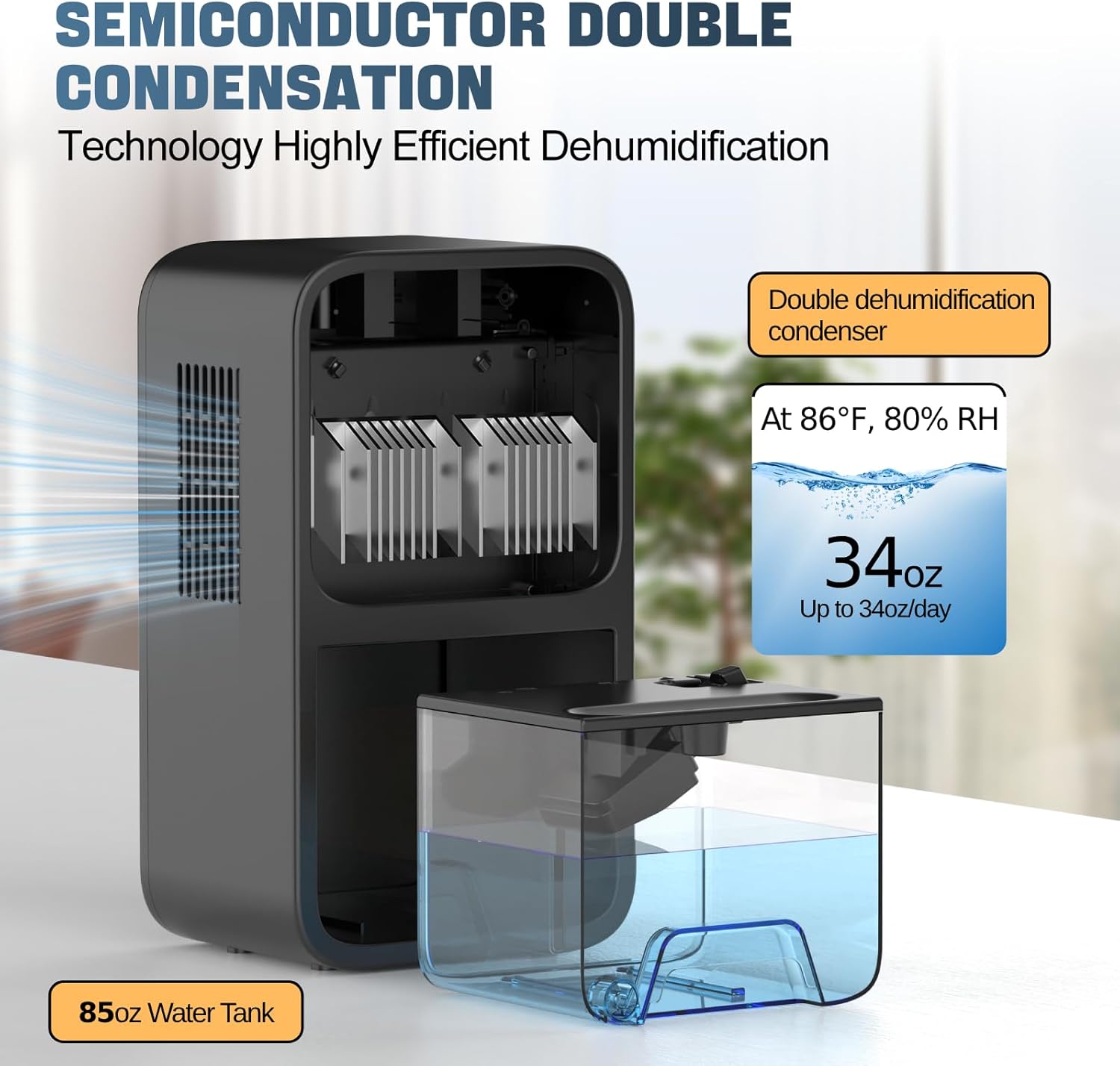
Figure 3: Internal Components and Water Tank
4. Setup
4.1 Unpacking
Carefully remove the dehumidifier and all accessories from the packaging. Inspect the unit for any signs of damage. If any damage is found, do not operate the unit and contact customer support.
4.2 Placement
Place the dehumidifier on a flat, stable surface in the desired location. Ensure there is at least 6 inches (15 cm) of clear space around all sides of the unit to allow for proper airflow. Avoid placing it directly against walls or furniture.

Figure 4: Optimal Placement for Effective Dehumidification
4.3 Power Connection
Connect the power adapter to the DC input port on the back of the dehumidifier. Plug the other end of the power adapter into a suitable electrical outlet (100-240V AC, 50/60Hz).
5. Operating Instructions
5.1 Powering On/Off
Press the Power Button (⏻) once to turn the dehumidifier ON. The unit will start operating in Powerful Mode by default. Press the Power Button again to turn the unit OFF.
5.2 Operating Modes
The SAMSICHI Dehumidifier offers two operating modes:
- Powerful Mode: This is the default mode upon startup. The dehumidifier operates at its maximum fan speed for quick and effective moisture removal. Noise level is typically between 30-40dB.
- Sleep Mode: Press the Sleep Mode Button (🌛) to activate Sleep Mode. In this mode, the fan speed is reduced, and all LED lights (including the water tank light) are turned off to ensure a quiet environment, ideal for bedrooms or during nighttime. Noise level is typically below 30dB. Press the Sleep Mode Button again to return to Powerful Mode.

Figure 5: Powerful Mode vs. Sleep Mode
5.3 Timer Function
To set an operating timer, press the Timer Button (🕑). Each press will cycle through the available timer settings: 8 hours, 12 hours, 24 hours, or continuous operation (no timer). The unit will automatically shut off once the set time has elapsed.
5.4 LED Light Control
The dehumidifier features a multi-color LED light strip on the front. Press the Light Button (💡) to cycle through 7 different color options (Red, Purple, Blue, Cyan, Green, Yellow, Orange) or to turn the light off completely. This allows for customization to suit your preference or room ambiance.
Video 1: Official product video demonstrating the SAMSICHI Dehumidifier's features, including its quiet operation and color-changing LED lights.
6. Maintenance
6.1 Emptying the Water Tank
When the water tank is full, the dehumidifier will automatically shut off, and the LED light strip will turn red and flash to indicate that the tank needs to be emptied. This prevents overflow and ensures safe operation.

Figure 6: Automatic Shut-Off and Full Tank Indicator
- Turn off the dehumidifier and unplug it from the power outlet.
- Gently pull out the water tank from the back of the unit.
- Remove the water tank cover and carefully pour out the collected water.
- Replace the water tank cover and slide the tank back into the dehumidifier until it clicks into place.
- Plug in the dehumidifier and turn it on to resume operation.
6.2 Continuous Drainage (Optional)
For continuous operation without needing to manually empty the tank, you can use the included drain hose:
- Locate the drain hole on the lower right corner of the water tank.
- Unplug the rubber stopper from the drain hole and save it for future use if you wish to revert to manual emptying.
- Connect one end of the provided drain hose to the drain hole, ensuring a secure fit.
- Direct the other end of the hose to a suitable drainage point, such as a floor drain or a large container, ensuring the hose is sloped downwards for gravity drainage.
6.3 Cleaning
- Exterior: Wipe the exterior of the dehumidifier with a soft, damp cloth. Do not use abrasive cleaners or solvents.
- Water Tank: Clean the water tank regularly with mild soap and warm water to prevent mold and mildew growth. Rinse thoroughly and dry before reinserting.
- Air Inlet/Outlet: Periodically check the air inlet and outlet vents for dust accumulation. Use a soft brush or vacuum cleaner with a brush attachment to gently remove any dust.
7. Troubleshooting
| Problem | Possible Cause | Solution |
|---|---|---|
| Dehumidifier does not turn on. | No power supply. Power button not pressed. | Ensure the power adapter is securely plugged into the unit and a working outlet. Press the Power Button (⏻). |
| No water collected or low dehumidification. | Humidity level is already low. Air vents are blocked. Room size exceeds capacity. Temperature is too low. | The unit will not collect water if humidity is below 45%. Ensure proper clearance around the unit. This unit is designed for spaces up to 800 sq. ft. Optimal operating temperature is above 41°F (5°C). |
| Water tank full indicator (red flashing light) is on, but tank is not full. | Water tank is not properly seated. | Remove the water tank and reinsert it firmly until it clicks into place. |
| Unusual noise during operation. | Unit is not on a stable surface. Obstruction in fan. | Place the unit on a flat, stable surface. Turn off and unplug the unit, then check for any foreign objects in the air vents. |
8. Specifications
- Brand: SAMSICHI
- Model: YP2318
- Coverage Area: Up to 800 sq. ft.
- Water Tank Capacity: 85 OZ (approx. 2.5 Liters)
- Dehumidification Capacity: Up to 34 oz/day (at 86°F, 80% RH)
- Operation Modes: Powerful Mode, Sleep Mode
- Noise Level: 30-40dB (Powerful Mode), <30dB (Sleep Mode)
- Timer Settings: 8H, 12H, 24H
- LED Lights: 7 Color Options
- Auto Shut-Off: Yes (when water tank is full)
- Drainage: Manual (tank) or Continuous (drain hose)
- Material: Plastic
- Product Dimensions: 5.3 x 7.2 x 12.6 inches
- Item Weight: 5.9 pounds
- UPC: 705888664589
9. Warranty and Support
SAMSICHI products are manufactured to the highest quality standards. For any questions, concerns, or technical support regarding your dehumidifier, please contact SAMSICHI customer service. Please have your model number (YP2318) and purchase information ready when contacting support.
For the most up-to-date warranty information and contact details, please refer to the official SAMSICHI website or the contact information provided with your purchase.