
iFlight BLITZ Whoop VTX
iFlight 5.8Ghz 40CH 2.5W/ 4.9Ghz 8CH 2.5W 2-8S VTX BWhoop
User Manual
1. Product Overview
Description
The iFlight BLITZ Whoop VTX is a high-power video transmitter designed for FPV drones and quadcopters. It features a built-in microphone, multiple power levels up to 2500mW, and supports 2-8S VBAT input. The VTX includes an integrated cooling fan and CNC cooling casing for efficient heat dissipation. It utilizes an MMCX interface and has a 25.5x25.5mm mounting pattern. Control is managed via LED indicators and function buttons for power level, band, and channel selection, with IRC Tramp telemetry support.
Key Features
- Built-in microphone for audio transmission.
- Input voltage range: 7V to 34V (2-8S VBAT).
- Four selectable power levels: PIT/25mW/400mW/1000mW/2500mW.
- 8 channels for 4.9Ghz and 40 channels for 5.8Ghz operation.
- CNC cooling casing with integrated cooling fan for dual heat dissipation.
- MMCX antenna interface.
- Compact dimensions: 50*30*16 mm, Lightweight: 32g.
- VTX telemetry: IRC Tramp.
What's in the Box
- 1 x BLITZ Whoop 4.9G 2.5W VTX
- Necessary wiring harnesses
- Mounting screws
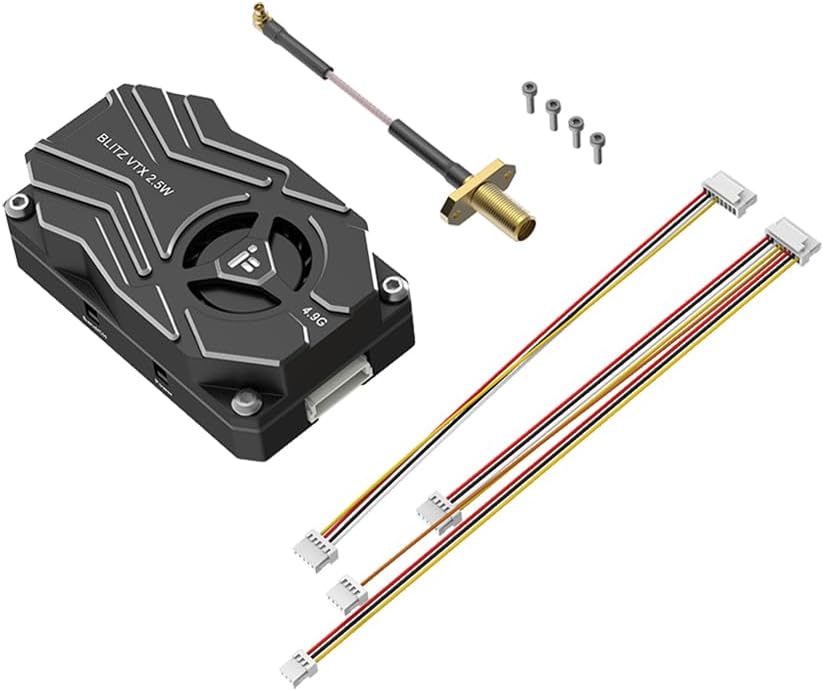
Figure 1.1: The iFlight BLITZ Whoop VTX module with its antenna cable, mounting screws, and wiring harnesses.
2. Important Safety Information
WARNING: The VTX is set to 25mW by default. Power levels above 25mW require a HAM license or must be approved by local authorities. Always ensure you are flying legal frequencies and use the appropriate Betaflight VTX tables according to your region's regulations.
- Always read the instructions for proper wiring before connecting the VTX. Incorrect wiring can cause damage.
- Ensure the antenna is properly installed before powering on the VTX. Operating without an antenna can significantly shorten the module's lifespan.
- Verify the correct voltage range (7-34V DC) and polarity (positive/negative) before applying power to prevent component damage.
- When installing the VTX, ensure sufficient space around the module for air convection to facilitate proper heat dissipation.
- Failure to provide adequate cooling may cause the module to activate overheat protection, leading to reduced power transmission or complete shutdown.
3. Setup Guide
Wiring and Port Connections
The BLITZ Whoop VTX features clearly labeled ports for easy integration into your FPV system. Refer to the diagram below for correct connections.
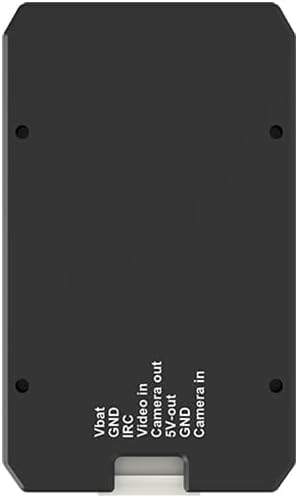
Figure 3.1: Bottom view of the VTX showing port connections.
| Port Label | Description |
|---|---|
| VBAT | Positive input for 2-8S (7-34V DC) battery voltage. |
| GND | Negative ground connection. |
| IRC | IRC Tramp Signal Input for VTX control from flight controller. |
| Video in | Video signal input from your FPV camera. |
| Camera out | Camera video output (if applicable for pass-through). |
| 5V out | 5V voltage output for powering peripherals like an FPV camera. |
| Camera in | Camera video input (alternative to 'Video in' depending on setup). |
Mounting
The VTX has a mounting pattern of 25.5x25.5mm with Φ1.6mm holes. Ensure secure mounting using the provided screws. It is crucial to leave adequate space around the VTX for air circulation to allow the integrated cooling fan and CNC casing to dissipate heat effectively. This prevents the VTX from entering overheat protection mode.
4. Operating Instructions
Power Button Functionality
The VTX features a 'Power' button to control its output power and PIT mode. Refer to the image below for button location.

Figure 4.1: Side view of the VTX showing the 'Band/CH' and 'Power' buttons.
- Press and hold for 2 seconds: Enters or exits PIT mode. A solid green LED light indicates that PIT mode is active.
- Short press: Changes the output power level. The number of green LED flashes indicates the current power setting:
- 1 flash = 25mW
- 2 flashes = 400mW
- 3 flashes = 1000mW
- 4 flashes = 2500mW
Band and Channel Button Functionality
The 'Band/CH' button allows you to cycle through the available bands and channels. Refer to Figure 4.1 for button location.
- Short press: Switches the channel. The number of blue LED flashes indicates the current channel (1 to 8 for 4.9Ghz, or 1 to 40 for 5.8Ghz depending on the selected band).
VTX Telemetry (IRC Tramp)
The BLITZ Whoop VTX supports IRC Tramp telemetry, allowing you to configure VTX settings directly from your flight controller's OSD (On-Screen Display) or Betaflight configurator. Connect the IRC pin on the VTX to a UART TX pad on your flight controller and configure the UART for VTX (Tramp) protocol in Betaflight.
5. Technical Specifications
| Specification | Value |
|---|---|
| Interface | MMCX |
| Power Levels | PIT/25mW/400mW/1000mW/2500mW |
| Mounting Pattern | 25.5x25.5mm / Φ1.6 |
| Dimensions | 50 x 30 x 16 mm |
| Weight | 32g |
| VTX Telemetry | IRC Tramp |
| Input Voltage (VBAT) | 2-8S (7-34V DC) |
| Manufacturer | IFlight |
| Recommended Age | 15 years and up |
6. Maintenance
To ensure the longevity and optimal performance of your iFlight BLITZ Whoop VTX, follow these maintenance guidelines:
- Keep Clean: Regularly inspect the VTX for dust, dirt, or debris, especially around the cooling fan and heatsink fins. Use a soft brush or compressed air to gently clean these areas.
- Ensure Proper Cooling: Always ensure that the VTX has adequate airflow during operation. Avoid enclosing it in tight spaces without ventilation, as this can lead to overheating and performance degradation.
- Antenna Connection: Periodically check the MMCX antenna connection to ensure it is secure. A loose connection can lead to poor video quality and potential damage to the VTX.
- Inspect Wiring: Before each flight, visually inspect all wiring connected to the VTX for any signs of wear, fraying, or damage. Replace any damaged wires immediately.
7. Troubleshooting
This section addresses common issues you might encounter with your iFlight BLITZ Whoop VTX.
| Problem | Possible Cause | Solution |
|---|---|---|
| No video signal or very poor range | Antenna not connected or damaged; Incorrect channel/band; VTX in PIT mode; Overheating. | Ensure antenna is securely connected. Verify VTX channel/band matches receiver. Check if VTX is in PIT mode (solid green LED) and exit if necessary. Ensure adequate cooling. |
| VTX gets excessively hot, power output reduces or shuts off | Insufficient airflow/cooling; Operating at high power in confined space. | Ensure proper ventilation around the VTX. Consider reducing power output if operating in a hot environment or with limited airflow. |
| VTX does not power on or components are damaged | Incorrect voltage input; Reverse polarity; Short circuit. | Double-check all wiring for correct voltage (7-34V) and polarity before connecting power. Inspect for any short circuits. If components are burned, the VTX may need replacement. |
| Cannot change VTX settings via Betaflight OSD | IRC Tramp not configured correctly; Wiring issue to flight controller. | Verify the IRC pin is connected to a UART TX pad on your flight controller. Ensure the correct UART is enabled for VTX (Tramp) protocol in Betaflight configurator. |
8. Warranty and Support
For warranty information, please refer to the official iFlight website or contact your point of purchase. Warranty terms typically cover manufacturing defects for a specified period from the date of purchase.
For technical support, troubleshooting assistance beyond this manual, or to inquire about spare parts, please visit the official iFlight support channels or their Amazon store page:
Visit the iFlight Store on Amazon
Please have your product model number (BLITZ Whoop VTX) and purchase details ready when contacting support.
9. Official Product Videos
No official product videos from the seller were provided for this manual. Please check the product listing or the manufacturer's official website for any available video resources.
Related documentsBLITZ Whoop VTX


Ask a question about this manual
Ask about setup, troubleshooting, compatibility, parts, safety, or missing instructions. Manuals+ will review the question and use this page’s manual context to help answer it.