
1. Introduction
The Havit Gamenote KB876L is a high-performance gaming keyboard designed for an immersive gaming experience. It features vibrant RGB backlighting, durable keys, and an ergonomic design for comfortable use. This manual provides detailed instructions for setting up, operating, maintaining, and troubleshooting your keyboard.

Figure 1.1: Havit Gamenote KB876L Gaming RGB Backlit Keyboard. This image displays the Havit Gamenote KB876L gaming keyboard from a top-down perspective, showcasing its full layout and vibrant RGB backlighting.
2. Setup Guide
Follow these simple steps to connect your Havit Gamenote KB876L keyboard to your computer:
- Unpack the Keyboard: Carefully remove the keyboard from its packaging.
- Connect the USB Cable: Locate the USB cable attached to the keyboard. Insert the USB connector into an available USB port on your computer.
- Driver Installation: The keyboard is plug-and-play. Your operating system should automatically detect and install the necessary drivers. No additional software installation is typically required.
- Verify Connection: Once connected, the keyboard's RGB lighting should illuminate, indicating a successful connection. Test by typing in a text editor.
3. Operating Instructions
3.1 RGB Lighting Modes
The Havit Gamenote KB876L features 12 different RGB lighting modes, allowing you to customize your gaming setup. Use the dedicated function keys to cycle through various effects and adjust brightness.
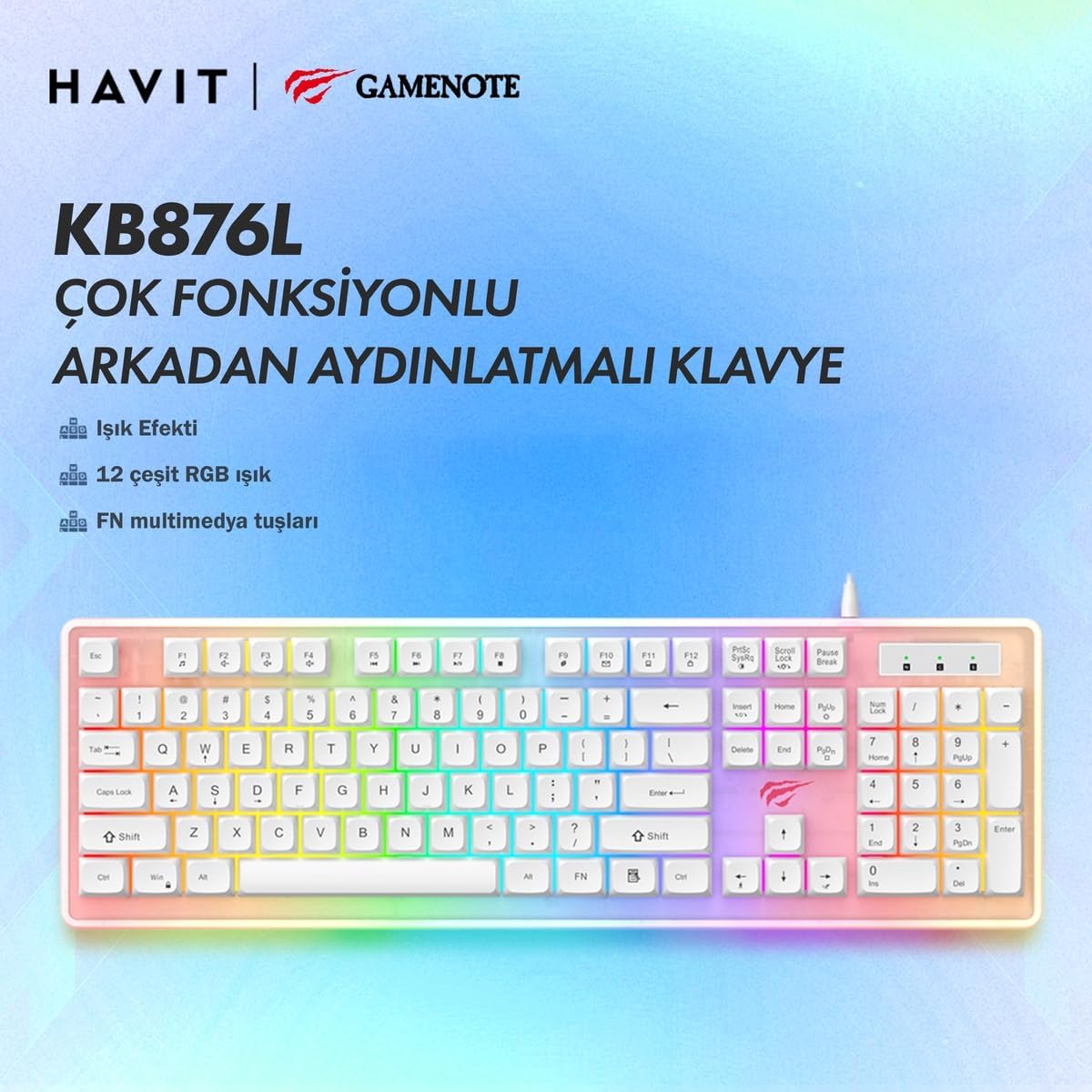
Figure 3.1: Multi-functional and Backlit Keyboard. An image emphasizing the multi-functional and backlit capabilities of the Havit Gamenote KB876L keyboard, including its 12 RGB lighting types and FN multimedia keys.

Figure 3.2: Full Keyboard Lighting Effect. This close-up image focuses on the numeric keypad section of the Havit Gamenote KB876L keyboard, illustrating the consistent and vibrant RGB lighting effect across the entire keyboard surface.
3.2 Function Keys
The keyboard includes dedicated function keys (FN) that provide quick access to multimedia controls and other system functions. Refer to the keycap legends for specific functions, often activated by pressing the 'FN' key in combination with 'F1' through 'F12' or other designated keys.
3.3 Ergonomic Design
The Havit Gamenote KB876L is designed with ergonomics in mind, providing a comfortable typing and gaming experience even during extended sessions. The keycap profile and keyboard angle are optimized to reduce strain.

Figure 3.3: Ergonomic Design. This image provides a side view of the Havit Gamenote KB876L keyboard, emphasizing its ergonomic design crafted for comfortable typing and extended use.
3.4 Key Response
Experience fast and precise input with the keyboard's 26-key fast response capability. This feature ensures that multiple simultaneous key presses are registered accurately, which is crucial for competitive gaming.

Figure 3.4: 26-Key Fast Response. An overhead view of the Havit Gamenote KB876L keyboard, illustrating its 26-key fast response capability, crucial for gaming precision.
4. Maintenance
To ensure the longevity and optimal performance of your Havit Gamenote KB876L keyboard, follow these maintenance guidelines:
- Regular Cleaning: Use a soft, dry cloth to wipe down the keycaps and keyboard surface. For deeper cleaning, use compressed air to remove dust and debris from between the keys.
- Avoid Liquids: Do not spill liquids on the keyboard. If a spill occurs, immediately disconnect the keyboard from your computer and allow it to dry completely before reconnecting.
- Handle with Care: Avoid dropping the keyboard or subjecting it to excessive force, which can damage internal components.
- Cable Management: Ensure the USB cable is not kinked or strained, which can lead to damage over time.
5. Troubleshooting
If you encounter issues with your Havit Gamenote KB876L keyboard, refer to the following common troubleshooting steps:
| Problem | Possible Cause | Solution |
|---|---|---|
| Keyboard not responding | Loose USB connection, faulty USB port, driver issue. | Ensure USB cable is securely plugged in. Try a different USB port. Restart your computer. |
| RGB lighting not working | Lighting mode turned off, software conflict. | Press the dedicated lighting control keys to cycle through modes or adjust brightness. Ensure no conflicting software is running. |
| Keys not registering | Debris under keycap, faulty key switch. | Use compressed air to clean under the keycaps. If problem persists for a specific key, contact support. |
If these steps do not resolve your issue, please refer to the Warranty and Support section for further assistance.
6. Specifications
Detailed technical specifications for the Havit Gamenote KB876L Gaming RGB Backlit Gaming Keyboard:
| Feature | Detail |
|---|---|
| Brand | Havit |
| Model Name | KB876L |
| Number of Keys | 104 |
| Key Life | 8 Million Key Presses |
| Lighting | 12 Different RGB Lighting Modes |
| Connection Type | USB |
| Cable Length | 1.5m |
| Dimensions (L*W*H) | 443*141*30mm |
| Material Type | Plastic |
| Compatible Devices | Laptop Computer |
| Recommended Uses | Gaming |

Figure 6.1: 8 Million Key Press Lifespan. A visual representation highlighting the impressive 8 million key press lifespan of the Havit Gamenote KB876L keyboard, indicating its durability.
7. Warranty and Support
The Havit Gamenote KB876L Gaming RGB Backlit Gaming Keyboard comes with a 2-year distributor warranty. This warranty covers defects in materials and workmanship under normal use.
For warranty claims, technical support, or any inquiries regarding your product, please contact your local distributor or the Havit customer service department. Keep your proof of purchase for warranty validation.
For the latest support information and contact details, please visit the official Havit website or the retailer's support page where you purchased the product.


