
DJI RS 4 Pro Combo
DJI RS 4 Pro Combo Instruction Manual
Comprehensive guide for setting up, operating, and maintaining your DJI RS 4 Pro Combo 3-Axis Gimbal Stabilizer.
1. Introduction
The DJI RS 4 Pro Combo is a professional-grade 3-axis gimbal stabilizer designed for a wide range of cameras, including DSLRs and cinema cameras. This manual provides essential information for the safe and effective use of your device, covering assembly, operation, and maintenance.
For first-time use, the DJI Ronin app is required for activation. Please download the latest version from the official DJI website, as it may not be available on Google Play due to platform compatibility issues.
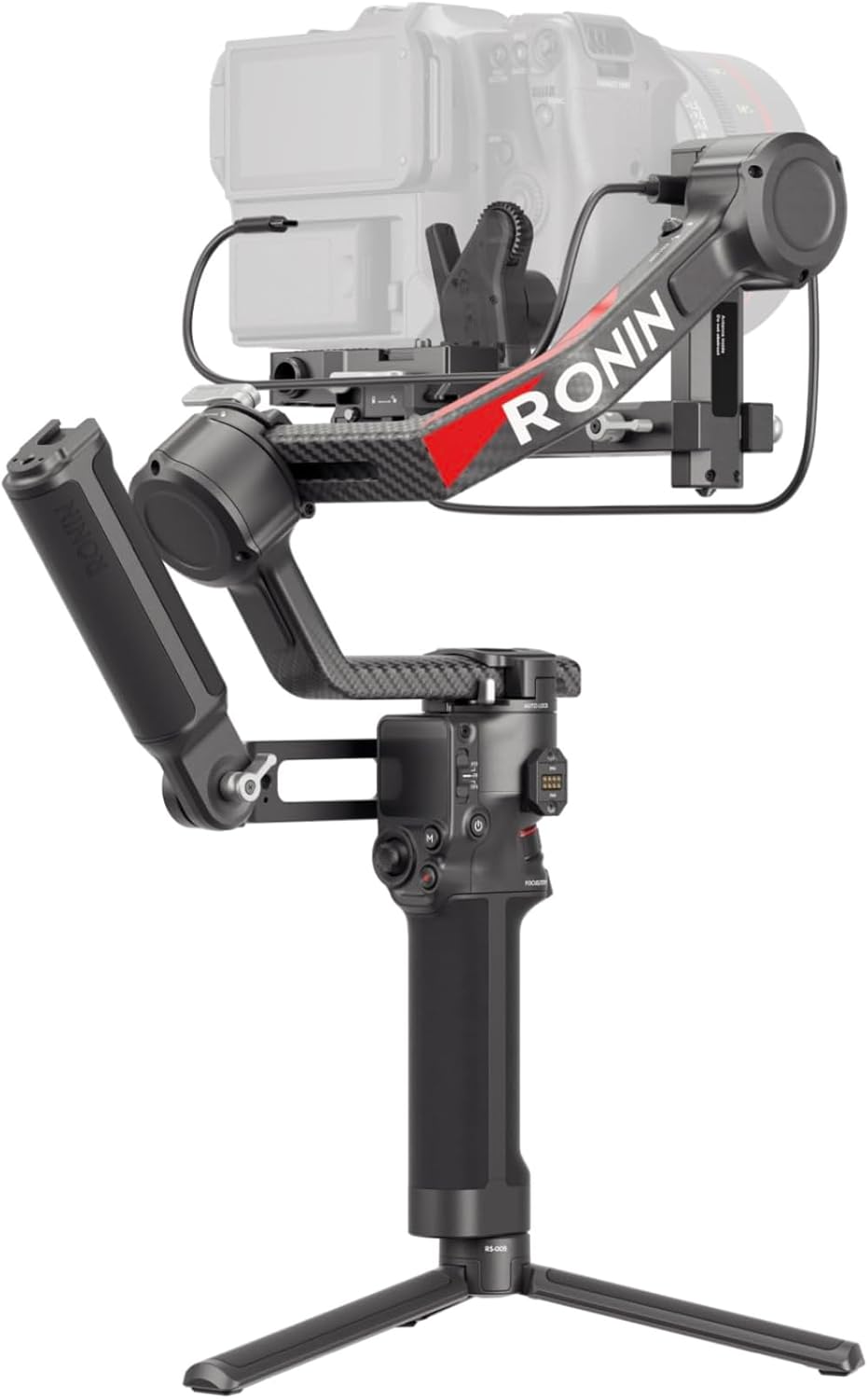
Image 1.1: The DJI RS 4 Pro Combo gimbal stabilizer with a camera mounted.
2. What's in the Box
The DJI RS 4 Pro Combo package includes the following components:
- Gimbal x1
- BG30 Battery Grip x1
- Quick-Release Plate (Arca-Swiss/Manfrotto) x1
- Extended Grip/Tripod (Metal) x1
- Briefcase Handle x1
- Ronin Image Transmitter x1
- Focus Pro Motor x1
- Lens-Fastening Support (Extended) x1
- Multi-Camera Control Cable (USB-C, 30 cm) x1
- USB-C Charging Cable (40 cm) x1
- Screw Kit x1
- Carrying Case x1
- USB-C Power Cable (20 cm) x1
- Mini-HDMI to Mini-HDMI Cable (20 cm) x1
- Mini-HDMI to HDMI Cable (20 cm) x1
- Mini-HDMI to Micro-HDMI Cable (20 cm) x1
- Focus Pro Motor Rod Mount Kit x1
- Focus Gear Strip x1
- Lower Quick-Release Plate (Extended) x1
- Phone Holder x1

Image 2.1: Visual representation of the components included in the DJI RS 4 Pro Combo package.
3. Setup
3.1. Initial Assembly
- Attach the BG30 Battery Grip: Securely connect the battery grip to the gimbal handle.
- Mount the Extended Grip/Tripod: Attach the metal tripod to the bottom of the battery grip for stable placement.
- Install Quick-Release Plate: Attach the quick-release plate to your camera's tripod mount.
- Mount Camera: Slide the camera with the quick-release plate onto the gimbal. Ensure it is securely locked.
- Balance the Gimbal: Unlock all axes and carefully balance the camera on the gimbal. Proper balancing is crucial for optimal performance and motor longevity. Refer to the DJI Ronin app for detailed balancing tutorials.
3.2. Automated Axis Locks
The DJI RS 4 Pro features 2nd-generation automated axis locks. These locks allow the gimbal to quickly power on, enter sleep mode, and enhance efficiency during setup, transitions, and storage.

Image 3.1: Close-up view of the automated axis lock mechanism on the DJI RS 4 Pro.
3.3. App Activation
Before first use, activate the DJI RS 4 Pro via the DJI Ronin app. Download the app directly from the official DJI website.
4. Operating Instructions
4.1. Native Vertical Shooting
The DJI RS 4 Pro supports 2nd-generation native vertical shooting. To switch to vertical mode, simply release the horizontal plate and secure it into the vertical position. No additional accessories are required for this transition.
Image 4.1: Diagram illustrating the mechanism for switching to native vertical shooting mode.
4.2. Payload Capacity and Motor Torque
The gimbal features carbon fiber axis arms and supports a payload capacity of up to 4.5 kg (10 lbs), with a 20% increase in motor torque compared to previous models. This allows it to accommodate mainstream mirrorless and cinema camera setups effectively.

Image 4.2: A cinematographer operating the DJI RS 4 Pro with a heavy camera setup, highlighting its 4.5kg payload capacity.
4.3. Control and Performance
The gimbal offers precise control through its 1.8-inch full-color touchscreen and a joystick mode switch. The joystick can be configured to control gimbal movement or lens zoom. The trigger button also features customizable functions, such as lock or FPV mode.

Image 4.3: Overview of the DJI RS 4 Pro's control interface, including the touchscreen, joystick, and trigger.
4.4. Stabilization Algorithm
Equipped with the 4th-generation RS Stabilization Algorithm, the gimbal provides enhanced stability, particularly in vertical shooting. It delivers a tactile feel to camera movement, improving overall shot quality.

Image 4.4: Comparison demonstrating the improved stability with the DJI RS 4 Pro's 4th-generation stabilization algorithm.
4.5. Car Mount Mode
The new Car Mount mode optimizes the gimbal stabilization algorithm based on vehicle vibrations and wind resistance data, enabling steady capture even in challenging conditions.

Image 4.5: A camera mounted on a car using the DJI RS 4 Pro in Car Mount Mode.
4.6. Dual Focus & Zoom Motors
When paired with two Focus Pro Motors, the DJI RS 4 Pro allows precise control over focus by rotating a dial and lens zoom via the joystick. This facilitates smooth and effortless lens control with a motor speed increase of 30% and a latency of 10 ms.

Image 4.6: Close-up of the dual focus and zoom motors attached to a camera lens on the gimbal.
4.7. LiDAR Focusing
The Focus Pro LiDAR and Motor provide accurate and intelligent LiDAR autofocus, with 76,800 ranging points within 20 meters. This system offers precise control in dynamic shooting scenarios.

Image 4.7: Visual representation of the LiDAR focusing system in action, showing ranging points.
4.8. Video Transmission Ecosystem
The DJI RS 4 Pro supports a comprehensive video transmission ecosystem, including integrated installation, power supply, intelligent focus assistance, and precise parameter control for gimbal, focus, and camera settings. It also features a Mirror Control Mode.

Image 4.8: A user monitoring video transmission from the DJI RS 4 Pro on an external screen.
4.9. Battery Runtime
With the DJI RS BG70 High-Capacity Battery Grip (sold separately), the RS 4 Pro's battery runtime can be extended up to 29 hours. This grip also provides up to 18 watts of power output via its USB-C port for cameras and accessories.

Image 4.9: Diagram illustrating the extended battery life provided by the DJI RS BG70 High-Capacity Battery Grip.
4.10. All-Scenario Solutions
The DJI RS 4 Pro supports multiple handheld configurations, including briefcase, dual-grip, and ring-mount setups. The DJI RS SDK protocol allows for integration with car mounts, jibs, Steadicam, cable cams, and sliders to meet diverse creative requirements.

Image 4.10: Examples of various shooting configurations and setups possible with the DJI RS 4 Pro.
5. Camera Compatibility
The DJI RS 4 Pro supports a wide range of cameras. Below is a list of compatible cameras for Bluetooth Shutter Control and Multi-Camera Control Cable or Bluetooth Shutter Control. For the most up-to-date and detailed compatibility list, please refer to the official DJI website.

Image 5.1: Table detailing camera compatibility for Bluetooth shutter control and multi-camera control with the DJI RS 4 Pro.
6. Specifications
| Feature | Detail |
|---|---|
| Product Dimensions | 16.38 x 8.78 x 7.95 inches (41.6 x 22.3 x 20.2 cm) |
| Item Weight | 4.05 pounds (1.84 Kilograms) |
| Folded Size | 27.1 × 28.3 × 7.5 cm |
| Payload Capacity | 4.5 kg (10 lbs) |
| Axis Arm Material | Carbon Fiber with Teflon™ Coating |
| Battery Type | 1 CR5 battery (included) |
| Max Battery Runtime | Up to 29 hours (with DJI RS BG70 High-Capacity Battery Grip, sold separately) |
| Model Number | 6941565974679 |
| UPC | 190021099777 |
| Color | Black |
| Manufacturer | DJI |

Image 6.1: Comparison of key specifications between DJI RS 4 Pro and DJI RS 4.
7. Maintenance
- Cleaning: Use a soft, dry cloth to clean the gimbal. Avoid liquid cleaners or solvents.
- Storage: Store the gimbal in its carrying case in a dry, cool environment when not in use.
- Battery Care: Charge the battery regularly, even if not in use, to maintain battery health. Avoid fully discharging the battery for extended periods.
- Firmware Updates: Regularly check the official DJI website or the DJI Ronin app for firmware updates to ensure optimal performance and access to new features.
8. Troubleshooting
- Gimbal Not Balancing: Ensure all axes are unlocked and the camera is centered. Re-balance the camera carefully. Check the payload capacity to ensure your camera setup is within limits.
- Motor Overload Warning: This often indicates improper balancing or an overloaded payload. Re-balance the gimbal or reduce the camera setup weight.
- Connection Issues with App: Ensure Bluetooth is enabled on your mobile device. Verify that the DJI Ronin app is the latest version downloaded from the official DJI website.
- Unresponsive Controls: Check battery levels. Restart the gimbal and your camera. Ensure all cables are securely connected.
For more detailed troubleshooting and support, please visit the official DJI support website.
9. Warranty and Support
DJI provides an official warranty for its products, offering one-stop technical support. For specific warranty terms, conditions, and to register your product, please visit the official DJI website.
You can also find additional safety information in the provided Safety Information (PDF) document.
For customer service and technical assistance, please contact DJI support through their official channels.
10. Product Videos
No official product videos from the seller were found in the provided data to embed in this manual.
Related documentsRS 4 Pro Combo


Ask a question about this manual
Ask about setup, troubleshooting, compatibility, parts, safety, or missing instructions. Manuals+ will review the question and use this page’s manual context to help answer it.