
1. Introduction
The DEWIN Tuya Smart WiFi DIN Rail Circuit Breaker is an advanced intelligent device designed for modern smart homes and industrial applications. It integrates high-performance chips and large-scale integrated circuits to ensure precise energy metering with an error rate of less than 0.3%. This device allows for remote control and monitoring of electrical parameters such as total power consumption, current, voltage, and power via the Tuya Smart mobile application. Its compact design and standard 35mm DIN rail installation make it convenient and practical for various scenarios, including power metering systems, schools, markets, household appliances, industries, and laboratories.

Figure 1: Overview of the DEWIN Tuya Smart WiFi DIN Rail Circuit Breaker.
2. Product Features
- Intelligent Chip: Utilizes high-performance chips for precise energy metering, ensuring accuracy within 0.3%.
- Remote Control Switch: Control the device remotely via the Tuya Smart mobile application. Set single timing, cycle timing, countdown, and other functions to meet various equipment switching needs.
- Real-time Data Monitoring: Monitor total power consumption, current, voltage, and power from your mobile phone, providing real-time status of connected loads.
- DIN Rail Design: Easy installation on a standard 35mm DIN rail without screws, offering a compact and practical solution.
- Wide Application: Connects via WiFi to smart systems, suitable for power metering, schools, markets, household appliances, industries, and laboratories.
- Safety Features: Provides overload and short-circuit protection, as well as overvoltage and undervoltage protection.
- Durable Material: Constructed from PC flame retardant material for enhanced safety and longevity.
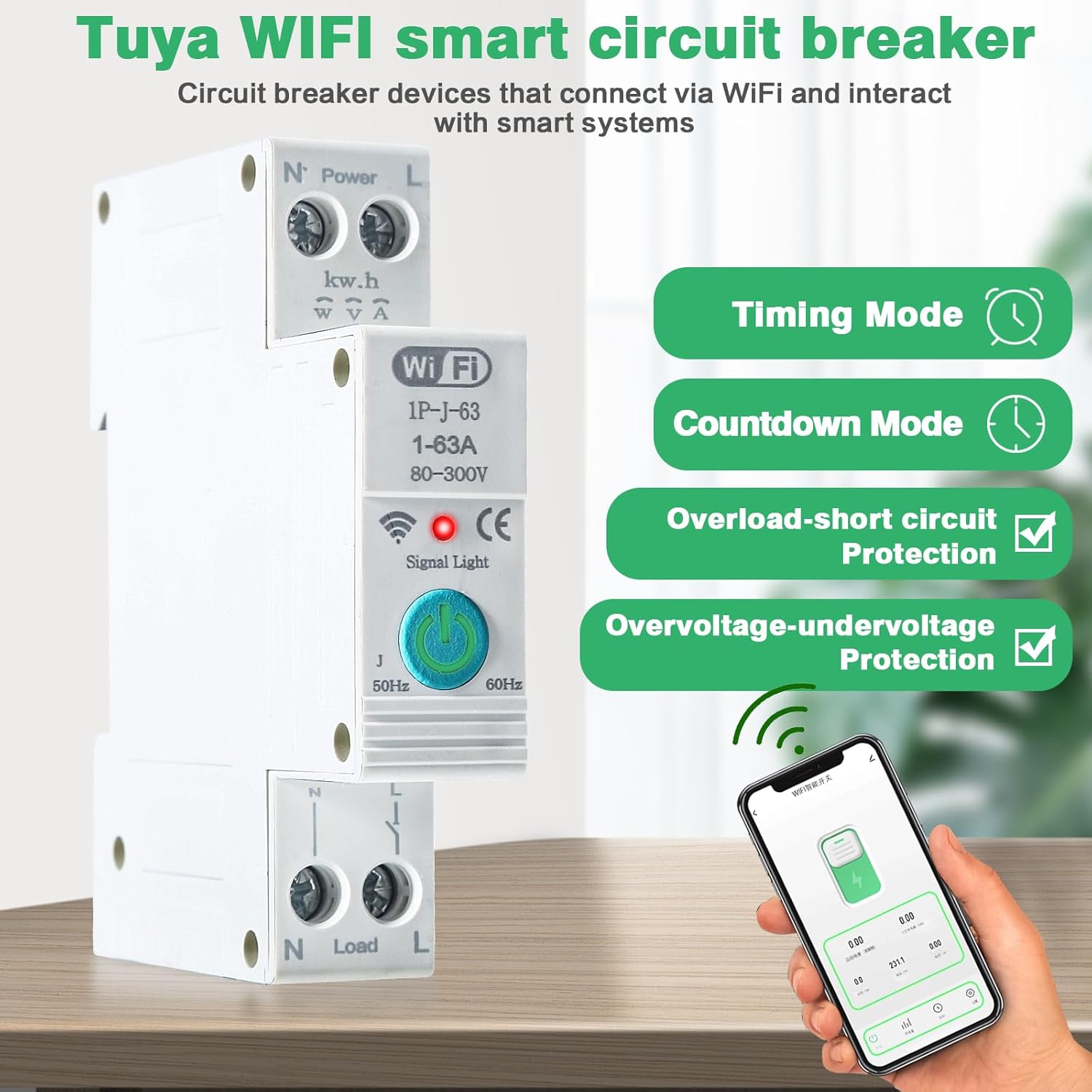
Figure 2: Key features including timing, countdown, and protection functions.

Figure 3: Close-up view of the touch button, guide rail positioning buckle, and PC flame retardant shell.
3. Package Contents
Please check the package contents upon receipt to ensure all items are present and undamaged.
- 1 x DEWIN Tuya Smart WiFi Circuit Breaker
- 1 x Instruction Manual
4. Safety Information
Before installation and operation, please read and understand all safety warnings and instructions. Failure to follow these instructions may result in electric shock, fire, or serious injury.
- Electrical Safety: Installation and wiring must be performed by a qualified electrician in accordance with local electrical codes and regulations.
- Power Disconnection: Always disconnect power at the main circuit breaker before performing any installation, wiring, or maintenance.
- Voltage Compatibility: Ensure the rated voltage of the circuit breaker matches your electrical system (230VAC).
- Indoor Use Only: This device is designed for indoor use in a dry environment. Do not expose to moisture or extreme temperatures outside the specified range.
- Load Capacity: Do not exceed the maximum current rating of 63A. Overloading can cause damage to the device and pose a fire hazard.
- Application Restriction: This product is connected via WiFi and is suitable for most scenarios with DIN rails. It is prohibited from being used for photovoltaic metering.
5. Installation Guide (Setup)
The DEWIN Smart WiFi Circuit Breaker is designed for easy installation on a standard 35mm DIN rail.
5.1 Physical Installation
- Power Off: Before starting, ensure the main power supply to the circuit is completely turned off at the distribution board.
- Mounting: Align the circuit breaker with the 35mm DIN rail. Press the guide rail positioning buckle (refer to Figure 3) and snap the device onto the rail. Release the buckle to secure it in place.
- Wiring: Connect the Live (L) and Neutral (N) lines to the "Power" input terminals at the top of the circuit breaker. Connect the load's Live (L) and Neutral (N) lines to the "Load" output terminals at the bottom. Ensure all connections are tight and secure. Refer to Figure 4 for the wiring diagram.
- Verify: Double-check all wiring connections to ensure they are correct and secure before restoring power.

Figure 4: Wiring diagram showing Live (L) and Neutral (N) connections for input (Power) and output (Load).
Important Note: This product is designed for single-phase AC230V systems. Ensure proper Live and Neutral line connections. Incorrect wiring can damage the device or pose a safety risk.
5.2 App Setup and Connection
To utilize the smart features, you need to connect the circuit breaker to the Tuya Smart App.
- Download App: Download the "Tuya Smart" app from your mobile device's app store (Google Play Store for Android or Apple App Store for iOS).
- Register/Login: Open the app and register for a new account or log in with an existing one.
- Power On: Restore power to the circuit breaker. The WiFi signal light on the device will start blinking, indicating it's in pairing mode.
- Add Device: In the Tuya Smart app, tap the "+" icon (usually in the top right corner) to add a new device.
- Select Device Type: Select "Electrical" or "Circuit Breaker" from the device list.
- Confirm Indicator: Confirm that the WiFi indicator light on the device is blinking rapidly. If not, press and hold the power button on the circuit breaker for 5-10 seconds until it blinks rapidly.
- Connect to WiFi: Enter your 2.4GHz WiFi network name and password in the app. The device does not support 5GHz WiFi networks.
- Pairing: The app will begin searching for and connecting to the device. Once connected, the WiFi signal light will become steady, and the device will appear in your app's device list.

Figure 5: WiFi light status (Steady = Connected, Blinking = Waiting for connection) and Switch light status (Red = OFF, Green = ON).
6. Operation
Once connected to the Tuya Smart App, you can control and monitor your circuit breaker remotely.
6.1 Manual Operation
The circuit breaker has a physical button for manual control:
- Press the button once to turn the circuit breaker ON or OFF.
- The switch light indicator (refer to Figure 5) will show Red for OFF and Green for ON.
6.2 App Control and Monitoring
Through the Tuya Smart App, you can access various functions:
- Remote ON/OFF: Tap the switch icon in the app to remotely turn the circuit breaker on or off from anywhere with an internet connection.
- Timing Mode: Set schedules for the circuit breaker to turn on or off at specific times. This includes single timing and cycle timing for recurring events.
- Countdown Mode: Set a countdown timer for the circuit breaker to turn off after a specified duration.
- Energy Monitoring: View real-time data on total power consumption, current, voltage, and power of the connected load. This helps in understanding and managing energy usage.
- Protection Settings: Configure overvoltage, undervoltage, overload, and short-circuit protection thresholds within the app to safeguard your appliances and electrical system.

Figure 6: Example of the circuit breaker's integration into a smart home system, controlling various appliances.
7. Maintenance
The DEWIN Smart WiFi Circuit Breaker requires minimal maintenance.
- Cleaning: Periodically wipe the device with a soft, dry cloth to remove dust. Do not use liquid cleaners or sprays.
- Inspection: Regularly inspect the wiring connections to ensure they remain tight and free from corrosion.
- Firmware Updates: Keep the Tuya Smart App updated to ensure the best performance and access to new features. The app may prompt you for device firmware updates; follow the instructions to update if available.
8. Troubleshooting
If you encounter issues with your DEWIN Smart WiFi Circuit Breaker, refer to the table below for common problems and solutions.
| Problem | Possible Cause | Solution |
|---|---|---|
| Device not powering on. | No power supply; incorrect wiring. | Check main circuit breaker. Verify wiring connections (Live and Neutral). |
| WiFi indicator blinking, cannot connect to app. | Incorrect WiFi password; 5GHz WiFi network; device too far from router; incorrect pairing mode. | Ensure correct 2.4GHz WiFi password. Move device closer to router. Confirm device is in rapid blinking pairing mode (press and hold button if needed). |
| Device frequently disconnects from WiFi. | Weak WiFi signal; network interference. | Improve WiFi signal strength (e.g., use a WiFi extender). Reduce interference from other 2.4GHz devices. |
| App shows incorrect power readings. | Calibration issue; temporary glitch. | Restart the device and the app. If problem persists, contact support. |
| Device trips unexpectedly. | Overload; short circuit; over/undervoltage; faulty appliance. | Check connected appliances for faults. Verify load does not exceed 63A. Review protection settings in the app. Consult a qualified electrician. |
9. Specifications
Detailed technical specifications for the DEWIN Tuya Smart WiFi DIN Rail Circuit Breaker.
| Parameter | Value |
|---|---|
| Product Name | Tuya WiFi Smart Circuit Breaker |
| Model Number | IYIQBCCCA-GS109771 |
| Connection Platform | Tuya Smart App |
| Material | PC Flame Retardant Material |
| Rated Voltage | 230VAC |
| Operating Voltage Range | 80-400VAC (Single Phase) |
| Rated Current | 1-63A |
| Rated Frequency | 50/60Hz |
| Overvoltage (>U) Adjustment Range | 120-300V |
| Undervoltage (<U) Adjustment Range | 80-210V |
| Wi-Fi Frequency | 2.4GHZ |
| Installation Method | 35mm DIN Rail |
| Product Dimensions (Height x Width x Depth) | 8.6 cm x 1.8 cm x 5.0 cm |
| Environmental Temperature Range | -30℃ to 70℃ |
| Number of Poles | 1 |
| Circuit Breaker Type | Standard |
| Country of Origin | China |

Figure 7: Product dimensions and a summary of key specifications.
10. Warranty and Support
DEWIN products are manufactured to high-quality standards. For specific warranty details, please refer to the warranty card included with your product or contact your point of purchase. If you require technical assistance or have questions regarding the operation or maintenance of your DEWIN Tuya Smart WiFi DIN Rail Circuit Breaker, please contact DEWIN customer support through the official website or your retailer.
Please have your model number (IYIQBCCCA-GS109771) and purchase information ready when contacting support.