
1. Introduction
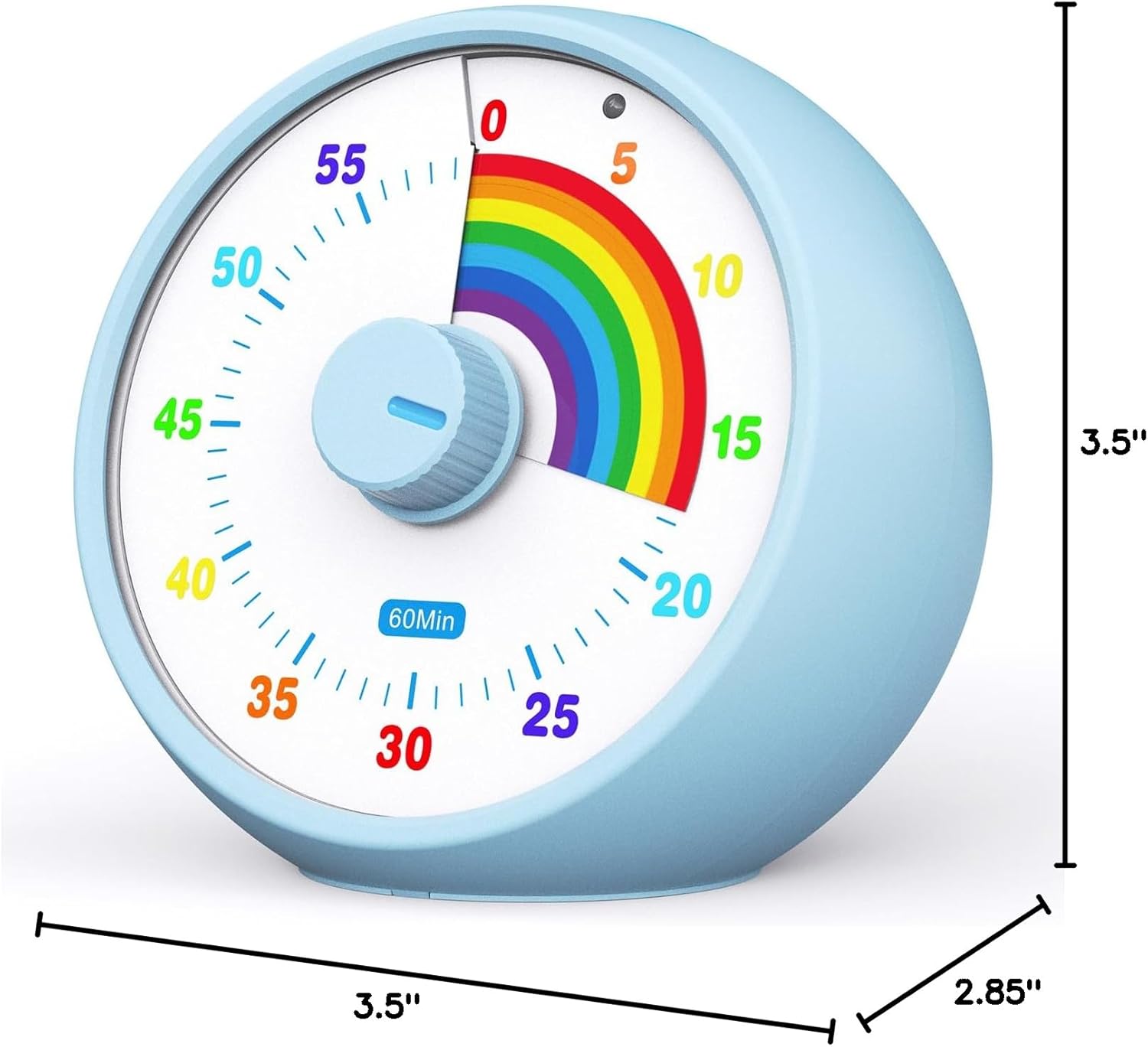
Thank you for choosing the kiecky squirrel 60-Minute Visual Timer. This device is designed to help individuals, especially children, visualize time and manage tasks more effectively. Its unique rainbow pattern provides a clear countdown, making it an ideal tool for classrooms, offices, kitchens, and various personal activities. This manual provides detailed instructions for setup, operation, and maintenance to ensure optimal performance.

2. Setup
2.1 Battery Installation
- Locate the battery compartment on the back of the timer.
- Open the battery compartment cover.
- Insert two (2) AAA batteries, ensuring correct polarity (+/-).
- Close the battery compartment cover securely.
2.2 Placement
Place the timer on a stable, flat surface where it is easily visible. Ensure it is away from direct heat sources or excessive moisture.
3. Operating Instructions
3.1 Setting the Timer

- To set the countdown time, rotate the central knob clockwise to increase the time. The rainbow pattern will expand to indicate the set duration.
- To decrease the set time, rotate the central knob counter-clockwise. The rainbow pattern will retract.
- The timer can be set for up to 60 minutes. The visual display will show the remaining time as the rainbow pattern gradually disappears.
3.2 Alarm and Flash Function
- When the set time expires, the timer will emit an audible alarm and/or a flash, depending on the selected volume setting.
- To stop the alarm or flash, press the button located on the top of the timer.
3.3 Volume Selection
The timer offers three volume settings to suit different environments:
- Treble: High volume setting for noisy environments.
- Middle Sound: Medium volume setting for general use.
- Mute: Silent operation with only a visual flash, ideal for quiet spaces like libraries or classrooms where sound might be disruptive.
Refer to the timer's back or side for the volume selection switch.
4. Features
- Visual Countdown: The unique rainbow pattern visually represents the passage of time, making it easy for users, especially children, to understand remaining duration.
- Silent Operation: Equipped with an exclusive scanning silent movement, ensuring no distracting ticking sounds during operation.
- Adjustable Volume: Three volume settings (treble, middle sound, mute) allow customization for various environments.
- Simple Operation: Easy to set by rotating a single knob.
- Portable Design: Compact and lightweight, making it convenient to carry and use in different locations.
- Energy Efficient: Operates on two AAA batteries for approximately 6-8 months.


5. Maintenance
- Cleaning: Wipe the timer with a soft, dry cloth. Do not use abrasive cleaners or immerse the device in water.
- Battery Replacement: Replace batteries when the timer's performance diminishes or the alarm becomes faint. Always use fresh AAA batteries.
- Storage: Store the timer in a cool, dry place when not in use for extended periods. Remove batteries if storing for several months to prevent leakage.
6. Troubleshooting
- Timer not starting/displaying:
- Ensure batteries are correctly installed with proper polarity.
- Replace old or depleted batteries with new ones.
- Alarm not sounding:
- Check the volume selection switch. Ensure it is not set to 'Mute'.
- Verify batteries are not low.
- Rainbow pattern not moving smoothly:
- This may indicate low battery power. Replace batteries.
- Ensure the timer is on a flat, stable surface.
7. Specifications
| Feature | Specification |
|---|---|
| Brand | kiecky squirrel |
| Model | 60-Minute Visual Timer |
| Color | Blue |
| Material | Plastic |
| Product Dimensions | 3.5"D x 2.85"W x 3.5"H |
| Item Weight | 120 Grams |
| Power Source | 2 x AAA Batteries (not included) |
8. Warranty & Support
kiecky squirrel offers a 180-day free replacement policy for this product. If you encounter any issues or require assistance, please contact our customer support. We are committed to providing a positive experience for every consumer.
For support, please refer to the contact information provided with your purchase or visit the official kiecky squirrel website.
