
Karinear KNI-B42890-F1-B-BS
Karinear Induction Hob Instruction Manual
Model: KNI-B42890-F1-B-BS
1. Introduction
Thank you for choosing the Karinear Plug-in Induction Hob. This manual provides essential information for the safe and efficient operation, installation, and maintenance of your new appliance. Please read this manual thoroughly before use and keep it for future reference.

Image: Karinear Induction Hob overview, showing the cooking zones and touch control panel.
2. Safety Information
Your safety and the safety of others are paramount. Please observe the following safety precautions:
- Electrical Safety: Ensure the hob is connected to a properly grounded 13 Amp power outlet. Do not use extension cords or adapters.
- Heat and Burn Hazard: The hob surface will become hot during and after use. Do not touch hot surfaces. Always use oven mitts or pot holders.
- Child Safety: This appliance is not intended for use by persons with reduced physical, sensory or mental capabilities, or lack of experience and knowledge, unless they have been given supervision or instruction. Keep children away from the appliance during operation.
- Cookware: Only use induction-compatible cookware. Non-compatible cookware will not heat.
- Ventilation: Ensure adequate ventilation around the hob during installation and operation.
Child Lock Function
The Child Lock function prevents accidental operation of the hob, especially by children or pets. When activated, 'LO' is displayed, and all other buttons are disabled.
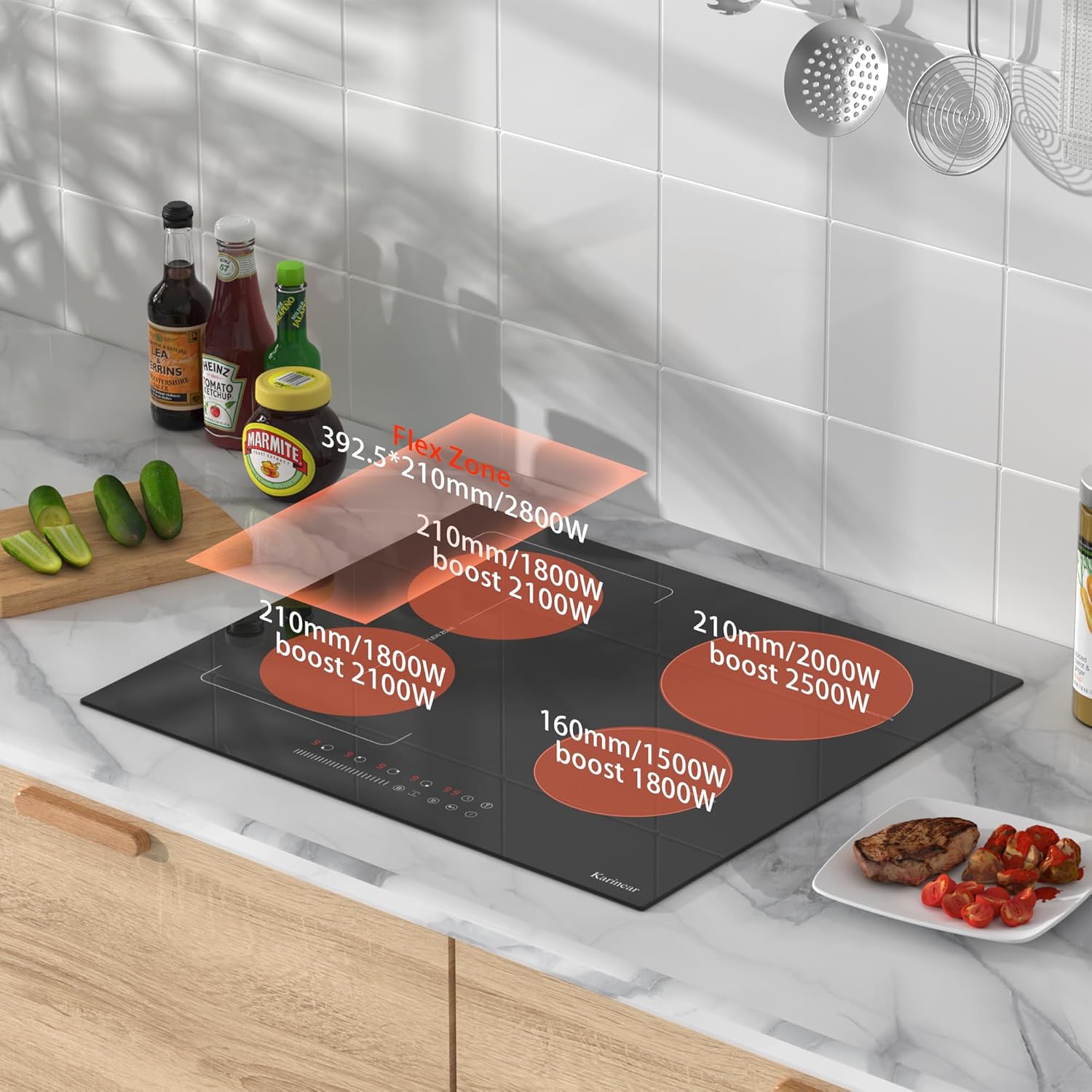
Image: The Child Lock feature helps prevent accidental activation by children or pets.
3. Product Features
The Karinear Induction Hob is equipped with advanced features for convenient and efficient cooking:
Control Panel Overview

Image: Detailed layout of the touch control panel, indicating functions such as heating zone selection, power/timer regulating, Boost, Stop&Go, Keep Warm, Timer, Child Lock, and ON/OFF.
Flex Zone
The Flex Zone allows you to combine two cooking zones into one large zone, ideal for larger pots, griddle pans, or multiple smaller pans. This provides greater flexibility for various cooking needs.
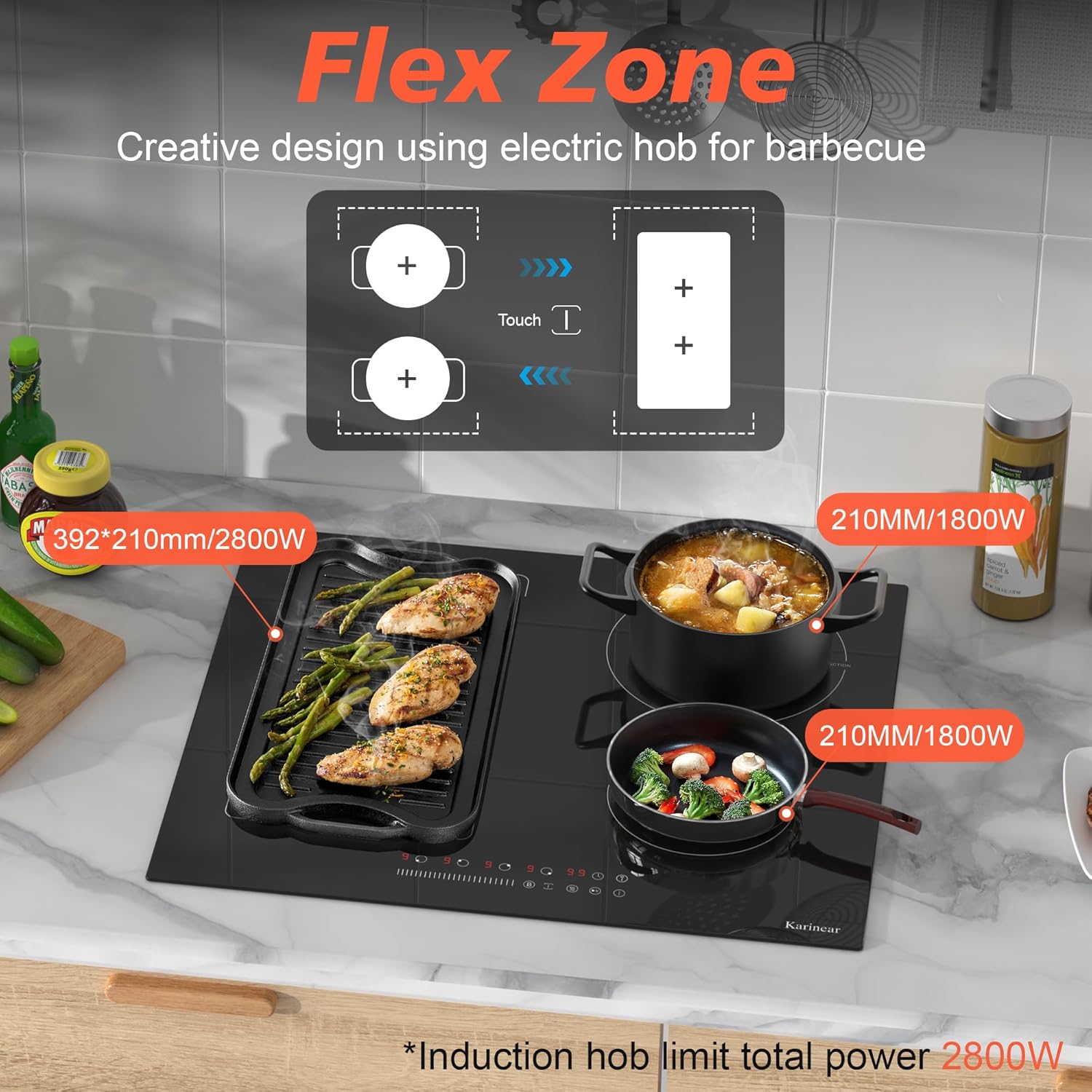
Image: The Flex Zone in use, accommodating a large grill pan for versatile cooking.
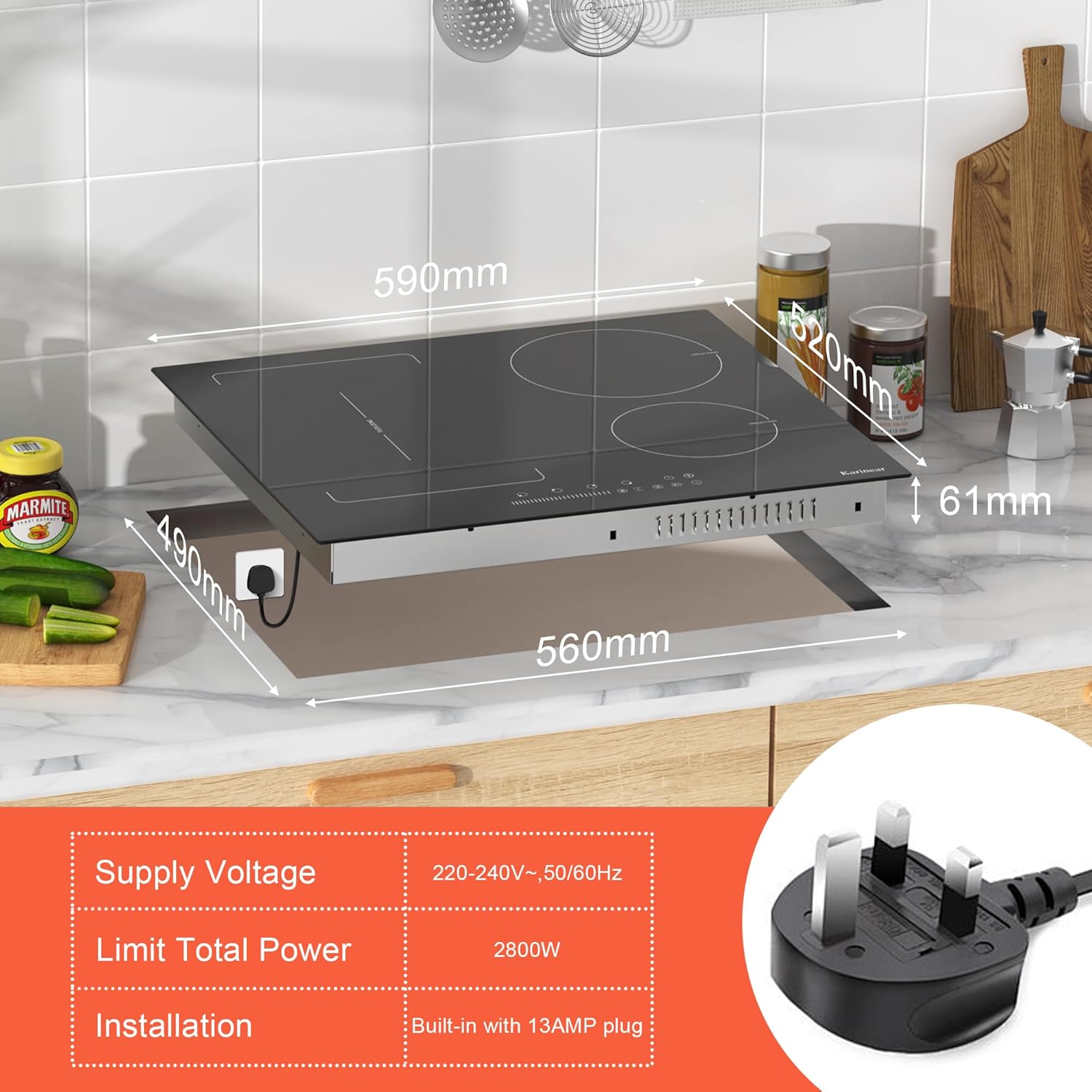
Image: Power distribution across the cooking zones, highlighting the Flex Zone's capabilities.
Boost Function
The Boost function provides maximum power to a selected cooking zone for a short period (up to 5 minutes), ideal for rapidly boiling water or searing food. The total power limit for the hob is 2800W.

Image: The Boost function quickly brings water to a boil.
Compatible Cookware
Induction hobs require cookware with a magnetic base. Compatible materials include cast iron, iron, and stainless steel. Cookware with rounded bottoms or made of ceramic, glass, copper, or aluminum is generally not compatible unless specifically designed for induction.

Image: Guide to compatible induction cookware, showing suitable materials like cast iron and stainless steel, and unsuitable ones like ceramic and glass.
4. Setup and Installation
The Karinear Induction Hob is designed for drop-in installation and comes with a 13 Amp plug for easy connection.
Dimensions and Power Requirements
- Product Dimensions: 23.23 x 2.4 x 20.47 inches (590mm x 520mm x 61mm)
- Cut-out Dimensions: Approximately 560mm x 490mm
- Supply Voltage: 220-240V~, 50/60Hz
- Limit Total Power: 2800W
- Installation Type: Built-in with 13AMP plug
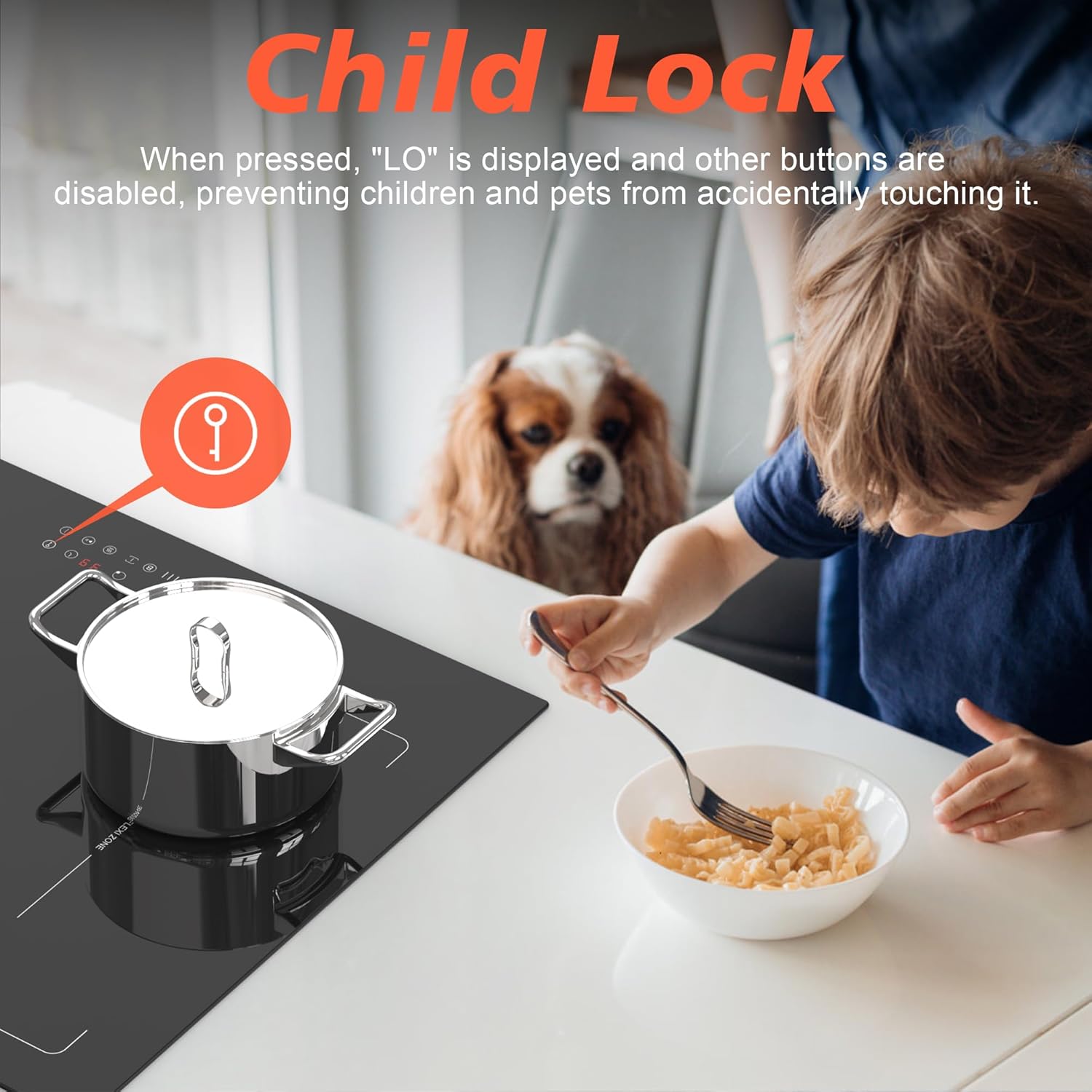
Image: Technical drawing with hob dimensions and electrical connection details.
Ensure the installation area provides sufficient clearance for ventilation and that the countertop material is heat-resistant. Consult a qualified electrician if you are unsure about the electrical connection.
5. Operating Instructions
Turning On/Off
- To turn on: Touch the ON/OFF button. The display will show '0' for all zones.
- To turn off: Touch the ON/OFF button again.
Selecting a Cooking Zone and Adjusting Power
- Touch the heating zone selection button for the desired zone.
- Use the power/timer regulating slider to adjust the heat level from 1 to 9. For continuous adjustment, keep your finger touching the slider bar.
Using the Flex Zone
- To activate the Flex Zone, select one of the two zones that form the Flex Zone, then touch the 'Flex Zone' button (often indicated by two linked circles or a bridge icon).
- Adjust the power for the combined zone using the power slider.
Activating Boost Function
- Select the desired cooking zone.
- Touch the 'Boost' button (often indicated by a 'B' or similar icon). The zone will operate at maximum power for approximately 5 minutes, then automatically reduce to a lower setting.
Using the Timer
- Select the cooking zone you wish to set a timer for.
- Touch the 'Timer' button. Use the power/timer regulating slider to set the desired cooking time.
- The zone will automatically turn off once the set time has elapsed.
Activating/Deactivating Child Lock
- To activate: Touch and hold the 'Child Lock' button (key icon) for a few seconds until 'LO' appears on the display.
- To deactivate: Touch and hold the 'Child Lock' button again for a few seconds until 'LO' disappears.
6. Maintenance and Cleaning
Regular cleaning and maintenance will ensure the longevity and optimal performance of your induction hob.
- Daily Cleaning: After each use, allow the hob to cool down. Wipe the glass ceramic surface with a damp cloth and mild detergent. Dry thoroughly with a clean cloth.
- Stubborn Stains: For burnt-on food or stubborn stains, use a specialized ceramic hob scraper or cleaner. Follow the product instructions carefully.
- Avoid Abrasives: Do not use abrasive cleaners, scouring pads, or harsh chemicals, as these can scratch or damage the glass surface.
- Control Panel: Wipe the touch control panel gently with a soft, damp cloth. Ensure it is dry before operating.
7. Troubleshooting
If you encounter issues with your induction hob, refer to the following common problems and solutions:
| Problem | Possible Cause | Solution |
|---|---|---|
| Hob does not turn on. | No power supply; Child Lock activated. | Check power connection and circuit breaker. Deactivate Child Lock. |
| Cooking zone not heating. | Non-compatible cookware; No pan detected; Pan not centered. | Use induction-compatible cookware. Ensure pan is on the zone and centered. |
| Hob makes buzzing/humming noise. | Normal operation of induction technology; Cookware type. | This is normal. Some cookware may produce more noise. |
| Power level drops when multiple zones are active (e.g., Boost). | Total power limit reached (2800W). | This is a design feature to prevent overloading the 13 Amp circuit. Adjust power levels across zones as needed. |
| Error code displayed. | Internal fault or specific issue. | Refer to the full troubleshooting guide in the comprehensive manual or contact customer support. |
If the problem persists after attempting these solutions, please contact Karinear customer support for assistance.
8. Specifications
| Attribute | Specification |
|---|---|
| Brand Name | Karinear |
| Model Info | KNI-B42890-F1-B-BS |
| Item Weight | 22.1 pounds |
| Product Dimensions | 23.23 x 2.4 x 20.47 inches |
| Installation Type | Drop-In |
| Burner Type | Induction |
| Heating Elements | 4 |
| Voltage | 230 Volts (220-240V) |
| Wattage | 2800 Watts |
| Fuel Type | Electric |
| Heater Surface Material | Glass Ceramic |
| Power Source | Corded Electric |
9. Warranty and Support
For warranty information, technical support, or service inquiries, please refer to the warranty card included with your product or visit the official Karinear website. Keep your purchase receipt as proof of purchase.
Contact Information:
- For general inquiries, please visit the Karinear Store on Amazon.
- For specific product support, refer to the contact details provided in your product packaging or the full manual.
Related documentsKNI-B42890-F1-B-BS


Ask a question about this manual
Ask about setup, troubleshooting, compatibility, parts, safety, or missing instructions. Manuals+ will review the question and use this page’s manual context to help answer it.