1. Introduction
This manual provides essential instructions for the assembly, operation, and maintenance of your FBXGT Minimalist Industrial Computer Desk, model shuozhuo-001. Please read this manual thoroughly before assembly and use to ensure proper setup and safe operation.

Image 1.1: The FBXGT Minimalist Industrial Computer Desk, showcasing its spacious top surface and integrated lower shelf, suitable for computers, laptops, and office accessories.
2. Safety Information
Observe the following safety guidelines to prevent injury or damage to the product:
- Ensure all components are securely fastened during assembly. Loose parts can lead to instability.
- Do not exceed the recommended weight capacity of the desk. Overloading can cause structural failure.
- Place the desk on a flat, stable surface to prevent wobbling or tipping.
- Keep small parts away from children during assembly to avoid choking hazards.
- Avoid placing hot items directly on the desk surface without protection to prevent damage.

Image 2.1: The desk features rounded corners, designed to reduce the risk of bumps and injuries during use.
3. Setup and Assembly
The FBXGT Minimalist Industrial Computer Desk is designed for easy assembly. Please follow these steps carefully:
3.1. Unpacking and Component Check
- Carefully open the packaging and remove all components.
- Verify that all parts listed in the included hardware pack are present and undamaged. Refer to the parts diagram (if provided in your physical manual).
3.2. Assembly Steps
- Attach the Side Frames: Connect the two metal side frames to the main desktop panel using the provided screws. Ensure they are aligned correctly.
- Install the Lower Shelf Supports: Secure the supports for the lower shelf between the two side frames.
- Place the Lower Shelf: Carefully position the lower shelf onto its supports and fasten it with the remaining screws.
- Tighten All Fasteners: Once all components are in place, systematically tighten all screws and bolts to ensure stability. Do not overtighten.
Note: Assembly typically requires a Phillips head screwdriver (not included).
4. Operating and Usage
This desk is designed for versatile use in various environments. Consider the following for optimal operation:
- Placement: Position the desk in a location with adequate space for movement and ventilation, away from direct sunlight or excessive moisture.
- Weight Distribution: Distribute weight evenly across the desktop and lower shelf. Avoid concentrating heavy items in one area.
- Integrated Storage: Utilize the lower shelf for organizing books, office supplies, or other items to maintain a tidy workspace.

Image 4.1: The integrated lower shelf provides convenient storage for books and other objects, helping to keep the desktop clear.
5. Maintenance and Care
Proper care will extend the life and appearance of your desk:
- Cleaning: Wipe the desk surface with a soft, damp cloth. For stubborn marks, use a mild, non-abrasive cleaner. Avoid harsh chemicals.
- Spills: Immediately wipe up any spills to prevent liquid absorption and potential damage to the engineered wood surface.
- Inspection: Periodically check all screws and fasteners to ensure they remain tight. Retighten if necessary.
- Protection: Use coasters for drinks and protective pads under hot items or sharp objects to prevent scratches and heat damage.

Image 5.1: The desk surface is designed to be wear-resistant, waterproof, and easy to clean, ensuring durability and simple maintenance.
6. Troubleshooting
If you encounter issues with your desk, refer to the following common problems and solutions:
| Problem | Possible Cause | Solution |
|---|---|---|
| Desk wobbles | Uneven floor; loose fasteners | Adjust desk levelers (if present) or place shims under legs. Check and tighten all assembly screws. |
| Surface scratches or marks | Sharp objects; abrasive cleaning | Use protective mats or coasters. Clean with soft cloth and mild cleaner. |
| Difficulty during assembly | Incorrect part orientation; missing hardware | Review assembly instructions carefully. Contact customer support if parts are missing or damaged. |
7. Specifications
| Feature | Detail |
|---|---|
| Brand | FBXGT |
| Model Name | shuozhuo-001 |
| Product Dimensions (L x W x H) | 100 cm x 60 cm x 72 cm (approx. 39.4" x 23.6" x 28.3") |
| Color | Black walnut |
| Style | Industrial, Minimalist |
| Top Material Type | Engineered Wood |
| Base Material | Metal |
| Finish Type | Matte |
| Item Weight | 9 kg (approx. 19.8 lbs) |
| Assembly Required | Yes |
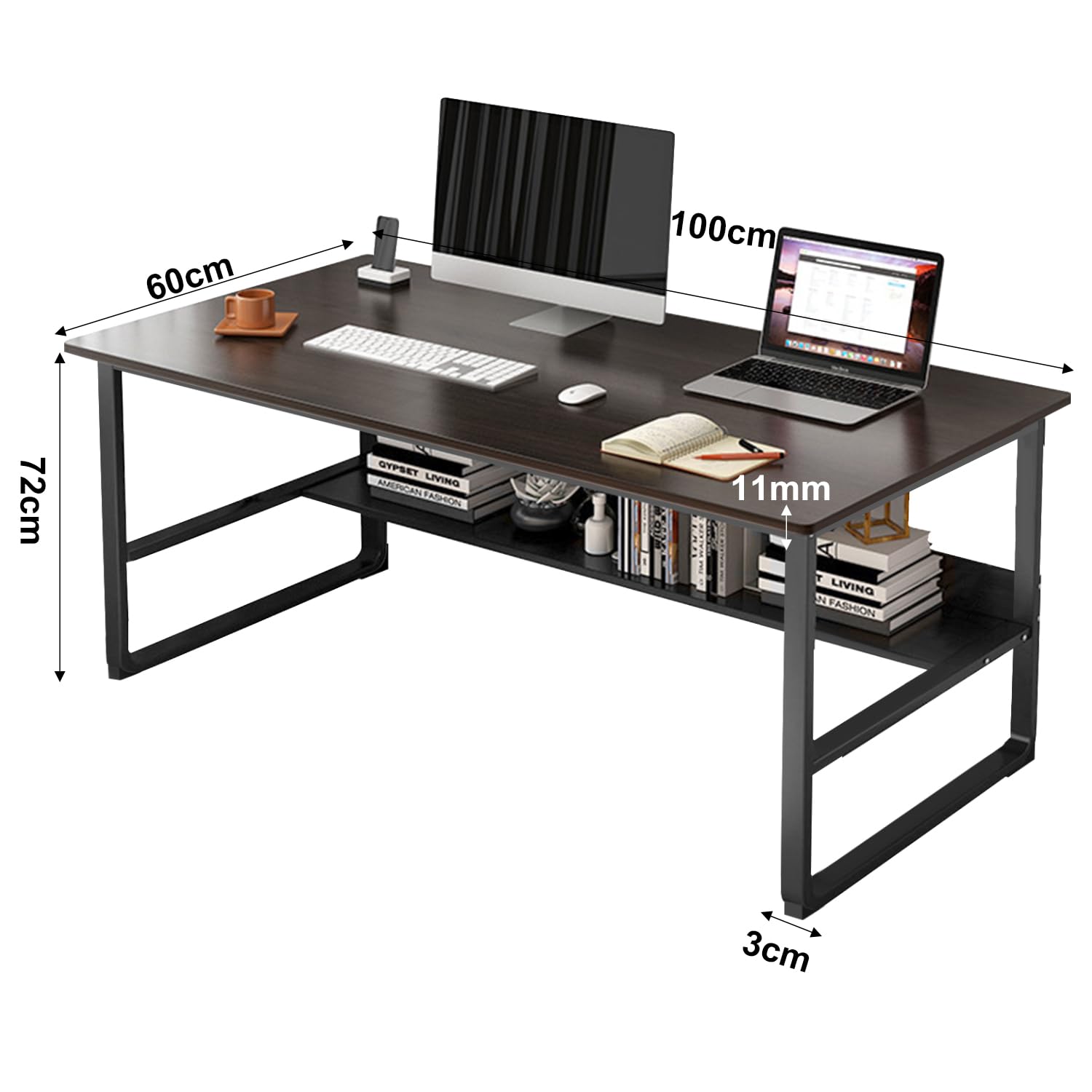
Image 7.1: Detailed dimensions of the FBXGT Minimalist Industrial Computer Desk, illustrating its length, width, and height.
8. Warranty and Support
This FBXGT product comes with a Limited Warranty. For specific terms and conditions of the warranty, please refer to the warranty card included with your purchase or visit the official FBXGT website.
For technical support, missing parts, or any inquiries regarding your product, please contact FBXGT customer service through the contact information provided on your purchase receipt or the brand's official support channels.


