
1. Introduction
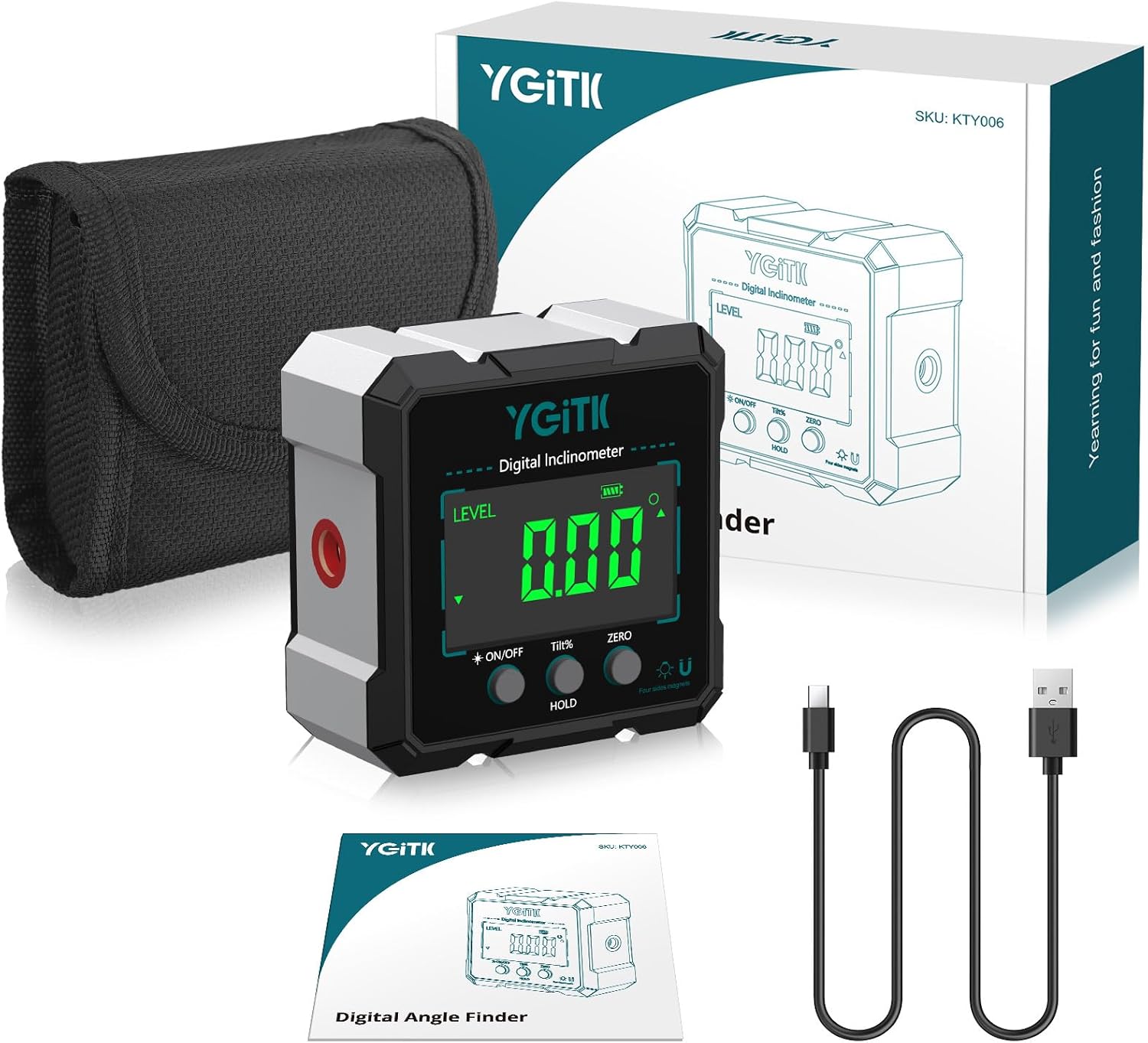
The YGiTK Magnetic Digital Angle Finder Model 5341 is a versatile tool designed for precise angle measurement and leveling. Constructed from durable aluminum, it is lightweight and portable, making it suitable for various applications including woodworking, construction, decoration, and DIY projects. This device combines the functionality of a traditional angle measuring tool with a laser level, offering enhanced utility.
1.1 Package Contents
- YGiTK Digital Angle Finder
- USB Type-C Charging Cable
- Protective Pouch
- User Manual
2. Safety Information
Please read and understand all safety instructions before using the YGiTK Digital Angle Finder. Failure to follow these instructions may result in injury or damage to the device.
2.1 Laser Safety
This device incorporates a Class 2 laser. Observe the following precautions:
- DO NOT stare directly into the laser beam.
- DO NOT direct the laser beam at people or animals.
- Avoid exposing eyes to direct or reflected laser beams.
- Use the device in a manner consistent with its intended purpose to prevent accidental exposure.
- Keep out of reach of children.
2.2 General Safety
- Ensure the device is clean and dry before use. The device has an IP54 waterproof rating, meaning it is protected from dust and splashing water, but it is not designed for immersion.
- Do not attempt to disassemble or modify the device. Repairs should only be performed by qualified personnel.
- Store the device in a safe place, away from extreme temperatures and direct sunlight.
- Use only the provided USB Type-C cable for charging.
3. Product Features
The YGiTK Digital Angle Finder is equipped with several features to enhance accuracy and ease of use:
- Multifunctional Design: Combines digital angle measurement with a laser level.
- 4*90° Multi-angle Measurement: Allows for measurements across a full 360-degree range, divided into four 90-degree quadrants.
- High Accuracy: Provides measurements with an accuracy of ±0.2° (±0.1° at 0° and 90°) and a resolution of 0.05°.
- 4-Side Strong Magnetic Base: Integrated magnets on all four sides for secure attachment to metal surfaces, facilitating hands-free operation.
- Rechargeable Battery: Built-in 340mAh lithium battery, rechargeable via Type-C USB, offering approximately 7 hours of continuous use after a 2-hour charge.
- Large LCD Display: Backlit display with illuminated numbers and letters for clear readability in various lighting conditions.
- Automatic Display Inversion: Numbers automatically invert when the device is turned upside down for easy reading.
- IP54 Waterproof Rating: Provides protection against dust and splashing water.


4. Setup
4.1 Initial Charging
Before first use, fully charge the device. Connect the provided USB Type-C cable to the charging port on the device and plug the other end into a compatible USB power adapter (not included) or a computer USB port.
- A full charge typically takes approximately 2 hours.
- The battery indicator on the LCD will show charging status.

4.2 Power On/Off
Press the ON/OFF button to power the device on or off.
5. Operating Instructions
5.1 Angle Measurement
- Place the base of the angle finder on the surface you wish to measure.
- The LCD will display the current angle relative to the horizontal plane.
- The device supports 4*90° measurement, meaning it can measure angles in any orientation, with the display automatically inverting for easy reading when the device is upside down.

5.2 Zeroing Function
To set a relative zero point for comparative measurements:
- Place the device on a reference surface.
- Press the ZERO button. The display will show 0.00°, indicating the new reference point.
- Move the device to the target surface to measure the angle relative to your set zero.
5.3 Hold Function and Unit Conversion
- Press the HOLD/Tilt% button once to freeze the current reading on the display. Press again to release.
- Long press the HOLD/Tilt% button to switch between angle units (degrees °) and tilt percentage (%).
5.4 Laser Operation
The device features dual lasers for precise alignment:
- Press the Laser Switch button (often integrated with ON/OFF or a separate button) once to activate the right laser.
- Press again to activate the left laser.
- Press a third time to activate both lasers simultaneously.
- Press a fourth time to turn off the lasers.

NOTE: The back of the inclinometer is not magnetic. Ensure the magnetic sides are used for attachment.

5.5 Video Demonstration

6. Maintenance
6.1 Cleaning
- Wipe the device with a soft, dry cloth.
- For stubborn dirt, a slightly damp cloth can be used, but ensure no moisture enters the device openings.
- Do not use abrasive cleaners or solvents.
6.2 Storage
- Store the angle finder in its protective pouch when not in use to prevent scratches and damage.
- Keep the device in a cool, dry place, away from direct sunlight and extreme temperatures.
- If storing for an extended period, ensure the battery is partially charged (around 50%) to prolong battery life. Recharge every few months.
7. Troubleshooting
| Problem | Possible Cause | Solution |
|---|---|---|
| Device does not power on. | Low battery. | Charge the device using the provided USB Type-C cable. |
| "Err" displayed on screen. | The angle being measured exceeds the device's operational range (e.g., front/rear camber exceeds 30°). | Adjust the device's position or the angle being measured to within the acceptable range. |
| Laser beam is weak or not visible. | Low battery; bright ambient light; laser switch not activated correctly. | Charge the device. Use in lower light conditions if possible. Press the laser switch button repeatedly to cycle through laser modes (right, left, both, off). |
| Inaccurate readings. | Device not properly zeroed; unstable surface; magnetic interference. | Perform a zero calibration on a stable, level surface. Ensure the device is placed firmly. Avoid strong magnetic fields during measurement if not using the magnetic feature. |

8. Specifications
| Feature | Detail |
|---|---|
| Model Number | 5341 |
| Measurement Range | 4 x 90° (0-360°) |
| Accuracy | ±0.2° (±0.1° at 0° and 90°) |
| Resolution | 0.05° |
| Material | Aluminum |
| Power Source | Rechargeable Lithium Polymer Battery (340mAh) |
| Charging Interface | USB Type-C |
| Charging Time | Approx. 2 hours |
| Working Time | Approx. 7 hours |
| Laser Class | Class 2 (Output <5mW) |
| Waterproof Rating | IP54 |
| Item Weight | 6.3 ounces (approx. 178g) |
| Dimensions | 4.8 x 4.06 x 1.46 inches (Package Dimensions) |
9. Warranty and Support
YGiTK products are manufactured to high-quality standards. For information regarding warranty coverage, technical support, or service, please refer to the warranty card included with your product or contact YGiTK customer service through the retailer where the product was purchased.
Please retain your purchase receipt as proof of purchase for any warranty claims.