1. Introduction
The HUACAM HDMIC-5802 is a dual UHF wireless handheld microphone system designed for various audio applications. This system features high-fidelity sound reproduction, intelligent wireless transmission, and broad compatibility with amplifier systems, KTV devices, and other audio terminals. Both the microphones and the receiver are equipped with built-in rechargeable lithium-ion batteries, offering convenience and portability for both indoor and outdoor use.
2. Package Contents
Please verify that all items listed below are included in your package:
- 2 x HUACAM Wireless Handheld Microphones
- 1 x Professional Wireless Receiver (with 6.35mm plug)
- 3 x Rechargeable Lithium-ion Batteries (for microphones and receiver)
- 1 x USB Charging Cable
- 1 x 3.5mm Audio Adapter
- 2 x Anti-slip Rings
- 2 x Microphone Covers
- 1 x User Manual
3. Product Overview
The HUACAM HDMIC-5802 system consists of two handheld microphones and a compact receiver, designed for ease of use and reliable performance.


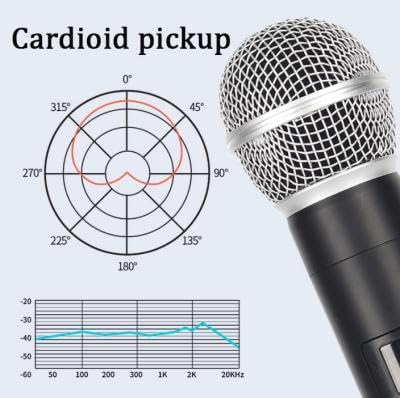
Microphone Features:
- High-Fidelity Sound: Utilizes imported dynamic microphone cores and integrated acoustic filter cotton for clear vocal reproduction and ambient noise isolation.
- Durable Construction: Made with metal for enhanced durability.
- Volume Control: Integrated volume adjustment for precise audio level management.
- Battery Indicator: Displays current battery status.
- Cardioid Pickup Pattern: Designed to capture sound primarily from the front, reducing background noise.
Receiver Features:
- UHF Wireless Technology: Ensures stable and interference-resistant signal transmission.
- 6.35mm Plug: Standard audio output for connecting to amplifiers, speakers, and karaoke machines.
- 3.5mm Adapter: Provides compatibility with a wider range of devices.
- One-Click Smart Pairing: Simplifies connection process.
System Features:
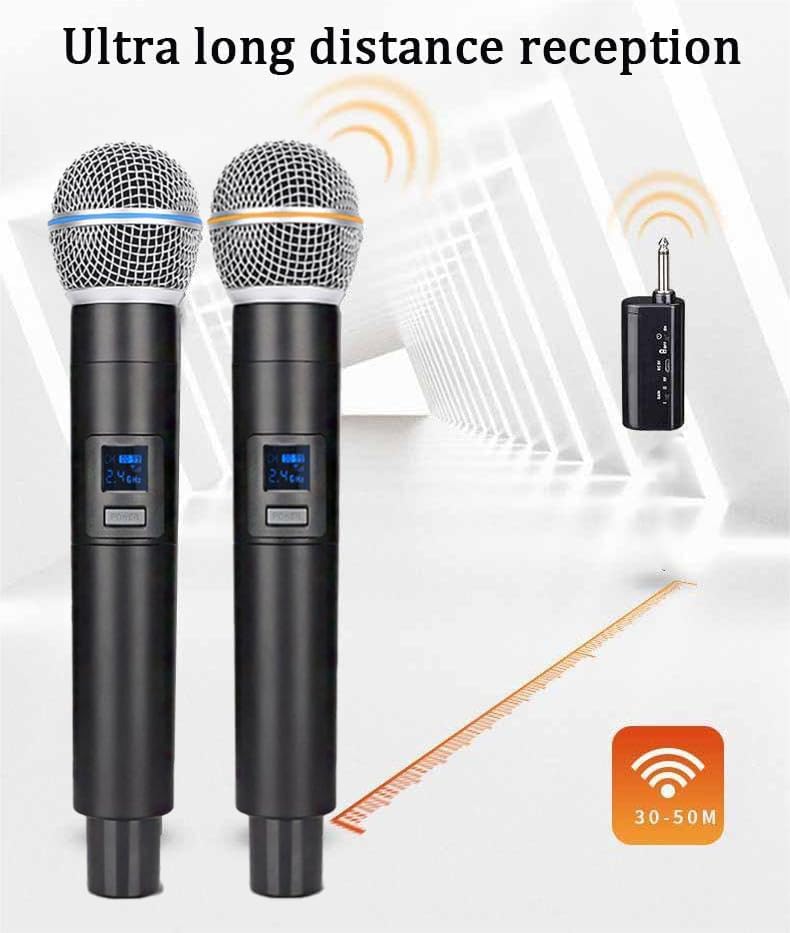
- Long-Distance Reception: Stable transmission within a 30-50 meter radius, supported by two-way frequency band encryption and an external antenna interface.
- Anti-Howling: Designed to minimize audio feedback.
- Automatic Frequency Tracking: Maintains stable connection.
- Rechargeable Batteries: Both microphones and receiver feature 1200mAh built-in rechargeable lithium-ion batteries.
4. Setup
4.1. Charging the Batteries
Before initial use, ensure all components are fully charged.
- Connect the USB charging cable to the charging port on the microphones and the receiver.
- Plug the other end of the USB cable into a standard USB power adapter (not included) or a computer USB port.
- The charging indicator will illuminate during charging and turn off or change color when fully charged.
- A full charge provides approximately 8 hours of continuous use.

4.2. Connecting the Receiver
- Identify the audio input port on your amplifier, speaker, or karaoke machine. This is typically a 6.35mm (1/4 inch) jack.
- Insert the 6.35mm plug of the receiver directly into the audio input port.
- If your device has a 3.5mm (1/8 inch) audio input, attach the provided 3.5mm adapter to the receiver's 6.35mm plug before inserting it into your device.
4.3. Powering On and Pairing
- Turn on the receiver by pressing its power button.
- Turn on each microphone by pressing its power button.
- The system features one-click smart pairing. The microphones and receiver should automatically connect within a few seconds after being powered on. The microphone display will show connection status.
- Adjust the volume on your connected audio device to a low level before testing the microphones.
5. Operating Instructions
5.1. Basic Operation
- Power On/Off: Press and hold the power button on each microphone and the receiver to turn them on or off.
- Volume Adjustment: Use the volume controls on the microphones to adjust the individual microphone output levels. Further volume adjustments can be made on your connected audio device.
- Battery Monitoring: Check the battery indicator on the microphones to monitor remaining power. Recharge when the indicator shows low battery.
5.2. Usage Tips
- Hold the microphone approximately 2-6 inches (5-15 cm) from your mouth for optimal sound capture.
- Avoid covering the microphone grille with your hand, as this can affect sound quality and cause feedback.
- Maintain a clear line of sight between the microphones and the receiver for best wireless performance.
- The system supports stable transmission within a 30-50 meter range. Performance may vary depending on environmental factors and obstacles.
6. Maintenance
6.1. Cleaning
- Wipe the microphone body and receiver with a soft, dry cloth.
- For the microphone grille, gently clean with a soft brush if necessary.
- Do not use harsh chemicals, solvents, or abrasive cleaners.
6.2. Battery Care
- Recharge the batteries regularly, even if the system is not in frequent use, to maintain battery health.
- Avoid fully discharging the batteries frequently.
- If storing the system for an extended period, charge the batteries to about 50% before storage and recharge every few months.
6.3. Storage
- Store the system in a cool, dry place away from direct sunlight and extreme temperatures.
- Keep components in their original packaging or a protective case to prevent damage.
7. Troubleshooting
If you encounter issues with your HUACAM HDMIC-5802 system, refer to the following common problems and solutions:
| Problem | Possible Cause | Solution |
|---|---|---|
| No sound from microphones | Microphones or receiver not powered on; Low battery; Receiver not connected correctly; Audio device volume too low; Microphones not paired. | Ensure all devices are powered on; Charge batteries; Check receiver connection to audio device; Increase audio device volume; Power cycle microphones and receiver to re-pair. |
| Interference or static noise | Other wireless devices nearby; Obstacles blocking signal; Operating outside range. | Move away from other electronic devices; Ensure clear line of sight between microphones and receiver; Reduce distance between microphones and receiver. |
| Short wireless range | Obstacles (walls, metal objects); Environmental interference; Low battery. | Ensure clear line of sight; Avoid dense obstacles; Charge batteries fully. |
| Microphone not charging | Faulty USB cable or power adapter; Charging port damage. | Try a different USB cable and power adapter; Contact customer support if port is damaged. |
| Feedback (howling) | Microphone too close to speaker; Volume too high. | Move microphone further from speakers; Reduce microphone or speaker volume. |
8. Specifications
| Feature | Specification |
|---|---|
| Model Name | HDMIC-5802 |
| Brand | HUACAM |
| Connectivity Technology | UHF Wireless |
| Connector Type | 6.35mm Jack (with 3.5mm adapter) |
| Microphone Form Factor | Handheld |
| Power Source | Battery Powered |
| Battery Type | Lithium-ion (Rechargeable) |
| Number of Batteries | 3 (included) |
| Material | Metal |
| Special Features | Volume Control, Battery Indicator |
| Compatible Devices | Amplifier, Speaker, Karaoke Machine |
| Wireless Range | Up to 30-50 meters (environment dependent) |
| UPC | 701807732490 |
9. Safety Information
- Do not expose the device to water or excessive moisture.
- Avoid dropping or subjecting the device to strong impacts.
- Do not attempt to disassemble or modify the device. This will void the warranty and may cause damage or injury.
- Keep out of reach of children.
- Use only the provided charging cable or a certified equivalent.
- Dispose of batteries according to local regulations. Do not expose batteries to high temperatures or fire.
10. Warranty and Support
For warranty information or technical support, please refer to the contact details provided with your purchase or visit the official HUACAM website. Please retain your proof of purchase for any warranty claims.


