
MiLESEEY D9
Contents
MiLESEEY D9 Pro Laser Measuring Tool User Manual
Model: D9
Introduction
The MiLESEEY D9 Pro is a professional-grade laser measuring tool designed for high precision and efficiency in various measurement tasks. Equipped with advanced features such as a dual visual aligning indicator, P2P technology, and seamless APP synchronization, it simplifies complex measurements for both professionals and DIY enthusiasts.
Key Features
- Advanced Dual Visual Aligning Indicator: Ensures 100% coaxial two-line alignment for precise horizontal or tilted marking.
- Cutting-Edge P2P Technology: Enables safe and accurate measurement of distances between any two points from a single remote location.
- Digitalize Projects via Dedicated APP: The "SMART LIFE" App allows direct data integration with hand-drawn plans or on-site pictures, streamlining workflow and data export.
- Industry-first Live Angle Display: Features a 360° angle sensor for real-time feedback on angle measurements on any surface.
- Multiple Measurement Modes: Offers 14 diverse measuring functions for various applications, from basic to advanced.
- Large Touch-sensitive Screen Display: A 2.4-inch IPS touchscreen with an intuitive, icon-based interface for easy navigation and readability in both horizontal and vertical orientations.
- Durable Construction: Made with Aluminium-magnesium alloy and rated IP66 for water resistance.
What's in the Box
Upon opening your MiLESEEY D9 Pro package, please verify that all the following components are included:
- D9 PRO Laser Distance Meter x1
- Hard Carrying Case x1
- Type-C Charge Cable x1
- Hand Strap x1
- User Manual x1

Image: All components included in the MiLESEEY D9 Pro package.
Video: An unboxing of the MiLESEEY D9 Laser Distance Meter, showing the contents of the package.
Video: A detailed unboxing of the D9 PRO Laser Measure, showcasing its packaging and included accessories.
Setup
Battery Charging
The D9 Pro is powered by a built-in 1800mAh rechargeable Lithium-Ion battery. Before first use, or when the battery indicator shows low charge, connect the device to a power source using the provided Type-C USB cable. A full charge typically takes approximately 3 hours and provides enough power for up to 30,000 measurements.

Image: The D9 Pro connected via its Type-C charging cable, highlighting its battery life and charging efficiency.
Initial Power On
To power on the device, press and hold the main power button located on the side or front of the unit. The IPS touchscreen will illuminate, displaying the main measurement interface. Ensure the device is fully charged for optimal performance.
Operating Instructions
Device Overview and Controls
The D9 Pro features a user-friendly interface with a 2.4-inch IPS touchscreen and quick-access physical buttons. The main measure button is centrally located for easy access. Side buttons provide additional controls for settings and menu navigation.

Image: A detailed guide to the D9 Pro's physical features and controls.
Measurement Modes
The D9 Pro offers an extensive range of 14 measuring functions to cater to diverse needs. Navigate through the modes using the touchscreen or quick-access buttons to select the desired measurement type (e.g., single distance, area, volume, Pythagorean, continuous measurement, stake-out).

Image: Demonstrates continuous measurement and stake-out functions.
Visual Aligning Indicator
The D9 Pro incorporates unique bilateral laser reference lines, ensuring 100% coaxial alignment. This feature provides a clear visual reference for precise horizontal or tilted alignment and marking, significantly enhancing accuracy and efficiency.

Image: The visual aligning reference in action, showing how laser lines assist in measuring inaccessible areas.

Image: An internal view demonstrating the bilateral visual aligning indicator's mechanism.
Video: A demonstration of the MiLESEEY D9 Pro Laser Measure's visual aligning indicator feature.
P2P Technology
The D9 Pro's P2P (Point-to-Point) function allows you to measure the distance between any two points from a single remote location. This is particularly useful for safely and accurately measuring in hard-to-reach areas or complex situations, such as inclined frames or ceilings.
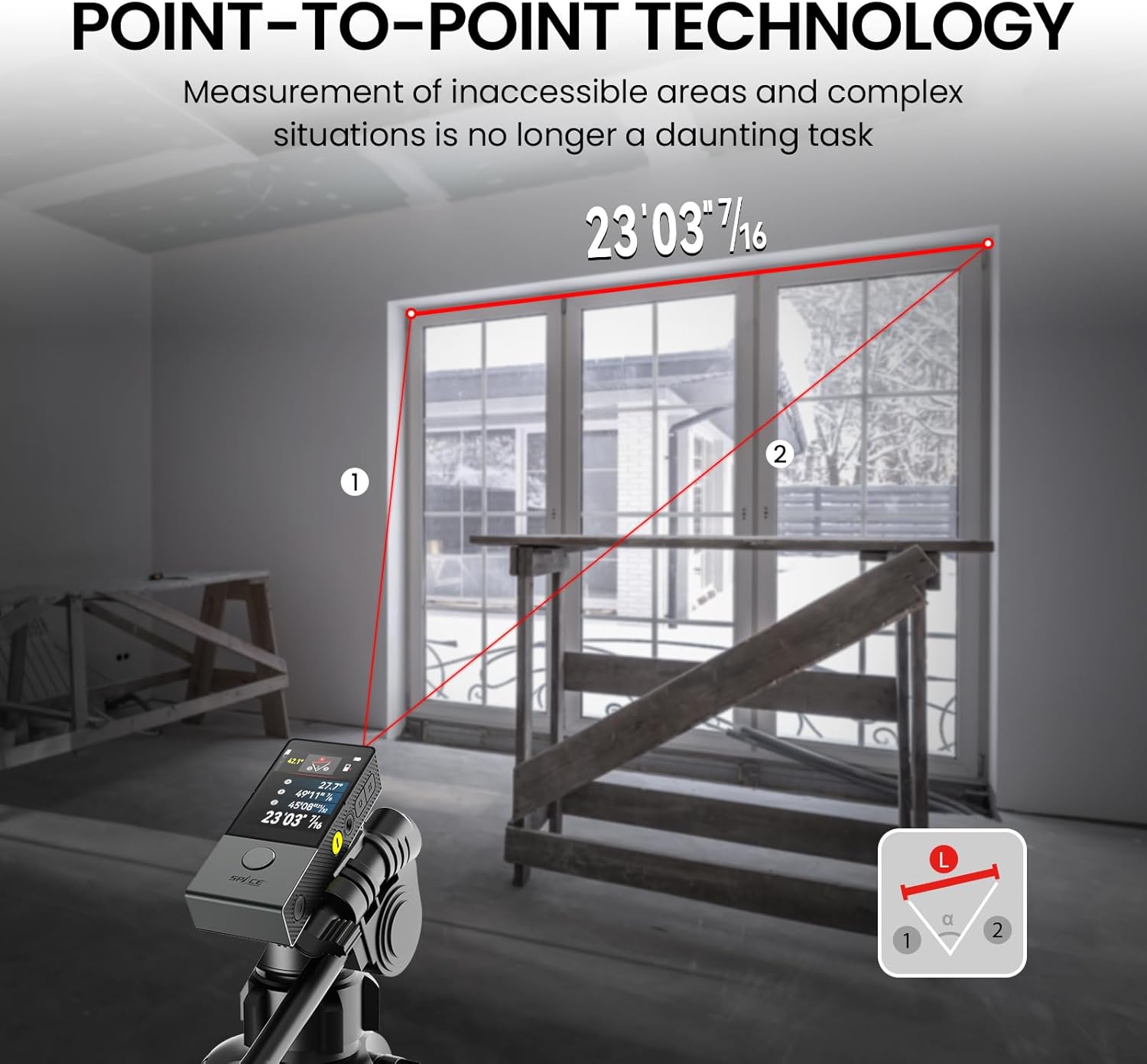
Image: Illustrates the P2P technology for measuring distances between two remote points.

Image: A user demonstrating the P2P measurement capability for high or inaccessible points.
Live Angle Display
Equipped with a 360° angle sensor, the D9 Pro provides an innovative live rotation angle display. This feature gives you real-time feedback and confirmation for angle measurements on any surface, aiding in precise alignment for various tasks.
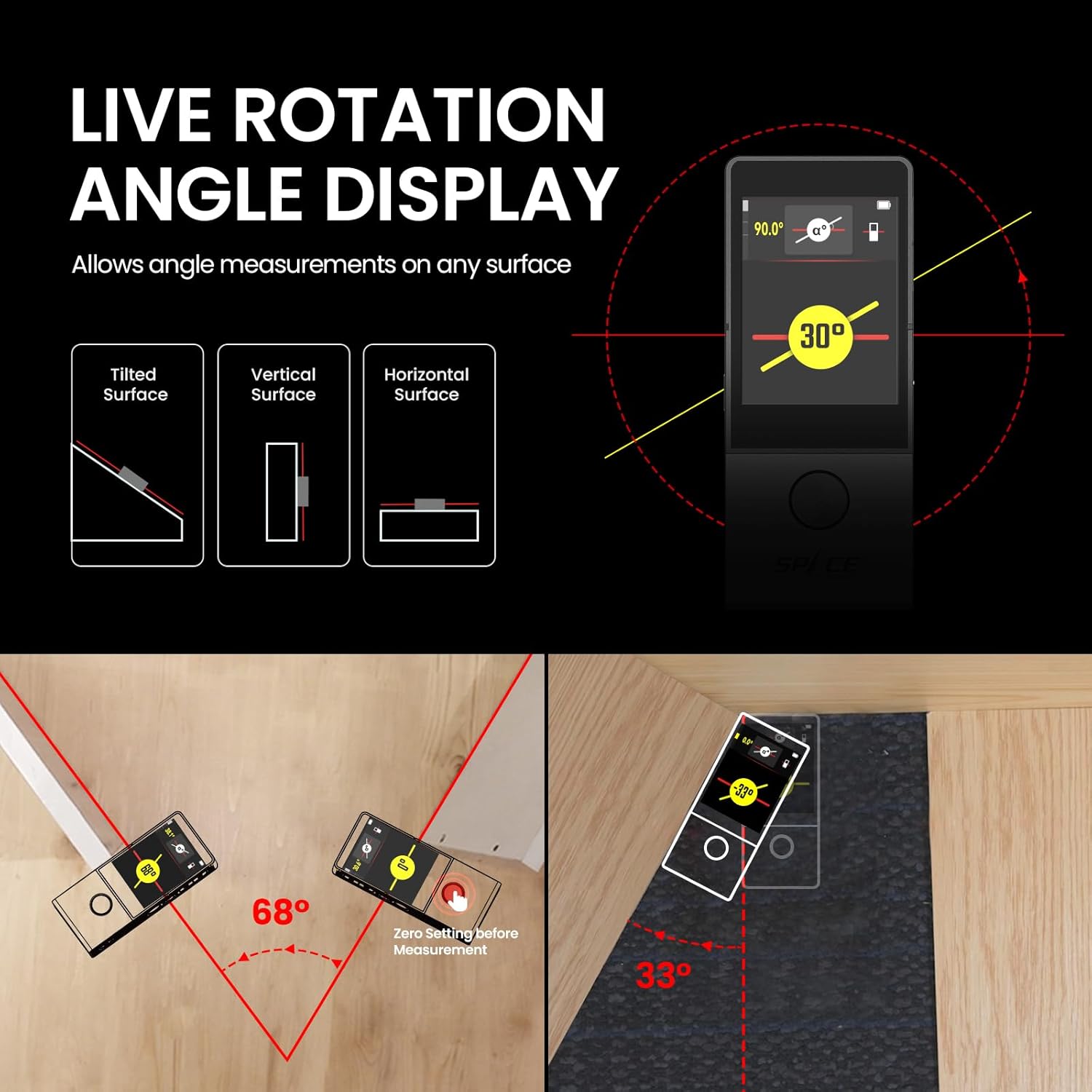
Image: Visual explanation of the live angle display on different surface orientations.

Image: A user demonstrating the live rotation angle display for accurate angle measurements.
APP Connectivity ("SMART LIFE" App)
The D9 Pro seamlessly connects with the "SMART LIFE" App, allowing you to digitalize your projects. You can directly drag and drop measured data onto hand-drawn plans or uploaded on-site pictures, simplifying your workflow. Data can be exported for PC use, shared with clients, or stored in spreadsheets for future reference.

Image: The D9 Pro's integration with the SMART LIFE app for digital project management.

Image: Demonstrates the app connectivity feature for managing measurements.
Reference Point Adjustment
The D9 Pro allows for easy shifting of the measurement reference point. You can choose to measure from the front edge of the device, the back edge, the aligning laser line, or the center of the tripod thread hole, providing flexibility for various measurement scenarios.

Image: Explains how to adjust the measurement reference point on the device.
Auto Rotating Display
The display on the D9 Pro automatically rotates to ensure convenient reading in both horizontal and vertical orientations, adapting to your working position.

Image: Demonstrates the auto-rotating display feature for enhanced readability.
Magnetic Mount
The integrated magnetic mount allows for easy attachment to metal surfaces, enabling hands-free measurement and increased stability during operation.

Image: The magnetic mount feature in use, securing the device to a metal surface.
Flashlight
The D9 Pro includes a built-in 90LM LED spotlight with two brightness modes. This flashlight can be operated independently, providing illumination in dark working conditions without needing to turn on the measuring functions.

Image: The D9 Pro's integrated flashlight providing illumination.
Color Themes
The device offers selectable white and black color themes for the display, allowing users to choose their preferred visual appearance for optimal readability in different lighting conditions.

Image: Shows the white and black color theme options for the display.
Video: A brief demonstration of the creative features of the D9 PRO laser distance meter.
Video: A comprehensive demonstration of the various product functions of the D9 PRO laser measure.
Maintenance
- Cleaning: Use a soft, damp cloth to clean the device. Do not use abrasive cleaners or solvents. Keep the laser lens clean for accurate measurements.
- Storage: Store the device in its hard carrying case in a cool, dry place when not in use. Avoid extreme temperatures and direct sunlight.
- Battery Care: To prolong battery life, avoid fully discharging the battery frequently. Charge the device regularly, even if not in active use, to maintain battery health.
- Avoid Impact: While durable, the device contains sensitive electronic components. Avoid dropping or subjecting it to strong impacts.
Troubleshooting
| Problem | Possible Cause | Solution |
|---|---|---|
| Inaccurate Measurements | Incorrect reference point selected; dirty laser lens; unstable measurement surface; environmental factors (e.g., strong light, reflective surfaces). | Verify the correct reference point (front, back, tripod) is selected. Clean the laser lens with a soft cloth. Ensure the device is stable during measurement. Avoid measuring on highly reflective or transparent surfaces. Adjust settings for outdoor use if applicable. |
| Device does not power on | Battery is depleted; device malfunction. | Charge the device fully using the provided Type-C cable. If the issue persists after charging, contact customer support. |
| Touchscreen unresponsive or sluggish | Temporary software glitch; screen protector interference. | Restart the device. Ensure hands are clean and dry. If a screen protector is installed, ensure it is properly applied and not interfering with touch sensitivity. |
| Error Code 204 | Internal configuration issue or sensor error. | Try restarting the device. If the error persists, a factory reset might be necessary (refer to the manual's settings section for instructions). If the problem continues, contact customer support for assistance. |
| App connectivity issues | Bluetooth not enabled; app not updated; device not paired. | Ensure Bluetooth is enabled on your smartphone and the D9 Pro. Update the "SMART LIFE" app to the latest version. Follow the app's pairing instructions to connect the device. |
Specifications
| Feature | Detail |
|---|---|
| Brand | MiLESEEY |
| Model Number | D9 |
| Color | Black |
| Material | Aluminium-magnesium alloy |
| Item Weight | 0.3 Kilograms (10.6 ounces) |
| Product Dimensions | 0.96"L x 1.9"W x 4.64"H |
| Measuring Range | 330 feet |
| International Protection Rating | IP66 (Water Resistant) |
| Batteries Included | Yes (1 Lithium Ion battery, included) |
| Battery Cell Type | Lithium |
| Laser Class | Class II Laser with 1mW output |
| Manufacturer | MiLESEEY |
| Country of Origin | China |
Warranty and Support
The MiLESEEY D9 Pro Laser Measuring Tool comes with a 2-Year Warranty from the date of purchase. This warranty covers defects in materials and workmanship under normal use. It does not cover damage caused by misuse, accidents, unauthorized modifications, or normal wear and tear.
For warranty claims, technical support, or any inquiries regarding your device, please contact MiLESEEY customer service through their official website or the contact information provided in your product packaging. Please have your purchase receipt and product model number (D9) ready when contacting support.
Ask a question about this manual
Ask about setup, troubleshooting, compatibility, parts, safety, or missing instructions. Manuals+ will review the question and use this page’s manual context to help answer it.