
1. Introduction
This manual provides detailed instructions for the safe and efficient use of your new Honor Magic 6 Lite Smartphone. Please read this manual thoroughly before using the device to ensure optimal performance and longevity.

Figure 1.1: The Honor Magic 6 Lite Smartphone, showcasing its sleek design and camera module.
Key Features:
- 1.5K Ultra-Bounce Anti-Drop Display: Certified with SGS five-star anti-drop protection for enhanced durability.
- 5300 mAh Super Durable Battery: High-density battery providing extended usage and supporting 35W fast charging.
- 108 MP Lossless Capture Camera: High-resolution main camera with 3x lossless zoom and a 16 MP front camera.
- Qualcomm Snapdragon 6 Gen 1 Processor: Powerful 4nm chipset for smooth performance.
- 8 GB RAM + 256 GB Storage: Enhanced memory with HONOR Turbo RAM for seamless multitasking.
- Android 13 with MagicOS 7.2: Full support for Google Mobile Services.
2. Setup Guide
2.1. Unboxing and Initial Inspection
Carefully remove all components from the packaging. Verify that all items are present:
- Honor Magic 6 Lite Smartphone
- USB Type-C Cable
- SIM Ejector Tool
- Quick Start Guide (if included)
Inspect the device for any visible damage. If any damage is found, do not proceed with setup and contact customer support.
2.2. Inserting the SIM Card(s)
- Locate the SIM card tray on the side of your device.
- Insert the SIM ejector tool into the small hole next to the tray and press firmly until the tray pops out.
- Place your Nano-SIM card(s) into the designated slots on the tray. Ensure the gold contacts face downwards. The Honor Magic 6 Lite supports dual SIM functionality.
- Carefully push the tray back into the device until it clicks into place.
2.3. Charging the Device
Before first use, it is recommended to fully charge your smartphone.
- Connect the USB Type-C cable to the charging port at the bottom of your phone.
- Connect the other end of the cable to a compatible 35W fast charger (sold separately or included in some regional packages) and plug it into a power outlet.
- The charging indicator will appear on the screen. Allow the device to charge until the battery icon shows full.
2.4. Powering On and Initial Setup
- Press and hold the Power button (located on the right side of the device) until the Honor logo appears.
- Follow the on-screen instructions to complete the initial setup, which includes selecting your language, connecting to Wi-Fi, setting up your Google account, and configuring security features like fingerprint or face unlock.
3. Operating Instructions
3.1. Display and Navigation
The Honor Magic 6 Lite features a vibrant 6.78-inch AMOLED display with a 120Hz refresh rate, 1.5K Retina resolution (2652x1200 pixels), and 429 PPI, offering crisp visuals and smooth scrolling. It supports 1.07 billion colors and has a 92.8% screen-to-body ratio.

Figure 3.1: Detailed specifications of the Honor Magic 6 Lite's display.
The device incorporates a 360° Anti-Drop Display technology, providing comprehensive protection against drops and impacts, certified by SGS five-star anti-drop rating.
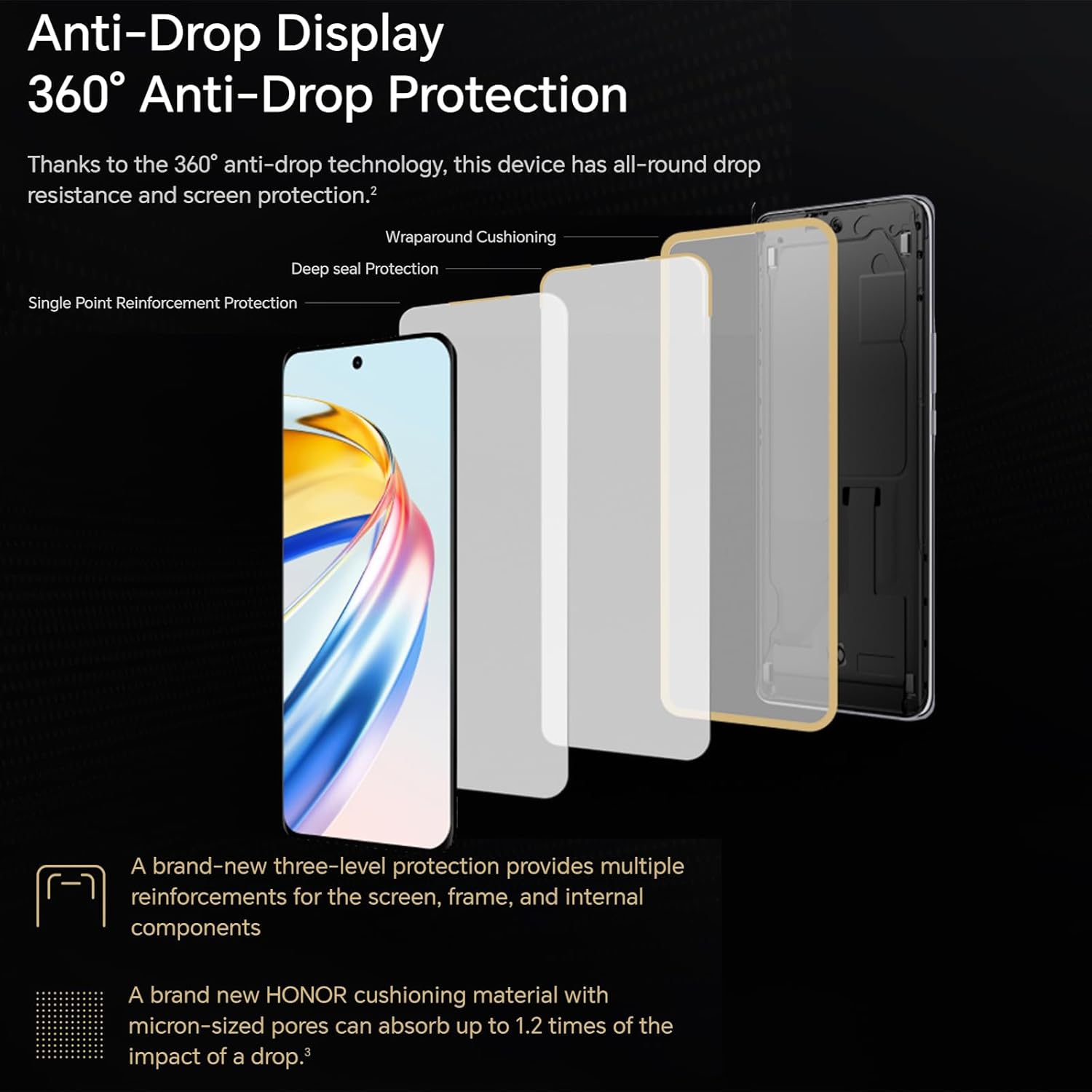
Figure 3.2: The multi-layered anti-drop protection system of the display.
3.2. Camera Features
The Honor Magic 6 Lite is equipped with a powerful 108 MP main camera and a 16 MP front camera, allowing you to capture high-quality photos and videos.

Figure 3.3: Examples of image quality from the 108MP main camera and wide-angle lens.
The camera supports 3x lossless zoom, enabling you to capture distant subjects with clarity without compromising image quality. It also features a sports recording mode to capture fast-moving action.
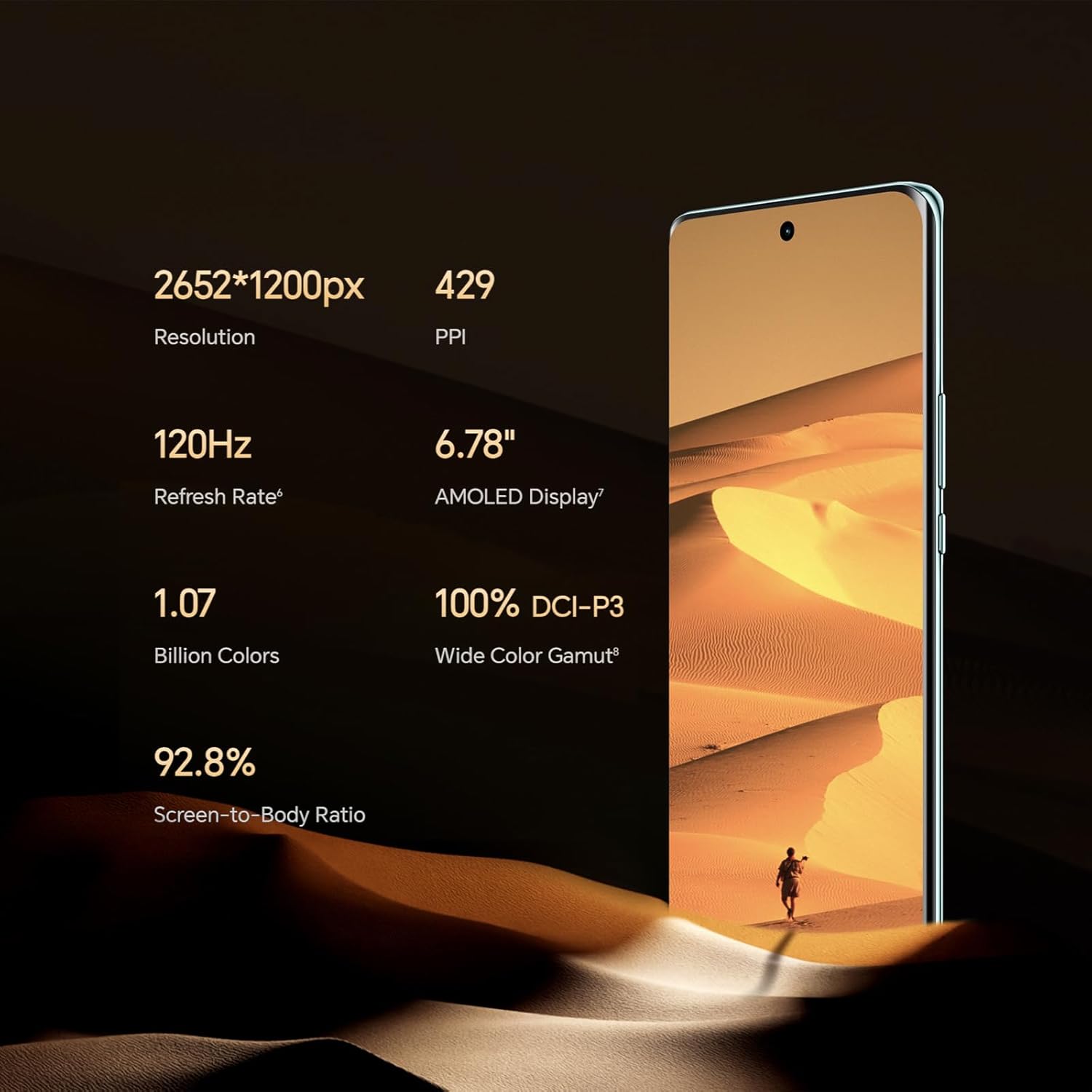
Figure 3.4: Illustration of the 3x lossless zoom feature.
3.3. Battery Management
The 5300 mAh high-density battery provides exceptional endurance, designed to last through intensive use. With 35W fast charging support, you can quickly replenish the battery.

Figure 3.5: Overview of the 5300mAh battery's capacity and typical usage times.
3.4. Performance and Software
Powered by the Qualcomm Snapdragon 6 Gen 1 processor, built on a 4nm process, the Honor Magic 6 Lite delivers robust performance for demanding tasks and gaming. The device comes with 8 GB of RAM and 256 GB of internal storage, enhanced by HONOR Turbo RAM technology for smooth application launches and transitions.
The smartphone runs on MagicOS 7.2, based on Android 13, and fully supports Google Mobile Services, allowing access to all your favorite apps from the Google Play Store.
3.5. Connectivity
The Honor Magic 6 Lite supports 5G cellular networks for high-speed internet access. It also includes standard connectivity options such as Wi-Fi and USB Type-C for data transfer and charging.
4. Maintenance and Care
4.1. Cleaning Your Device
To keep your Honor Magic 6 Lite in optimal condition, follow these cleaning guidelines:
- Use a soft, lint-free cloth to wipe the screen and body of the phone.
- Avoid using abrasive materials, alcohol, or chemical cleaners, as these can damage the screen coating and finish.
- For stubborn smudges, slightly dampen the cloth with water, but ensure no liquid enters the ports.
4.2. Software Updates
Regularly check for and install software updates to ensure your device has the latest features, security patches, and performance improvements. Updates are typically delivered over-the-air (OTA).
- Go to Settings > System & updates > Software update.
- Tap Check for updates.
- If an update is available, follow the on-screen prompts to download and install it. Ensure your device has sufficient battery life and a stable internet connection before starting an update.
4.3. Battery Care
To maximize battery lifespan:
- Avoid exposing the device to extreme temperatures (very hot or very cold).
- Do not let the battery completely drain frequently.
- Use only approved chargers and cables.
5. Troubleshooting
This section addresses common issues you might encounter with your Honor Magic 6 Lite. If the problem persists, please contact customer support.
5.1. Device Not Turning On
- Check Battery: Ensure the device has sufficient charge. Connect it to a charger for at least 10-15 minutes before attempting to power on again.
- Force Restart: Press and hold the Power button for about 10-15 seconds until the device vibrates and the Honor logo appears.
5.2. Apps Crashing or Freezing
- Close and Reopen: Close the problematic app from recent apps and reopen it.
- Clear Cache: Go to Settings > Apps > [App Name] > Storage > Clear cache.
- Update App: Ensure the app is updated to its latest version from the Google Play Store.
- Restart Device: A simple restart can often resolve temporary software glitches.
5.3. Poor Wi-Fi or Cellular Connection
- Toggle On/Off: Turn Wi-Fi or cellular data off and then on again from the Quick Settings panel.
- Restart Router/Modem: For Wi-Fi issues, restart your Wi-Fi router.
- Check Signal Strength: Ensure you are in an area with good network coverage.
- Reset Network Settings: Go to Settings > System & updates > Reset > Reset network settings. Note: This will erase all saved Wi-Fi passwords and Bluetooth connections.
5.4. Battery Draining Quickly
- Identify Usage: Go to Settings > Battery to see which apps are consuming the most power.
- Adjust Settings: Reduce screen brightness, disable unnecessary features like GPS or Bluetooth when not in use, and close background apps.
- Software Update: Ensure your device software is up to date.
6. Technical Specifications
| Feature | Specification |
|---|---|
| Brand | HONOR |
| Model Name | Magic6 Lite |
| Color | Black |
| Operating System | Android 13.0 (MagicOS 7.2) |
| Display Size | 6.78 Inches |
| Display Resolution | 2652 x 1200 pixels |
| Refresh Rate | 120 Hz |
| Processor | Qualcomm Snapdragon 6 Gen 1 |
| CPU Speed | 2.4 GHz |
| RAM Size | 8 GB |
| Storage Capacity | 256 GB (Internal) |
| Main Camera Resolution | 108 Megapixels |
| Front Camera Resolution | 16 Megapixels |
| Battery Composition | Lithium-Polymer |
| Battery Capacity | 5300 mAh |
| Special Features | High-resolution camera, Long battery life with fast charging, High-quality display |
| Connectivity | USB Type-C, Wi-Fi, 5G |
| ASIN | B0CS6688HG |
| Country of Origin | Germany |
7. Warranty and Support
7.1. Product Warranty
Your Honor Magic 6 Lite Smartphone comes with a standard manufacturer's warranty. Please refer to the warranty card included in your product packaging for specific terms, conditions, and duration. Keep your proof of purchase for warranty claims.
Please note that information regarding the availability of spare parts and guaranteed software updates is not available at this time.
7.2. Customer Support
For technical assistance, troubleshooting beyond this manual, or warranty inquiries, please contact Honor customer support through their official website or the contact information provided in your product documentation.
You can also visit the official Honor support page for FAQs, software downloads, and service center locations.


