
Introduction
This manual provides essential information for the safe assembly, operation, and maintenance of your OLAKIDS 12V Electric Ride-On Truck. Please read all instructions carefully before use to ensure proper function and safety for the child. Keep this manual for future reference.
Safety Information
WARNING: Failure to follow these safety instructions may result in serious injury or death.
- Never leave a child unattended while operating this vehicle.
- Always ensure the child is seated in the seat when using this vehicle.
- Keep hands, hair, and clothing away from all moving parts.
- Always wear shoes when operating this vehicle.
- A maximum of two children are allowed in the vehicle at a time.
- Children under 3 years of age cannot use this vehicle.
- Only drive on level ground.
- Do not operate near swimming pools, other bodies of water, drop-offs, or on steep inclines.
- Do not drive the vehicle into loose dirt, mud, sand, fine gravel, or on wet surfaces.
- Do not drive the vehicle on public streets or near cars.
- This product complies with US CPSIA and ASTM Requirements, and DOE & CEC Requirements for electrical energy efficiency.
What's in the Box
The package includes the following components:
- OLAKIDS Kids Ride on Truck (main body)
- Remote Control
- Charger
- Assembly Hardware (screws, nuts, etc.)
- Instruction Manual

Image: The complete OLAKIDS 12V Electric Ride-On Truck in white, ready for use.
Setup and Assembly
Assembly is required for this product. Please follow the detailed instructions provided in the separate assembly guide included in your package. Ensure all parts are accounted for before beginning assembly.
Key Assembly Components:
- Wheels: Attach the four wear-resistant wheels securely.
- Steering Wheel: Install the steering wheel, ensuring all connections are firm.
- Seat: Secure the comfortable seat, ensuring the adjustable seat belt is functional.
- Rearview Mirrors: Attach the rearview mirrors to their designated positions.
- Battery Connection: Connect the battery as per the assembly guide.
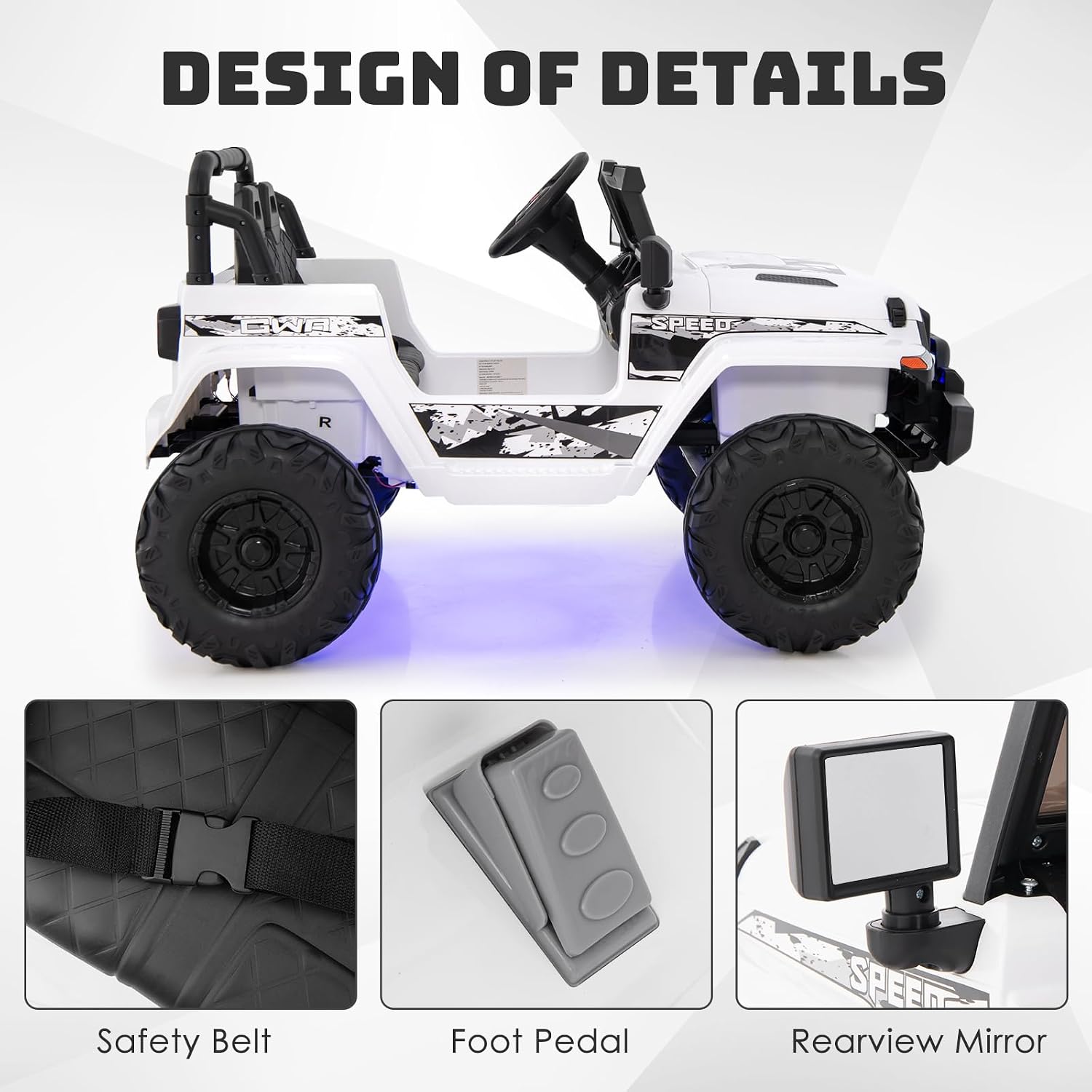
Image: Detailed view of the safety belt, foot pedal, and rearview mirror, which are key components during assembly.

Image: The durable, wear-resistant wheels designed for various terrains like asphalt, brick, and wood floors.
Operating Instructions
Driving Modes:
- Child Manual Control: Children can operate the truck using the foot pedal and steering wheel.
- Parental Remote Control: Parents can control the vehicle manually using the included 2.4GHz remote control, especially useful for younger children or for safety intervention. The remote requires 2* 1.5V AAA batteries (not included).

Image: The 2.4G parental remote control with labeled buttons for lights, forward/backward movement, turning, stopping, speed adjustment, and pairing.
Dashboard Controls:
The realistic dashboard provides various controls for an engaging driving experience:
- Power Switch: Turns the vehicle on/off.
- Forward/Stop/Reverse Switch: Selects the driving direction.
- Fast/Slow Switch: Adjusts the speed setting.
- Lights: Activates the bright LED lights.
- Horn Button: Sounds the horn.
- Engine Sound Button: Plays realistic engine sounds.

Image: The truck's dashboard, highlighting the steering wheel, horn, engine sound, speed controls, and power switch for a realistic driving experience.
Music Player Functions:
The integrated music player offers entertainment options:
- Built-in Music: Pre-loaded tunes for immediate enjoyment.
- Bluetooth: Connect your device wirelessly to play custom music.
- USB Port: Play music from a USB drive.
- Radio: Tune into radio stations.
- Volume Adjustment: Control the audio level.
- Battery Display: Shows the current battery level.

Image: The music player console, featuring controls for battery display, USB input, volume, radio, Bluetooth connectivity, and music selection.
Soft Start Function:
The vehicle is equipped with a soft start function to ensure a gradual acceleration, preventing sudden jolts and providing a safer, smoother driving experience for children.

Image: A graph demonstrating the smooth acceleration curve of the soft start function compared to the abrupt start of a non-soft start system.
Maintenance
Charging the Battery:
- Use only the provided charger.
- Ensure the charging port is clean and dry before connecting the charger.
- Charging time is typically 8-12 hours. Do not overcharge.
- Disconnect the charger once the battery is fully charged.
General Care:
- Clean the vehicle with a damp cloth. Do not use abrasive cleaners or solvents.
- Store the vehicle in a dry place away from direct sunlight and moisture.
- Regularly check all screws and fasteners to ensure they are tight.
- Inspect the wheels for wear and tear.
Troubleshooting
If you encounter issues with your OLAKIDS Ride-On Truck, please refer to the following common solutions:
| Problem | Possible Cause | Solution |
|---|---|---|
| Vehicle does not move | Battery is low or disconnected; Power switch is off; Loose wiring. | Charge the battery; Check battery connections; Ensure power switch is on; Inspect wiring for secure connections. |
| Remote control not working | Remote batteries are dead or incorrectly inserted; Remote not paired. | Replace remote batteries (2* 1.5V AAA); Refer to pairing instructions in the assembly guide. |
| Vehicle moves slowly | Low battery; Overload (exceeding weight capacity); Driving on unsuitable terrain. | Charge the battery; Reduce load; Drive on level, firm surfaces. |
| Music player not functioning | Volume too low; USB device not recognized; Bluetooth not connected. | Increase volume; Ensure USB device is formatted correctly; Re-pair Bluetooth device. |
Specifications

Image: Visual representation of the product's key specifications including age, weight capacity, and overall dimensions.
| Feature | Detail |
|---|---|
| Brand | Olakids |
| Model Number | TY328019 |
| Motor | 2*35 W |
| Battery | 12V (Charger Output DC 12V) |
| Play Time | 1-2 Hours |
| Charging Time | 8-12 Hours |
| Low Speed | 2.6-3 KM/H |
| High Speed | 5.5-6 KM/H |
| Net Weight | 42.5 lbs |
| Maximum Weight Capacity | 77 lbs |
| Recommended Age | 36-96 Months (3-8 Years) |
| Product Dimensions (L x W x H) | 44" x 30" x 26.5" |
| Material Type | Iron, Polypropylene |
| Assembly Required | Yes |
Warranty and Support
For warranty information or technical support, please contact Olakids customer service. Details for contacting support can typically be found on the product packaging or on the official Olakids website.
Olakids is committed to providing quality products and support. Please retain your proof of purchase for any warranty claims.


