1. Introduction
The Panasonic CP-JNF01CW Smart Pet Feeder is designed to provide automated and precise feeding for small to medium-sized cats and dogs. This device offers convenience and peace of mind, ensuring your pet receives the correct amount of food at scheduled times, even when you are away. With app control, you can manage feeding schedules, monitor food levels, and ensure your pet's dietary needs are met.
2. Product Features
- Automated Feeding: Schedule up to 12 feeding intervals per day for precise portion control.
- Versatile Food Compatibility: Suitable for dry, freeze-dried, and puffed pet food with diameters ranging from 4 mm to 12 mm.
- Smart App Control: Manage feeding schedules, receive low food alerts, and adjust portions remotely via a dedicated application (compatible with Android and iOS).
- Easy Cleaning: The hygienic stainless steel food bowl is dishwasher-safe for convenient maintenance.
- Integrated Desiccant Compartment: A compartment in the lid helps keep food fresh and dry.
- Anti-Jam System: Designed to prevent food blockages, ensuring consistent food delivery.
- Dual Power Supply: Operates via AC adapter with an option for battery backup (batteries not included) to ensure uninterrupted feeding during power outages.
- Secure Placement: Suction cups on the base provide stable positioning on flat surfaces.
- Quality Materials: Food-contact materials are carefully selected for pet safety.

3. Setup Guide
3.1 Unpacking and Assembly
- Carefully remove all components from the packaging.
- Ensure all parts are present: main feeder unit, food bowl, power adapter.
- Place the stainless steel food bowl into its designated slot on the feeder base.
3.2 Power Connection
- Connect the power adapter to the feeder and plug it into a standard electrical outlet.
- For battery backup, insert appropriate batteries (not included) into the battery compartment located at the bottom of the unit. This ensures operation during power interruptions.
3.3 App Download and Pairing
The Panasonic CP-JNF01CW Smart Pet Feeder is compatible with the Smart Life application. Follow these steps to connect your feeder:
- Download the "Smart Life" app from your smartphone's app store (iOS App Store or Google Play Store).
- Register or log in to your Smart Life account.
- Ensure your feeder is powered on and your smartphone is connected to a 2.4GHz Wi-Fi network.
- In the app, tap "Add Device" or the "+" icon.
- Select "Small Home Appliances" then "Pet Feeder (Wi-Fi)".
- Follow the on-screen instructions to put the feeder into pairing mode (usually involves pressing and holding a button on the feeder until an indicator light flashes).
- Enter your Wi-Fi network password when prompted.
- Once connected, the feeder will appear in your device list within the app.
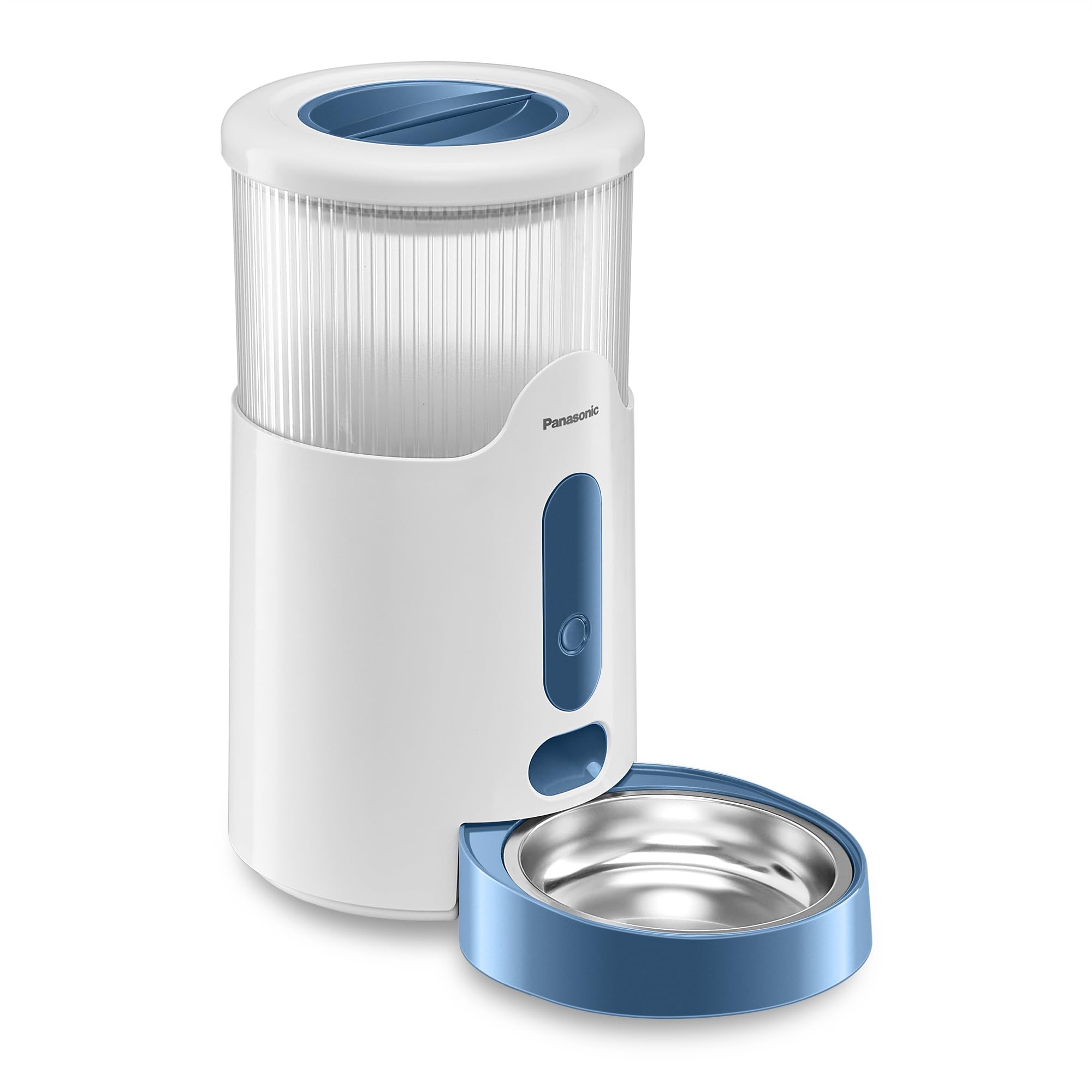
3.4 Filling the Food Tank
- Open the lid of the food tank.
- Pour dry pet food into the tank. Ensure the food size is between 4mm and 12mm to prevent blockages.
- Close the lid securely.
- Place a desiccant packet (if desired) into the designated compartment in the lid to maintain food freshness.
4. Operating Instructions
4.1 Setting Feeding Schedules (App Control)
Use the Smart Life app to create and manage your pet's feeding schedule:
- Open the Smart Life app and select your Panasonic Pet Feeder.
- Navigate to the "Feeding Plan" or "Schedule" section.
- Tap to add a new feeding time.
- Set the desired time for the meal.
- Specify the number of portions to dispense for that meal. One portion typically corresponds to a specific volume of food. Refer to the app for exact portion size details.
- Repeat for all desired feeding times throughout the day (up to 12 intervals).
- Save your feeding plan. The feeder will now automatically dispense food according to your schedule.
4.2 Manual Feeding
You can manually dispense food at any time using the app or the physical button on the feeder:
- Via App: On the feeder's control screen in the Smart Life app, locate the "Feed" or "Manual Feed" option. Select the number of portions and confirm to dispense food immediately.
- Via Feeder Button: Press the manual feed button on the front of the feeder. Each press will dispense one portion of food.
4.3 Smart Food Level Monitoring
The feeder is equipped with a sensor to monitor the food level in the tank. When the food level is low, you will receive an alert via the Smart Life app, prompting you to refill the tank.

5. Maintenance
5.1 Cleaning the Food Bowl
- Remove the stainless steel food bowl from the feeder base.
- The bowl is dishwasher-safe. Alternatively, wash it by hand with mild soap and water.
- Rinse thoroughly and dry completely before placing it back into the feeder.
5.2 Cleaning the Main Unit and Food Tank
- Unplug the feeder from the power outlet before cleaning.
- Wipe the exterior of the feeder with a soft, damp cloth. Do not submerge the main unit in water.
- For the food tank, empty any remaining food. Wipe the interior with a dry or slightly damp cloth. Ensure it is completely dry before refilling.
- Regularly check the food dispensing mechanism for any food residue or blockages and clean as necessary.

5.3 Desiccant Replacement
- The desiccant packet in the lid helps absorb moisture and keep food fresh.
- Replace the desiccant packet every 1-2 months, or as recommended by the desiccant manufacturer, to maintain optimal freshness.
6. Troubleshooting
| Problem | Possible Cause | Solution |
|---|---|---|
| Food not dispensing or dispensing inconsistently. |
|
|
| App cannot connect to the feeder. |
|
|
| Feeding schedule discrepancies (e.g., early feeding). |
|
|
| Low food alert not received. |
|
|
7. Specifications
| Feature | Detail |
|---|---|
| Model Number | CP-JNF01CW |
| Dimensions (L x W x H) | 33.8 x 19 x 36 cm |
| Weight | 1.85 kg |
| Capacity | 2.8 Liters |
| Recommended Species | Small to Medium Dogs and Cats |
| Food Type Compatibility | Dry, freeze-dried, puffed food (4mm - 12mm diameter) |
| Material | Plastic (main unit), Stainless Steel (food bowl) |
| Color | White |
| Connectivity Technology | Wi-Fi (2.4GHz) |
| Power Input | 5 Volts (AC adapter) |
| Energy Consumption | 1.0 W (normal use), < 0.5 W (standby) |
| Battery Backup | Yes (batteries not included) |
| Care Instructions | Dishwasher-safe food bowl |
| Special Features | Smart App Control, Feeding Schedule, Portion Control, Low Food Alert, Anti-Jam System |

8. Safety Information
- Always ensure the feeder is placed on a stable, flat surface to prevent tipping.
- Keep the power cord out of reach of pets to prevent chewing or entanglement.
- Use only the provided power adapter.
- Do not immerse the main feeder unit in water or other liquids.
- Regularly inspect the feeder for any damage. Discontinue use if damaged.
- This device is intended for indoor use only.
- Ensure that only dry pet food is used in the feeder. Wet food can cause blockages and hygiene issues.
- The materials in contact with pet food are carefully selected to be safe for animals.