
1. Product Overview
The Best Choice Products Electric Power Lift Recliner Chair, model SKY5896, is designed to provide dependable comfort and assistance. This versatile chair features a power lift mechanism, reclining capabilities, massage functions, and integrated heating. It includes convenient cupholders, side pockets, and a USB port for charging devices.
The chair offers three adjustable positions: a reclined and lifted position, a lifted leg rest, and a fully lifted chair position to aid in standing. Its sturdy, anti-tipping base ensures stability, while the linen fabric provides a comfortable and durable surface.

This image displays the Best Choice Products Electric Power Lift Recliner Chair in olive linen, highlighting its integrated massage and heat functions with visual indicators.
2. Safety Information
Always read and follow the assembly instructions carefully. Do not exceed the maximum weight capacity of 330 lbs. Be cautious when using the power lift and reclining functions to avoid injury. Keep the chair on a stable, level surface to prevent tipping. Do not leave the chair unattended while in use.
3. Package Contents
Please ensure all components are present before beginning assembly:
- Chair Base
- Backrest
- Armrests (Left and Right)
- Power Adapter
- Remote Control for Massage and Heat
- Installation Hardware
4. Assembly Instructions
Assembly of the Best Choice Products Electric Power Lift Recliner Chair is required. Follow the included instructions carefully for proper setup. Generally, assembly involves connecting the backrest and armrests to the chair base and then connecting the electrical components.
- Unpack all components and verify against the package contents list.
- Attach the backrest to the chair base by sliding it into the designated slots until it locks securely.
- Attach the left and right armrests to the chair base, ensuring they are firmly connected.
- Connect the power adapter to the chair's power input and then to a wall outlet.
- Connect the remote control for massage and heat to its designated port.
- Ensure all connections are secure and cables are neatly tucked away to prevent tripping hazards.
5. Operating Instructions
5.1 Power Lift and Recline Functions
The chair's power lift and recline functions are controlled by an easy-to-reach button located on the side of the chair.
- To recline: Press and hold the appropriate button to smoothly recline the chair to your desired position.
- To lift: Press and hold the other button to gently tilt the chair forward, assisting you in standing up from a seated position.

An illustration demonstrating the power lift mechanism, which gently tilts the chair forward to assist users in standing up.
5.2 Massage and Heat Functions
The massage and heat features are operated using the attached remote control.
- Power Button: Press to turn the massage and heat functions on or off.
- Heat Button: Activates the two heat settings in the lumbar area.
- Intensity Button: Adjusts the massage intensity between high and low.
- Mode Button: Cycles through the three available massage modes.
- Target Area Buttons: Select specific areas for massage, including the back, lumbar, thighs, and lower legs.

This image shows the remote control for the massage and heat features, detailing buttons for power, heat, intensity, mode selection, and targeted body areas.
5.3 USB Port and Storage
The chair includes a USB port for convenient charging of wireless devices. Additionally, two side pockets and two front pockets provide storage for reading materials, remote controls, or other small items.
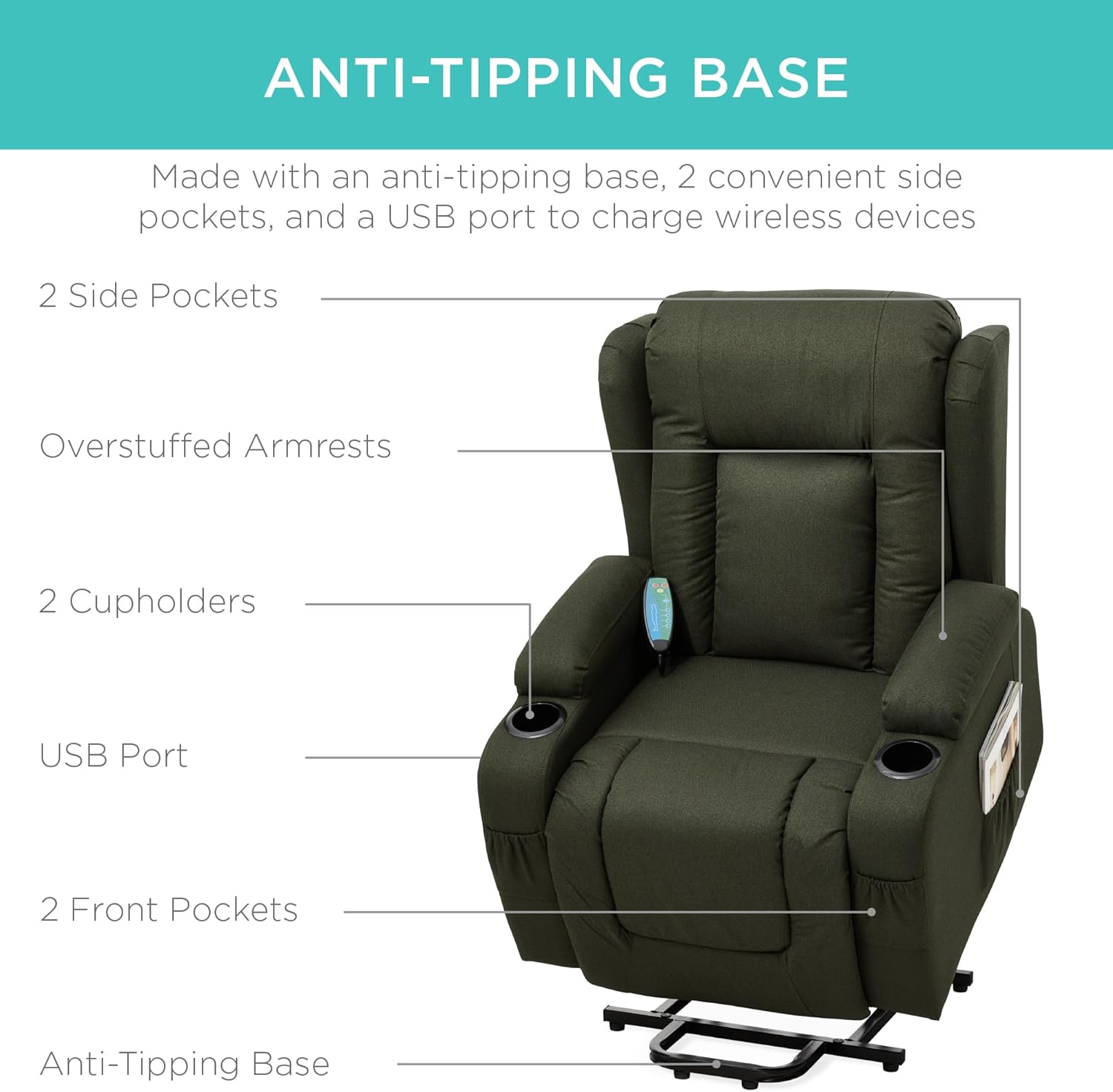
A visual breakdown of the chair's features, including the stable anti-tipping base, convenient side pockets, integrated cupholders, and a USB charging port.
6. Maintenance
To ensure the longevity and appearance of your recliner chair, follow these maintenance guidelines:
- Cleaning: For general cleaning, use a soft, damp cloth with mild soap. Blot spills immediately. Avoid harsh chemicals or abrasive cleaners.
- Fabric Care: The linen fabric is designed for durability. Regular vacuuming with a soft brush attachment can help remove dust and debris.
- Mechanism: Periodically check all moving parts and connections to ensure they are secure. Do not attempt to lubricate the electrical components.
- Power Cords: Inspect power cords regularly for any signs of damage. If damaged, discontinue use and contact customer support.

A close-up view of the durable olive linen fabric, showcasing its texture and weave.
7. Troubleshooting
If you encounter any issues with your recliner chair, refer to the following troubleshooting tips:
- Chair Not Responding: Ensure the power adapter is securely plugged into both the chair and a working wall outlet. Check for any loose cable connections.
- Massage/Heat Not Working: Verify the remote control is properly connected and its power button is activated. Check the intensity and mode settings.
- Unusual Noises: If the chair makes unusual noises during operation, discontinue use and inspect for any obstructions or loose parts. Do not attempt to force movement.
- USB Port Not Charging: Ensure the chair is powered on and the device cable is securely connected to the USB port.
If problems persist after attempting these solutions, please contact customer support.
8. Specifications
| Feature | Specification |
|---|---|
| Brand | Best Choice Products |
| Model Number | SKY5896 |
| Color | Olive |
| Product Dimensions | 36.5"D x 33"W x 47"H |
| Weight Capacity | 330 lbs |
| Material | Linen (Finish Type), Foam (Fill Material) |
| Special Features | Power Lift, Recline, Massage, Heat, USB Port, Cupholders, Side Pockets |
| Reclining Position Count | 3 |
| Item Weight | 100 pounds |
| UPC | 842957137367 |

A detailed diagram illustrating the overall dimensions of the recliner chair, including height, width, depth, and reclined length.
9. Warranty and Support
For warranty information or customer support, please refer to the documentation included with your purchase or visit the official Best Choice Products website. You may also contact their customer service department directly for assistance with product inquiries, troubleshooting, or parts replacement.
Customer Support Link: Best Choice Products Store


