1. Product Overview
Thank you for choosing the ULTTY Bladeless Circulator Fan. This innovative 2-in-1 fan is designed for both floor and wall mounting, providing versatile air circulation for your home or office. Its bladeless design ensures safety, especially for households with children and pets, while offering powerful and quiet operation with multiple speed settings and convenient timer functions.
2. Safety Instructions
Please read all safety instructions carefully before using this appliance to prevent injury or damage.
- Always ensure the power supply matches the voltage specified on the rating label.
- Do not immerse the appliance, cord, or plug in water or other liquids.
- Unplug from the outlet when not in use, before cleaning, or before moving the appliance.
- Keep hands, hair, and clothing away from the air inlet and outlet during operation.
- Do not insert any objects into the fan openings.
- This appliance is not intended for use by persons (including children) with reduced physical, sensory, or mental capabilities, or lack of experience and knowledge, unless they have been given supervision or instruction concerning use of the appliance by a person responsible for their safety.
- Do not operate the fan with a damaged cord or plug.
- Place the fan on a stable, flat surface.
- Do not use outdoors or in wet conditions.
3. Package Contents
Verify that all items are present in the package:
- ULTTY Bladeless Circulator Fan Unit
- Remote Control
- Power Cord
- Wall Mounting Bracket (with screws)
- User Manual
4. Setup
4.1 Floor Placement
Place the fan unit on a stable, flat surface. Ensure there is adequate space around the fan for optimal air circulation.
4.2 Wall Mounting
To mount the fan on a wall:
- Select a suitable wall location, ensuring it is sturdy enough to support the fan's weight and away from obstructions.
- Use the provided wall mounting bracket as a template to mark the drilling points on the wall.
- Drill holes and insert wall anchors if necessary.
- Secure the wall mounting bracket to the wall using the provided screws.
- Carefully attach the fan unit to the mounted bracket, ensuring it is securely locked in place.

Figure 4.1: The ULTTY fan demonstrating its 2-in-1 capability, shown both on a floor and mounted on a wall.
5. Operating Instructions
5.1 Power On/Off
- Connect the power cord to a suitable electrical outlet.
- Press the Power Button on the fan unit or remote control to turn the fan on or off.
5.2 Adjusting Air Volume (7 Speeds)
- While the fan is on, press the Speed Adjustment Button (often indicated by '+' or '-') on the fan unit or remote control to cycle through the 7 available air volume settings.
- The fan offers a range from a gentle breeze to a strong airflow.
5.3 Oscillation Function
The fan features both horizontal oscillation and vertical tilt for comprehensive air distribution.
- Horizontal Oscillation: Press the Oscillation Button on the fan unit or remote control to activate 80-degree automatic horizontal oscillation. Press again to stop.
- Vertical Tilt: Manually adjust the fan head up or down to achieve a vertical airflow angle of up to 180 degrees.

Figure 5.1: Illustration of the fan's adjustable vertical tilt and automatic horizontal oscillation capabilities.
5.4 Timer Function
The fan includes a timer for automatic shut-off and a sleep mode.
- Power-Off Timer: Press the Timer Button on the remote control to set the fan to automatically turn off after 1 to 8 hours. Each press cycles through the available timer settings.
- Sleep Mode: Activate sleep mode for a gentle, gradually decreasing airflow, ideal for comfortable sleep and energy saving.
5.5 Remote Control Usage
The remote control allows convenient operation from a distance. Ensure the remote is pointed towards the fan's receiver for optimal response.
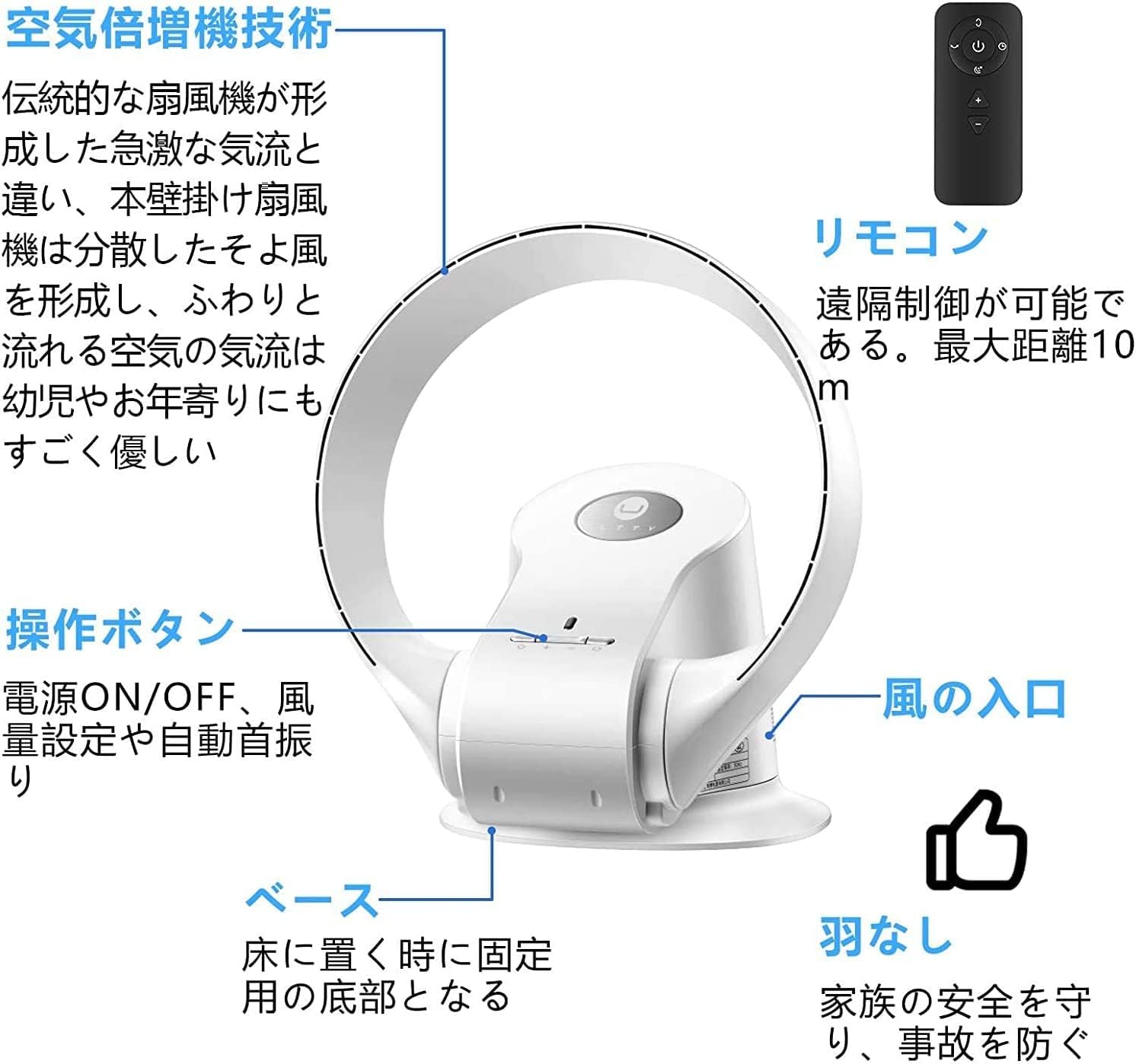
Figure 5.2: Overview of the fan's control panel and remote control.
6. Key Features
- Bladeless Design for Safety & Style: Combines safety and modern aesthetics. With no external blades, there's no worry about hands or hair getting caught, making it safe for homes with babies and pets. The sleek design adds a premium touch to any room.
- Versatile 2-in-1 Functionality: Can be used as a floor-standing unit or easily mounted on a wall with the included bracket. This space-saving design allows for efficient air circulation throughout the room. Its compact size makes it portable and easy to use anywhere.
- Wide-Angle Airflow: Features adjustable airflow angle up to 180 degrees vertically and an 80-degree automatic horizontal oscillation. This ensures cool air is distributed evenly across the room, effectively eliminating temperature inconsistencies when used with air conditioning.
- 7-Speed Air Volume Adjustment: Utilizing advanced technology, the fan offers 7 distinct air volume settings, from a gentle breeze to a powerful airflow, adjustable with a single touch to suit your preference.
- Convenient Timer Function: Equipped with a sleep mode that gradually reduces air volume for comfortable rest, and a power-off timer that can be set for 1 to 8 hours. This feature is ideal for use during sleep, improving sleep quality and saving energy by efficiently circulating air before bedtime.

Figure 6.1: The fan's wide air circulation capability, distributing air effectively across a room.
7. Maintenance
Regular cleaning helps maintain the fan's performance and extends its lifespan.
- Cleaning the Exterior: Wipe the exterior surfaces of the fan with a soft, damp cloth. Do not use abrasive cleaners or solvents.
- Cleaning the Air Inlet: Periodically clean the air inlet grille to prevent dust buildup, which can affect airflow. Use a soft brush or a vacuum cleaner with a brush attachment.
- Ensure the fan is unplugged from the power outlet before any cleaning or maintenance.
8. Troubleshooting
If you encounter any issues with your ULTTY Bladeless Circulator Fan, refer to the following common problems and solutions:
| Problem | Possible Cause | Solution |
|---|---|---|
| Fan does not turn on. | No power supply; Power button not pressed. | Check if the power cord is securely plugged in. Press the power button on the unit or remote. |
| Weak or no airflow. | Air inlet/outlet blocked; Low speed setting. | Ensure air inlet and outlet are clear of obstructions. Increase the fan speed setting. |
| Oscillation not working. | Oscillation function not activated. | Press the oscillation button on the fan unit or remote control. |
| Remote control not responding. | Batteries depleted; Obstruction between remote and fan. | Replace remote control batteries. Ensure no obstructions and point remote directly at the fan. |
9. Specifications
| Feature | Detail |
|---|---|
| Brand | U ULTTY |
| Model Number | SKJ-CR309WD |
| Product Dimensions | 37D x 24W x 32H cm |
| Package Dimensions | 38.2 x 32 x 24.3 cm |
| Material | ABS |
| Color | White |
| Wattage | 26 W |
| Voltage | 220 Volts |
| Power Source | Corded Electric |
| Special Feature | Oscillation, Timer |
| Controller Type | Remote Control |
| Recommended Use | Air Circulation |
| Room Type | Home Office, Bedroom |
| Package Weight | 3 Kilograms |
| Batteries Required | No |
10. Warranty and Support
ULTTY products are manufactured to the highest quality standards. This product is covered by a limited warranty from the date of purchase. Please retain your proof of purchase for warranty claims.
For technical support, troubleshooting assistance, or warranty inquiries, please contact ULTTY customer service through the retailer where you purchased the product or visit the official ULTTY website for contact information.
Please have your model number (SKJ-CR309WD) and purchase date ready when contacting support.


