
1. Introduction
This manual provides detailed instructions for the safe and effective operation of your HUIOP AS511B Digital Differential Pressure Gauge. Please read this manual thoroughly before use and retain it for future reference.
1.1 Product Overview
The HUIOP AS511B is a digital differential pressure gauge designed for precise measurement of differential pressure, temperature, and humidity. It features a dual-port design, an LCD backlight display, and various measurement units, making it suitable for a wide range of applications.

Figure 1.1: Front view of the HUIOP AS511B Digital Differential Pressure Gauge, showing the LCD display and control buttons.
1.2 Package Contents
Verify that all items listed below are present and in good condition:
- 1 x HUIOP AS511B Digital Differential Pressure Gauge
- 1 x Package of Accessories (connectors, etc.)
- 2 x Plastic Tubes
- 1 x Zipper Pouch
- 1 x User Manual (English)
2. Safety Information
Always observe the following safety precautions to prevent injury or damage to the device:
- Do not attempt to open or modify the device.
- Ensure the device is used within its specified operating and storage temperature/humidity ranges.
- Avoid exposing the device to strong impacts, vibrations, or corrosive environments.
- Do not apply pressure exceeding the maximum permanent load pressure range to prevent damage to the sensor.
- Keep the device away from water and other liquids.
3. Product Features
The AS511B Differential Pressure Gauge incorporates several features for enhanced performance and user convenience:
- High Precision Sensor: Ensures accurate and reliable measurements.
- Multi-Unit Conversion: Supports various pressure units (hPa, kPa, mmHg, psi, mbar, bar, ozin², inHg, Kgcm², inH₂O, ftH₂O, cmH₂O).
- Data Storage: Capability to store measurement data.
- LCD with Backlight: Provides clear readings in various lighting conditions.
- Max/Min Value: Displays maximum and minimum recorded values.
- Data Hold: Freezes the current reading on the display.
- Temperature and Humidity Measurement: Integrated sensors for environmental monitoring.
- Automatic Shutdown: Conserves battery life.
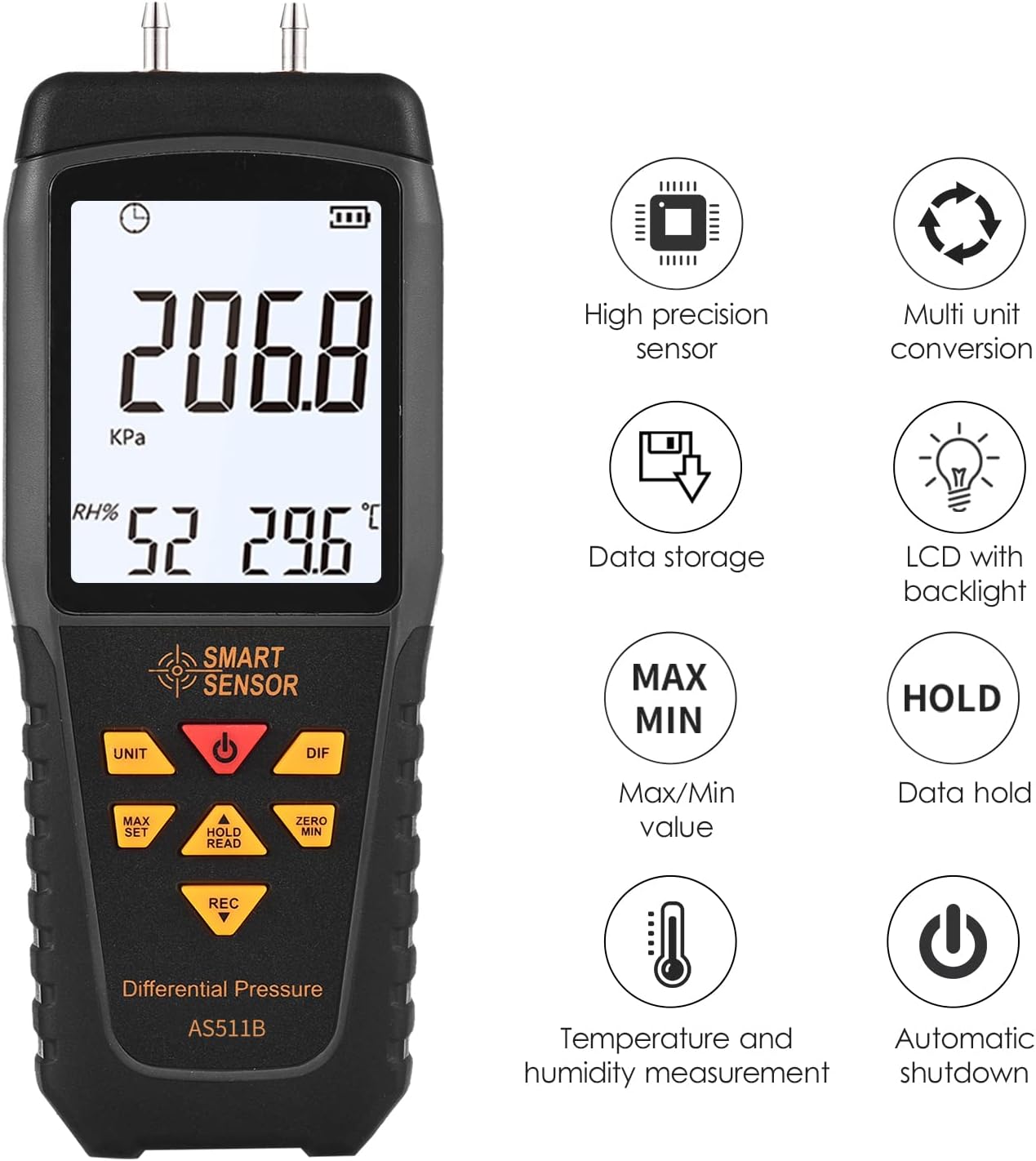
Figure 3.1: Visual representation of the AS511B's key features.
4. Setup
4.1 Battery Installation
- Locate the battery compartment cover on the back of the device.
- Slide or unclip the cover to open it.
- Insert three (3) 1.5V AAA batteries, ensuring correct polarity (+/-).
- Replace the battery compartment cover securely.
4.2 Connecting Pressure Tubes
- Identify the two pressure ports at the top of the device.
- Connect the provided plastic tubes to the desired pressure sources. The 'P1' port is typically for positive pressure, and 'P2' for negative pressure, or for measuring the differential between two points.
- Ensure the tubes are securely attached to prevent leaks.
5. Operation
5.1 Power On/Off
- Press the Power button () to turn the device on.
- Press and hold the Power button to turn the device off.
5.2 Unit Selection
- Press the UNIT button to cycle through available pressure units (hPa, kPa, mmHg, psi, mbar, bar, ozin², inHg, Kgcm², inH₂O, ftH₂O, cmH₂O).
5.3 Differential Pressure Measurement
- Once powered on and tubes are connected, the device will display the differential pressure.
- The display will show the pressure reading, along with temperature and humidity.
5.4 Max/Min/Average Measurement
- Press the MAX SET button to enter the Max/Min/Average recording mode.
- Subsequent presses will cycle through Maximum, Minimum, and Average values.
- Press the button again to exit this mode.
5.5 Data Hold
- Press the HOLD READ button to freeze the current reading on the display.
- Press the button again to release the hold and resume live measurement.
5.6 Zero Adjustment
- Ensure both pressure ports are open to atmospheric pressure (or connected to the same reference pressure).
- Press the ZERO MIN button to zero the differential pressure reading. This calibrates the device for accurate differential measurements.
5.7 Data Recording
- Press the REC button to initiate data recording. An indicator will appear on the display.
- Press the REC button again to stop recording.
- Refer to the device's display or specific menu options for reviewing recorded data (if applicable, based on device interface).
6. Specifications
The following table details the technical specifications for the HUIOP AS511B Digital Differential Pressure Gauge:

Figure 6.1: Comparison of AS511 and AS511B models, highlighting the AS511B's wider measurement range.
| Parameter | Specification (AS511B) |
|---|---|
| Differential Pressure Measuring Range | -206.8 ~ 206.8 KPa |
| Maximum Permanent Load Pressure Range | -413.6 ~ 413.6 KPa |
| Pressure Resolution | 0.1 KPa |
| Pressure Accuracy | ±1%FS, maximum error: ±2.08 KPa |
| Measurement Selection Rate | 0.5 seconds |
| Supported Units | hPa, kPa, mmHg, psi, mbar, bar, ozin², inHg, Kgcm², inH₂O, ftH₂O, cmH₂O |
| Temperature Measurement Range | -10 ~ 60℃ |
| Humidity Measuring Range | 5 ~ 99%RH |
| Temperature Accuracy | ±2℃ |
| Humidity Accuracy | ±5%RH |
| Storage Environment | -10 ~ 70℃ / -4 ~ 140℉ |
| Power Supply | 3 * 1.5V AAA battery (NOT included) |
| Item Size | 167 * 65 * 30mm / 6.57 * 2.56 * 1.18in |
| Item Weight | 141g / 4.99oz |

Figure 6.2: Comprehensive specifications for both AS511 and AS511B models.

Figure 6.3: Detailed unit conversion ranges and resolutions for AS511 and AS511B.
7. Maintenance
7.1 Cleaning
- Wipe the device with a soft, dry cloth.
- Do not use abrasive cleaners, solvents, or corrosive chemicals.
- Ensure no moisture enters the pressure ports or other openings.
7.2 Storage
- When not in use for extended periods, remove the batteries to prevent leakage.
- Store the device in the provided zipper pouch in a cool, dry place, away from direct sunlight and extreme temperatures.
- Ensure the pressure ports are clean and free from obstructions before storage.
8. Troubleshooting
If you encounter issues with your AS511B, consider the following common troubleshooting steps:
- Device does not power on: Check if the batteries are correctly installed and have sufficient charge. Replace if necessary.
- Inaccurate readings: Ensure the pressure tubes are securely connected and free from kinks or blockages. Perform a zero adjustment as described in Section 5.6.
- Display is dim or flickering: Replace the batteries.
- No pressure reading: Verify that the pressure source is active and the tubes are properly connected to both the source and the device ports.
If the problem persists after attempting these steps, please contact customer support.
9. Warranty and Support
This product is covered by a standard manufacturer's warranty. For specific warranty terms and conditions, please refer to the documentation provided at the time of purchase or contact your retailer.
For technical support, service, or inquiries, please contact HUIOP customer service through the contact information provided with your purchase or on the official HUIOP website.