
1. Introduction
Thank you for choosing the Twesync Smart Bird Feeder G02. This device combines a traditional bird feeder with advanced smart technology, including a 1080P HD camera, solar power, and AI bird identification. This manual provides detailed instructions for setup, operation, and maintenance to ensure you get the most out of your birdwatching experience.
2. Product Features
- 1080P HD Camera with 120° Wide-Angle Lens: Capture clear, detailed images and videos of visiting birds.
- AI Bird Species Recognition: Automatically identifies over 11,000 bird species (30-day free trial included).
- Real-time Notifications: Receive instant alerts on your mobile app when birds are detected.
- Solar Powered with 5000mAh Battery: Equipped with a 3W 360° adjustable solar panel and a high-capacity battery for continuous operation, reducing the need for frequent manual charging.
- Clear Color Night Vision: Observe birds day and night with motion-activated night vision capabilities.
- Storage Options: Store videos and photos in the cloud (30-day free trial) or on an SD card (up to 128GB, not included).
- Bird-Friendly & Durable Design: IP65 weatherproof construction made from Acrylonitrile Butadiene Styrene (ABS) and recycled plastics, featuring a 1.25L capacity and drainage design to prevent mold.
- Multiple Mounting Options: Includes a sturdy bracket for tree, pole, or wall mounting.
3. What's in the Box
The Twesync Smart Bird Feeder G02 package includes:
- Twesync Smart Bird Feeder with integrated 1080P HD Camera
- 3W 360° Solar Panel with connecting cable
- Mounting Kit (includes screws, wall anchors, L-shaped bracket, and tree/pole strap)
- USB Charging Cable
- User Manual
- Fruit Forks (for offering additional bird treats)

Image: Twesync Smart Bird Feeder G02 shown with different mounting configurations: tree mount, wall mount, and pole mount. The solar panel is visible connected to the feeder.
4. Setup Guide
4.1 Initial Charging
Before first use, fully charge the bird feeder's internal 5000mAh battery using the provided USB cable. This ensures optimal performance from the start.
4.2 Assembly
- Attach the perch to the main feeder unit.
- Screw the antenna onto the designated port on the back of the feeder.
- If using an SD card (not included), insert it into the slot on the camera module.
- Secure the top cover onto the feeder.
4.3 Mounting
Choose a location that offers a clear view of birds and receives adequate sunlight for the solar panel. Use the provided mounting kit to secure the feeder:
- Wall/Tree Mount: Use the L-shaped bracket and screws/wall anchors to attach the feeder securely.
- Pole Mount: Utilize the pole strap to fasten the feeder to a pole (1-inch pole not included).
4.4 Solar Panel Connection
Mount the solar panel in a location that receives maximum direct sunlight throughout the day. Connect the solar panel's cable to the charging port on the bird feeder. This will provide continuous power to the camera.
4.5 App Installation & Wi-Fi Connection
- Download the Twesync mobile app from your device's app store.
- Create an account and follow the in-app instructions to add your Smart Bird Feeder.
- Ensure your Wi-Fi network is 2.4GHz (5GHz networks are not supported). The 5dBi external antenna helps maintain a stable connection.

Video: An overview of the Twesync Smart Bird Feeder with Camera, highlighting its features and ease of setup. This video demonstrates the product's design and functionality.
5. Operating Instructions
5.1 Filling the Feeder
Lift the top cover of the feeder and pour your desired bird seed (e.g., sunflower seeds, nuts, mealworms) into the 1.25L capacity container. Close the cover securely.

Image: Step-by-step visual guide demonstrating the simple process of refilling the bird feeder with seed by lifting the top cover.
5.2 Using the Mobile App
- Live View: Access a real-time feed from the camera to watch birds as they visit.
- Notifications: Receive alerts on your phone when motion is detected at the feeder.
- AI Identification: The app will identify bird species captured by the camera.
- Recording & Playback: Manually record videos or review automatically captured clips.
- Two-Way Audio: Speak through the camera's speaker (e.g., to deter squirrels).
- Night Vision: The camera automatically switches to night vision in low-light conditions.
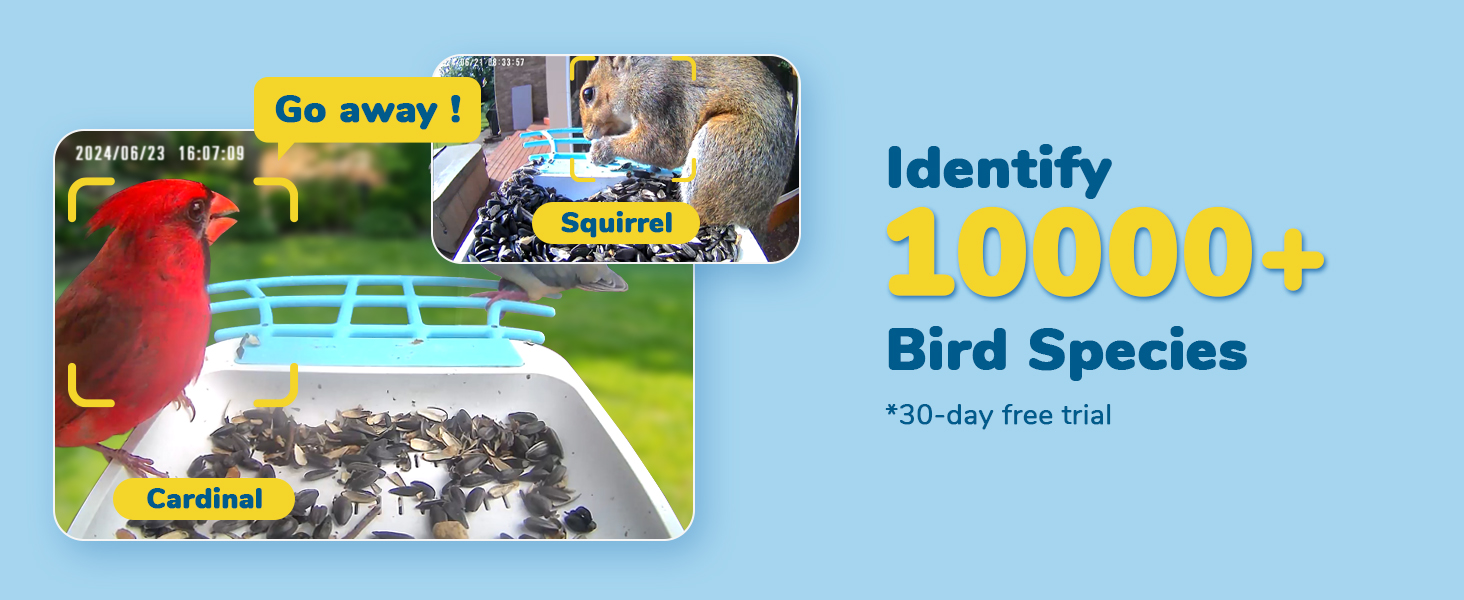
Image: The Twesync mobile app interface displaying AI bird identification, showing a cardinal and a squirrel with species labels.
6. Maintenance
6.1 Cleaning the Feeder
Regular cleaning is essential to prevent mold growth and ensure bird health. The feeder features a drainage design to minimize moisture buildup.
- Remove old seed and debris.
- Wipe down all surfaces with a mild soap and water solution.
- Rinse thoroughly and allow to dry completely before refilling.

Image: Visual steps illustrating how to easily clean the Twesync Smart Bird Feeder, including removing the camera module and using a brush.
6.2 Battery & Solar Panel Care
Ensure the solar panel is free from dirt, leaves, or snow to maximize charging efficiency. Periodically check the battery level via the app.
7. Troubleshooting
- No Power: Check solar panel placement for adequate sunlight. Ensure the solar panel cable is securely connected. Fully charge the internal battery via USB if needed.
- No Wi-Fi Connection: Verify your Wi-Fi network is 2.4GHz. Ensure the feeder is within range of your router. Try restarting your router and the feeder.
- Poor Video Quality: Check Wi-Fi signal strength in the app. Ensure the camera lens is clean and free from obstructions.
- No Motion Detection: Adjust motion sensitivity settings in the app. Ensure the camera's view is clear.
- Squirrels Accessing Feeder: While designed to be squirrel-resistant, persistent squirrels may find ways to access the feeder. Utilize the two-way audio feature to deter them or consider repositioning the feeder.
8. Specifications
| Feature | Detail |
|---|---|
| Brand | Twesync |
| Model Number | G02 |
| Camera Resolution | 1080P HD |
| Battery Capacity | 5000mAh |
| Solar Panel Power | 3W |
| Wi-Fi Compatibility | 2.4GHz (not compatible with 5GHz) |
| Material | Acrylonitrile Butadiene Styrene (ABS), New and Post-Consumer Recycled Plastics |
| Capacity | 1.25 Liters |
| Special Features | AI Bird Identification, Night Vision, Motion Detection, Weatherproof (IP65), Easy-Refill Top, Drainage Design, Squirrel Proof, Rat Proof |
| Item Dimensions (L x W x H) | 16.72"L x 10.58"W x 12.85"H |
| UPC | 720118914395 |
9. Safety Information
To ensure the safety of wildlife and the environment, please adhere to the following guidelines:
- Ensure proper installation to prevent the feeder from falling or causing harm.
- Use only appropriate bird food types. Avoid feeding birds human food scraps or anything that could be harmful.
- Regularly clean the feeder to prevent the spread of diseases among birds.
- Secure the feeder to prevent access by larger animals that could damage the unit or harm birds.
10. Warranty and Support
For warranty information and customer support, please refer to the official Twesync website or contact your retailer. Keep your purchase receipt for any warranty claims.