1. Introduction
The JAGTRADE K82 Gaming Keyboard is designed for an enhanced gaming and typing experience. It features a 94-key layout, mechanical feel, and three-color backlighting. This manual provides detailed instructions for setup, operation, and maintenance.

Image 1.1: The JAGTRADE K82 Gaming Keyboard in Lake Blue, showcasing its compact 94-key layout and overall design.
2. Package Contents
Ensure all items are present in the package:
- 1x JAGTRADE K82 Gaming Keyboard
- 1x USB Cable
3. Setup
- Unpack the keyboard and USB cable from the packaging.
- Connect the USB cable to the USB port on the keyboard.
- Plug the other end of the USB cable into an available USB port on your computer (PC or laptop).
- The keyboard is plug-and-play and should be automatically recognized by your operating system. No additional drivers are typically required.
4. Operating Instructions
4.1 Backlighting
The K82 keyboard features three-color backlighting with various multicolor lighting effects. Use the designated keys (often Fn + specific keys like arrow keys or Ins/Del/Home/End/PgUp/PgDn) to cycle through lighting modes, adjust brightness, or change colors. Refer to the keyboard's key legends for specific backlight control functions.

Image 4.1: The 94-key minimalist layout of the K82 keyboard, highlighting its space-saving design compared to a standard 104-key layout, and demonstrating mixed color lighting effects.
4.2 Multimedia Features
The keyboard includes dedicated multimedia function keys to improve office and entertainment efficiency. These functions are typically accessed by holding the Fn key and pressing the corresponding F1-F12 keys.

Image 4.2: Diagram illustrating the multimedia function key combinations (Fn + F1-F12) for controlling media playback, volume, and other system functions.
| Key Combination | Function |
|---|---|
| Fn + F1 | Player |
| Fn + F2 | Volume Down |
| Fn + F3 | Volume Up |
| Fn + F4 | Mute |
| Fn + F5 | Stop Player |
| Fn + F6 | Previous Track |
| Fn + F7 | Play/Pause |
| Fn + F8 | Next Track |
| Fn + F9 | |
| Fn + F10 | Home |
| Fn + F11 | Lock Win Key |
| Fn + F12 | Calculator |
4.3 Independent Volume Knob
The keyboard features an independent volume knob for convenient and fast volume adjustment. Rotate the knob clockwise to increase volume and counter-clockwise to decrease volume.

Image 4.3: Close-up view of the independent volume knob located on the upper right side of the keyboard, along with indicator lights for Num Lock, Caps Lock, and Scroll Lock.
4.4 Hot-Swappable Switches
The K82 keyboard supports hot-swappable switches, allowing users to easily change out individual key switches without soldering. This feature enables customization of typing feel and simplifies maintenance.
Video 4.4: Demonstration of the hot-swappable feature of the keyboard, showing how to remove and replace keycaps and switches using the provided tool. The video also highlights the various lighting effects, waterproof design, and anti-ghosting capability.
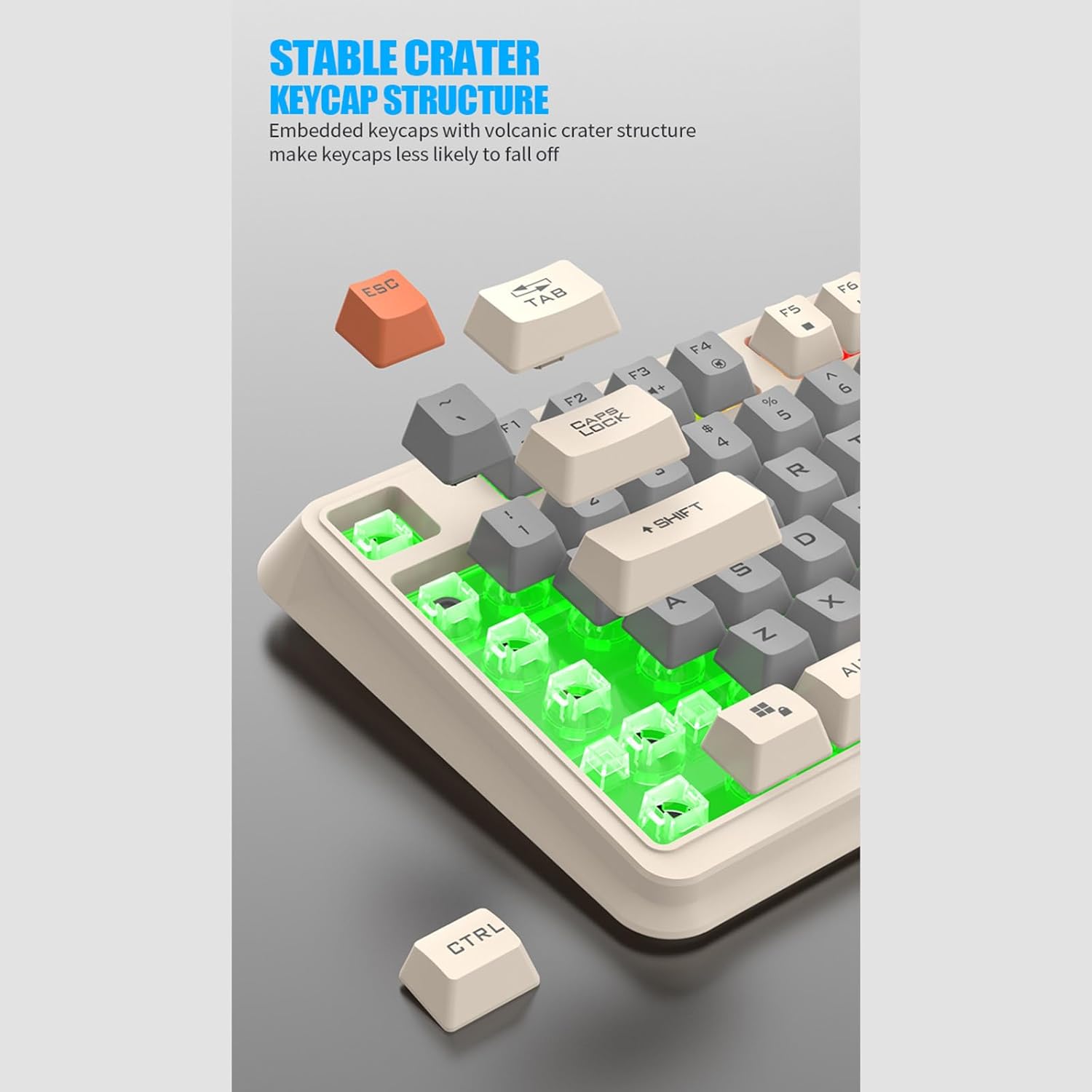
Image 4.5: Close-up view of the stable crater keycap structure, designed to prevent keycaps from easily falling off and ensuring durability.
4.5 Anti-Ghosting
The K82 keyboard features anti-ghosting technology, ensuring that multiple simultaneous key presses are registered accurately, which is crucial for fast-paced gaming and typing.
5. Features
- 94-Key Minimalist Layout: Space-saving design while retaining full keyboard functionality.
- Three-Color Backlit: Offers various multicolor lighting effects for an immersive experience.
- Mechanical Feel: Provides tactile feedback similar to mechanical keyboards.
- Durable Construction: Made with ABS material and luminous keys for longevity.
- Independent Volume Knob: For quick and convenient audio control.
- Hot-Swappable Switches: Allows for easy customization and replacement of key switches.
- Anti-Ghosting: Ensures accurate registration of multiple simultaneous key presses.
- USB Connectivity: Simple plug-and-play setup for PC and laptop.

Image 5.1: Various color combinations of the K82 keyboard, demonstrating its aesthetic appeal even when the backlighting is off.
6. Specifications
| Attribute | Detail |
|---|---|
| Brand | JAGTRADE |
| Model | K82 |
| Number of Keys | 94 Keys |
| Product Dimensions | 15.55"L x 6.02"W x 1.3"H (39.5 x 15.3 x 3.3 cm) |
| Material | Acrylonitrile Butadiene Styrene (ABS) |
| Connectivity Technology | USB |
| Keyboard Description | Ergonomic |
| Special Features | Backlit, Waterproof (splashproof) |
| Compatible Devices | Laptop, PC |
| Color (Current Variant) | Lake Blue |
7. Maintenance
7.1 Cleaning
To clean the keyboard, use a soft, dry cloth. For stubborn dirt, a slightly damp cloth can be used. Ensure the keyboard is disconnected from the computer before cleaning.
7.2 Water Resistance
The K82 keyboard is designed to be splashproof. This means it can withstand minor splashes from the front. Important: The keyboard cannot be submerged in water, and the keycaps should not be exposed to excessive water. Avoid pouring liquids directly onto the keyboard.
8. Troubleshooting
- Keyboard not responding:
- Ensure the USB cable is securely connected to both the keyboard and the computer.
- Try plugging the keyboard into a different USB port on your computer.
- Restart your computer.
- Backlight not working:
- Check if the backlight function is turned off. Use the designated Fn key combinations to cycle through lighting modes or adjust brightness.
- Keys not registering:
- Ensure the keyboard is clean and free from debris under the keycaps.
- If a specific key switch is faulty, utilize the hot-swappable feature to replace it (if you have spare switches).
9. Warranty and Support
For warranty information and technical support, please refer to the documentation provided with your purchase or contact JAGTRADE customer service through their official website or your retailer.