
Introduction
Thank you for choosing the PRETTYCARE V3 Cordless Vacuum Cleaner. This manual provides essential information for the safe and efficient operation, maintenance, and troubleshooting of your new vacuum cleaner. Please read this manual thoroughly before first use and keep it for future reference.
The PRETTYCARE V3 is designed for versatile cleaning, featuring a powerful brushless motor, intelligent suction modes, and a multi-stage filtration system to ensure a clean and healthy environment.
Safety Instructions
- Always disconnect the vacuum cleaner from the charger before cleaning or performing maintenance.
- Do not use the vacuum cleaner to pick up water or other liquids, hot ashes, or sharp objects.
- Keep hair, loose clothing, fingers, and all parts of the body away from openings and moving parts.
- Use only PRETTYCARE recommended accessories and replacement parts.
- Store the vacuum cleaner in a dry place, away from direct sunlight and extreme temperatures.
- This appliance is not intended for use by persons (including children) with reduced physical, sensory or mental capabilities, or lack of experience and knowledge, unless they have been given supervision or instruction concerning use of the appliance by a person responsible for their safety.
Product Components
Familiarize yourself with the components of your PRETTYCARE V3 vacuum cleaner:

This image displays an exploded view of the PRETTYCARE V3 Cordless Vacuum Cleaner, showing all its individual components laid out. Each part is numbered for easy identification, including the main motor unit, power adapter, removable battery, HPC filter screens, wall mount, adjustable metal tube, power brush, 2-in-1 brush, and crevice nozzle.
- Main Motor Unit
- Power Adapter
- Removable Battery
- HPC Filter Screens (2x)
- Wall Mount
- Adjustable Metal Tube
- Power Brush
- 2-in-1 Brush
- Crevice Nozzle
Setup and Assembly
1. Initial Charging
Before first use, fully charge the battery. The battery can be charged while attached to the main unit or separately.

This image illustrates two methods for charging the PRETTYCARE V3 vacuum cleaner. On the left, the vacuum is shown mounted on a wall-mounted charging station, connected to power. On the right, the removable battery is shown being charged independently using the power adapter.
- Connect the power adapter to the charging port on the main unit or directly to the battery.
- Plug the adapter into a power outlet.
- The LCD display will indicate charging status. A full charge typically takes approximately 4-5 hours.
2. Assembling the Vacuum Cleaner
- Attach the Metal Tube: Insert the adjustable metal tube into the main motor unit until it clicks into place.
- Attach the Power Brush: Connect the power brush head to the other end of the metal tube, ensuring it clicks securely.
- Install the Battery: Slide the fully charged battery into the battery slot on the main motor unit until it locks.
For different cleaning tasks, you can attach various accessories directly to the main motor unit or to the metal tube.

This image demonstrates the versatility of the PRETTYCARE V3 vacuum cleaner by showing it configured with different attachments for various cleaning scenarios. It includes the main power brush for floors, a crevice tool for tight spaces, a 2-in-1 dusting brush for surfaces, and the crevice nozzle with extension rod for high or hard-to-reach areas.
Operating Instructions
1. Powering On/Off
Press the power button on the main unit to turn the vacuum cleaner on or off.
2. Suction Modes and LCD Display
The PRETTYCARE V3 features an intelligent LCD touchscreen display and multiple suction modes:

This image provides a detailed view of the PRETTYCARE V3's LCD touchscreen display. It shows the remaining battery percentage, an ambient light indicator, and icons representing the different suction modes: Automatic mode, and three manual suction levels (25kPa, 35kPa, 45kPa).
- Automatic Mode (AUTO): The vacuum cleaner intelligently detects the amount of dust and adjusts suction power automatically to optimize battery life.
- Manual Modes: Select from three manual suction levels (25kPa, 35kPa, 45kPa) via the touchscreen for specific cleaning needs.

This image illustrates the automatic mode feature of the PRETTYCARE V3 vacuum cleaner. It shows the vacuum transitioning from a carpeted surface to a hard floor, with visual cues indicating that the suction power automatically adjusts to optimize performance for each floor type.

This image demonstrates the three manual suction levels (25kPa, 35kPa, 45kPa) available on the PRETTYCARE V3 vacuum cleaner. It shows the vacuum being used on a sofa, with visual indicators for each suction level, suggesting different power settings for varying cleaning needs and debris types.
3. Cleaning Different Surfaces
- Hard Floors and Carpets: Use the main power brush. The LED lights on the brush head illuminate dark areas.
- Under Furniture: The 180° flexible hose and 270° rotatable LED floor nozzle allow for easy cleaning under furniture without bending.
- Corners and Edges: The upgraded floor brush design allows for better cleaning along edges and reduces tangling.
- Tight Spaces and Upholstery: Use the crevice nozzle or the 2-in-1 brush for detailed cleaning.

This image demonstrates the flexible design of the PRETTYCARE V3 vacuum cleaner. It shows the vacuum's main tube bending at an angle, allowing the user to easily clean under low furniture like a sofa or cabinet without needing to stoop or kneel.

This image highlights the improved design of the floor brush on the PRETTYCARE V3 vacuum cleaner. It shows the brush effectively cleaning along the edge of a step or wall, indicating its ability to reach corners and reduce hair tangling.
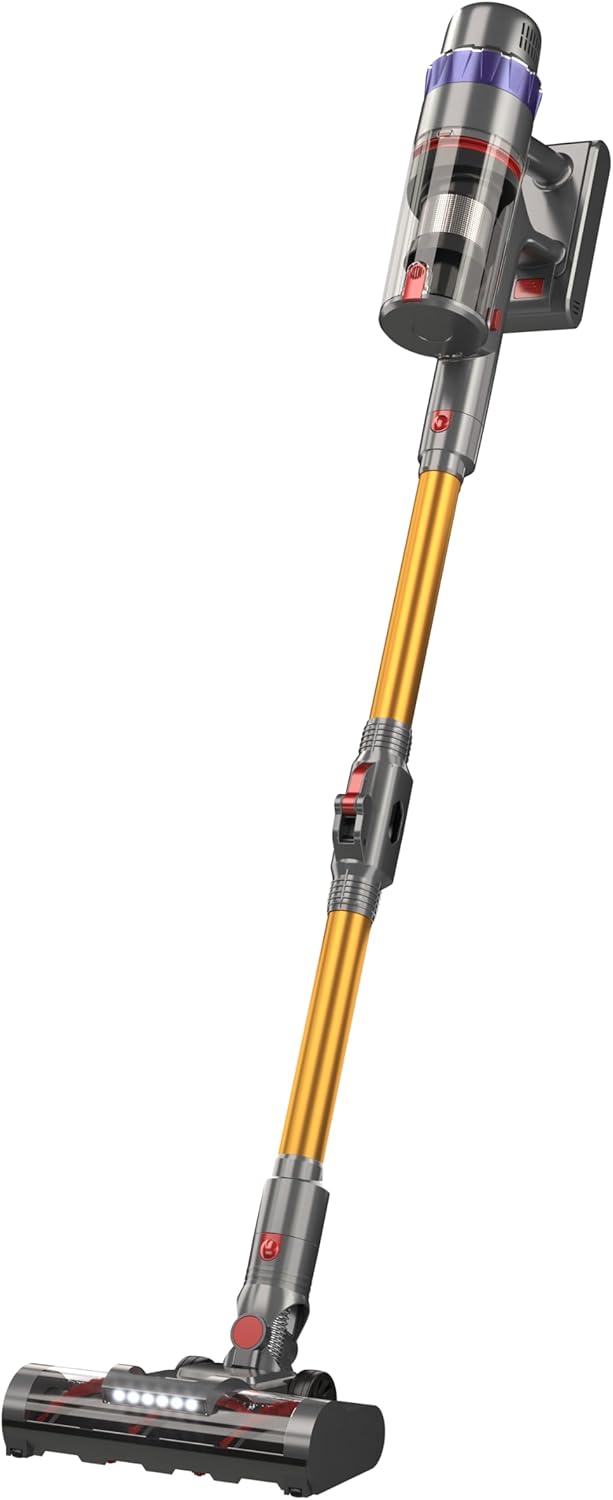
This is a full view of the PRETTYCARE V3 Cordless Vacuum Cleaner, showcasing its sleek design and assembled form, ready for use.
Maintenance
Regular maintenance ensures optimal performance and extends the lifespan of your PRETTYCARE V3 vacuum cleaner.
1. Emptying the Dustbin
Empty the dustbin after each use or when the MAX fill line is reached.
- Press the dustbin release button to detach it from the main unit.
- Hold the dustbin over a trash can and press the bottom release latch to open the dustbin and empty its contents.
This image demonstrates the simple one-click dust removal feature of the PRETTYCARE V3 vacuum cleaner. It shows a hand pressing a button to release the bottom of the dustbin, allowing collected debris to fall directly into a trash receptacle.
2. Cleaning the Filter System
The V3 features a 5-stage cyclone filtration system. Clean the filters regularly to maintain suction power and air quality.

This diagram illustrates the advanced 5-stage filtration system of the PRETTYCARE V3 vacuum cleaner. It highlights the different components: high-density filter system, sponge filter, stainless steel honeycomb filter, cyclone centrifugal technology, and dust separation technology, all working together to achieve high air purification.
- Remove the filters from the dustbin.
- Tap off loose dirt. The filters are washable.
- Rinse the filters under cold running water until the water runs clear.
- Allow filters to air dry completely for at least 24 hours before reassembling. Do not use a dryer or heat source.
- Replace filters every 3-6 months, depending on usage.
This image shows the washable filter component of the PRETTYCARE V3 vacuum cleaner being cleaned under running water in a sink, emphasizing the ease of maintenance for the filtration system.
3. Cleaning the Brush Roll
Periodically check the brush roll for tangled hair or debris.
- To remove the brush roll, locate the release latch on the side of the power brush head and open it.
- Pull out the brush roll.
- Use scissors to cut away any tangled hair or threads.
- Reinsert the brush roll and close the latch until it clicks.
This image illustrates the removable brush head feature of the PRETTYCARE V3 vacuum cleaner. It shows a hand pressing a release mechanism on the side of the brush head, indicating how easily the brush can be detached for cleaning or maintenance.
Troubleshooting
| Problem | Possible Cause | Solution |
|---|---|---|
| Vacuum not turning on | Battery not charged; Battery not properly installed; Power button not pressed correctly. | Charge the battery fully; Ensure battery is clicked into place; Press the power button firmly. |
| Low suction power | Dustbin full; Filters clogged; Brush roll tangled; Blockage in tube/hose. | Empty dustbin; Clean/wash filters; Remove tangled hair from brush roll; Check for and remove blockages. |
| Brush roll not spinning | Brush roll tangled; Brush head not properly attached; Obstruction. | Clean brush roll; Reattach brush head securely; Remove any obstructions. |
| Short battery runtime | Battery not fully charged; Using high suction mode continuously; Battery degradation. | Ensure battery is fully charged; Use automatic or lower suction modes when possible; Contact support for battery replacement if needed. |
Specifications
| Feature | Specification |
|---|---|
| Model | V3 |
| Motor Power | 530W Brushless Motor |
| Max Suction Power | 45KPA |
| Battery | 8*2500mAh Removable Battery |
| Runtime | Up to 60 minutes (in automatic mode) |
| Filtration System | 5-stage Cyclone Filtration (99.99% purification rate) |
| Display | LCD Touchscreen |
| Weight | 4.26 Kilograms (product weight) |

This diagram illustrates the internal structure of the 560W brushless motor used in the PRETTYCARE V3 vacuum cleaner, highlighting its components and emphasizing its role in providing higher suction power, longer battery life, and extended durability.
Warranty and Support
PRETTYCARE products are manufactured to the highest quality standards. For warranty information, technical support, or replacement parts, please contact PRETTYCARE customer service.
You can find contact information on the official PRETTYCARE website or through your purchase platform.
Please retain your proof of purchase for warranty claims.


