1. Product Overview
This manual provides essential information for the safe and effective use of your KAGMIKA LYZRC L900 Pro Se / L900 Se Max Drone Battery. This 7.4V 2200mAh Li-ion battery is designed as a replacement or spare part for the LYZRC L900 Pro Se and L900 Se Max drones, offering approximately 25 minutes of flight time per charge.
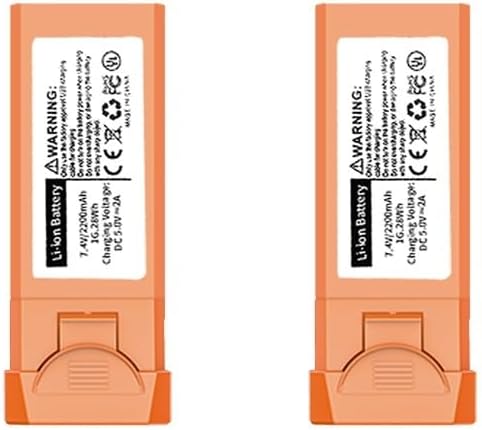
Image 1.1: Two KAGMIKA LYZRC L900 Pro Se / L900 Se Max Drone Batteries. These orange-colored batteries feature a label indicating 'Li-ion Battery', '7.4V / 2200mAh', '16.28Wh', 'Charging Voltage: DC 5.0V-2A', and various safety certifications.
2. Safety Information
Please read and adhere to all safety warnings to prevent damage to the battery, drone, or personal injury.
- Charging: Only use the factory-approved USB charging cable for charging. Do not use the battery to power the drone while it is charging.
- Handling: Do not charge or discharge the battery with any sharp objects. Avoid puncturing, dropping, or subjecting the battery to severe impacts.
- Temperature: Do not expose the battery to extreme temperatures (hot or cold) or direct sunlight.
- Storage: Store the battery in a cool, dry place away from flammable materials.
- Disposal: Dispose of batteries according to local regulations. Do not dispose of in general waste.

Image 2.1: Close-up view of a single orange KAGMIKA LYZRC L900 Pro Se / L900 Se Max Drone Battery, highlighting the warning label. The label explicitly states 'WARNING: Only use the factory approved USB charging cable for charging. Do not use on the battery power when charging. Do not charge or discharge the battery with any sharp object.'
3. Package Contents
The package contains the following item:
- 1 x KAGMIKA LYZRC L900 Pro Se / L900 Se Max Drone Battery (7.4V 2200mAh)
4. Setup and Installation
Follow these steps to properly install the battery into your LYZRC L900 Pro Se or L900 Se Max drone:
- Ensure the drone is powered off before attempting battery installation or removal.
- Locate the battery compartment on your drone. Refer to your drone's specific user manual for exact location if unsure.
- Gently insert the battery into the compartment, ensuring the connectors align correctly.
- Push the battery firmly until it clicks into place, indicating a secure connection.
- Close the battery compartment cover, if applicable.
5. Operating Instructions
5.1 Charging the Battery
To ensure optimal performance and battery longevity, follow these charging guidelines:
- Connect the factory-approved USB charging cable to the battery's charging port.
- Plug the other end of the USB cable into a compatible DC 5.0V-2A power source (e.g., a USB wall adapter, computer USB port).
- The charging time is approximately 2 hours for a full charge.
- Observe the battery's indicator lights (if present) to monitor charging status. Refer to your drone's manual for specific light patterns.
- Disconnect the battery once fully charged. Do not overcharge.
5.2 Battery Usage
Once fully charged and installed, the battery provides power for drone operation. The estimated flight time is approximately 25 minutes, though actual flight time may vary based on drone model, flight conditions, and usage patterns.
6. Maintenance
Proper maintenance extends the life of your battery:
- Cleaning: Use a dry, soft cloth to clean the battery and its contacts. Do not use liquids or solvents.
- Storage: If storing the battery for an extended period, charge it to approximately 50-60% capacity. Store in a cool, dry place (15-25°C or 59-77°F) away from direct sunlight and extreme temperatures.
- Inspection: Regularly inspect the battery for any signs of damage, swelling, or leakage. Discontinue use immediately if any damage is observed.
7. Troubleshooting
If you encounter issues with your battery, consider the following:
- Battery not charging: Ensure the charging cable is securely connected to both the battery and the power source. Verify the power source is functional and provides DC 5.0V-2A.
- Short flight time: Ensure the battery is fully charged before use. Flight time can be affected by cold weather, aggressive flying, or drone payload. If the issue persists, the battery may be nearing the end of its lifespan.
- Battery not fitting: Double-check that you have the correct battery model (LYZRC L900 Pro Se / L900 Se Max compatible) and that it is inserted in the correct orientation.
For persistent issues, contact KAGMIKA customer support.
8. Specifications
| Feature | Detail |
|---|---|
| Brand | KAGMIKA |
| Model Number | LILYY123 |
| Compatibility | LYZRC L900 Pro Se Drone, LYZRC L900 Se Max Drone |
| Battery Type | Li-ion Battery |
| Voltage | 7.4V |
| Capacity | 2200mAh (16.28Wh) |
| Estimated Flight Time | Approximately 25 minutes |
| Charging Voltage | DC 5.0V-2A |
| Estimated Charging Time | Approximately 2 hours |
| Battery Weight | 66.4g (1.76 ounces) |
| Package Dimensions | 1.18 x 0.79 x 0.39 inches |
| Assembly Required | No |
| Number of Pieces | 1 |
9. Warranty and Support
Warranty information for this product was not provided in the available details. For specific warranty terms, technical support, or further assistance, please contact KAGMIKA customer service directly through their official channels or the retailer where the product was purchased.