
Introduction
This manual provides essential information for the safe and efficient use of your Itel L4365 43-inch Full HD Smart LED TV. Please read these instructions carefully before operating the device and retain them for future reference.
The Itel L4365 is a 43-inch Full HD Smart LED TV featuring a resolution of 1920x1080 pixels, a 60 Hz refresh rate, and a 178-degree wide viewing angle. It includes smart features such as built-in Wi-Fi, Chromecast, and pre-installed streaming applications.
Important Safety Information
Always follow basic safety precautions when using this television to reduce the risk of fire, electric shock, and injury.
- Do not expose the TV to rain or moisture.
- Do not open the TV casing; refer all servicing to qualified personnel.
- Ensure proper ventilation around the TV.
- Use only the power cord supplied with the TV.
- Keep the TV away from direct sunlight, heat sources, and strong magnetic fields.
Setup Guide
1. Unboxing and Package Contents
Carefully remove the TV and all accessories from the packaging. Verify that all components are present:
- Itel L4365 Smart LED TV
- Remote Control
- Power Cord
- User Manual (this document)
- Warranty Card
- Table Stand Components
- Wall Mount Bracket (if included)
2. Installing the TV Stand or Wall Mount
You can choose to place the TV on a table using the included stand or mount it on a wall. For wall mounting, professional installation is recommended.
Table Stand Installation:
- Place the TV face down on a soft, flat surface to prevent screen damage.
- Align the stand components with the screw holes on the bottom of the TV.
- Secure the stands using the provided screws. Ensure they are tightened firmly.
- Carefully lift the TV to its upright position on a stable, level surface.
Wall Mount Installation:
If using a wall mount, refer to the instructions provided with your specific wall mount kit. Ensure the wall can support the weight of the TV. Amazon Home Services can arrange installation.
3. Connecting External Devices
The Itel L4365 TV offers various connectivity options:
- HDMI Ports (x2): Connect set-top boxes, Blu-ray players, gaming consoles, or other HDMI-enabled devices.
- USB Ports (x2): Connect USB storage devices for media playback.
- RJ45 Port: Connect to your local area network (LAN) for wired internet access.
- AV Input: For older devices using composite video and stereo audio.
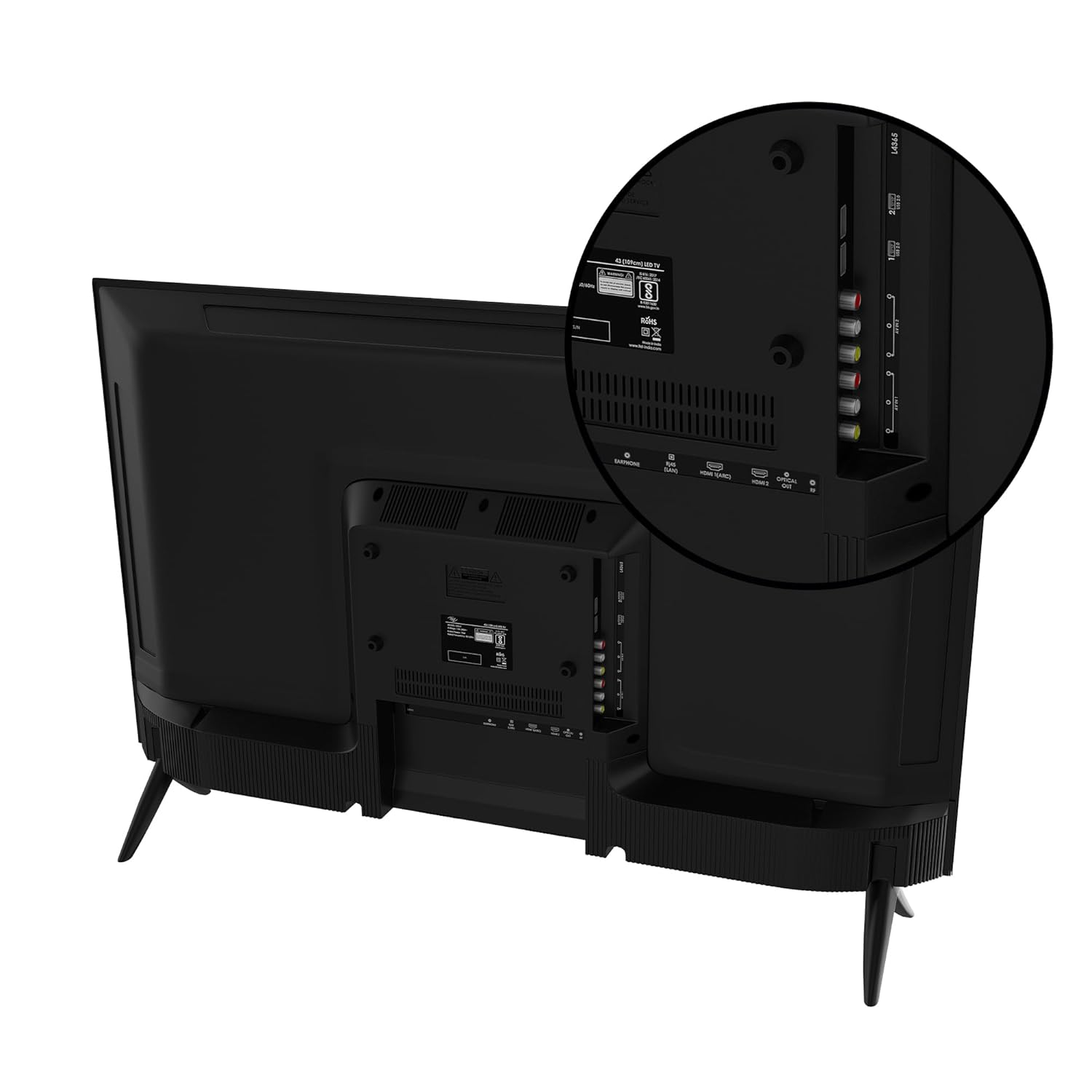
Image: Rear view of the Itel L4365 TV, highlighting the HDMI, USB, and other input ports for connecting external devices.
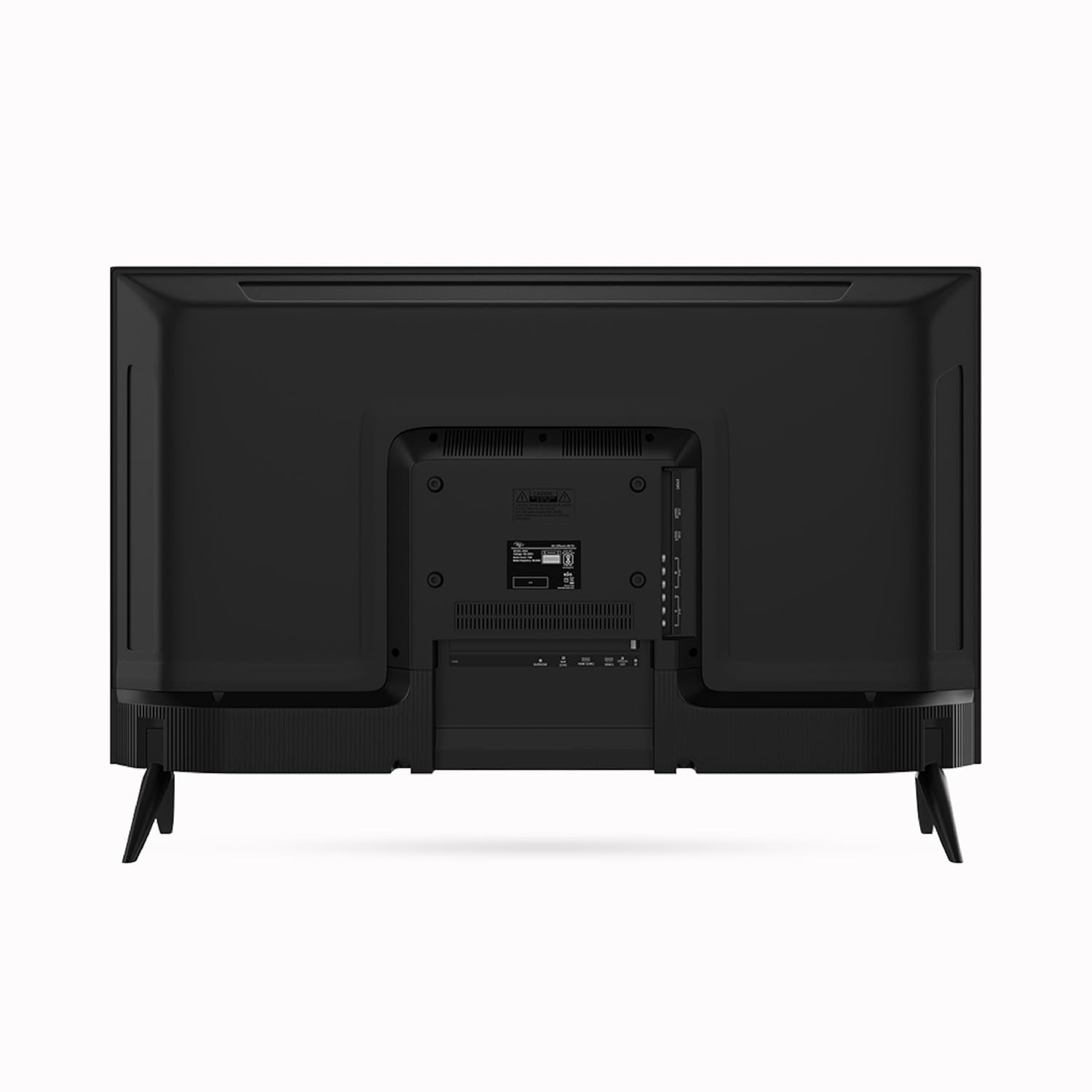
Image: Full rear view of the Itel L4365 TV, showing the overall design and stand attachment points.

Image: Side profile of the Itel L4365 TV, illustrating its slim design.
4. Powering On the TV
- Connect the power cord securely to the TV's power input and then to a wall outlet.
- Press the power button on the TV or the remote control to turn on the TV.
- Follow the on-screen instructions for initial setup, including language selection, network connection, and channel scanning.
Operating Instructions
1. Remote Control
The TV comes with a smart remote control featuring direct keys for popular streaming services. Ensure batteries are correctly inserted. The remote uses infrared technology.
2. Smart TV Features
Your Itel L4365 TV is equipped with a range of smart features for enhanced entertainment:
- Pre-installed Apps: Access popular streaming services like Netflix, Prime Video, and YouTube directly.
- Wi-Fi Connectivity: Connect to your home wireless network for internet access.
- Chromecast Built-in: Cast content from your compatible smartphone or tablet directly to the TV.

Image: The Itel L4365 TV displaying logos of pre-installed OTT applications such as YouTube, Zee5, SonyLIV, and Prime Video.

Image: The Itel L4365 TV demonstrating Chromecast Built-in functionality, with a smartphone mirroring its display to the TV.
3. Display Settings
The TV features a Full HD Crystal Clear Display with Dynamic Contrast and Dynamic Colour Enhancer. You can adjust picture settings such as brightness, contrast, color, and sharpness through the TV's menu to suit your viewing preferences.

Image: The Itel L4365 TV highlighting its frameless design for an immersive viewing experience.
4. Audio Settings
The TV is equipped with 12+12 Watts output and Dolby Audio, providing a rich sound experience. You can select from built-in multi-scenario sound effects (e.g., Standard, Music, Movie) or customize equalizer settings via the audio menu.

Image: The Itel L4365 TV integrated into a living room, with visual cues representing 24W Dolby Audio for an immersive sound experience.
Maintenance
Cleaning the TV
- Always unplug the TV before cleaning.
- Use a soft, dry cloth to wipe the screen and cabinet.
- For stubborn marks, lightly dampen the cloth with water or a mild, non-abrasive screen cleaner. Never spray cleaner directly onto the screen.
- Avoid using alcohol, benzene, thinners, or other volatile substances, as they may damage the TV.
Care and Storage
- Do not block ventilation openings.
- Avoid placing heavy objects on the TV.
- If storing the TV for an extended period, ensure it is kept in a cool, dry place, preferably in its original packaging.
Troubleshooting
Before contacting support, try the following solutions for common issues:
| Problem | Possible Cause / Solution |
|---|---|
| No power | Ensure the power cord is securely connected to both the TV and the power outlet. Check if the power outlet is working. |
| No picture, but sound is present | Check the input source. Press the 'Source' button on the remote to select the correct input (HDMI, AV, etc.). |
| No sound, but picture is present | Check the volume level. Ensure 'Mute' is not activated. Check audio settings in the TV menu. |
| Remote control not working | Check and replace batteries. Ensure there are no obstructions between the remote and the TV's IR sensor. |
| Smart features not connecting to Wi-Fi | Ensure your Wi-Fi router is on and working. Re-enter the Wi-Fi password in the TV's network settings. Try restarting both the TV and the router. |
Specifications
Detailed technical specifications for the Itel L4365 Smart LED TV:

Image: Front view of the Itel L4365 TV with its physical dimensions (width 965mm, height 570mm, depth 85mm) clearly indicated.
| Feature | Detail |
|---|---|
| Brand | Itel |
| Model | L4365 |
| Screen Size | 43 Inches (108 cm) |
| Display Technology | LED |
| Resolution | Full HD (1920 x 1080 Pixels) |
| Refresh Rate | 60 Hz |
| Viewing Angle | 178 Degrees |
| Aspect Ratio | 16:9 |
| Sound Output | 12W + 12W (24W Total) |
| Audio Technology | Dolby Audio, Built-in Multi-Scenario Sound Effects |
| HDMI Ports | 2 |
| USB Ports | 2 |
| Connectivity | Wi-Fi, RJ45 (LAN) |
| Smart Features | Netflix, Prime Video, YouTube, Chromecast Built-in |
| Memory | 512MB RAM + 4GB Storage |
| Mounting Type | Table Mount / Wall Mount |
| Product Dimensions (LxWxH) | 965 x 85 x 570 cm (approx. 96.5 x 8.5 x 57 cm) |
| Item Model Number | L4365 |
| Date First Available | 11 January 2024 |
Warranty Information
The Itel L4365 Smart LED TV comes with a 2-year warranty provided by Itel from the date of purchase. Please retain your purchase receipt for warranty claims. For detailed terms and conditions, refer to the warranty card included in the package or visit the official Itel website.
Customer Support
For installation, wall mounting, or product demonstration services, please contact Amazon Home Services. For any other product-related inquiries, technical assistance, or warranty support, please contact Itel customer support. You can find toll-free numbers and contact details on the official Itel brand website.
Visit the Itel Store on Amazon for more information.
