1. Product Overview
The MokerLink 16-Port Gigabit Ethernet Switch is an unmanaged network switch designed for expanding network connectivity in home or small office environments. It features 16 Gigabit Ethernet ports, offering high-speed data transfer with plug-and-play simplicity. The fanless metal design ensures quiet and stable operation.

Figure 1: Overview of the MokerLink 16-Port Gigabit Ethernet Switch, highlighting its full Gigabit ports, plug and play functionality, power-saving features, wall-mountable design, LED indicators, and fanless operation.
Key Features:
- 16 Gigabit Ethernet Ports: Provides 16 10/100/1000Mbps RJ45 ports for high-speed network connections.
- Plug and Play: Requires no configuration, making setup quick and easy.
- Fanless Design: Ensures silent operation, suitable for various environments.
- Durable Metal Casing: Offers robust protection and efficient heat dissipation.
- Energy Efficient: Features power-saving functionality (IEEE 802.3az EEE support) to reduce energy consumption.
- Flexible Placement: Supports desktop or wall-mount installation.
2. Package Contents
Verify that all items are present in the package:
- 1 x MokerLink 16-Port Gigabit Ethernet Switch
- 1 x Power Adapter (DC 12V / 1.0A)
- 1 x User Manual (this document)
3. Setup and Installation
Follow these steps to set up your MokerLink Gigabit Ethernet Switch:
- Choose a Location: Place the switch on a stable desktop or mount it on a wall. Ensure adequate ventilation around the device.
- Connect Power: Insert the DC plug of the power adapter into the switch's DC input port. Plug the other end of the power adapter into a standard electrical outlet. The power LED indicator will illuminate.
- Connect Network Devices: Connect your network devices (e.g., computers, printers, network-attached storage, routers, IP cameras, wireless access points) to any of the 16 RJ45 ports using standard Ethernet cables. The switch supports auto MDI/MDIX, so crossover cables are not required.
- Verify Connection: Once a device is connected, the corresponding port's LED indicator will light up (green for link, flashing for data transmission).
- Wall Mounting (Optional): If wall mounting, use appropriate screws and anchors (not included) with the mounting holes on the switch.
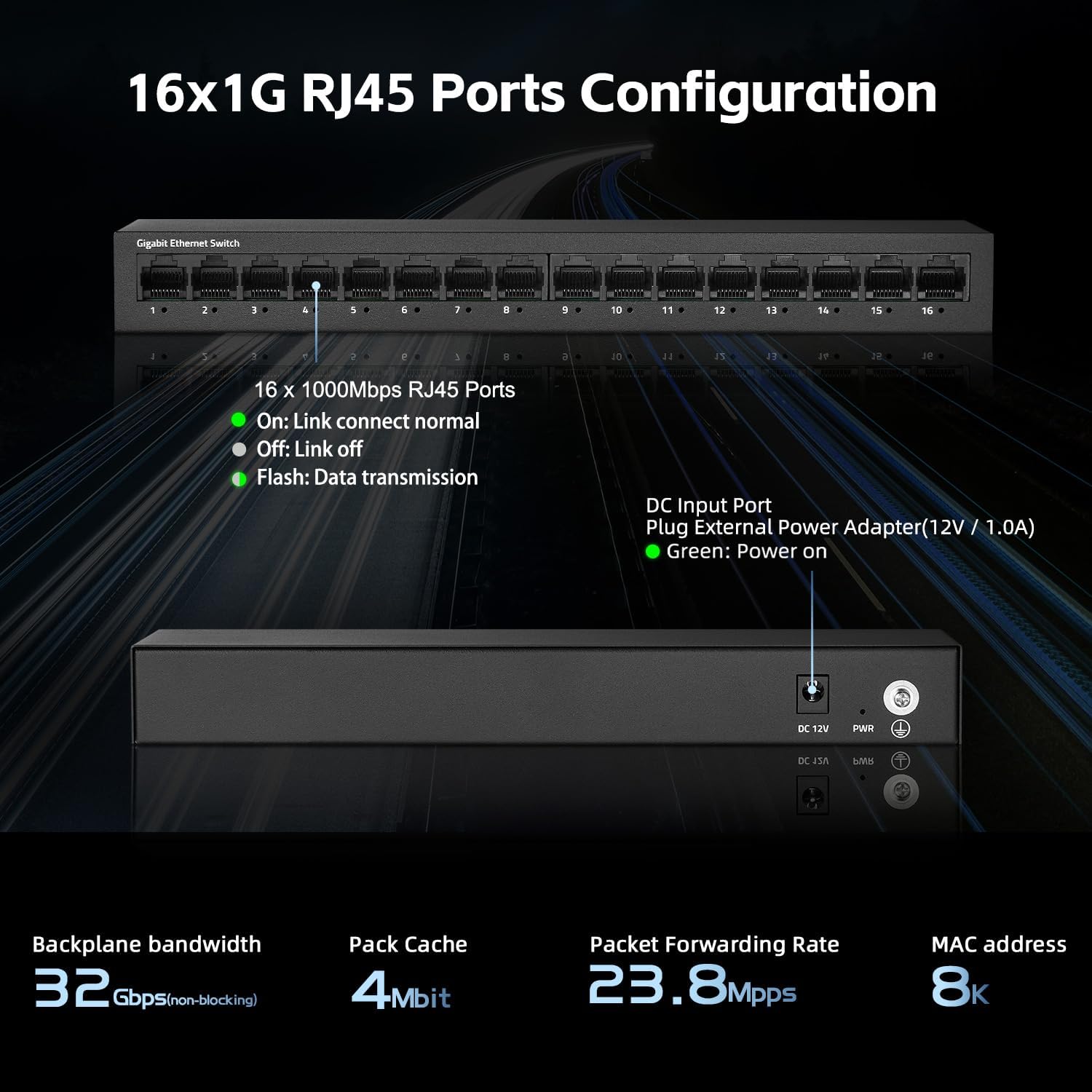
Figure 2: Rear view of the switch showing the DC input port and power LED indicator.

Figure 3: Ethernet cables connected to the switch ports.

Figure 4: Example of the switch mounted on a wall, demonstrating its flexible placement options.
4. Operating Instructions
The MokerLink 16-Port Gigabit Ethernet Switch is an unmanaged device, meaning it operates automatically without requiring user configuration. Simply connect your devices, and the switch will handle network traffic efficiently.
LED Indicators:
| Indicator | Status | Description |
|---|---|---|
| Power LED | Green | The switch is powered on. |
| Port Link/Act LEDs (1-16) | Green (Solid) | A device is connected to the port, and the link is active. |
| Green (Flashing) | Data is being transmitted or received through the port. | |
| Off | No device is connected, or the connected device is powered off/inactive. |

Figure 5: Close-up view of the port LED indicators, showing a green light for an active link.
Automatic Functions:
- Auto-Negotiation: Each port automatically detects the link speed of the connected network device (10/100/1000Mbps) and adjusts for compatibility and optimal performance.
- Auto MDI/MDIX: Automatically detects the type of Ethernet cable (straight-through or crossover) and adjusts accordingly, eliminating the need for specific cable types.
- Non-Blocking Wire Speed: All ports can simultaneously transmit and receive data at their full wire speed without congestion.
5. Maintenance and Care
To ensure the longevity and optimal performance of your MokerLink switch, follow these maintenance guidelines:
- Environment: Operate the switch within its specified temperature range (0°C to 45°C). Avoid placing it in direct sunlight, near heat sources, or in areas with high humidity.
- Cleaning: Use a soft, dry cloth to clean the exterior of the switch. Do not use liquid or aerosol cleaners.
- Ventilation: Ensure that the ventilation holes on the sides of the switch are not blocked to allow for proper heat dissipation. The fanless design relies on natural convection.
- Power Supply: Use only the provided power adapter. If the adapter is damaged, replace it with an equivalent approved adapter.
- Cable Management: Organize network cables neatly to prevent strain on the ports and accidental disconnections.

Figure 6: The switch features a fanless metal design for efficient heat dissipation and energy saving.
6. Troubleshooting
If you encounter issues with your MokerLink switch, refer to the following common troubleshooting steps:
- No Power:
- Ensure the power adapter is securely connected to both the switch and a working electrical outlet.
- Check if the power outlet is functional by plugging in another device.
- Verify the power LED on the switch is illuminated.
- No Link/Activity on a Port:
- Ensure the Ethernet cable is securely connected to both the switch port and the network device.
- Check the status of the connected network device (e.g., computer is powered on, network adapter is enabled).
- Try a different Ethernet cable.
- Try connecting the device to a different port on the switch.
- Verify the link/activity LED for the port is illuminated (solid green for link, flashing for activity).
- Slow Network Speed:
- Ensure all connected devices and cables support Gigabit Ethernet (1000Mbps). The switch will operate at the lowest common speed.
- Check for excessive network traffic or bandwidth-intensive applications running on connected devices.
- Restart the switch by unplugging and replugging the power adapter.
- Intermittent Connection:
- Inspect Ethernet cables for damage.
- Ensure the switch is placed in a stable environment, free from excessive heat or electromagnetic interference.
- Check for loose power or Ethernet cable connections.
7. Specifications
| Feature | Description |
|---|---|
| Model | 16*1G Unmanaged |
| Ports | 16 x 10/100/1000Mbps RJ45 Ports |
| Switching Capacity | 32 Gbps |
| Packet Forwarding Rate | 23.8 Mpps |
| MAC Address Table | 8K |
| Jumbo Frame | 9K (Standard for Gigabit Ethernet) |
| Standards | IEEE 802.3, IEEE 802.3u, IEEE 802.3ab, IEEE 802.3x, IEEE 802.3az |
| Interface Type | RJ45 |
| Transmission Method | Store-and-Forward |
| Power Supply | External Power Adapter (DC 12V / 1.0A) |
| Power Consumption | Low power consumption (Energy Efficient Ethernet support) |
| LED Indicators | Power, Link/Act (per port) |
| Dimensions (L x W x H) | Approximately 10.16 x 5.04 x 3.23 inches (25.8 x 12.8 x 8.2 cm) |
| Item Weight | Approximately 1.65 pounds (0.75 kg) |
| Case Material | Metal |
| Operating Temperature | 0°C to 45°C (32°F to 113°F) |
| Operating Humidity | 10% to 90% non-condensing |
| Installation | Desktop or Wall-Mount |

Figure 7: Visual representation of the switch's high port speed and switching capacity.
8. Official Product Videos
The following videos provide additional information and visual guidance for the MokerLink 16-Port Gigabit Ethernet Switch:
Video 1: Product Overview (0:38)
This short video provides a quick overview of the MokerLink 16-Port Gigabit Ethernet Switch, highlighting its main features and design.
Video 2: Detailed Features and Usage (2:11)
A more in-depth video demonstrating the features and typical usage scenarios of the Gigabit Ethernet Switch.
Video 3: Installation and Connectivity (1:38)
This video guides you through the physical installation and connection process for the switch.
Video 4: Key Highlights (0:36)
A concise video highlighting important aspects and benefits of the MokerLink switch.
Video 5: Advanced Overview (1:25)
This video offers a more advanced look at the switch's capabilities and performance.
Video 6: Quick Feature Spotlight (0:20)
A very brief video focusing on a specific feature or benefit of the switch.
Video 7: Comprehensive Demonstration (2:59)
This comprehensive video provides a full demonstration of the MokerLink 16-Port Gigabit Ethernet Switch, from unboxing to operation.
9. Warranty and Support
Warranty Information: For details regarding the product warranty, please refer to the warranty card included with your purchase or contact the seller/manufacturer directly. Warranty terms may vary by region and retailer.
Technical Support: If you require technical assistance or have questions not covered in this manual, please contact MokerLink customer support through their official website or the retailer from whom you purchased the product.
For more information, visit the MokerLink Store on Amazon.


