
1. Introduction
Thank you for choosing the GLOBE Motion Sensor Security Flood Light. This product is designed to enhance the security and illumination of your outdoor spaces with its advanced motion detection and adjustable lighting features. Please read this manual thoroughly before installation and operation to ensure proper use and safety.

Figure 1: GLOBE Motion Sensor Security Flood Light (Model 17000138)
2. Safety Information
WARNING: To avoid electric shock, ensure power is turned off at the circuit breaker before installation or servicing. All wiring connections must be made in accordance with local and national electrical codes.
- This product is designed for outdoor use and is weather-resistant. However, ensure all connections are properly sealed to prevent water ingress.
- Use only bulbs that meet the specified requirements (2x Standard Base Dimmable E26 PAR38 Shape 120W Max Bulbs, sold separately).
- Do not attempt to modify the product. Any modifications may void the warranty and pose safety risks.
- Keep children away from the installation area.
- Consult a qualified electrician if you are unsure about any part of the installation process.

Figure 2: The flood light is designed to be outdoor rated and weather resistant.
3. Setup and Installation
The GLOBE Motion Sensor Security Flood Light features a Dual Mount system, allowing for both wall and eave mounting. All necessary mounting hardware is included.
3.1. Before You Begin
- Ensure power is OFF at the circuit breaker.
- Unpack all components and verify that all parts are present.
- Acquire two Standard Base Dimmable E26 PAR38 Shape 120W Max Bulbs (sold separately).
3.2. Mounting Options
The adjustable arm design allows for flexible positioning of the motion sensor and lamp heads for optimal coverage.
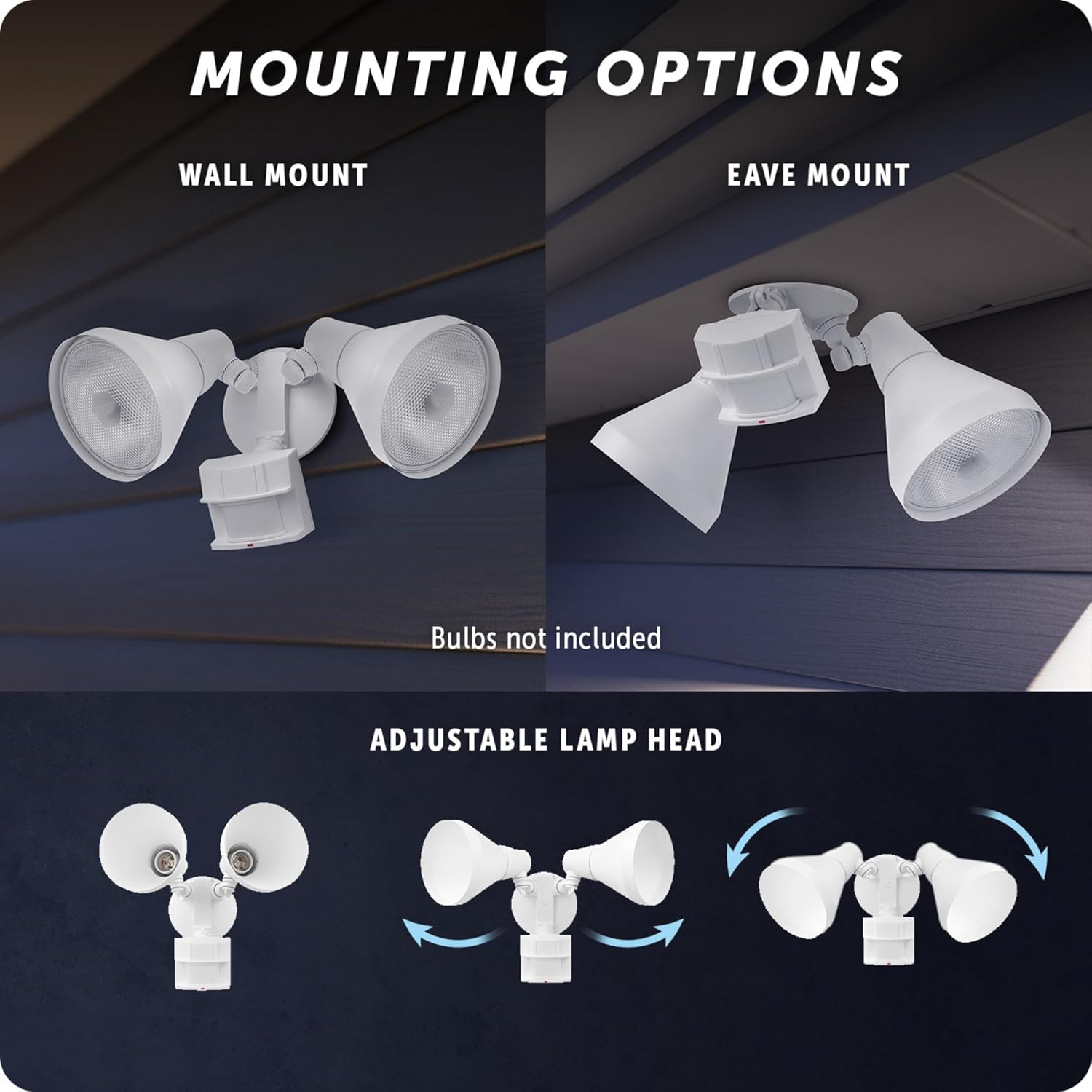
Figure 3: Wall Mount and Eave Mount configurations. The lamp heads are adjustable.
3.3. Wiring and Bulb Installation
- Connect the flood light's wiring to your household electrical system according to local electrical codes. This is a hardwired unit.
- Once the unit is securely mounted and wired, screw in the two E26 PAR38 bulbs into the lamp heads.
- Adjust the lamp heads to direct light as desired. The swivel arm design allows for directional light.

Figure 4: The flood light is hardwired for reliable outdoor illumination.
4. Operating Instructions
This flood light features advanced motion detection and the MotionBright 2-level lighting system.
4.1. Motion Detection
- The motion sensor has a 180° detection zone and can detect motion up to 70 feet (21 meters).
- An LED indicator light confirms when motion is detected.
- The light will automatically turn off after a selected duration of 1, 5, or 20 minutes if no further motion is detected.

Figure 5: The motion sensor provides a wide detection zone for enhanced security.
4.2. MotionBright 2-Level Lighting
When dimmable bulbs are used, the MotionBright feature provides energy-saving ambient lighting and full brightness when motion is detected:
- Low Ambient Light: When no motion is detected, the light will remain at a constant low ambient setting.
- Full Brightness: Upon detection of motion, the light will automatically switch to full brightness.
A photocell ensures that the light operates only during nighttime hours.

Figure 6: MotionBright feature provides both ambient and full brightness lighting.
5. Maintenance
The GLOBE Motion Sensor Security Flood Light is constructed from durable materials designed for outdoor environments. Regular maintenance is minimal.
5.1. Cleaning
- Clean the light fixture periodically with a soft, damp cloth.
- Do not use abrasive cleaners or solvents, as they may damage the finish or components.
5.2. Bulb Replacement
- Ensure power is OFF at the circuit breaker before replacing bulbs.
- Allow bulbs to cool completely before handling.
- Replace with 2x Standard Base Dimmable E26 PAR38 Shape 120W Max Bulbs.
6. Troubleshooting
If your flood light is not operating as expected, refer to the following common issues and solutions:
| Problem | Possible Cause | Solution |
|---|---|---|
| Light does not turn on. |
|
|
| Light stays on continuously. |
|
|
| Light flickers or dims unexpectedly. |
|
|
7. Specifications
Detailed specifications for your GLOBE Motion Sensor Security Flood Light:
| Feature | Detail |
|---|---|
| Brand | GLOBE |
| Model Number | 17000138 |
| Product Dimensions | 3.8 x 5.8 x 8 inches; 15.2 ounces |
| Color | White |
| Material | Resin |
| Light Fixture Form | Floodlight |
| Motion Detection Zone | 180 degrees, up to 70 feet (21 meters) |
| Auto-Off Duration | 1, 5, or 20 minutes |
| Bulb Requirements | 2x Standard Base Dimmable E26 PAR38 Shape 120W Max Bulbs (sold separately) |
| Mounting Type | Dual Mount (Wall or Eave) |
| Manufacturer | Globe Electric |

Figure 7: Product dimensions for installation planning.
8. Warranty and Support
The GLOBE Motion Sensor Security Flood Light is backed by a 2-year warranty, demonstrating Globe Electric's commitment to quality.
For technical support, warranty claims, or further assistance, please contact Globe Electric customer service. Refer to the product packaging or Globe Electric's official Amazon store for more information.


