
Product Overview
The XTRONS 12.3 Inch Android 14 Car Stereo is an advanced in-dash navigation system designed to seamlessly integrate with Mercedes-Benz E-Class W212 Sedan/Saloon and S212 Estate/Wagon models from 2013-2014, specifically those equipped with NTG 4.5 and NTG 4.7 systems. This unit features a large, high-fidelity IPS touch screen, an Octa-Core processor with 4GB RAM and 64GB ROM, and supports global 4G LTE connectivity. It enhances your driving experience with features like Wireless CarPlay, Wireless/Wired Android Auto, built-in DSP for superior audio, and the ability to retain many original vehicle functions.

Figure 1: Front view of the XTRONS 12.3 Inch Android 14 Car Stereo, highlighting its 12.3" HD IPS screen, Android OS, 2K Video support, Global 4G LTE, Octa Core processor, 4GB RAM, and 64GB ROM.
Package Contents
Upon unboxing, please verify that all the following components are included:
- 1 x ISO Wiring Harness
- 1 x AMI Cable
- 1 x GPS Antenna
- 1 x 4G Antenna
- 1 x USB/LVDS Cable
- 1 x SIM Card Ejector
- 3 x Screws
- 1 x Mini Speaker
- 1 x Installation Instruction
- 1 x User Manual

Figure 2: Visual representation of all accessories included in the product package.
Compatibility and Important Notes
This unit is specifically designed for:
- Mercedes-Benz E-Class 4-door Sedan/Saloon (W212) (2013-2014) with NTG4.5 and NTG4.7 System
- Mercedes-Benz E-Class 5-door Estate/Wagon (S212) (2013-2014) with NTG4.5 and NTG4.7 System
Important Compatibility Notes:
- If your car is equipped with an AMI port, you will need to connect the provided AMI cable to the ISO cable's "audio in" port.
- Ensure the AUX input in your car's audio system is enabled to fully utilize the audio features of this head unit.

Figure 3: Illustration of the XTRONS unit installed in a compatible Mercedes-Benz dashboard, highlighting the 4-pin LVDS port and AMI/MMI/MI port for connectivity.
Setup and Installation
Detailed installation instructions are provided in the included Installation Instruction manual. It is recommended that installation be performed by a qualified professional to ensure proper functionality and avoid damage to the vehicle or unit. The wiring harness diagram below provides an overview of the connections.

Figure 4: Detailed diagram of the ISO wiring harness and various ports on the rear of the unit, including GPS antenna, 4G antenna, USB/LVDS cable, and audio inputs/outputs.
Operating Instructions
Display and Interface
The unit features a 12.3-inch IPS touch screen with 1920x720 resolution, offering clear and vivid display effects. It supports multi-task display, allowing you to run two applications simultaneously, and Picture-in-Picture (PIP) mode, so you can watch videos while navigating or using other apps.

Figure 5: Demonstrates the 12.3-inch display size compared to 10.25 inches, multi-tasking capabilities, Picture-in-Picture mode, IPS touch screen responsiveness, and the inclusion of two USB inputs.
Connectivity
The unit offers versatile connectivity options:
- Global 4G LTE: Insert a Nano-SIM card (not included) directly into the unit to access 4G mobile broadband. This supports 99% of worldwide carriers.
- Dual Wi-Fi Band: Connect to 2.4GHz or 5GHz Wi-Fi networks for fast internet speed and flexibility.
- USB Tethering: Connect your smartphone via USB and enable USB tethering to share your phone's internet connection with the unit.

Figure 6: Illustrates the three primary methods for internet access: built-in 4G LTE via SIM card, dual-band Wi-Fi connectivity, and USB tethering from a smartphone.
Smartphone Integration
Enjoy seamless smartphone integration with Wireless CarPlay and Wireless/Wired Android Auto. These features allow you to access compatible apps from your smartphone directly on the large screen, enabling safer operations and voice commands via Siri or Google Assistant.

Figure 7: Displays the unit's capability for wireless CarPlay, wireless and wired Android Auto, and screen mirroring, along with voice command functionality.
Video 1: An overview of the XTRONS 12.3 Inch Android Car Stereo, demonstrating its features including the user interface, connectivity options, and smartphone integration.
Audio Features
The built-in Digital Sound Processor (DSP) allows you to customize your audio experience with advanced sound settings, including equalizer adjustments and bass enhancements, to take your music listening to the next level.
Retained Factory Features
This unit is designed to retain access to many of your vehicle's original features, including:
- Factory COMAND knob and touch mouse control
- Original radio and CD player functionality
- Car information display
- Original Bluetooth system
- Steering wheel controls
- Parking camera display
- Compatibility with Optic Fiber Amplifier system and original navigation

Figure 8: Shows the XTRONS unit seamlessly integrated into the dashboard, demonstrating its ability to support and retain various original vehicle controls and systems.
Navigation
The unit supports various Android navigation software, including Sygic, IGO, Waze, and Google Maps, providing flexible and reliable guidance for your journeys.
User Interface Customization
The system offers stylish UI themes, allowing you to switch the user interface to your preferred look easily.
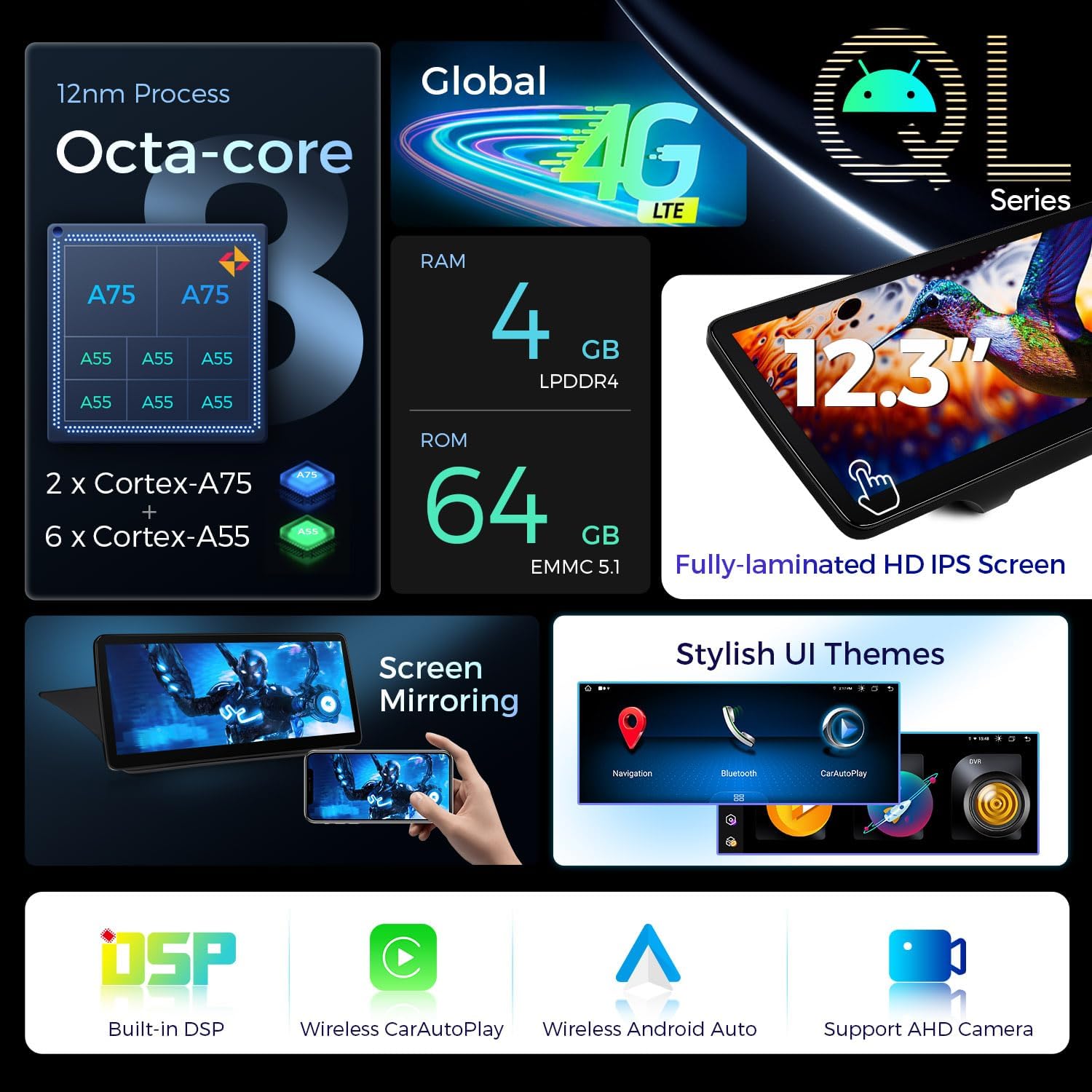
Figure 9: Illustrates the internal hardware specifications and various software features, including customizable UI themes and support for external accessories.
Maintenance
To ensure the longevity and optimal performance of your XTRONS car stereo, regularly clean the screen with a soft, lint-free cloth. Avoid using harsh chemicals or abrasive materials. Keep the unit free from excessive dust and moisture. For any internal maintenance or repairs, please contact professional technical support.
Troubleshooting
If you encounter any issues with your XTRONS car stereo, please refer to the dedicated troubleshooting section in the comprehensive User Manual provided with the product. Common issues and their solutions are typically covered there. If the problem persists, please contact XTRONS technical support for assistance.
Specifications
| Feature | Detail |
|---|---|
| Display Size | 12.3 Inches |
| Screen Resolution | 1920x720 HD IPS |
| Operating System | Android 14 |
| Processor | Octa Core (2x Cortex-A75 + 6x Cortex-A55) |
| RAM | 4GB DDR4 |
| ROM | 64GB EMMC 5.1 |
| Connectivity Technology | Bluetooth 5.0, USB, Wi-Fi (2.4GHz/5GHz), Global 4G LTE |
| Smartphone Integration | Wireless CarPlay, Wireless/Wired Android Auto |
| Audio Output Mode | Stereo, Built-in DSP |
| Mounting Type | Dashboard Mount |
Warranty and Support
XTRONS provides a 1-year warranty for this unit. For any technical assistance or warranty claims, please do not hesitate to contact XTRONS via Amazon email. Our team is committed to providing professional technical support and ensuring your rights and interests are protected at all times. Additionally, the product comes with a 30-day return policy.


