
1. Introduction
The TYT MD-UV390 Plus is an advanced digital two-way radio designed for reliable and secure communication. This upgraded model features dual-band VHF/UHF capabilities, a rugged IP67 waterproof and dustproof rating, and supports both Digital Mobile Radio (DMR) and traditional analog modes. With AES256 encryption, high output power, and extensive channel capacity, it is suitable for various professional and amateur applications.
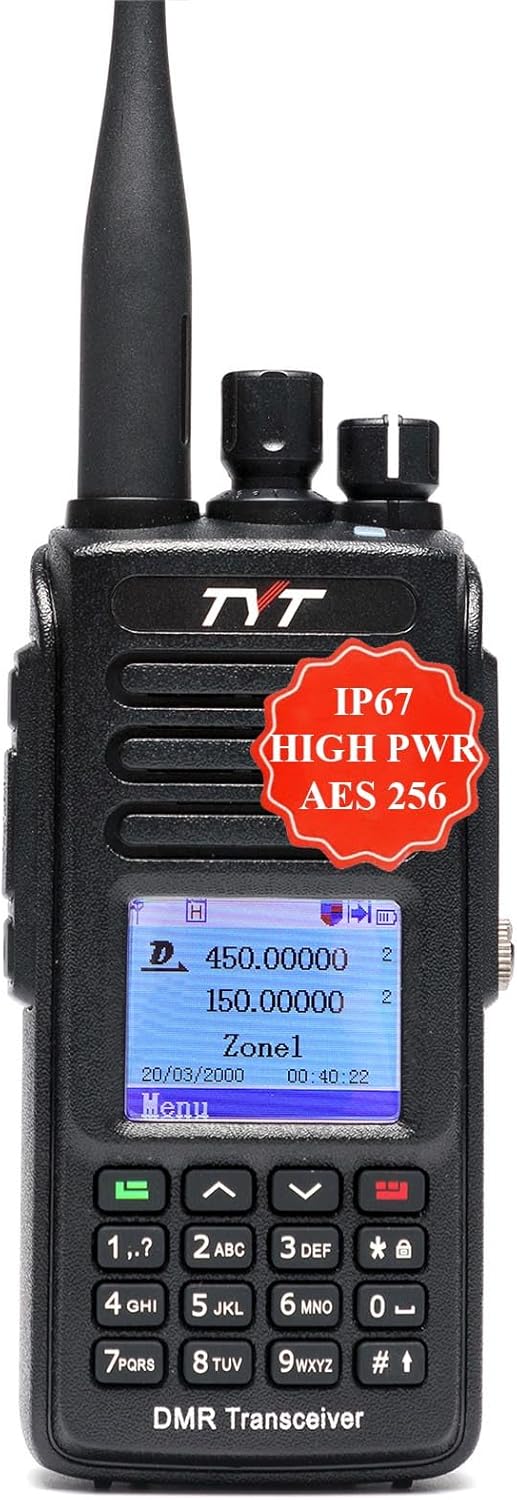
Figure 1: TYT MD-UV390 Plus Digital Two-Way Radio
2. Package Contents
Upon unpacking, please verify that all the following items are included in your package:
- TYT MD-UV390 Plus Handheld Radio
- 7.4V 2800mAh Li-ion Battery Pack
- Belt Clip
- Adapter
- Desktop Charger
- Driver & Software CD
- Programming Cable
- User Manual

Figure 2: Included accessories with the radio
3. Key Features
The MD-UV390 Plus offers a robust set of features for enhanced communication:
- AES256 Encryption: Provides secure communication. Note: This feature requires special software activation.
- Dual Band Operation: Supports both VHF and UHF frequencies.
- Rugged IP67 Rating: Waterproof and dustproof for reliable use in harsh environments.
- Dual Mode: Operates in both Digital (DMR) and Analog modes.
- High Output Power: Capable of 10W output for extended range.
- Extensive Channel Capacity: Up to 3000 programmable channels.
- Advanced Digital Functions: Includes Remote Kill/Stun/Activate, Voice Prompt, Built-in CTCSS/DCS, Priority Scan, DTMF decoding/encoding, Private Call, Group Call, All Call, and Text Messaging.
- MotoTRBO Compatibility: Complies with ETSI TS 102 361-1, -2, -3 digital protocol and is compatible with MotoTRBO Tier 1 & 2.
- USB Type-C Charging: Convenient charging option directly on the battery.

Figure 3: Overview of MD-UV390 Plus features
Video 1: TYT MD-UV390 Plus DMR Radio Overview. This video demonstrates the radio's physical features, menu navigation, and key functionalities.
4. Technical Specifications
| Specification | Value |
|---|---|
| Model Number | MD-UV390 Plus (AES UV390) |
| Frequency Range | VHF/UHF |
| Number of Channels | 3000 |
| Output Power | High Power (up to 10W) |
| Water Resistance Level | IP67 (Waterproof/Dustproof) |
| Battery Type | 7.4V 2800mAh Li-ion |
| Talking Range Maximum | 4 Kilometers (approx. 2.5 miles) |
| Item Weight | 1.5 Pounds |
| Package Dimensions | 7.87 x 6.22 x 3.35 inches |
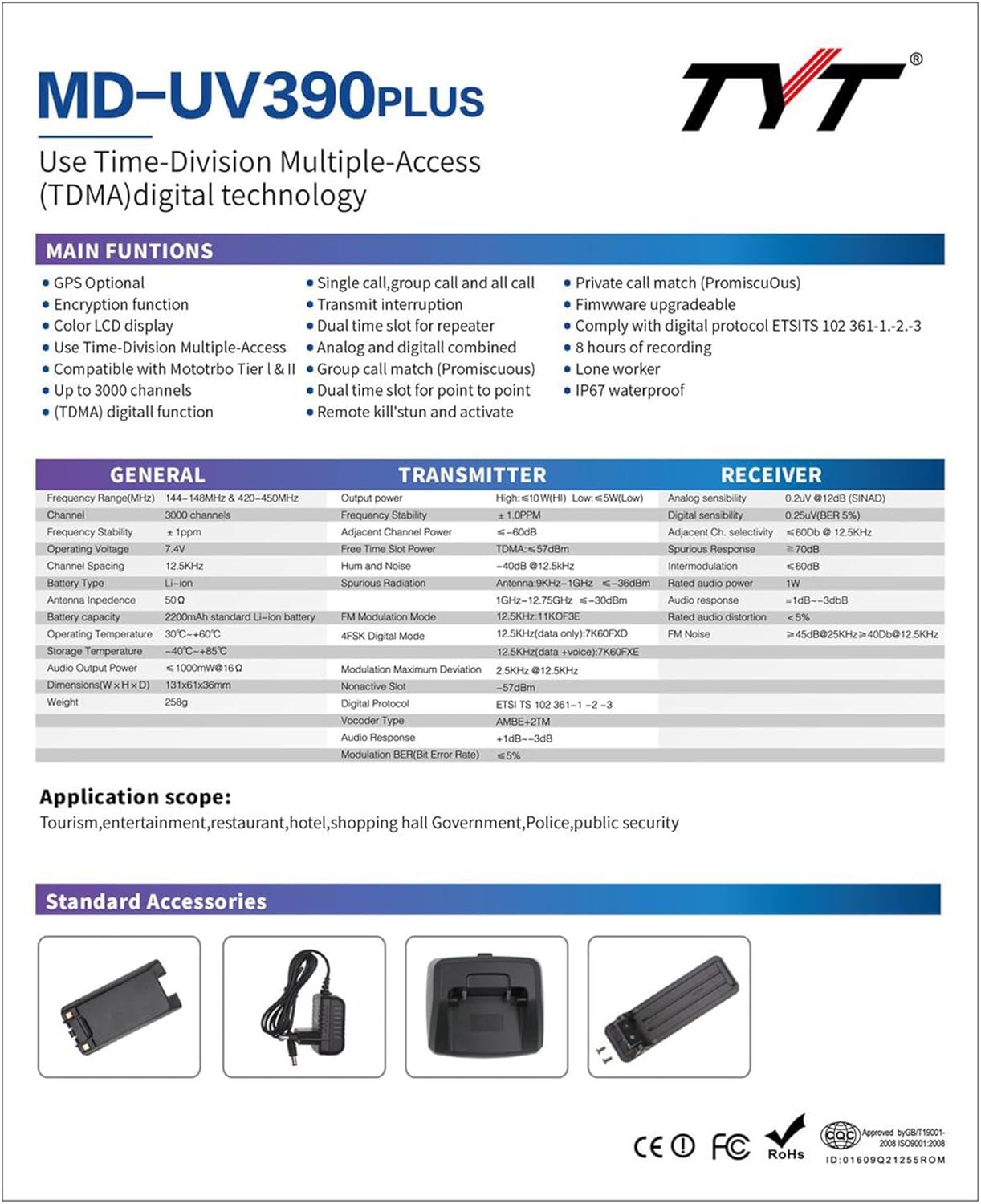
Figure 4: Detailed specifications of the MD-UV390 Plus
5. Initial Setup
- Install Battery: Align the 7.4V 2800mAh Li-ion battery pack with the back of the radio and slide it into place until it clicks securely.
- Attach Antenna: Screw the antenna clockwise onto the connector at the top of the radio until it is finger-tight. Do not overtighten.
- Charge Battery: Connect the desktop charger to a power outlet using the provided adapter. Place the radio (with battery installed) into the desktop charger. The charging indicator will show the charging status. Alternatively, the battery pack supports direct USB Type-C charging. Open the protective cover on the battery to access the USB-C port and connect a compatible cable.
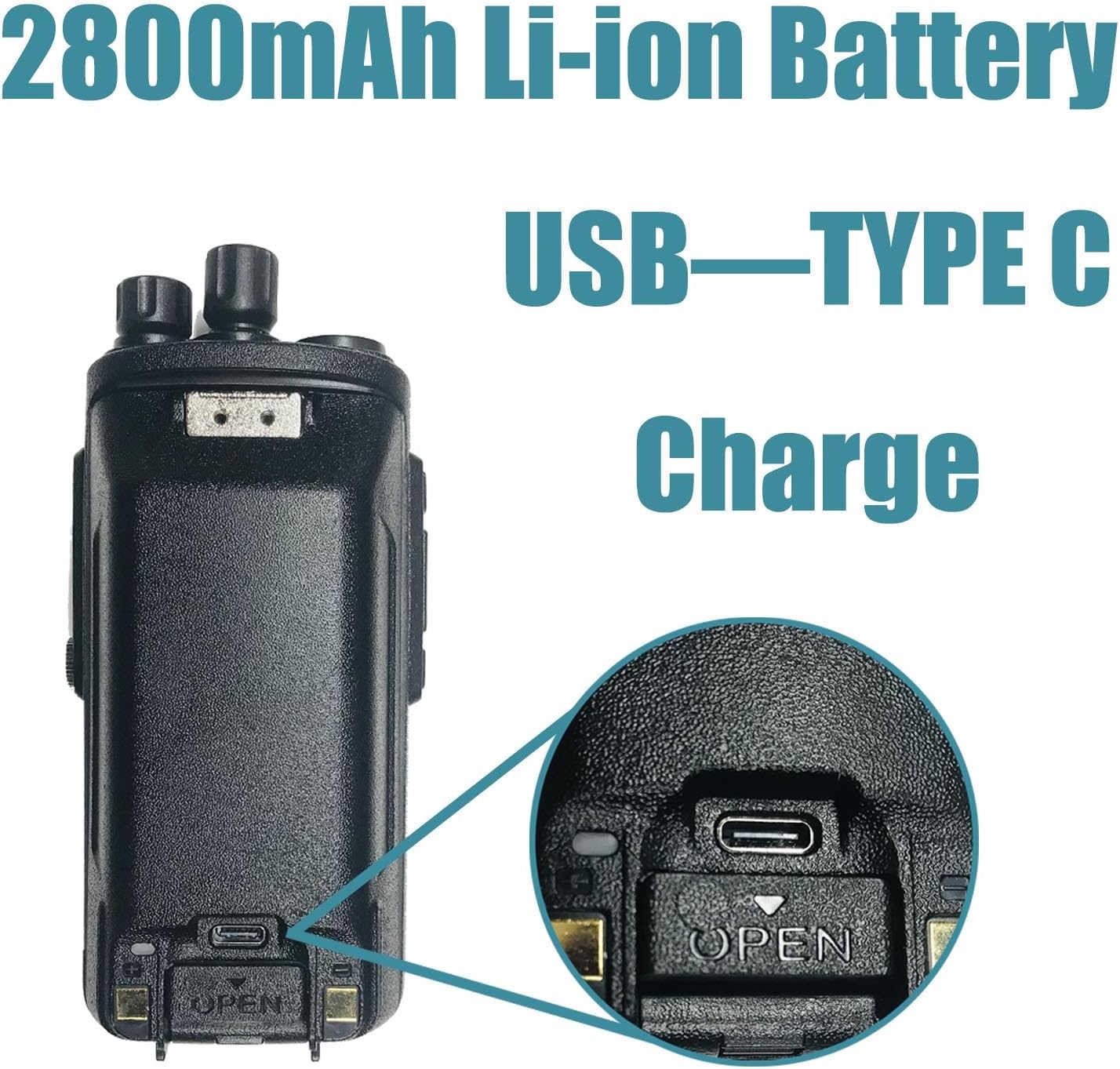
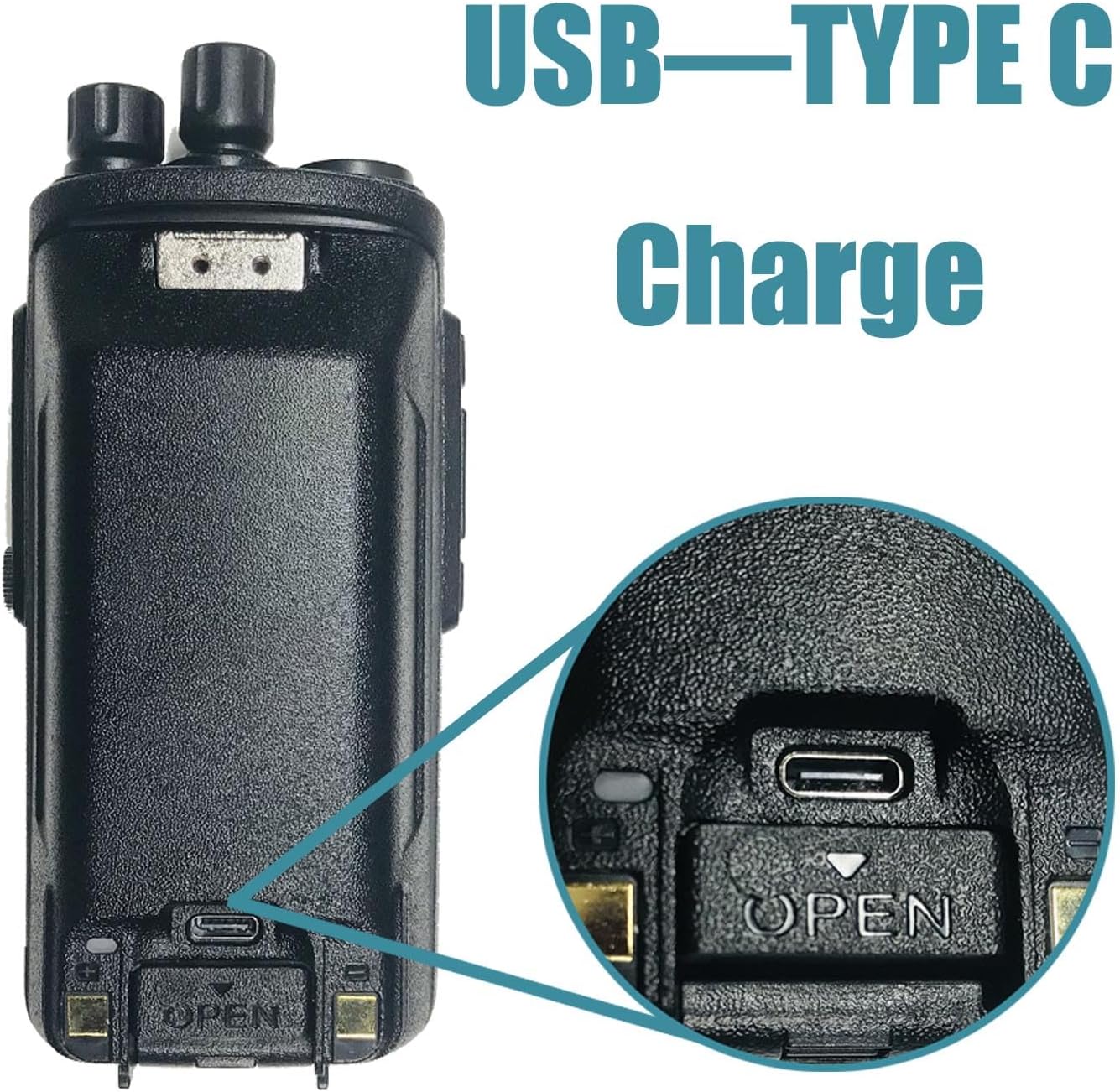
Figure 5: Battery installation and USB Type-C charging port
6. Basic Operation
- Power On/Off: Rotate the top-left knob clockwise to power on the radio. Rotate counter-clockwise until a click is heard to power off.
- Volume Adjustment: Continue rotating the power knob clockwise to increase volume, and counter-clockwise to decrease.
- Channel Selection: Use the channel knob (top-right) to select desired channels. The display will show the current channel.
- Push-to-Talk (PTT): Press and hold the large button on the left side of the radio to transmit. Release to receive.
- Menu Navigation: Use the keypad and navigation buttons (up/down arrows, Menu/OK, Back) to access and adjust radio settings.
Video 2: TYT MD-UV390 Plus DMR Radio Operation. This video demonstrates basic operations including power, channel selection, and menu navigation.
7. Programming the Radio
The TYT MD-UV390 Plus is programmable via a computer using dedicated software and the included programming cable. This allows for customization of channels, contacts, and various radio settings.
7.1 Software and Driver Installation
- Obtain Software: The necessary programming software and drivers are typically provided on the included CD or can be downloaded from the official TYT Electronics website. Ensure you download the correct software version for your MD-UV390 Plus model and your operating system (Windows only; Mac is not supported).
- Install Drivers: Before connecting the radio, install the USB programming cable drivers. Follow the on-screen instructions during installation.
- Install Programming Software: Install the CPS (Customer Programming Software) by following the setup wizard.
7.2 Connecting and Programming
- Connect Radio: Ensure the radio is powered on. Connect the programming cable to the radio's accessory port (usually covered by a rubber flap on the side) and then to a USB port on your Windows PC.
- Launch Software: Open the installed CPS software.
- Select COM Port: In the software, navigate to the 'Communication' or 'Port' settings and select the correct COM port assigned to your programming cable. You may need to check Device Manager in Windows to identify the correct port.
- Read from Radio: Use the software's 'Read from Radio' function to download the current configuration from your MD-UV390 Plus. This creates a baseline for your modifications.
- Edit Settings: Modify channels, contacts, zones, and other parameters as needed within the software interface.
- Write to Radio: After making all desired changes, use the 'Write to Radio' function to upload the new configuration to your device.
8. Maintenance and Care
- Cleaning: Use a soft, damp cloth to clean the radio's exterior. Do not use harsh chemicals or solvents.
- Waterproof Rating (IP67): The radio is designed to withstand immersion in up to 1 meter of water for 30 minutes. Ensure all port covers (e.g., earpiece port, USB-C port on battery) are securely closed to maintain its waterproof integrity.
- Battery Care: Avoid overcharging or completely draining the Li-ion battery. Store the battery in a cool, dry place when not in use.
- Antenna: Always ensure the antenna is properly attached before transmitting to prevent damage to the radio.

Figure 6: The radio demonstrating its IP67 waterproof capability
9. Troubleshooting
If you encounter issues with your TYT MD-UV390 Plus, consider the following common solutions:
- Radio Not Powering On: Check if the battery is fully charged and properly installed. Ensure the power knob is rotated fully clockwise.
- No Transmission/Reception: Verify that the antenna is securely attached. Check the selected channel and ensure it is within the radio's frequency range. Confirm that the radio is in the correct mode (Digital/Analog) for the intended communication.
- Programming Issues: Ensure the correct drivers and programming software are installed. Verify the programming cable is properly connected and the correct COM port is selected in the software.
- Poor Audio Quality: Check the volume level. Ensure the microphone and speaker are clear of obstructions.
- Encryption Not Working: Confirm that AES256 encryption is enabled and correctly configured in the programming software for both transmitting and receiving radios. Remember that this feature may require special software activation.
10. Warranty and Support
The TYT MD-UV390 Plus comes with a 90-day warranty from the date of purchase. This warranty covers manufacturing defects under normal use. Please retain your proof of purchase for warranty claims.
For technical support, updated firmware, drivers, or programming software, please visit the official TYT Electronics website. You may also contact the seller, HESENATE, for assistance.