
1. Introduction
This manual provides essential instructions for the safe and effective use of your SOULYI Biometric Gun Safe, Model SYZ-08. Please read this manual thoroughly before installation and operation to ensure proper functionality and security.

Image: The SOULYI Biometric Gun Safe with its auto-sliding door open, revealing a handgun stored inside.
2. Safety Information
- Always store firearms unloaded and separate from ammunition.
- Keep backup keys in a secure location away from the safe and out of reach of unauthorized individuals.
- Do not store the safe keys inside the safe.
- Ensure the safe is securely mounted to prevent unauthorized removal.
- Regularly check battery levels to ensure continuous operation.
- This safe is designed to deter theft and provide quick access to authorized users. It is not fireproof or waterproof.

Image: A child reaching towards a SOULYI gun safe mounted on a shelf, illustrating the importance of secure placement to prevent unauthorized access.
3. Package Contents
Verify that all items are present in the package:
- SOULYI Biometric Gun Safe (Model SYZ-08)
- Mounting Rack
- Backup Keys (2)
- Mounting Hardware (Screws, Anchors)
- User Manual (This document)

Image: The SOULYI gun safe displayed alongside its accessories, including the mounting rack, backup keys, and mounting screws.
4. Setup
4.1 Battery Installation
The safe requires four (4) AA batteries (not included) for operation. The battery compartment is located on the front panel.
- Locate the battery compartment cover on the front of the safe.
- Remove the cover.
- Insert four (4) AA batteries, ensuring correct polarity (+/-).
- Replace the battery compartment cover.
Important:
- Use four AA batteries.
- Mixing different types of batteries may render the device unusable.
- Inserting the batteries with the wrong polarity (+/-) will prevent the device from turning on.

Image: A detailed view of the external battery compartment on the SOULYI gun safe, illustrating the correct insertion of four AA batteries.
4.2 Mounting Options
The SOULYI Biometric Gun Safe offers versatile mounting options. Pre-drilled mounting plates and hardware are included.
- Prepare the Mounting Rack: Secure the mounting rack to your desired surface (e.g., underside of a desk, side of a nightstand, inside a cabinet) using the provided screws and anchors. Ensure the surface is sturdy enough to support the safe's weight and contents.
- Attach the Safe: With the safe unlocked and the door open, align the safe with the mounted rack. Slide the safe onto the rack.
- Secure the Safe: Use the hand screw to fix the gun safe securely to the rack.
Available Mounting Orientations:
- Top Mounted: Under a desk or shelf.
- Left Mounted: On the left side of a cabinet or furniture.
- Right Mounted: On the right side of a cabinet or furniture.

Image: A three-step visual guide demonstrating the installation process of the SOULYI gun safe, from mounting the rack to securing the safe.

Image: Illustrations depicting the three primary installation methods for the SOULYI gun safe: mounted under a desk, mounted on the left side of furniture, and mounted on the right side of furniture.
5. Operating Instructions
5.1 Access Methods
The safe provides three methods for quick access:
- Biometric Fingerprint Scan: For rapid, personalized access.
- Digital PIN Code: A programmable numerical code.
- Backup Key: For manual override in emergencies or battery failure.
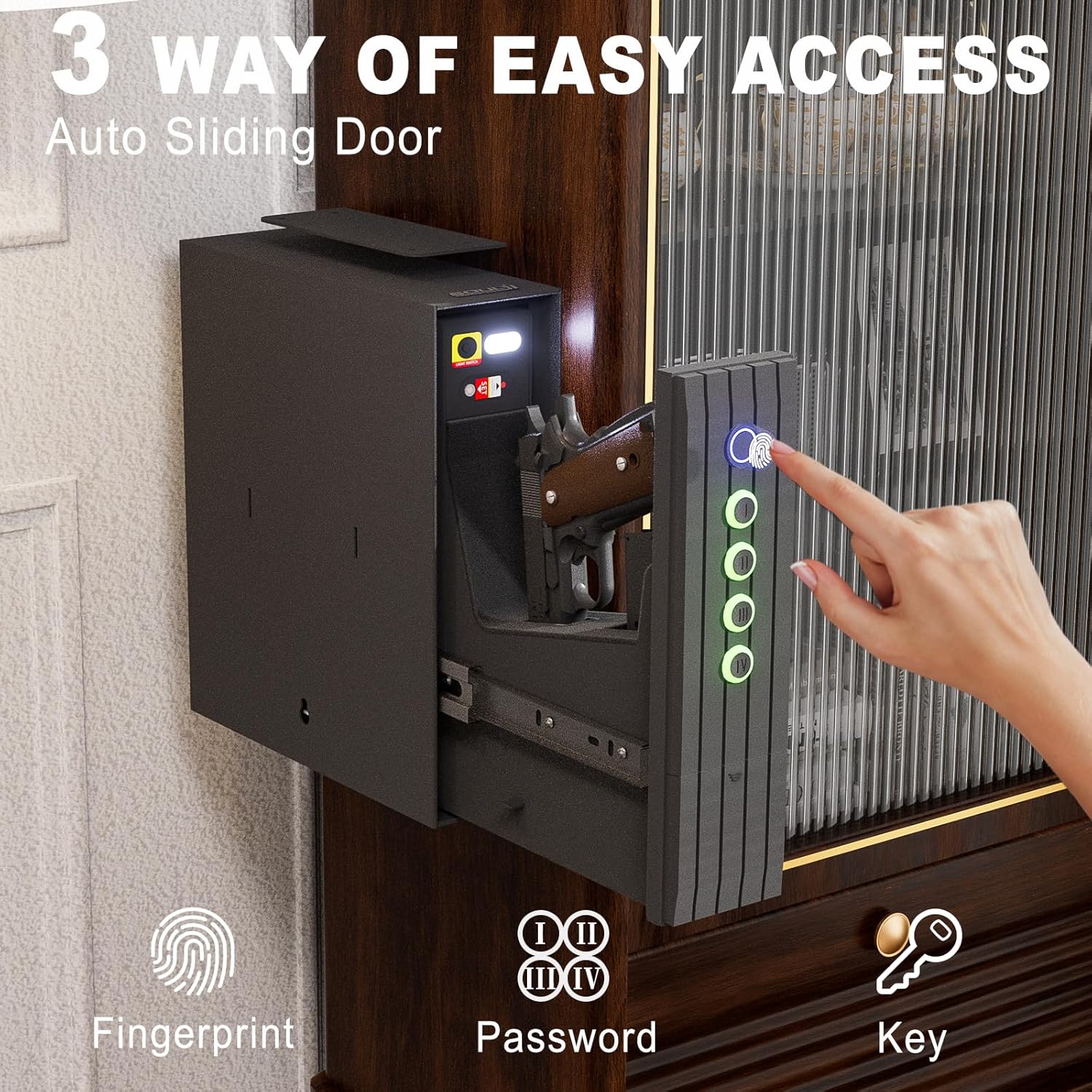
Image: A visual representation of the three quick access methods for the SOULYI gun safe: fingerprint recognition, digital keypad entry, and traditional key lock.
5.2 Programming Fingerprints
The safe can store up to 100 unique fingerprints.
- Open the safe using an existing method (PIN or key).
- Locate the programming button inside the safe. Press it once.
- Place your finger on the fingerprint scanner. The indicator light will change.
- Lift and place your finger multiple times (usually 4-5 times) from different angles until the indicator light confirms successful registration.
- Repeat for additional fingerprints.

Image: Close-up of the SOULYI gun safe's fingerprint panel, highlighting its capacity for 100 fingerprints, 0.5-second unlocking speed, and 650 DPI resolution.
5.3 Setting PIN Code
The safe uses a 4-digit PIN code.
- Open the safe using an existing method (fingerprint or key).
- Locate the programming button inside the safe. Press and hold it until the indicator light changes.
- Enter your desired 4-digit PIN code on the keypad.
- Press the '#' button to confirm.
- Re-enter the 4-digit PIN code and press '#' again to verify.
5.4 Silent Mode and LED Light Control
The safe features a silent mode and an internal LED light for discreet operation and visibility.
- Silent Mode (Turn ON/OFF Sound): Long press the first button on the keypad to toggle the sound on or off.
- LED Light Switch: The internal LED light can be manually switched on or off. Refer to the diagram for the light switch location.

Image: Instructions for controlling the sound (silent mode) and the internal LED light of the SOULYI gun safe.
6. Maintenance
6.1 Battery Replacement
When the keypad lights up green and beeps six times after any operation, it indicates that the batteries need to be replaced.
- Open the battery compartment as described in Section 4.1.
- Remove the old batteries.
- Insert four new AA batteries, observing correct polarity.
- Replace the cover.

Image: A visual alert indicating a low battery condition on the SOULYI gun safe, prompting battery replacement.
6.2 Cleaning
Wipe the exterior of the safe with a soft, damp cloth. Avoid abrasive cleaners or solvents that could damage the finish or electronic components.
7. Troubleshooting
| Problem | Possible Cause | Solution |
|---|---|---|
| Safe does not open with fingerprint. | Finger not placed correctly, unregistered fingerprint, low batteries. | Ensure finger covers the sensor completely. Re-register fingerprint. Replace batteries. Use PIN or key. |
| Safe does not open with PIN code. | Incorrect PIN entered, low batteries. | Verify PIN code. Replace batteries. Use fingerprint or key. |
| Safe does not power on. | Dead or incorrectly installed batteries. | Replace batteries with new AA batteries, ensuring correct polarity. |
| Door mechanism is stiff or stuck. | Obstruction, lack of lubrication. | Check for obstructions. Apply a small amount of silicone lubricant to the sliding rails if necessary. |
8. Specifications
- Model: SYZ-08
- Brand: SOULYI
- Dimensions (D x W x H): 12.4" x 11" x 3.68"
- Weight: Approximately 15 lbs
- Material: Alloy Steel
- Lock Type: Biometric, Electronic Combination Lock, Key
- Fingerprint Capacity: Up to 100
- Power: 4 x AA Batteries (not included)
- Special Features: Alarm System, Anti-Theft, Biometric Fingerprint, Silent Mode, LED Light
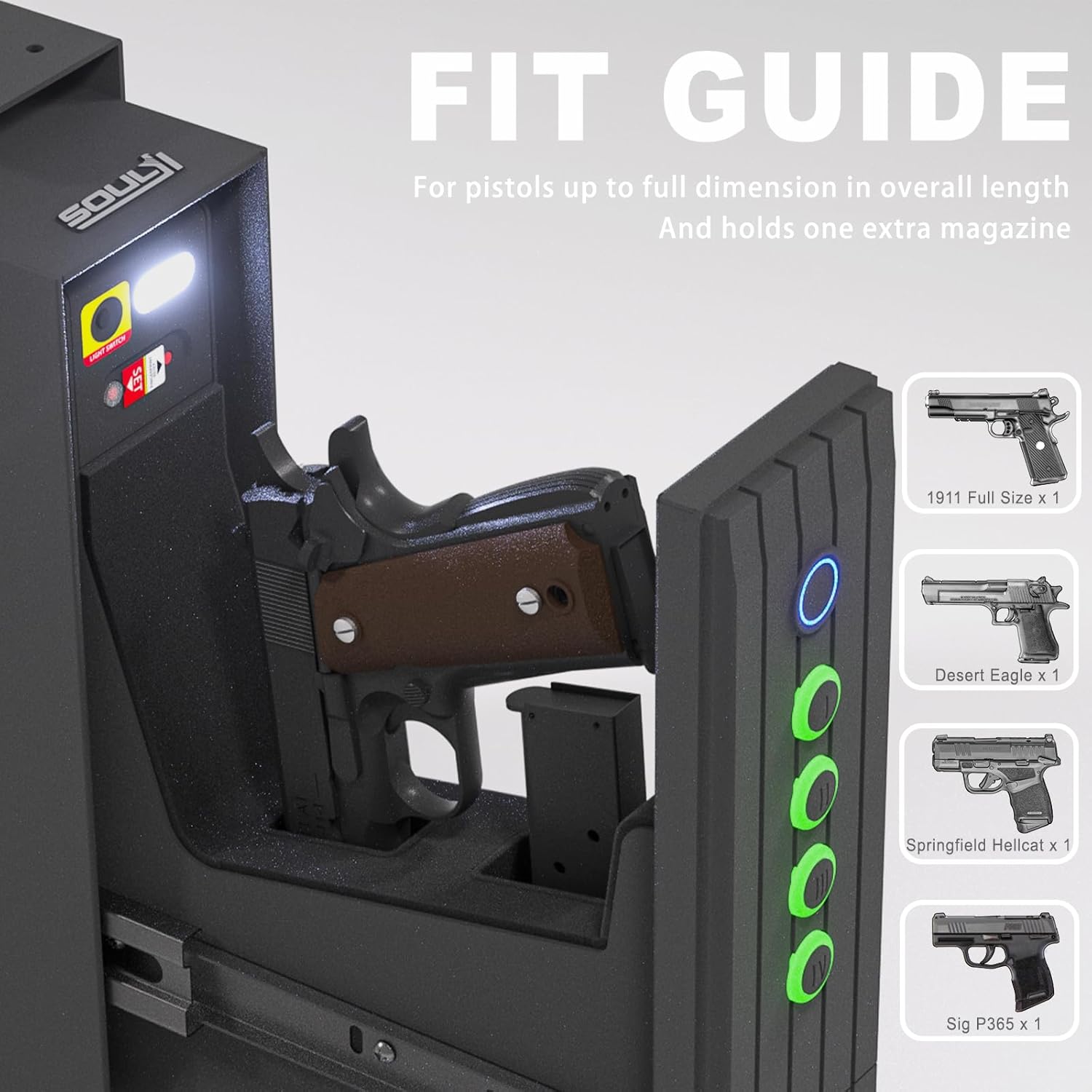
Image: A fit guide illustrating the internal dimensions and capacity of the SOULYI gun safe, accommodating various full-size handguns and an extra magazine.
9. Warranty and Support
For warranty information and customer support, please refer to the contact details provided with your purchase or visit the official SOULYI website. Keep your purchase receipt for warranty claims.


