
Introduction
This manual provides detailed instructions for the safe and effective use of your GRIFEMA GD303 Rechargeable Head Torch. Please read this manual thoroughly before first use and retain it for future reference.

Image: The GRIFEMA GD303 Rechargeable Head Torch, featuring multiple LED bulbs and an adjustable elastic headband.
Setup
Charging the Head Torch
The GRIFEMA GD303 Head Torch is equipped with built-in 2 x 1200mAh rechargeable lithium batteries. Use the included USB cable for charging.
- Locate the Type-C charging port on the side of the head torch.
- Connect the included USB cable to the Type-C port and to a suitable USB power source (e.g., wall adapter, computer USB port, power bank).
- A full charge provides approximately 4 to 6 hours of continuous power in high brightness mode.

Image: Close-up view of the head torch showing the Type-C charging port and elastic headband.
Wearing the Head Torch
Adjust the elastic headband for a comfortable and secure fit on your head. The adjustable system bands are designed to provide maximum comfort and balance between the front and back of your head, allowing for hands-free use.
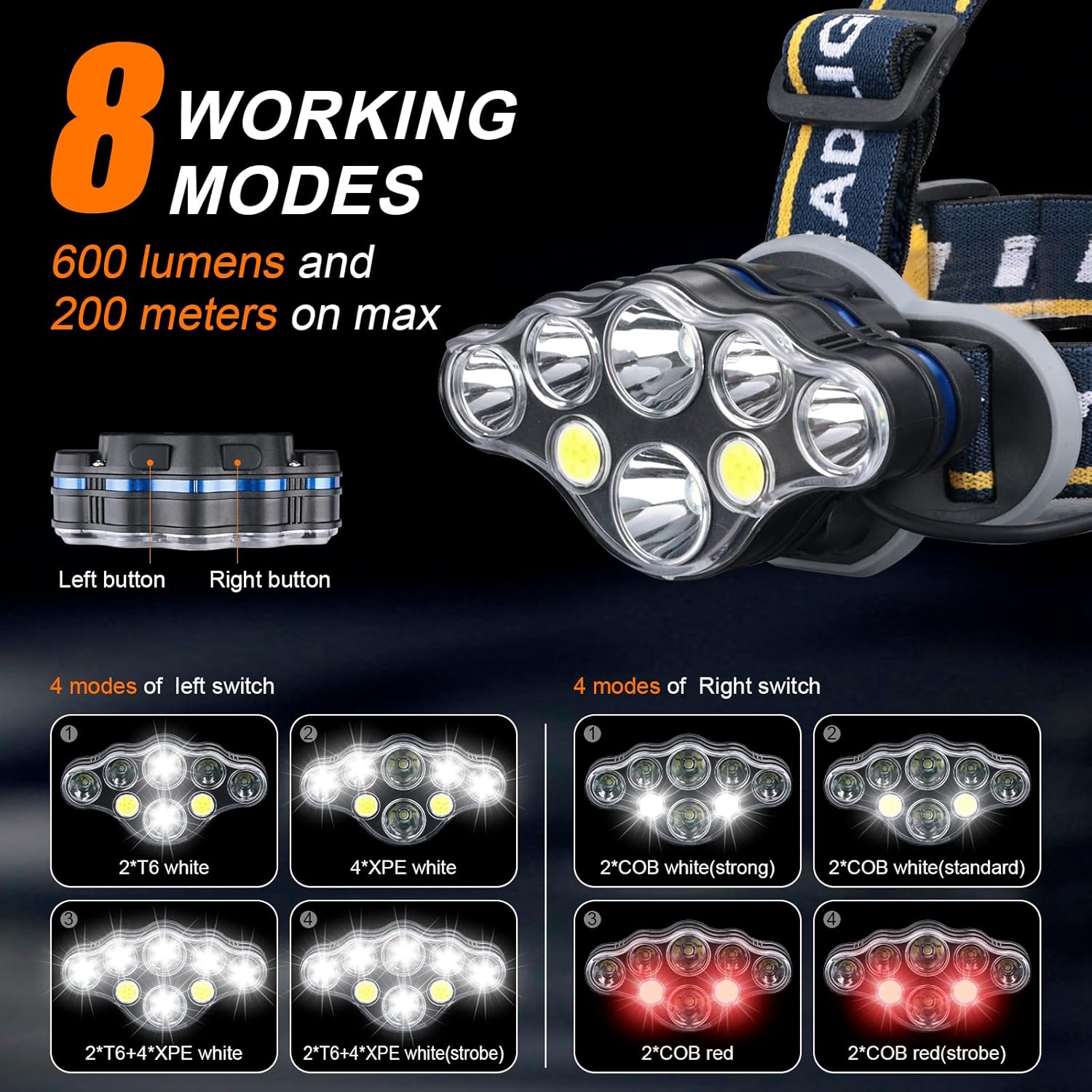
Image: A person wearing the GRIFEMA GD303 head torch, demonstrating its comfortable fit and hands-free operation.
Operating Instructions
Power On/Off and Mode Selection
The head torch features two control buttons located on the top: a Left Switch and a Right Switch. Each switch controls different lighting modes.
Left Switch Modes:
Press the Left Switch repeatedly to cycle through the following main lighting modes:
- 2 Main Lights on: Activates the two central T6 white LEDs.
- 4 Auxiliary Lights on: Activates the four XPE white LEDs.
- All Lights on: Activates all 6 white LEDs (2*T6 + 4*XPE).
- All Lights Flashing: All 6 white LEDs flash (strobe mode).
Right Switch Modes:
Press the Right Switch repeatedly to cycle through the following COB (Chip-on-Board) lighting modes:
- 2 COB White Light Strong: Activates the two COB white lights at high intensity.
- 2 COB White Light Weak: Activates the two COB white lights at lower intensity.
- 2 COB Red Light Bright: Activates the two COB red lights.
- 2 COB Red Light Flash: The two COB red lights flash.

Image: Visual representation of the 8 distinct lighting modes controlled by the left and right buttons.
Adjusting the Beam Angle
The headlamp unit can be manually rotated up to 90 degrees. This allows you to direct the light beam precisely where it is needed, adapting to various activities and viewing angles.

Image: Illustration showing the headlamp unit pivoting 90 degrees to adapt to different head angles and lighting needs.
Maintenance
Cleaning
To clean the head torch, gently wipe the exterior with a soft, damp cloth. Do not use abrasive cleaners, solvents, or harsh chemicals, as these can damage the product's finish and components.
Water Resistance
The GRIFEMA GD303 Head Torch has an IPX45 water-resistant rating. This means it is protected against splashing water from any direction and can safely be used in rainy conditions. However, it is not designed for submersion in water.

Image: The head torch shown with icons indicating its IPX45 waterproof, snowproof, and shockproof capabilities.
Battery Care
To maximize the lifespan of the built-in lithium batteries:
- Charge the head torch regularly, even if it is not in frequent use, to prevent deep discharge.
- Avoid fully discharging the battery before recharging.
- Store the head torch in a cool, dry place when not in use for extended periods.
Troubleshooting
Head Torch Not Turning On
- Check Battery Charge: Ensure the battery is charged. Connect the head torch to a USB power source and observe if the charging indicator activates.
- Verify Button Press: Ensure the power buttons are pressed firmly and correctly.
Dim or Flickering Light
- Low Battery: The battery may be low. Recharge the head torch fully.
- Clean Lens: Ensure the lens is clean and free from dirt, dust, or obstructions that might impede light output.
Headband Discomfort
- Adjust Straps: Adjust the elastic straps to achieve a comfortable and secure fit. The straps are designed for adjustability to suit various head sizes.
Specifications
| Feature | Detail |
|---|---|
| Model | GD303 |
| Light Source | 8 LED (2*T6, 4*XPE, 2*COB) |
| Brightness | Max 600 lumens |
| Beam Range | Max 200 meters |
| Power Source | 2 x 1200mAh Rechargeable Lithium Batteries (Built-in) |
| Charging Port | USB Type-C |
| Runtime | 4-6 hours (high brightness) |
| Water Resistance | IPX45 |
| Adjustable Angle | 90 degrees |
| Material | Kunststoff (Plastic) |
| Dimensions | 3.74"D x 1.38"W x 1.97"H |
| Weight | 10.2 ounces (0.29 Kilograms) |
Energy Efficiency Information

Image: The EU Energy Label for the GRIFEMA GD303, indicating an energy efficiency class G and consumption of 10 kWh/1000h.
The GRIFEMA GD303 Head Torch has an energy efficiency rating of G, consuming 10 kWh/1000h. For detailed product information, refer to the EU EPREL database:
Safety Information
- Eye Safety: Do not look directly into the LED light when it is on, as it may cause temporary vision impairment.
- Children: Keep the head torch out of reach of children.
- Disassembly: Do not attempt to disassemble or modify the head torch. This may void the warranty and pose a safety risk.
- Charging: Use only the provided USB cable or a certified equivalent for charging.
- Temperature: Avoid exposing the head torch to extreme temperatures or direct sunlight for prolonged periods.
Warranty and Support
GRIFEMA products are designed for reliability and performance. For warranty information or technical support, please refer to the contact details provided with your purchase or visit the official GRIFEMA website.
Please retain your proof of purchase for any warranty claims.