
1. Introduction
Thank you for choosing the MANKIW D06 Bluetooth Headphones. These wireless in-ear headphones are designed to provide a high-quality audio experience with advanced features such as Bluetooth 5.3 connectivity, a digital LED display for battery status, and intuitive touch controls. This manual will guide you through the setup, operation, and maintenance of your new headphones.
2. Package Contents
Please check the package for the following items:
- MANKIW D06 Wireless Earbuds (Left and Right)
- Charging Case with Digital LED Display
- Type-C Charging Cable
- User Manual
- 3 Pairs of Earplugs (S, M, L)
3. Product Overview

Image 3.1: MANKIW D06 Wireless Earbuds securely placed within their charging case. The earbuds feature a sleek black design, and the case is compact, indicating portability.
The MANKIW D06 headphones consist of two wireless earbuds and a portable charging case. The charging case features a dual LED display that shows the battery percentage of both the case and each individual earbud (Left and Right).

Image 3.2: Close-up of the charging case's digital LED display, clearly showing the battery levels for the left earbud (L), right earbud (R), and the charging case itself (%). This display provides real-time battery status.
4. Charging Your Headphones
For optimal performance, fully charge your headphones and charging case before first use.
4.1 Charging the Earbuds
- Place the earbuds into the charging case, ensuring they are correctly seated in their respective slots (L for Left, R for Right).
- The LED display on the charging case will show the charging status of each earbud.
- A full charge provides up to 8 hours of continuous use for the earbuds.
4.2 Charging the Charging Case
- Connect the provided Type-C charging cable to the charging port on the case.
- Connect the other end of the cable to a USB power adapter (not included) or a computer's USB port.
- The LED display will show the charging progress of the case. When fully charged, the display will indicate 100%.
- The charging case provides multiple charges, extending the total playtime up to 32 hours.
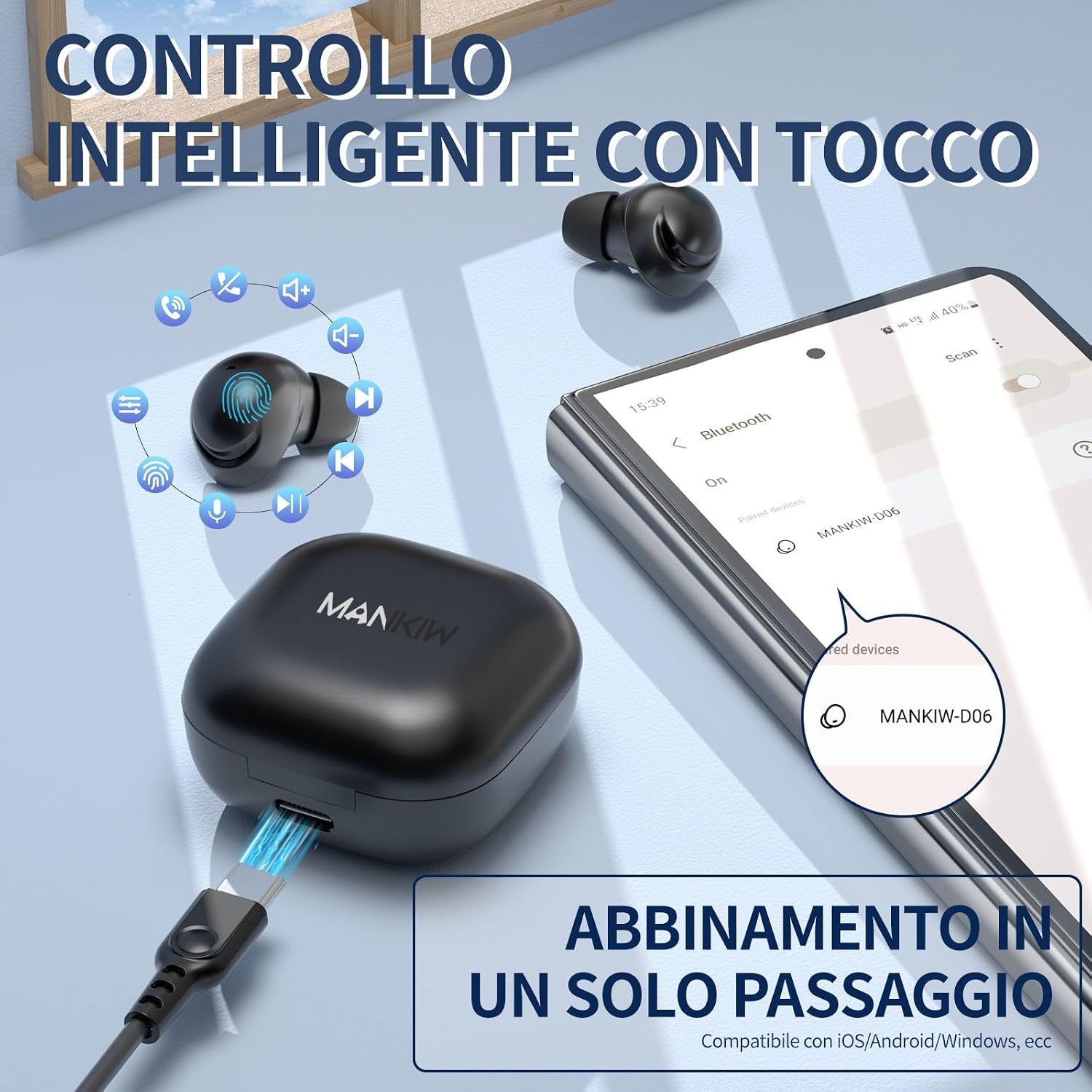
Image 4.1: The MANKIW D06 charging case connected via a Type-C cable for charging. The image also illustrates the touch control areas on the earbuds and the Bluetooth pairing process on a smartphone.
5. Setup and Bluetooth Pairing
The MANKIW D06 headphones utilize advanced Bluetooth 5.3 technology for a stable and fast connection.
- Power On: Open the charging case. The earbuds will automatically power on and enter pairing mode.
- Activate Bluetooth: On your smartphone or device, enable Bluetooth.
- Search for Device: Look for "MANKIW-D06" in the list of available Bluetooth devices.
- Connect: Select "MANKIW-D06" to pair. Once connected, you will hear an audible confirmation, and the device will show as connected on your phone.
- Automatic Reconnection: After the initial pairing, the earbuds will automatically connect to the last paired device when removed from the charging case, provided Bluetooth is enabled on your device.

Image 5.1: A visual representation of the advanced Bluetooth 5.3 chip integrated into the MANKIW D06 earbuds, highlighting its benefits of increased speed, stability, and a 10-meter range.
6. Operating Instructions: Touch Controls
The MANKIW D06 earbuds feature intuitive touch controls for easy management of your audio and calls.
- Play/Pause: Single tap on either earbud.
- Next Track: Triple tap on the right earbud.
- Previous Track: Triple tap on the left earbud.
- Volume Up: Touch and hold the right earbud.
- Volume Down: Touch and hold the left earbud.
- Answer/End Call: Single tap on either earbud during an incoming call.
- Reject Call: Touch and hold either earbud during an incoming call.
- Activate Voice Assistant: Double tap on either earbud (e.g., Siri, Google Assistant).
Image 6.1: A diagram illustrating the various touch control functions on the MANKIW D06 earbuds, including play/pause, track skipping, volume adjustment, and call management.
7. Comfort and Fit
The MANKIW D06 earbuds are designed for a comfortable and secure fit, adapting to the natural curves of your ear. Three different sizes of earplugs (Small, Medium, Large) are included to ensure you find the best fit for optimal sound quality and comfort.
- Choose the earplug size that provides a snug yet comfortable seal in your ear canal.
- Gently insert the earbud into your ear and rotate slightly until it feels secure.

Image 7.1: The MANKIW D06 earbud shown alongside three different sizes of ear tips, demonstrating the options available for a customized and comfortable fit.

Image 7.2: An illustration highlighting the compact dimensions of the MANKIW D06 earbuds and charging case, emphasizing their portability and ease of storage in a pocket.
8. Audio Quality
Experience immersive stereo bass and crystal-clear calls with the MANKIW D06 headphones. They incorporate lossless HD DSR rendering technology, which significantly amplifies bass, enriches midrange tones, and maintains crystal-clear treble for a balanced and powerful sound profile.

Image 8.1: A graphic depicting an immersive sound experience, with musical instruments surrounding an earbud, symbolizing the high-fidelity stereo audio and clear call quality of the MANKIW D06 headphones.
9. Maintenance and Care
To ensure the longevity and optimal performance of your MANKIW D06 headphones, follow these care instructions:
- Cleaning: Regularly clean the earbuds and charging case with a soft, dry, lint-free cloth. Do not use abrasive cleaners or solvents.
- Water Resistance: The earbuds feature IP5 nano coating technology, providing protection against splashes and sweat. However, they are not designed for submersion in water. Avoid exposing them to heavy rain or swimming.
- Storage: When not in use, store the earbuds in their charging case to protect them from dust and damage. Store in a cool, dry place.
- Battery Care: Avoid fully depleting the battery for extended periods. Charge the case and earbuds regularly, even if not in frequent use, to maintain battery health.
10. Troubleshooting
If you encounter any issues with your MANKIW D06 headphones, please refer to the following common solutions:
| Problem | Solution |
|---|---|
| Earbuds not pairing with device. |
|
| Only one earbud is working. |
|
| Low volume or poor sound quality. |
|
| Charging case not charging. |
|
11. Specifications
| Feature | Detail |
|---|---|
| Model Name | D06 |
| Brand | MANKIW |
| Connectivity Technology | Wireless (Bluetooth 5.3) |
| Wireless Communication Technology | Bluetooth |
| Hardware Interface | Bluetooth 5 |
| Control Method | Touch |
| Microphone Format | Built-In |
| Form Factor | In Ear |
| Ear Placement | In Ear |
| Noise Control | Sound Isolation |
| Impedance | 32 Ohms |
| Material | Plastic |
| Item Weight | 44 Grams (total) |
| Battery Life (Earbuds) | Up to 8 hours (single charge) |
| Total Playtime (with case) | Up to 32 hours |
| Charging Port | Type-C |
| Water Resistance | IP5 Nano Coating (splash/sweat resistant) |
12. Warranty and Support
MANKIW products are manufactured to the highest quality standards. For any questions, concerns, or technical support regarding your MANKIW D06 Bluetooth Headphones, please refer to the contact information provided with your purchase or visit the official MANKIW website. We are committed to providing excellent customer service.
Please retain your proof of purchase for warranty claims.


