1. Introduction
The Ibiza MOBILE800 is a versatile, battery-powered 800W portable audio system designed for various events and mobile use. It features multiple audio input options, including Bluetooth, USB, microSD, and AUX, along with dedicated inputs for microphones and a guitar. The system also includes sound effects, adjustable EQ, TWS (True Wireless Stereo) functionality, integrated lighting modes, and a recording feature. Its built-in wheels and trolley handle ensure easy transport.
This manual provides essential information for the safe and efficient operation of your MOBILE800 audio system. Please read it thoroughly before use and retain it for future reference.
2. Safety Instructions
- Read all instructions before operating the device.
- Keep the unit away from water, moisture, and extreme temperatures.
- Do not open the casing. There are no user-serviceable parts inside. Refer all servicing to qualified personnel.
- Use only the provided power adapter for charging.
- Ensure proper ventilation around the unit to prevent overheating.
- Avoid placing heavy objects on the unit.
- Do not expose the battery to excessive heat or direct sunlight.
- Dispose of batteries responsibly according to local regulations.
3. Package Contents
Please check that all items are present upon unpacking:
- Ibiza MOBILE800 Portable Party Audio System
- Wired Microphone
- Power Adapter
- User Manual (this document)
4. Product Overview
4.1. Front and Side View

This image displays the front view of the Ibiza MOBILE800 portable audio system. It highlights the integrated trolley handle at the top, sturdy wheels at the bottom, and the vibrant multi-color LED lighting that frames the main speaker grille. A wired microphone and its connecting cable are shown in the foreground, indicating included accessories.
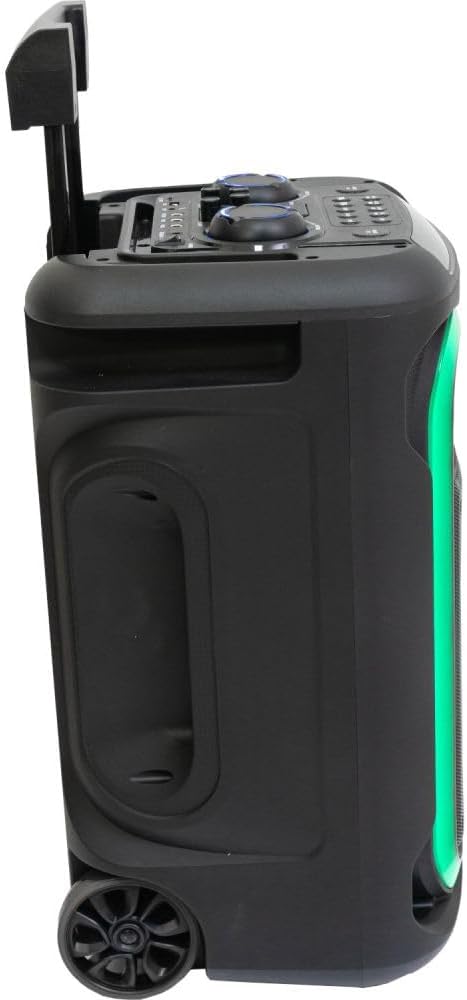
This image shows a side view of the Ibiza MOBILE800 with its trolley handle fully extended, illustrating its readiness for transport. The side panel includes a recessed handle for easy lifting, and the dynamic LED lighting along the front edge is visible.
4.2. Control Panel

This top-down view details the control panel of the Ibiza MOBILE800. It features various rotary knobs for adjusting volume, bass, treble, echo, and delay. Below these, a row of buttons provides control for mode selection, track navigation (previous, next), play/pause, record, TWS pairing, X-Bass activation, and LED lighting modes. Input ports for TF card, USB, AUX, Guitar, and two Microphones (MIC1, MIC2) are clearly labeled, along with the DC 15V power input and the main power switch (ON/OFF).
4.3. Portability Features
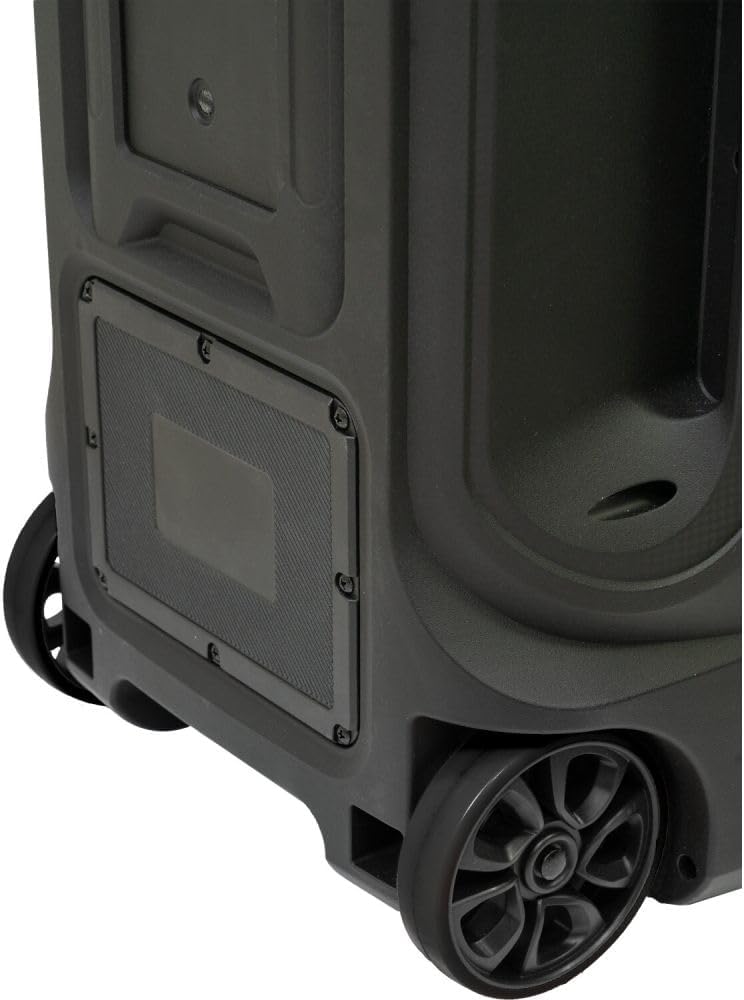
This close-up image focuses on the bottom rear section of the Ibiza MOBILE800, showcasing its robust wheels and the integrated mechanism for the trolley handle. These features are designed to facilitate easy and convenient transportation of the audio system.
5. Setup
5.1. Charging the Battery
- Connect the provided power adapter to the DC 15V input port on the control panel.
- Plug the power adapter into a suitable power outlet.
- The charging indicator (if available) will illuminate. Allow sufficient time for a full charge before first use (typically 4-6 hours).
- The unit can be used while charging.
5.2. Initial Power On
- Ensure the unit is charged or connected to power.
- Locate the POWER switch on the control panel.
- Flip the switch to the 'ON' position. The display will light up, indicating the unit is active.
6. Operating Instructions
6.1. Selecting Input Mode
Press the MODE button repeatedly to cycle through available input sources: Bluetooth, USB, microSD, and AUX.
6.2. Bluetooth Connection
- Switch the unit to Bluetooth mode using the MODE button. The display will show 'BLUE' or a similar indicator, and a pairing tone may sound.
- On your mobile device, enable Bluetooth and search for 'MOBILE800'.
- Select 'MOBILE800' to pair. A confirmation tone will sound upon successful connection.
True Wireless Stereo (TWS) Function
To connect two MOBILE800 units for stereo sound:
- Ensure both MOBILE800 units are powered on and in Bluetooth mode.
- On one unit (this will be the master), press and hold the TWS button. It will search for the other unit.
- Once connected, a confirmation tone will sound, and both units will play in stereo.
- Connect your mobile device to the master unit via Bluetooth as described above.
6.3. USB/MicroSD Playback
- Insert a USB drive or microSD card into the respective port.
- The unit will automatically switch to USB or microSD mode and begin playback. If not, press the MODE button.
- Use the PREV, NEXT, and PLAY/PAUSE buttons for media control.
6.4. AUX Input
- Connect an external audio device (e.g., smartphone, MP3 player) to the AUX input using a 3.5mm audio cable.
- Switch the unit to AUX mode using the MODE button.
- Control playback from your connected device.
6.5. Microphone and Guitar Inputs
- Connect the wired microphone to either MIC1 or MIC2 input.
- Connect a guitar to the GUITAR input.
- Adjust the microphone volume using the MIC.VOL knob.
- Adjust the guitar volume using the GT.VOL knob.
- Use the ECHO and DELAY knobs to add effects to the microphone/guitar sound.
- Press the MIC.PRI button to activate microphone priority, which automatically lowers music volume when speaking into the microphone.
6.6. Sound Adjustments
- VOLUME: Adjusts the overall master volume.
- BASS: Adjusts the low-frequency output.
- TREBLE: Adjusts the high-frequency output.
- X-BASS: Press this button to activate or deactivate the bass boost function for enhanced low-end sound.
6.7. Lighting Modes
Press the LED MODE button repeatedly to cycle through different integrated lighting effects or to turn the lights off.
6.8. Recording Function
The unit can record audio from microphone/guitar inputs directly to a connected USB drive or microSD card.
- Ensure a USB drive or microSD card is inserted.
- Connect your microphone or guitar.
- Press the REC button to start recording.
- Press the REC button again to stop recording.
- Recorded files will be saved to the USB drive or microSD card.
7. Maintenance
- Cleaning: Use a soft, dry cloth to clean the exterior of the unit. Do not use abrasive cleaners or solvents.
- Battery Care: To prolong battery life, avoid fully discharging the battery frequently. Recharge the unit regularly, even if not in use, to maintain battery health. Store in a cool, dry place.
- Storage: When storing the unit for extended periods, ensure it is fully charged and stored in a dry environment.
8. Troubleshooting
| Problem | Possible Cause | Solution |
|---|---|---|
| No power | Battery discharged; Power switch off; Power adapter not connected. | Charge the battery; Turn the power switch ON; Connect the power adapter securely. |
| No sound | Volume too low; Incorrect input mode; Device not connected properly. | Increase master volume; Select correct input mode; Check cable connections or Bluetooth pairing. |
| Bluetooth not pairing | Unit not in Bluetooth mode; Device too far; Interference. | Ensure unit is in Bluetooth mode; Move device closer; Restart both devices. |
| Microphone/Guitar not working | Volume knob too low; Cable not connected; Microphone/Guitar issue. | Increase MIC.VOL/GT.VOL; Ensure cables are fully inserted; Test with another microphone/guitar if possible. |
| TWS connection fails | Units too far apart; One unit not in Bluetooth mode. | Ensure both units are in Bluetooth mode and close to each other; Try re-initiating TWS pairing. |
9. Specifications
| Feature | Detail |
|---|---|
| Model Number | 10-5591 |
| Power Output | 800 W (Peak) |
| Music Sources | Bluetooth, USB, microSD, AUX |
| Inputs | 1x Guitar, 2x Microphone (6.35mm), 1x AUX (3.5mm) |
| Effects | Echo, Delay, Bass Boost (X-BASS) |
| Battery Type | Lead Acid 12 V 7 A |
| Power Supply | 15 Vdc 2 A |
| Power Consumption | 120 W |
| Bluetooth Frequency | 2402-2480 MHz |
| Dimensions (L x W x H) | 350 x 300 x 590 mm (13.78 x 11.81 x 23.23 inches) |
| Weight | 11.35 kg (25 lbs) |
| Material | Plastic |
| Included Components | Wired Microphone, Power Adapter |
10. Warranty and Support
The Ibiza MOBILE800 audio system is covered by a manufacturer's warranty against defects in materials and workmanship. Please refer to the warranty card included with your product or contact your retailer for specific warranty terms and conditions.
For technical support, troubleshooting assistance, or service inquiries, please contact the retailer where you purchased the product or visit the official Ibiza Sound website for contact information.


