
Pilipane B0CRRXN97L
Contents
Pilipane 4-Pin Dashcam Cable User Manual
Model: B0CRRXN97L (20M Variant)
Introduction
This manual provides essential information for the proper use, installation, and maintenance of your Pilipane 4-Pin Dashcam Cable. Designed for reliable video transmission in various vehicle types, this cable ensures stable connectivity for your camera systems.
Product Features
- Reliable Vehicle Camera Connection: Ensures stable connection for various camera devices in cars, trailers, and buses. Features an external screw design for enhanced stability and a copper wire core for optimal current.
- Anti-Interference Technology: Utilizes shielded copper wire and aluminum foil to provide strong anti-interference capabilities, ensuring stable and clear video transmission.
- Durable and Portable Design: Constructed from high-quality PVC material, designed to withstand bending without cracking, ensuring durability and longevity. Compact, lightweight, and portable for convenient use.
- Easy Installation and Universal Compatibility: User-friendly design for straightforward installation, suitable for both professionals and DIY users. Compatible with a wide range of camera connection devices for cars, trucks, and buses.
- Versatile Application Scenarios: Ideal for enhancing vehicle safety with a rear-view camera or expanding surveillance capabilities in passenger cars, trucks, and bus applications.
Specifications
| Specification | Detail |
|---|---|
| Item Type | 4-pin Car Monitor Cable |
| Material | PVC |
| Cable Outer Diameter | Approx. 4.5 mm (0.2 inches) |
| Length (for this model) | 20 meters (65.6 feet) |
| ASIN | B0CRRXN97L |
| Manufacturer Reference | Pilipaneqacsh2d8yr-14 |
The package includes 1 x Car Monitor Cable.
Setup and Installation
The Pilipane 4-Pin Dashcam Cable is designed for straightforward installation. Follow these general guidelines:
- Preparation: Ensure all devices (dashcam, rear-view camera, monitor) are powered off before connecting the cable.
- Connection: Connect one end of the 4-pin cable to the output port of your camera device (e.g., dashcam or rear-view camera).
- Monitor Connection: Connect the other end of the cable to the input port of your car monitor or display unit. The male screw design on the connectors helps secure a stable connection.
- Routing: Carefully route the cable through your vehicle, avoiding sharp edges or areas where it might be pinched or damaged. Utilize existing cable channels or secure with cable ties if necessary.
- Testing: Once connected, power on your devices and verify that the video signal is being transmitted clearly and stably.
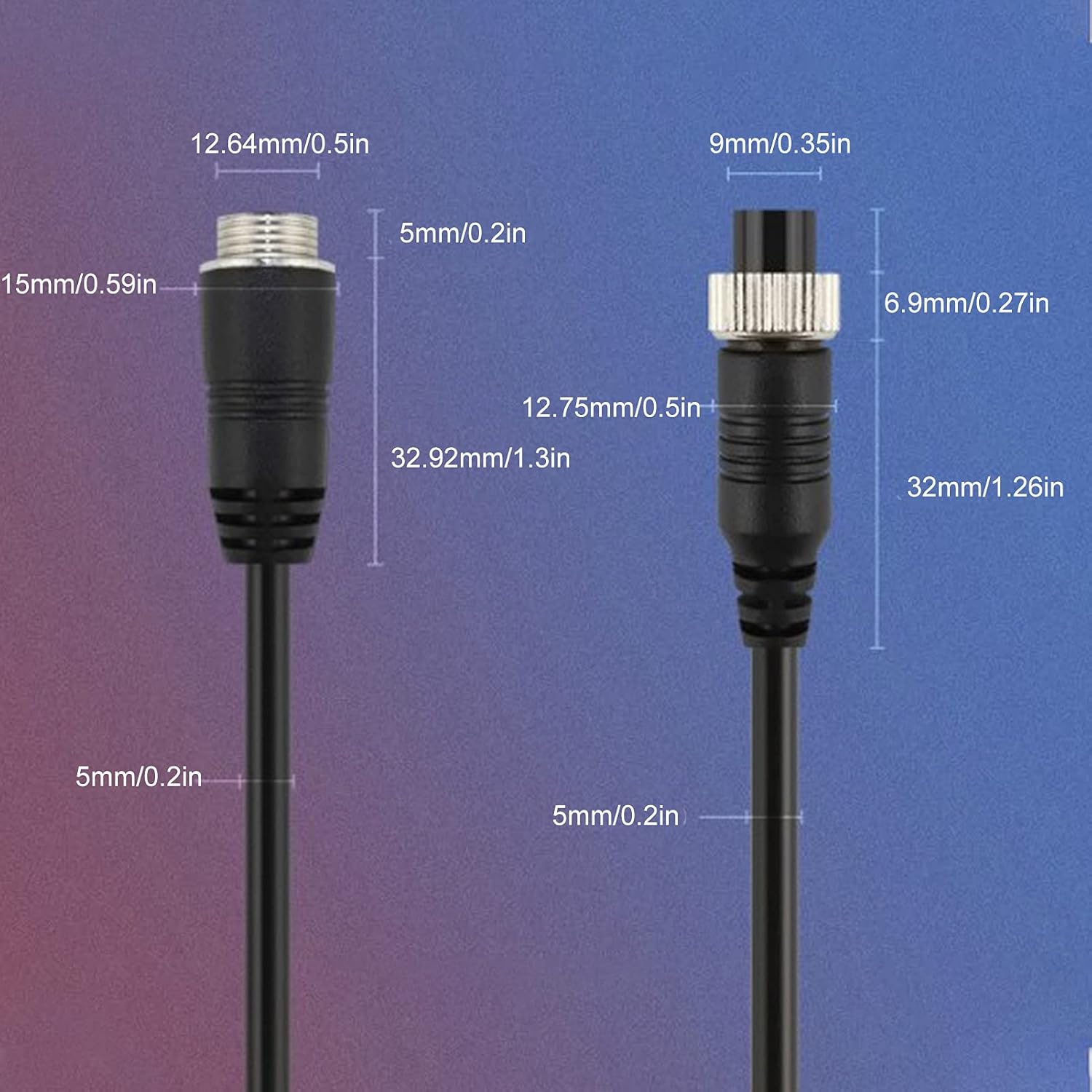
Image: Detailed view of the 4-pin male and female connectors, showing their dimensions for proper fit and connection. The male connector has an outer screw thread for secure fastening.

Image: This image illustrates key features of the cable, including the male screw design for stable connections, the copper wire core for optimal current, shielded copper wire and aluminum foil for strong anti-interference, and the high-quality PVC material for durability and flexibility.
Operating Instructions
Once installed, the Pilipane 4-Pin Dashcam Cable operates passively, facilitating the video and power transmission between your camera and monitor. No specific user interaction is required for the cable itself.
- Ensure all connected devices (dashcam, rear-view camera, monitor) are powered on according to their respective manuals.
- Verify that the video feed from your camera is displayed correctly on your monitor.
- The cable is designed for continuous operation in various vehicle environments, including cars, trucks, and buses.

Image: This image demonstrates the broad compatibility of the Pilipane 4-pin dashcam cable, suitable for use in various vehicles such as cars, trucks, and buses, highlighting its versatility for different surveillance needs.

Image: The cable is shown in the foreground, with a background depicting an interior view of a bus with a mounted surveillance camera. This illustrates the cable's application in connecting vehicle camera systems for monitoring purposes.
Maintenance
The Pilipane 4-Pin Dashcam Cable requires minimal maintenance to ensure its longevity and optimal performance.
- Cleaning: Periodically wipe the cable and connectors with a soft, dry cloth to remove dust or dirt. Avoid using harsh chemicals or abrasive materials.
- Inspection: Regularly inspect the cable for any signs of wear, cuts, kinks, or damage to the PVC insulation or connectors.
- Connection Check: Ensure the screw connections on the 4-pin connectors remain tight to prevent signal loss or intermittent connectivity.
- Storage: If the cable is removed for storage, coil it loosely to prevent kinking and store it in a dry, cool place away from direct sunlight and extreme temperatures.
Troubleshooting
If you encounter issues with your Pilipane 4-Pin Dashcam Cable, consider the following troubleshooting steps:
| Problem | Possible Cause | Solution |
|---|---|---|
| No video signal or black screen | Loose connection, incorrect port, damaged cable, power issue with camera/monitor. | Ensure both ends of the cable are securely connected and the screw collars are tightened. Verify the cable is plugged into the correct input/output ports. Check power supply to camera and monitor. Inspect cable for visible damage. |
| Flickering or distorted video | Interference, loose connection, damaged cable, incompatible device. | Tighten connections. Ensure the cable is not routed near strong electromagnetic interference sources. While the cable has anti-interference shielding, severe external interference can still affect signal quality. Test with another cable if possible to rule out device issues. |
| Cable does not fit | Incorrect connector type, incompatible device. | Verify that your camera and monitor use 4-pin aviation connectors. This cable is specifically designed for 4-pin connections. |
If problems persist after following these steps, consult the manuals for your camera and monitor devices or contact Pilipane customer support.
Warranty and Support
For information regarding warranty coverage, returns, or technical support for your Pilipane 4-Pin Dashcam Cable, please refer to the purchase documentation or contact the seller directly. Pilipane is committed to providing reliable products and customer assistance.
You can visit the official Pilipane store on Amazon for more information: Pilipane Store
Ask a question about this manual
Ask about setup, troubleshooting, compatibility, parts, safety, or missing instructions. Manuals+ will review the question and use this page’s manual context to help answer it.