
Introduction
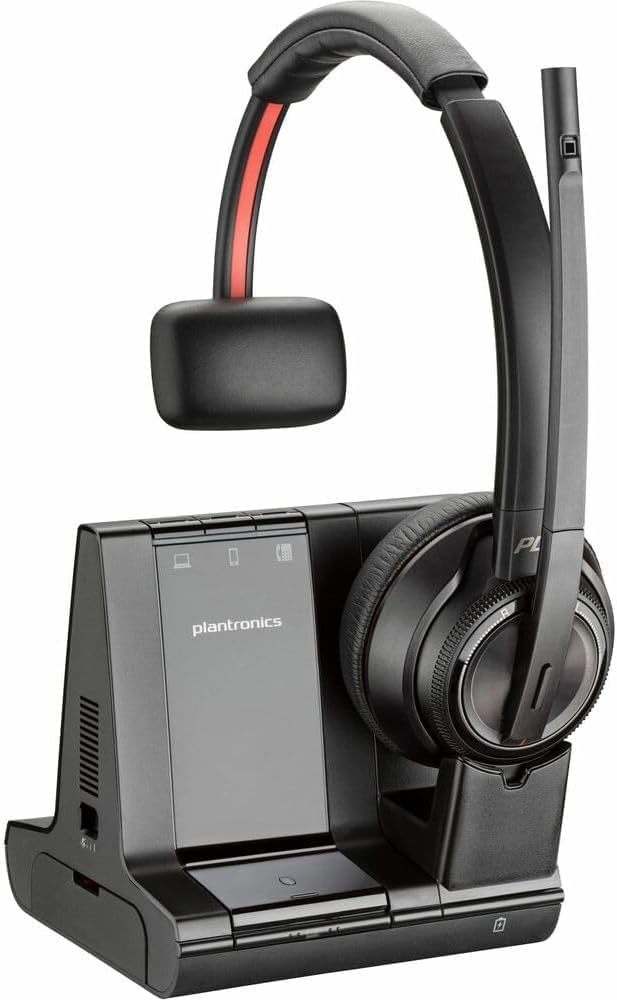
The Poly Savi 8200 Office 8210 Headset is designed for hybrid workers, offering wireless freedom and superior audio clarity. This headset integrates long-range DECT™ technology with USB plug-and-play convenience, ensuring secure, private, and clear conversations. It is built for comfort and productivity in both home and office environments.
Product Overview
The Poly Savi 8210 headset provides exceptional sound quality and comfort for extended use. Its design focuses on minimizing distractions and maximizing concentration during calls and meetings.

Key Features
- Superior Sound: Provides exceptional quality sound with greater immersion and Hi-fi stereo audio.
- Active Noise Canceling (ANC): Tunes out nearby noise for enhanced concentration.
- Noise-Canceling Microphone: Features close conversation limiting to ensure your voice is heard clearly.
- Flexible Microphone Boom: Allows for optimal positioning.
- Wireless Freedom: Utilizes DECT™ 6.0 technology for long-range mobility up to 137 m/450 ft (line of sight).
- Multi-Device Connectivity: Plug-and-play to PC/Mac via universal USB D400 adapter, and compatible with mobile and desk phones.
- Intuitive Controls: Dedicated mute, call answer/end, and volume controls on the headset.
- Comfortable Design: Over-the-head earpiece shape with soft ear-cups for all-day wear.
- SoundGuard DIGITAL: Sound leveling and acoustic limiting for hearing protection.
- Long Battery Life: Up to 13 hours talk time and 50 hours standby time.
Setup & Connectivity
The Poly Savi 8210 headset offers versatile connectivity options to seamlessly integrate into your workflow.
- Base Unit Connection: Connect the headset base unit to your PC/Mac via the universal USB D400 adapter. The base also supports 3-way connectivity for computer, desk phone, and mobile devices.
- Headset Pairing: The headset is typically pre-paired with its base. If re-pairing is needed, follow the instructions in the full user guide.
- Bluetooth Connectivity: For mobile devices, enable Bluetooth on your device and pair with the headset.
- Wireless Range: Enjoy a wireless range of up to 450 ft (line of sight) with DECT™ 6.0 technology.
Operating Instructions
Utilize the headset's intuitive controls for efficient call management.
- Call Controls: Use the dedicated buttons on the earcup to answer/end calls and adjust volume.
- Mute Function: A dedicated mute button allows for quick muting and unmuting of the microphone.
- Microphone Positioning: Adjust the flexible microphone boom for optimal voice pickup.
- Wearing Style: The headset features an over-the-head design for comfortable wear.
Charging and Battery
Ensure your headset is always ready for use with proper charging practices.
- Charging: Place the headset on its charging base. The base connects via USB to a power source.
- Battery Life: The headset provides up to 13 hours of talk time and up to 50 hours of standby time on a full charge.
- Charging Time: A full charge typically takes 3 hours. The 490mAh lithium-ion polymer battery is rechargeable and replaceable.
Maintenance
To ensure longevity and optimal performance of your Poly Savi 8210 headset, follow these general maintenance guidelines:
- Cleaning: Regularly wipe the headset and base with a soft, dry cloth. Avoid using harsh chemicals or abrasive materials.
- Storage: When not in use, store the headset on its charging base or in a protective case to prevent damage.
- Battery Care: Avoid fully discharging the battery frequently. Charge the headset regularly to maintain battery health.
- Environmental Conditions: Keep the headset away from extreme temperatures, humidity, and direct sunlight.
Troubleshooting
If you encounter issues with your Poly Savi 8210 headset, try the following basic troubleshooting steps:
- No Audio/Poor Audio: Ensure the headset is properly connected to the base and your device. Check volume settings on both the headset and your connected device.
- Connectivity Issues: Verify that the USB D400 adapter is securely plugged into your computer. For Bluetooth, ensure the headset is paired and within range of your mobile device.
- Charging Problems: Confirm the charging base is powered and the headset is correctly seated on the base. Check the charging cable for any damage.
- Microphone Not Working: Ensure the microphone boom is positioned correctly and not muted. Check microphone settings on your connected device.
- Interference: Move away from other wireless devices or large metal objects that might cause interference.
Specifications
| Feature | Detail |
|---|---|
| Model Name | Savi 8200 Office |
| Item Model Number | 8210 |
| Brand | POLY |
| Noise Control | Active Noise Cancellation |
| Frequency Response | 20 Hz-20 kHz |
| Connectivity Technology | Wireless |
| Wireless Communication Technology | Bluetooth / DECT 6.0 |
| Bluetooth Version | 4.2 |
| Wireless Range | Up to 450 ft (line of sight) |
| Compatible Devices | Most softphone applications, PCs, laptops, Macs with USB-A ports |
| Control Type | Voice Control |
| Item Weight | 4 ounces |
| Product Dimensions | 9.7 x 8.2 x 8.8 inches |
| Battery Life (Talk Time) | Up to 13 hours |
| Battery Life (Standby) | Up to 50 hours |
| UPC | 197497168921 |
Official Product Video
Warranty and Support
For warranty information, technical support, or further assistance with your Poly Savi 8200 Office 8210 Headset, please refer to the official Poly website or contact their customer service. Keep your purchase receipt for warranty claims.


