
Pilipane Pilipanei48c1096mr-14
Contents
Instruction Manual
Pilipane 4 Pin Car Camera Cable
Model: Pilipanei48c1096mr-14
1. Product Overview
The Pilipane 4 Pin Car Camera Cable is a high-quality extension cord designed to provide a stable and reliable connection for various camera devices in automobiles, trailers, and buses. This cable is engineered to minimize interference and ensure clear video transmission, making it an essential component for vehicle monitoring systems.

Figure 1: The Pilipane 4 Pin Car Camera Cable, coiled for storage and transport. This cable features robust 4-pin connectors at each end, designed for secure and stable connections in vehicle camera systems.
2. Key Features
- Reliable Vehicle Camera Connection: Features a male screw design for enhanced stability and a copper wire core for optimal current strength, ensuring a dependable connection for seamless camera monitoring in automobiles, trailers, and buses.
- Anti-Interference Technology: Equipped with shielded copper wire and aluminum foil to provide strong anti-interference capabilities, resulting in more stable video transmissions and clear, uninterrupted monitoring.
- Durable and Portable Design: Constructed from high-quality PVC material, designed to withstand bending without cracking. Its compact, lightweight, and portable nature makes it easy to carry and convenient for various camera setups.
- Easy Installation and Universal Compatibility: User-friendly design allows for straightforward installation. Universally compatible with a wide range of camera connection devices, making it suitable for auto, truck, and bus monitoring systems.
- Versatile Application Scenarios: Ideal for enhancing vehicle safety with backup cameras or expanding monitoring capabilities across diverse scenarios, including auto, truck, and bus applications.

Figure 2: Key features of the cable, highlighting the male screw design for stable connections, copper wire core for current integrity, shielded construction for anti-interference, and high-quality PVC material for durability.
3. Setup and Installation
The Pilipane 4 Pin Car Camera Cable is designed for straightforward installation. Follow these general guidelines for connecting your camera system:
- Identify Connectors: Locate the 4-pin male and female connectors on your camera and monitor/DVR system. The cable features a male screw design on one end and a female connector on the other.
- Connect Securely: Align the 4-pin male connector of the cable with the corresponding female port on your camera or video source. Gently push and then twist the screw collar to secure the connection firmly.
- Extend to Monitor: Connect the other end of the cable (female connector) to the 4-pin male port on your monitor, DVR, or display unit. Ensure a snug fit.
- Route Cable Safely: Route the cable along a path that avoids sharp edges, moving parts, and excessive heat. Use cable ties or clips to secure it in place and prevent tangling or damage.
- Test Connection: Once connected, power on your camera and monitor system to verify that the video signal is being transmitted clearly and without interruption.
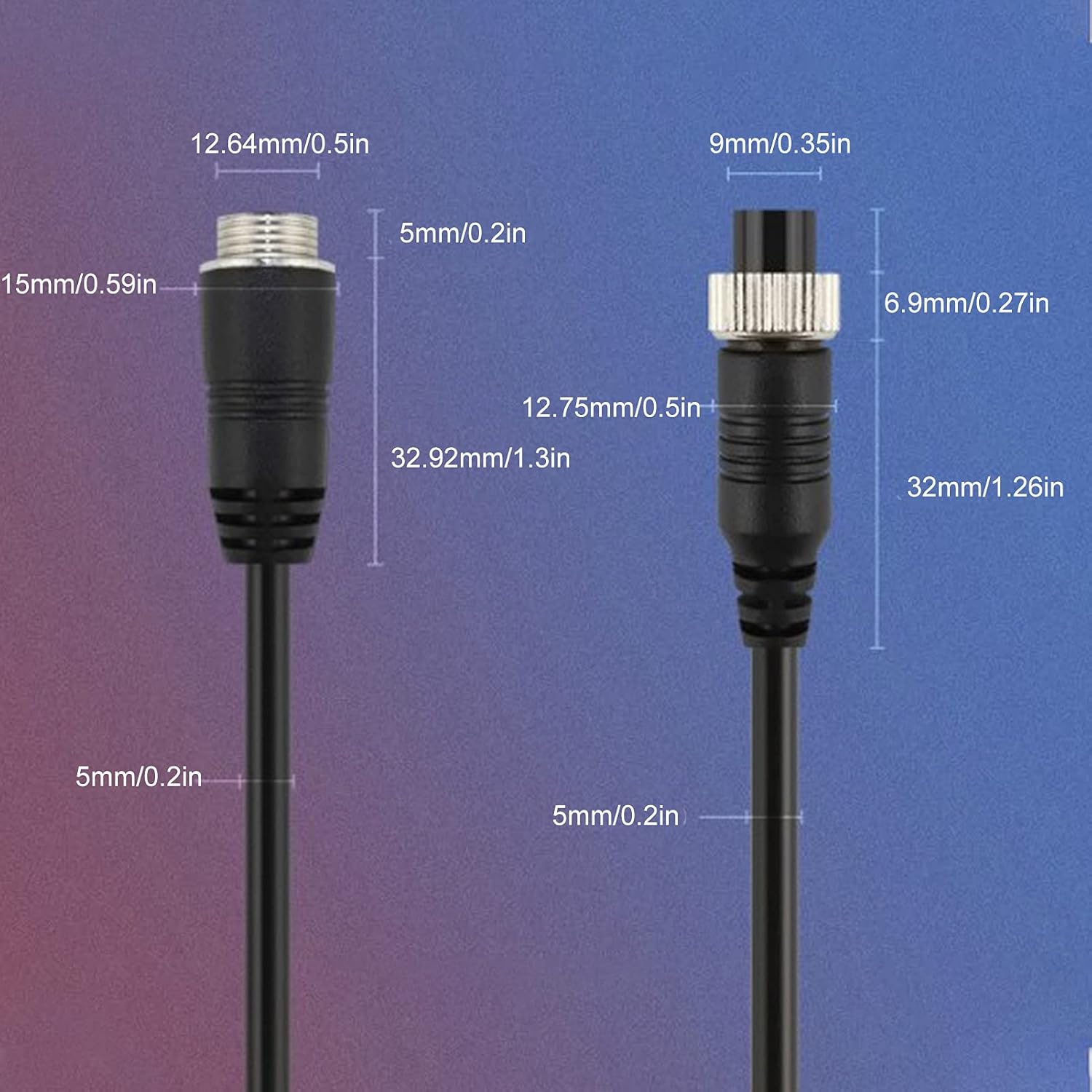
Figure 3: Detailed dimensions of the 4-pin male and female connectors, illustrating their precise design for secure and compatible connections with various vehicle camera systems.
4. Operating Instructions
As an extension cable, the Pilipane 4 Pin Car Camera Cable operates passively by transmitting video and power signals between your camera and display unit. Proper "operation" primarily involves ensuring a secure and stable connection.
- Verify Connection: Always ensure that both ends of the cable are securely fastened to their respective ports. A loose connection can lead to signal loss or intermittent video.
- Monitor Video Feed: Once connected, observe your monitor for a clear and stable video feed. The anti-interference design of this cable helps maintain signal integrity even in electrically noisy environments.
- Avoid Excessive Bending: While the cable is designed to be durable and resistant to bending, avoid sharp or extreme bends that could stress the internal wiring over time.

Figure 4: The cable's versatility in various vehicle applications, including cars, trucks, and buses, demonstrating its broad compatibility for different monitoring needs.
5. Maintenance
The Pilipane 4 Pin Car Camera Cable requires minimal maintenance due to its robust construction. Adhering to these simple practices will ensure its longevity and optimal performance:
- Regular Inspection: Periodically inspect the cable for any signs of wear, cuts, or damage to the PVC outer jacket. Check the connectors for corrosion or bent pins.
- Cleaning: If the cable becomes dirty, wipe it gently with a soft, damp cloth. Avoid using harsh chemicals or abrasive cleaners that could damage the PVC material.
- Proper Storage: When not in use, coil the cable loosely and store it in a dry, cool place away from direct sunlight and extreme temperatures. Avoid tightly winding or kinking the cable.
- Protect Connectors: Keep the connectors clean and free of dust or debris. If disconnecting for extended periods, consider using protective caps if available.
6. Troubleshooting
If you experience issues with your Pilipane 4 Pin Car Camera Cable, consider the following troubleshooting steps:
| Problem | Possible Cause | Solution |
|---|---|---|
| No video signal / Black screen | Loose connection; Damaged cable; Incorrect port connection; Camera/monitor power issue. | Ensure both ends of the cable are securely connected. Inspect the cable for visible damage. Verify the cable is connected to the correct 4-pin input/output ports. Check power supply to camera and monitor. |
| Flickering or distorted video | Partial connection; Electromagnetic interference; Damaged cable. | Tighten all connections. While the cable has anti-interference features, ensure it's routed away from strong electrical sources if possible. Inspect cable for internal damage. |
| Poor image quality | Dirty connectors; Cable length too long for signal strength (unlikely with this cable); Camera/monitor issue. | Clean connectors with a soft, dry cloth. Verify camera and monitor settings. |
If troubleshooting steps do not resolve the issue, please contact customer support for further assistance.
7. Specifications
| Attribute | Detail |
|---|---|
| Item Type | 4Pin Car Monitor Cable |
| Brand | Pilipane |
| Model Number | Pilipanei48c1096mr-14 |
| Material | PVC |
| Cable Outer Diameter | Approx. 4.5mm / 0.2in |
| Connector Type | 4 Pin ATX (Male screw design) |
| Special Feature | Lightweight, Anti-interference (shielded copper wire and aluminum foil) |
| Compatible Devices | Various camera devices in automobiles, trailers, and buses |
| Package Includes | 1 x Car Monitor Cable |
| Country of Origin | China |
| Item Weight | Approx. 0.11 Kilograms (3.87 ounces) |
| Available Lengths (Example) | 5m/16.4ft, 10m/32.8ft, 15m/49.2ft, 20m/65.6ft (This specific product is 20M) |

Figure 5: The Pilipane 4 Pin Car Camera Cable shown in an application context, illustrating various available lengths to suit different installation requirements.
8. Warranty and Support
For information regarding product warranty, returns, or technical support, please refer to the purchase documentation or contact the seller directly. Keep your proof of purchase for any warranty claims.
Manufacturer: Pilipane
Contact: Please visit the official Pilipane store on Amazon or the retailer's website where the product was purchased for contact information.
Amazon Store Link: Pilipane Store
Ask a question about this manual
Ask about setup, troubleshooting, compatibility, parts, safety, or missing instructions. Manuals+ will review the question and use this page’s manual context to help answer it.