
1. Introduction
The NJTY T03B is a versatile non-contact voltage tester designed for safe and efficient electrical assessment. It features advanced NCV detection, voice broadcast alerts, dual sensitivity modes, and an integrated LED flashlight, making it an essential tool for identifying live/hot wires, detecting circuit breaks, and troubleshooting electrical issues.

Figure 1: NJTY T03B Non-Contact Voltage Tester
2. Safety Information
Always prioritize safety when working with electrical systems. Read and understand all instructions before using this device. Failure to follow safety guidelines may result in electric shock, fire, or personal injury.
- Do not use the tester if it appears damaged or is not operating correctly.
- Ensure batteries are correctly installed before use.
- Always assume circuits are live until tested and confirmed safe.
- Wear appropriate personal protective equipment (PPE) when performing electrical work.
- This device is designed for voltage detection; it is not a substitute for proper lockout/tagout procedures.
3. Setup
3.1. Battery Installation
- Locate the battery compartment cover on the rear of the device.
- Slide or unclip the cover to open the compartment.
- Insert two AAA batteries, ensuring correct polarity (+/-).
- Replace the battery compartment cover securely.
3.2. Power On/Off
- To power on: Press and hold the power button (usually marked with a power symbol) until the device activates.
- To power off: Press and hold the power button again. The device also features an automatic shutdown after 5 minutes of inactivity to conserve energy.
4. Operating Instructions
4.1. Sensitivity Adjustment
The T03B offers two sensitivity modes for varied testing environments:
- High Sensitivity (12V-1000V): Suitable for detecting lower voltages or when a broader detection range is needed.
- Low Sensitivity (48V-1000V): Ideal for higher voltage detection or to minimize false positives in noisy electrical environments.
To switch sensitivity: Press the 'H/L' button on the device to toggle between high and low sensitivity modes.

Figure 2: Adjusting Sensitivity on the T03B
4.2. Non-Contact Voltage (NCV) Detection
The NCV function allows for safe voltage detection without direct contact with conductors.
- Ensure the device is powered on.
- Bring the tip of the tester close to the wire, outlet, or electrical component you wish to test.
- The device will emit an audible alarm and flash its red indicator light if voltage is detected. The voice broadcast feature will announce the presence of voltage.

Figure 3: NCV Detection with Voice Broadcast
4.3. Live/Hot Wire and Neutral Line Identification
The T03B can differentiate between live/hot wires and neutral lines:
- Live/Hot Wire: When detecting a high voltage electric field or live wire, the tester issues a "High voltage electric field, live wire" alert and flashes red.
- Neutral Line: When detecting a low voltage or neutral field, it promptly alerts with a "caution, low voltage field" voice warning and yellow blinking lights.
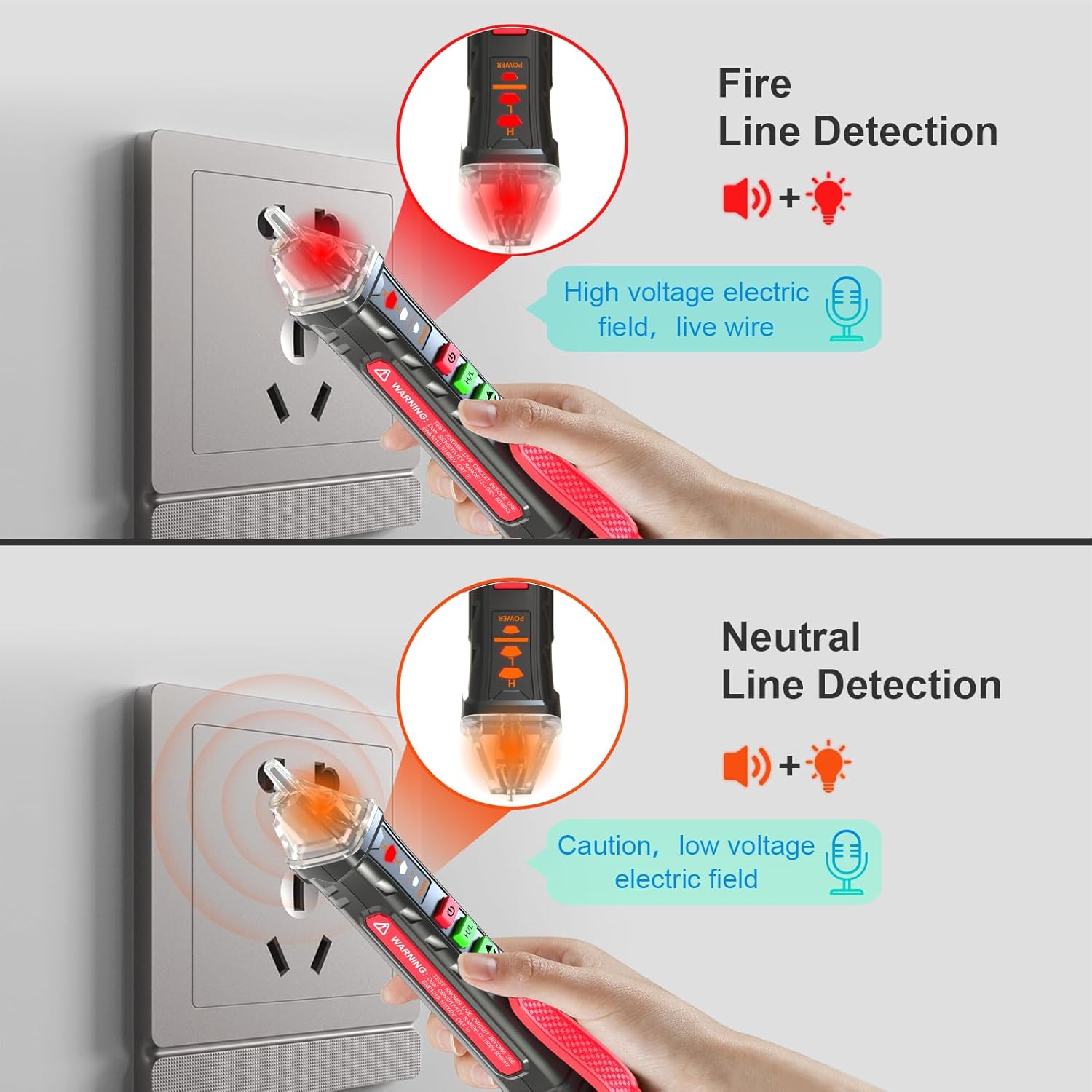
Figure 4: Identifying a Fire Line

Figure 5: Identifying a Neutral Line
4.4. Wire Breakpoint Finder
This feature helps locate breaks in insulated wires:
- Move the tester along the length of the insulated wire.
- The device will indicate voltage up to the point of the break. The absence of a signal beyond a certain point indicates a break in the wire.

Figure 6: Performing a Wire Breakpoint Test
4.5. LED Flashlight
The integrated LED flashlight assists in working in dimly lit areas.
- To activate the flashlight: Press the flashlight button (usually marked with a light bulb symbol).
- To deactivate: Press the flashlight button again.

Figure 7: Using the LED Flashlight
5. Maintenance
5.1. Cleaning
Wipe the device with a dry, clean cloth. Do not use abrasive cleaners or solvents.
5.2. Storage
Store the tester in a cool, dry place away from direct sunlight and extreme temperatures. Remove batteries if storing for extended periods to prevent leakage.
6. Troubleshooting
- Device not powering on: Check battery installation and ensure batteries are not depleted. Replace if necessary.
- Inconsistent readings: Ensure the sensitivity mode is appropriate for the testing environment. Avoid strong electromagnetic interference.
- No voice broadcast: Check if the voice feature is enabled (if applicable) or if the speaker is obstructed.
7. Specifications
| Feature | Specification |
|---|---|
| Product Dimensions | 16.48 x 2.29 x 2.9 cm; 68 g |
| Brand | NJTY |
| Power Source | Battery Powered (2x AAA) |
| Style | T03B |
| Color | Red |
| Min. Operating Voltage | 12 Volts |
| Maximum Operating Voltage | 1000 Volts |
| Upper Temperature Rating | 50 Degrees Celsius |
| Measurement Type | Voltmeter |
8. Warranty and Support
The NJTY T03B Non-Contact Voltage Tester comes with a Five-Year Warranty. This warranty covers free returns and exchanges for up to five years from the date of purchase. For support or warranty claims, please contact NJTY customer service.


