
1. Introduction
Thank you for purchasing the TESSAN USB Type-C Power Strip. This compact and versatile power strip is designed to provide convenient power access and charging for multiple devices simultaneously. It features 3 AC outlets, 2 USB-A ports, and 2 USB-C ports, making it an ideal solution for home, office, or travel within Japan.
Important: This product is designed for use in Japan only. Do not use it outside of Japan.
2. Product Features
- 7-in-1 Power Solution: Equipped with 3 AC outlets, 2 USB-A ports, and 2 USB-C ports, allowing you to power and charge up to 7 devices simultaneously.
- Compact and Lightweight Design: Measuring approximately 72x55x28mm and weighing about 120g, this power strip is small enough to fit in your hand and is highly portable for travel or business trips. Its thin design ensures a stable fit when plugged into a wall outlet.
- Smart USB Charging: The USB-A ports provide 5V-2.4A output when used alone, and the USB-C ports provide 5V-3A output when used alone. These ports are suitable for charging smartphones, tablets, and other electronic devices.
- Multi-directional AC Outlets: The 3 AC outlets are distributed on three different sides, preventing larger adapters from blocking adjacent outlets, ensuring all ports can be used efficiently.
- Enhanced Safety Features: Constructed from heat-resistant ABS 94V0 material, capable of withstanding up to 750°C to prevent electrical fires. Features an insulation cap on the 2-pin AC plug to prevent tracking. Includes surge protection to safeguard connected devices from lightning strikes and power surges.
- Versatile Application: With a total maximum output of 1500W, it is suitable for various indoor environments such as living rooms, kitchens, bedrooms, and offices.

Image: The TESSAN power strip connected to a wall outlet, simultaneously charging a laptop, smartphone, tablet, and smartwatch using its AC, USB-A, and USB-C ports.
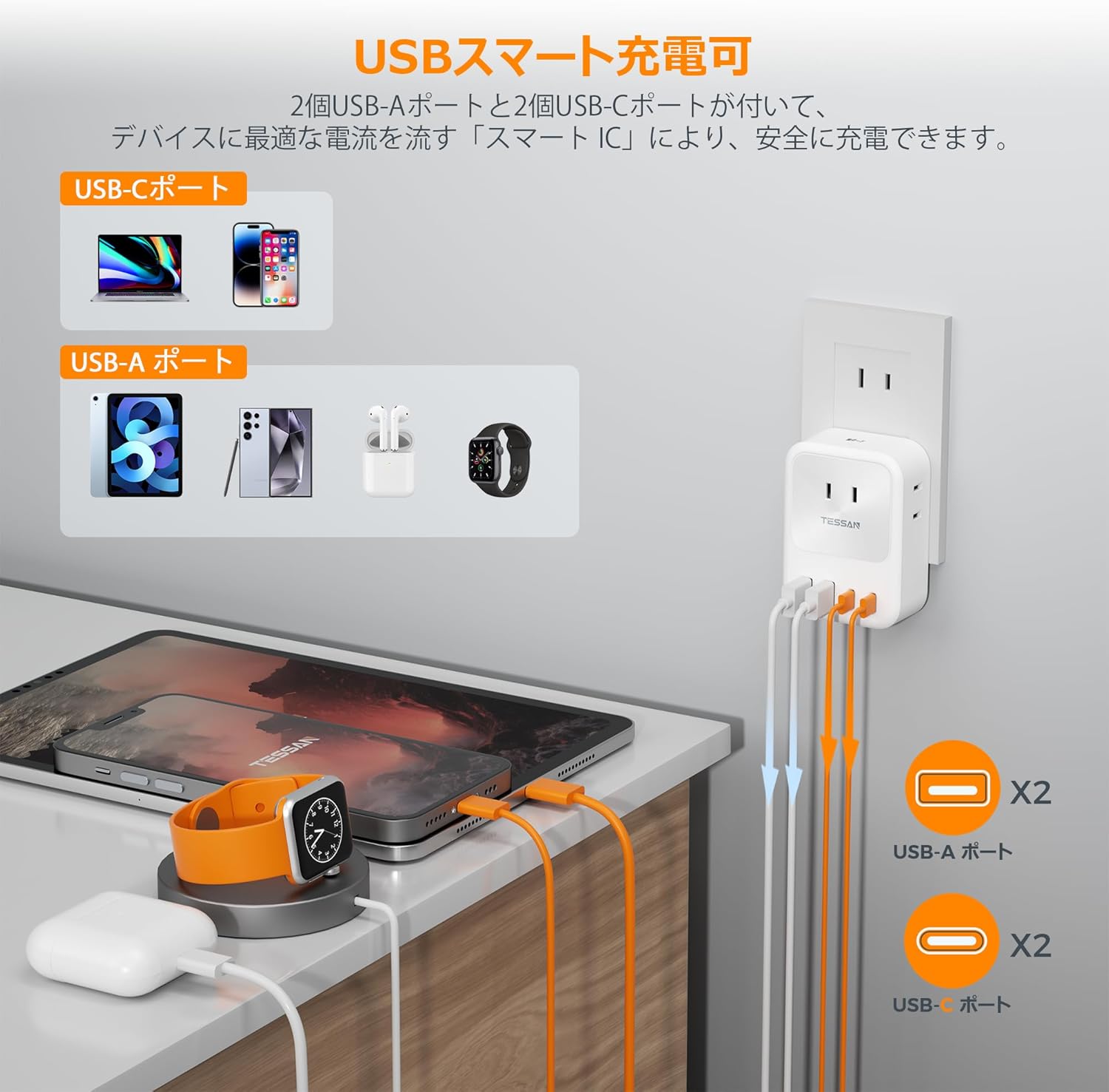
Image: A visual representation of the smart charging feature, illustrating how USB-A and USB-C ports deliver optimal current to various devices like smartphones, tablets, and wearables.
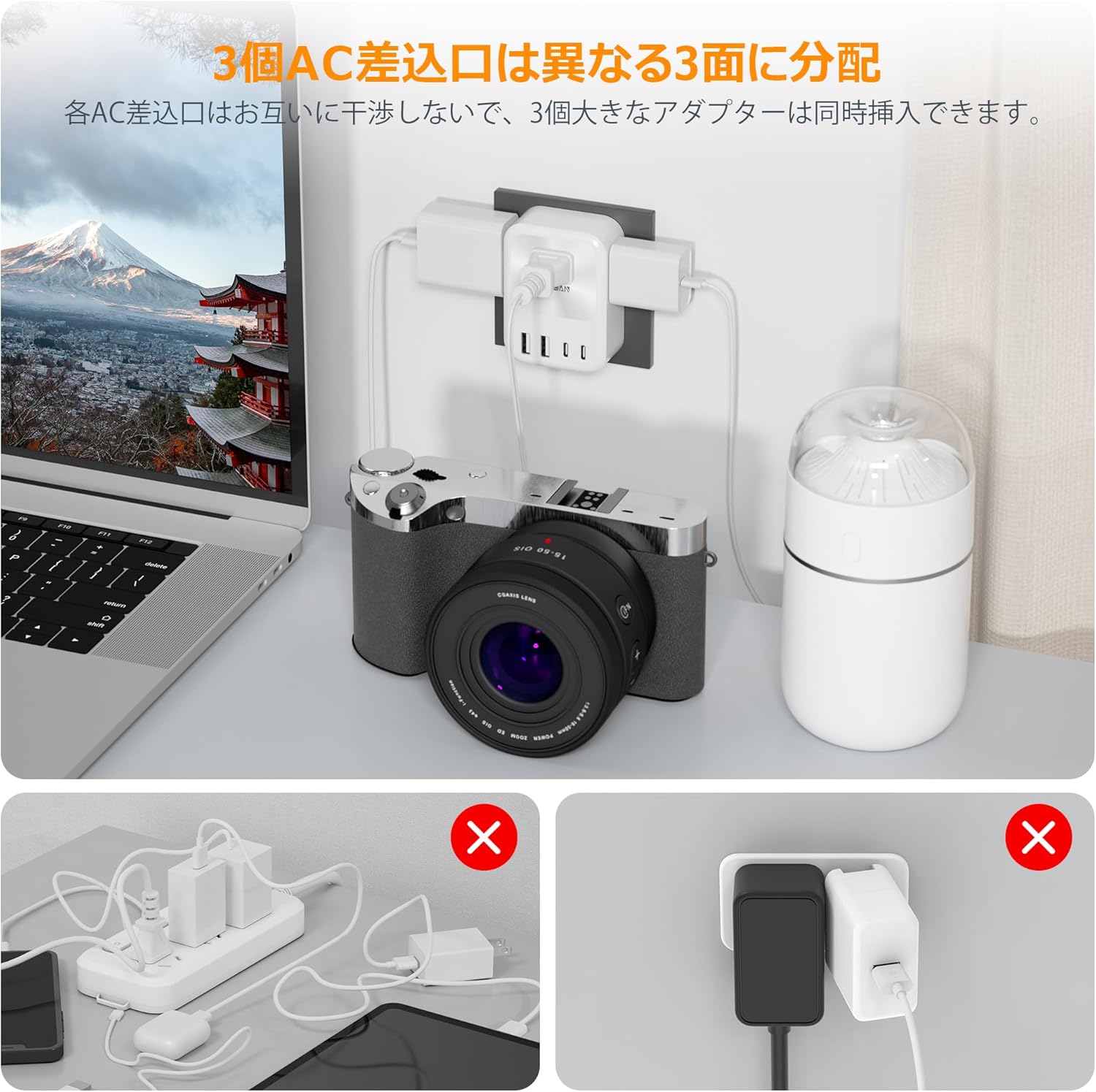
Image: The power strip plugged into a wall, with three AC adapters connected to its side-facing outlets, demonstrating how the design prevents blockage of adjacent ports. Below are examples of poor power strip usage.
3. Safety Instructions
To ensure safe operation and prevent damage to the product or connected devices, please adhere to the following safety guidelines:
- Indoor Use Only: This power strip is designed for indoor use in dry locations only. Do not use it outdoors or in wet environments.
- Japan Use Only: This product is specifically designed for the Japanese power standard (100V). Do not use it in countries with different voltage standards.
- Avoid Overloading: Do not exceed the maximum total power output of 1500W. Overloading can cause overheating and potential fire hazards.
- Proper Insertion: Ensure the power strip is fully inserted into a wall outlet. A loose connection can generate heat.
- Keep Away from Water: Do not expose the power strip to water or other liquids.
- Children and Pets: Keep the power strip out of reach of children and pets.
- Do Not Disassemble: Do not attempt to disassemble, repair, or modify the unit. This will void the warranty and may pose a safety risk.
- Inspect Regularly: Periodically inspect the power strip for any signs of damage, such as frayed cords or loose connections. Discontinue use if damage is found.

Image: The TESSAN power strip highlighting its comprehensive safety features, including protection against overcurrent, overheating, overvoltage, short circuits, overload, and overcharging. An insulation cap on the plug is also shown.
4. Setup
- Unpack: Carefully remove the power strip from its packaging.
- Inspect: Check the device for any visible damage. If damaged, do not use and contact customer support.
- Plug In: Insert the power strip's plug firmly into a standard Japanese 2-pin wall outlet (100V). Ensure it is securely seated.
- Connect Devices: You can now connect your devices to the available AC outlets, USB-A ports, and USB-C ports.
5. Operating Instructions
Using the TESSAN USB Type-C Power Strip is straightforward:
- AC Outlets: Plug your AC-powered devices (e.g., laptop chargers, lamps, small appliances) into any of the three AC outlets. The multi-directional design allows for optimal use of space.
- USB-A Ports: Connect your USB-A compatible devices (e.g., older smartphones, smartwatches, power banks) using their respective USB-A cables.
- USB-C Ports: Connect your USB-C compatible devices (e.g., newer smartphones, tablets, certain laptops) using their respective USB-C cables.
- Simultaneous Use: You can use all 3 AC outlets, 2 USB-A ports, and 2 USB-C ports concurrently, provided the total power consumption does not exceed 1500W.
6. Maintenance
To ensure the longevity and optimal performance of your power strip:
- Cleaning: Disconnect the power strip from the wall outlet before cleaning. Use a dry, soft cloth to wipe the surface. Do not use liquid cleaners or abrasive materials.
- Storage: When not in use for extended periods, unplug the power strip and store it in a cool, dry place away from direct sunlight and moisture.
- Avoid Physical Damage: Do not drop, crush, or expose the power strip to strong impacts.
7. Troubleshooting
If you encounter issues with your TESSAN power strip, please refer to the following common solutions:
- No Power to Devices:
- Ensure the power strip is firmly plugged into a working wall outlet.
- Check if the total power consumption of connected devices exceeds 1500W. Unplug some devices if overloaded.
- Verify that the connected devices are properly plugged into the power strip and are functioning correctly.
- Slow Charging via USB Ports:
- Ensure you are using appropriate charging cables for your devices.
- Some devices may require higher power input than the USB ports can provide, especially if multiple devices are charging simultaneously.
- Check if the device's battery is severely depleted, which can sometimes lead to slower initial charging.
- Power Strip Feels Warm:
- It is normal for the power strip to feel slightly warm during operation, especially when charging multiple devices.
- If it feels excessively hot or emits a burning smell, immediately unplug it from the wall outlet and discontinue use. Contact customer support.
If the problem persists after trying these steps, please contact TESSAN customer support.
8. Specifications
| Feature | Specification |
|---|---|
| Model Number | TS-726-2C |
| Brand | TESSAN |
| Color | White |
| AC Outlets | 3 |
| USB-A Ports | 2 |
| USB-C Ports | 2 |
| Total Power Output | Max 1500W |
| USB-A Output (single port) | 5V-2.4A |
| USB-C Output (single port) | 5V-3A |
| Dimensions | Approx. 8.6 x 6.9 x 5.2 cm |
| Weight | Approx. 120 g |
| Material | Heat-resistant ABS 94V0 |
| Plug Type | Type A - 2 pin (Japanese standard) |

Image: The TESSAN power strip shown next to a smartphone, illustrating its compact size and dimensions (80mm height, 58mm width, 30mm depth).
9. Warranty and Support
TESSAN is committed to providing high-quality products and customer satisfaction. While specific warranty details are not provided in this manual, please retain your proof of purchase for any warranty claims. For product support, technical assistance, or inquiries, please contact TESSAN customer service through the retailer where you purchased the product or visit the official TESSAN website.
We prioritize your peace of mind and the protection of your information, ensuring a secure and reliable experience with our products.