
Product Overview
The Pilipane 4 Pin Vehicle Camera Extension Cable is designed to provide a reliable and stable connection for various camera devices in automobiles, trailers, and buses. This cable features a male screw design for enhanced stability, a copper wire core for optimal current flow, and shielded copper wire with aluminum foil for strong anti-interference capabilities, ensuring clear and uninterrupted video transmission.
Constructed from high-quality PVC material, the cable is durable, flexible, and resistant to cracking, offering long-lasting performance. Its compact and lightweight design makes it easy to transport and use across different vehicle monitoring systems.

Image: The Pilipane 4 Pin Vehicle Camera Extension Cable, neatly coiled, showcasing its robust black PVC exterior and 4-pin connectors on both ends.
Setup and Installation
This 4 Pin Vehicle Monitor Cable is designed for user-friendly installation, suitable for both professionals and DIY enthusiasts. Its universal compatibility ensures seamless operation with various camera connection devices.
- Identify Connection Points: Locate the 4-pin male and female ports on your vehicle camera and monitor system.
- Connect the Cable: Align the male screw connector of the Pilipane cable with the female port on your camera or monitor, and the female connector with the male port on the other device.
- Secure Connection: Gently push the connectors together until they are fully seated. The male screw design helps to secure the connection, preventing accidental disconnections.
- Route the Cable: Carefully route the cable along the vehicle's interior, ensuring it is not pinched, stretched, or exposed to excessive heat or sharp edges. Use cable ties or clips if necessary to keep it tidy and secure.
- Test System: After installation, power on your vehicle's monitoring system to verify that the camera feed is clear and stable.

Image: The Pilipane 4 Pin Vehicle Camera Extension Cable shown in an installation context within a bus, connecting a camera mounted on the ceiling.
Operating Principles
The Pilipane 4 Pin Vehicle Camera Extension Cable facilitates the transmission of video signals and power between your vehicle's camera and monitor. Its core functionality relies on several key design elements:
- Stable Connection: The male screw design ensures a firm and stable physical connection, minimizing signal loss due to vibrations or movement common in vehicles.
- Optimal Current Flow: The copper wire core maintains optimal current power, which is crucial for consistent camera operation and clear video output.
- Interference Prevention: Equipped with shielded copper wire and aluminum foil, the cable effectively blocks electromagnetic interference (EMI) and radio frequency interference (RFI). This advanced shielding technology ensures a more stable video transmission, providing a clear and uninterrupted view of your vehicle's surroundings.
This cable is ideal for enhancing the safety of your vehicle with a rearview camera or expanding your monitoring capabilities in various scenarios, including automobiles, trucks, and buses.

Image: The Pilipane 4 Pin Vehicle Camera Extension Cable displayed alongside illustrations of a car, truck, and bus, highlighting its versatile application across different vehicle types.
Maintenance
Proper maintenance of your Pilipane 4 Pin Vehicle Camera Extension Cable will ensure its longevity and continued reliable performance.
- Regular Inspection: Periodically inspect the cable for any signs of wear, such as cuts, abrasions, or kinks, especially at the connection points and along its routed path.
- Cleanliness: Keep the connectors free from dust, dirt, and moisture. Use a soft, dry cloth to gently wipe the connectors if needed. Avoid using harsh chemicals or abrasive materials.
- Avoid Extreme Conditions: While the PVC material is durable, avoid exposing the cable to extreme temperatures (both hot and cold) or direct sunlight for prolonged periods, as this can degrade the material over time.
- Proper Handling: When disconnecting, always grasp the connector housing, not the cable itself, to prevent damage to the internal wiring. Avoid sharp bends or excessive pulling on the cable.
- Secure Routing: Ensure the cable remains securely routed within the vehicle to prevent it from being snagged, stepped on, or otherwise damaged during vehicle operation or passenger movement.
Troubleshooting
If you encounter issues with your Pilipane 4 Pin Vehicle Camera Extension Cable, consider the following troubleshooting steps:
- No Video Signal or Intermittent Signal:
- Check both ends of the cable to ensure they are securely connected to the camera and monitor. Re-seat the connectors firmly.
- Inspect the cable for any visible damage (cuts, severe kinks, exposed wires). A damaged cable may need replacement.
- Ensure the camera and monitor are receiving adequate power.
- Test the system with a different cable if available, to rule out the cable as the source of the problem.
- Poor Video Quality (Flickering, Static, Distorted Image):
- While the cable has anti-interference properties, ensure it is routed away from major electrical components or power lines within the vehicle that could generate strong electromagnetic interference.
- Verify that the camera and monitor settings are correctly configured.
- Clean the connectors to ensure good contact.
- Product Damage Warning: If you find the product damaged, deformed, or exhibiting abnormal performance, immediately stop using it and contact the seller or manufacturer for assistance.
Specifications
| Feature | Detail |
|---|---|
| Item Type | 4Pin Vehicle Monitor Cable |
| Brand | Pilipane |
| Material | PVC |
| Cable Outer Diameter | Approx. 4.5 mm / 0.2 inch |
| Length (Model) | 10M (32.8 ft) |
| ASIN | B0CRRP9PY7 |
| Weight | 0.11 Kilogram |
| Batteries Required | No |
| Compatible Devices | Universal (for car, truck, bus camera/monitor systems) |
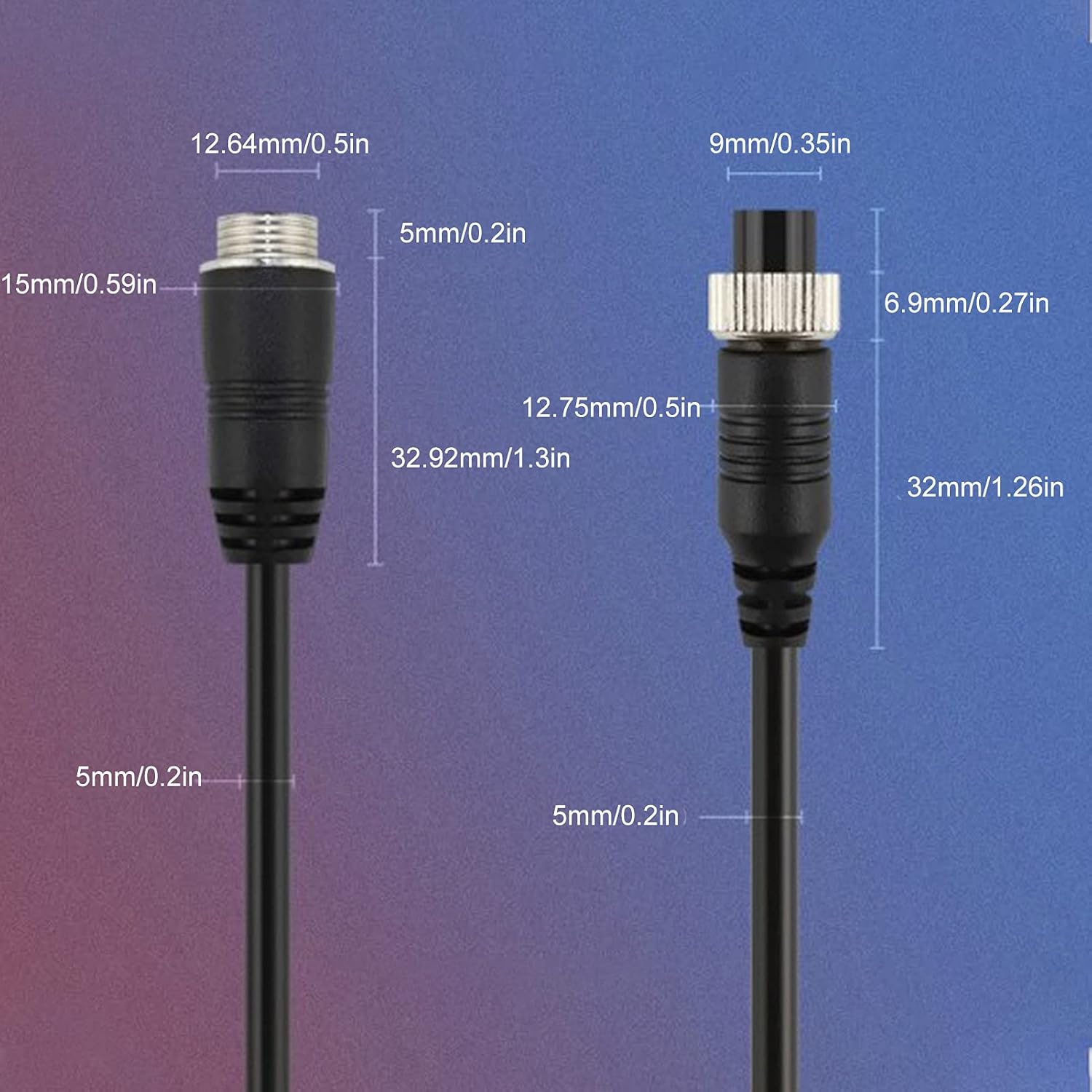
Image: A technical diagram illustrating the precise dimensions of the male and female 4-pin connectors of the cable, including outer diameter and pin length.
Warranty and Support
Specific warranty details for the Pilipane 4 Pin Vehicle Camera Extension Cable are not provided in this manual. For information regarding warranty coverage, claims, or technical support, please contact the seller or manufacturer directly through the platform where the product was purchased.
For general inquiries or assistance, refer to the contact information provided by Pilipane or the authorized retailer.