
Overview
This manual provides instructions for the proper use and care of your Phomemo M832 Portable Printer Case. Designed to protect your portable thermal printer and its accessories, this hard shell case ensures durability and convenience for business, office, home, and travel use.
Product Features
- Compatibility: Designed for Phomemo M832, M833, M834, M835, M836 Portable Printers, also compatible with Jadens Travel Wireless Printer and Munbyn ITP01 thermal Printer.
- Internal Dimensions: 10.55" x 3.46" x 3.46" inches (268 mm x 88 mm x 88 mm).
- Storage Capacity: Accommodates 1 printer, 2 rolls of paper, 1 power cord, and 1 charging head.
- Protective Construction: Made of high-quality hard EVA material with a soft fleece interior to protect against damage, knocks, and drops.
- Durability: Waterproof, dust-proof, and crush-resistant.
- Portability: Features a sturdy hand strap and smooth zipper for easy transport.
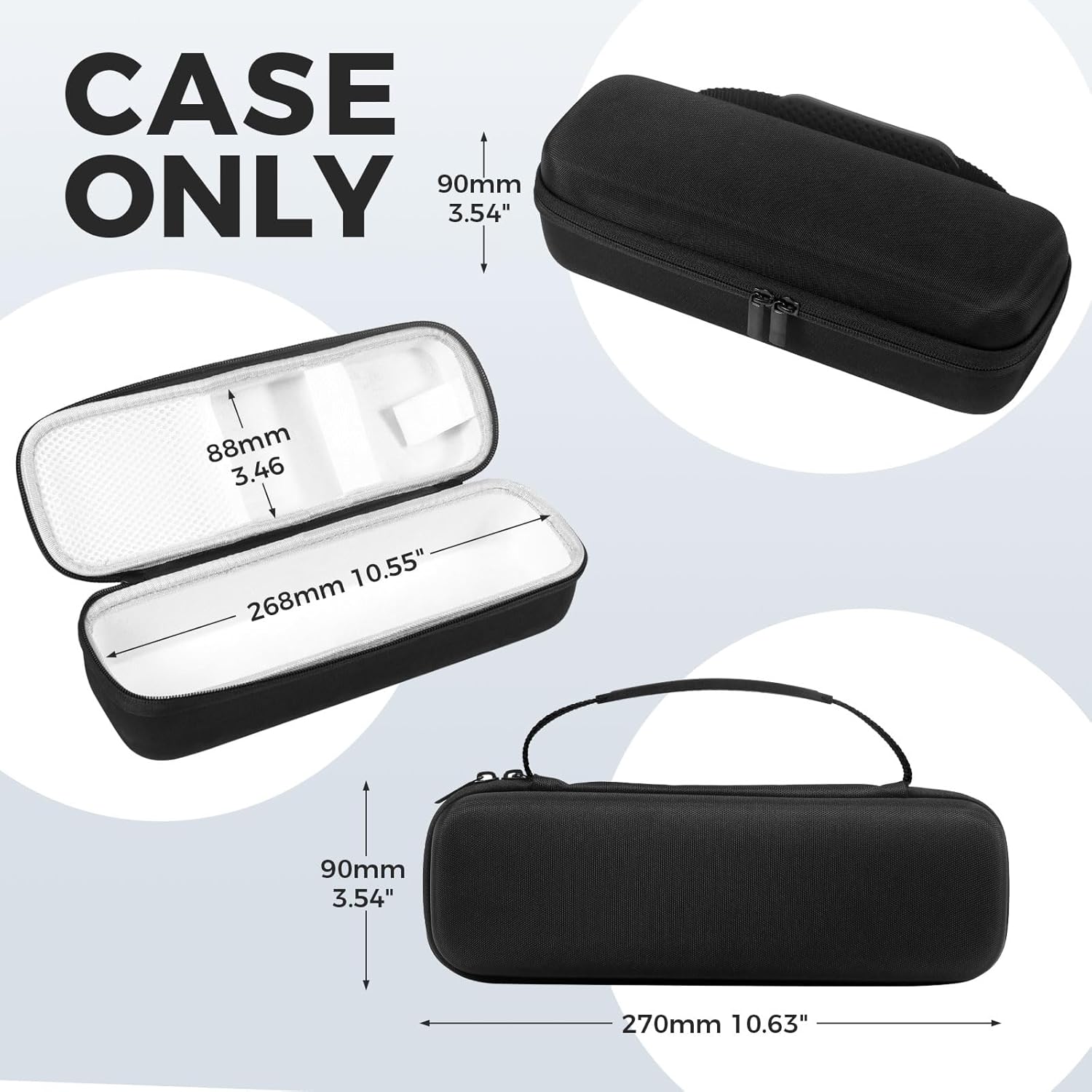
Image: Exterior view of the Phomemo M832 Portable Printer Case, highlighting its dimensions: 270mm (10.63") length, 90mm (3.54") width, and 90mm (3.54") height.

Image: Interior view of the Phomemo M832 Portable Printer Case, showing compartments for a printer, USB cable, and roll paper, along with anti-scratch lining.
Setup Instructions
1. Unpacking
Carefully unpack the Phomemo M832 Portable Printer Case. Inspect for any damage.
2. Placing Your Printer
Open the case using the smooth zipper. Place your compatible portable printer (e.g., Phomemo M832, M833, M834, M835, M836) into the main compartment. Ensure it fits snugly within the internal dimensions of 10.55" x 3.46" x 3.46" inches.

Image: Detailed view of the case interior, showing a mesh pocket for paper storage, a soft divider, and the hard shell construction, designed to securely hold the printer and accessories.
3. Organizing Accessories
Utilize the inner mesh pocket and durable elastic straps to secure up to two rolls of thermal paper, your power cord, and charging head. This prevents items from shifting during transport.

Image: Comparison showing the organized storage of a printer and labels within the Phomemo case versus a messy, unorganized setup without the case.
Operating Instructions
1. Opening and Closing the Case
To open, simply pull the dual zippers apart. To close, ensure all items are securely placed inside and zip the case completely. The smooth zipper ensures effortless operation.
2. Carrying the Case
Use the sturdy hand strap for easy carrying. The compact design allows the case to be placed inside backpacks, suitcases, or other travel bags.

Image: A person walking while easily carrying the Phomemo M832 Portable Printer Case by its sturdy handle, demonstrating its portability.
3. Protection Features
The hard shell exterior and soft fleece interior provide protection against impacts, drops, and scratches. The waterproof, dust-proof, and crush-resistant properties safeguard your printer in various environments.

Image: Visual representation of the case's durability, illustrating its waterproof, drop-resistant, and shockproof capabilities with water droplets and cracked ground effects.
Maintenance
1. Cleaning
Wipe the exterior of the case with a damp cloth as needed. For the interior, use a soft, dry cloth to remove any dust or debris. Avoid harsh chemicals or abrasive cleaners.
2. Storage
Store the case in a cool, dry place away from direct sunlight and extreme temperatures to maintain its material integrity.
Troubleshooting
1. Printer Does Not Fit
Verify your printer model is compatible with the Phomemo M832 case. Check the internal dimensions (10.55" x 3.46" x 3.46" inches) against your printer's measurements.
2. Accessories Not Secure
Ensure all accessories are properly placed within the mesh pocket and secured by the elastic straps.
Product Specifications
| Feature | Detail |
|---|---|
| Product Dimensions | 10.55 x 3.46 x 3.46 inches |
| Item Weight | 7.4 ounces |
| Manufacturer | Phomemo |
| ASIN | B0CRQJHQWM |
| Date First Available | January 7, 2024 |
Warranty & Support
For after-sales service, please contact Phomemo support:
- Email: support@phomemo.com
- WhatsApp: +86 15338193665
- Tel: +1 855 957 5321 (Toll Free)
- Office Hours: Mon-Fri 9AM-5PM (EST)
For additional resources and FAQs, please visit the official Phomemo website.
Video Guide
Phomemo M08F Quick Start Guide
This video provides a quick start guide for the Phomemo M08F printer, demonstrating basic operations such as checking accessories, removing protective paper, turning on the printer, feeding thermal paper, and connecting to the Phomemo app. While specific to the M08F printer, the general handling and setup principles can be useful for understanding how to interact with Phomemo portable printers and their accessories like this case.


