
Introduction
This manual provides detailed instructions for the operation and maintenance of your PINDOWS PDS-643 Analog-Digital Sports Watch. Please read this manual thoroughly to ensure proper use and to maximize the lifespan of your watch.
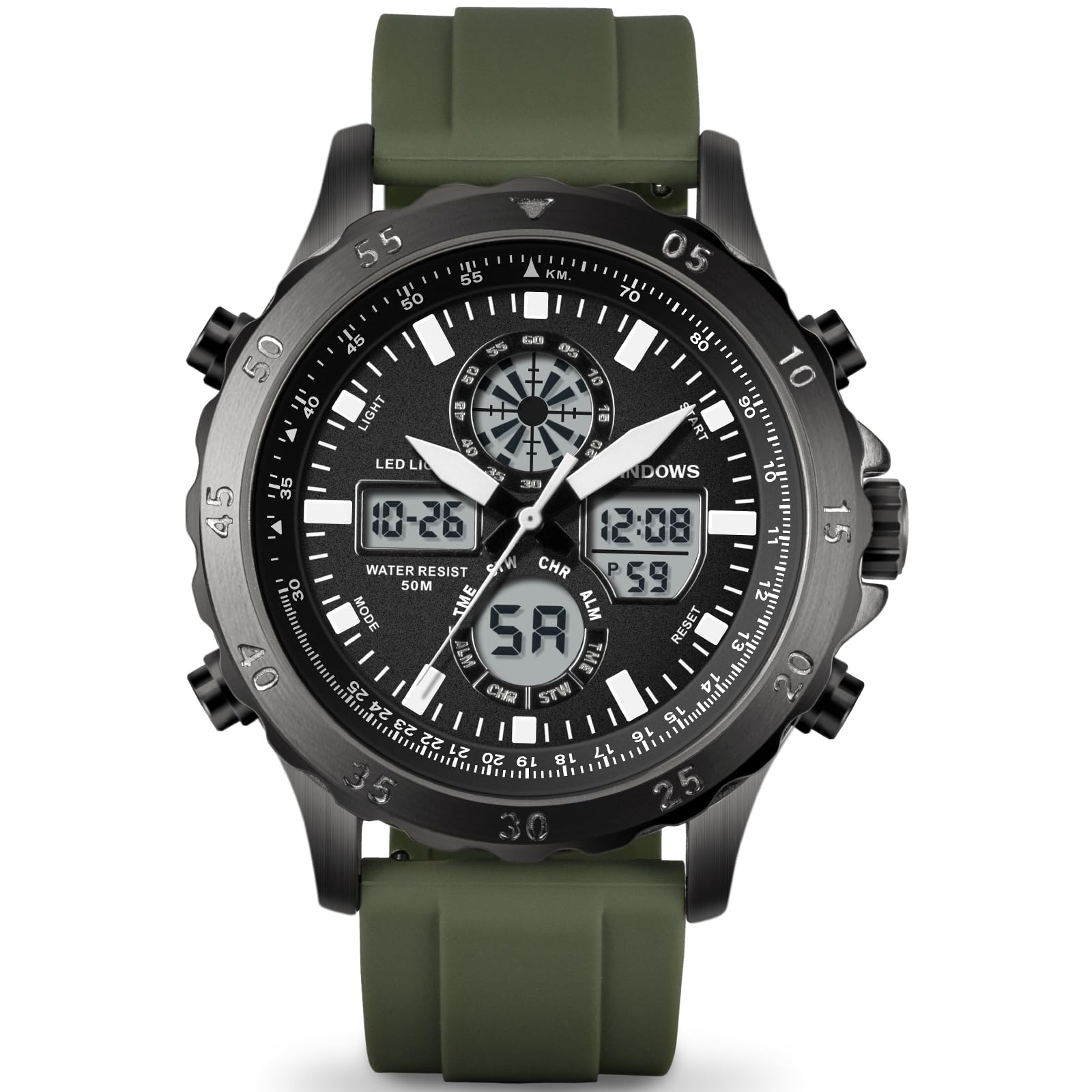
Figure 1: Front view of the PINDOWS PDS-643 watch with a green strap.
Watch Components
Familiarize yourself with the main components and buttons of your PINDOWS PDS-643 watch:

Figure 2: Diagram illustrating the watch buttons (Light, Start/Pause, Mode, Adjustment) and key dimensions.
- Light Button: Activates the LED backlight.
- Start/Pause Button: Used for starting/stopping the stopwatch and adjusting settings.
- Mode Button: Cycles through different watch modes (Time, Alarm, Stopwatch).
- Adjustment Button: Used for resetting the stopwatch and confirming settings.
- Crown: Used for setting the analog time.
Setup and Initial Configuration
Setting Analog Time
- Pull the crown out to the first position.
- Turn the crown to adjust the analog hands to the correct time.
- Push the crown back in to secure the setting.
Setting Digital Time and Date
- Press the Mode Button repeatedly until the digital time display starts flashing, indicating adjustment mode.
- Use the Start/Pause Button to cycle through the settings (seconds, minutes, hours, date, month, day of week).
- Use the Adjustment Button to change the value of the flashing item.
- Once all settings are correct, press the Mode Button again to exit adjustment mode.
Operating Instructions
Using the Stopwatch
- Press the Mode Button until "STW" (Stopwatch) appears on the digital display.
- Press the Start/Pause Button to start the stopwatch.
- Press the Start/Pause Button again to pause the stopwatch.
- To resume, press the Start/Pause Button.
- To reset the stopwatch to zero, press the Adjustment Button while the stopwatch is paused.
Setting and Using the Alarm
- Press the Mode Button until "ALM" (Alarm) appears on the digital display.
- Press the Start/Pause Button to select the hour or minute setting.
- Use the Adjustment Button to set the desired alarm time.
- Press the Mode Button to confirm and exit.
- To activate/deactivate the alarm, press the Start/Pause Button and Adjustment Button simultaneously in alarm mode. An alarm icon will appear/disappear.
LED Backlight
Press the Light Button to illuminate the digital display for visibility in low-light conditions. The backlight will remain active for a few seconds.

Figure 3: The watch display with the LED backlight activated for improved visibility.
Hourly Chime
The watch can be set to chime every hour. To activate or deactivate this feature, press the Mode Button to enter time display mode, then press the Adjustment Button and Start/Pause Button simultaneously. A chime icon will indicate activation.
Maintenance and Care
Water Resistance (50 Meters)
Your PINDOWS PDS-643 watch is water-resistant up to 50 meters (5 ATM). This means it is suitable for daily use, splashes, rain, and short periods of recreational swimming. It is not suitable for diving, snorkeling, or showering with hot water, as steam can penetrate the seals. Do not operate buttons while the watch is submerged.

Figure 4: The watch demonstrating its water resistance capabilities.
Battery Replacement
The watch is powered by one lithium metal battery. When the display dims or functions become erratic, it may be time to replace the battery. Battery replacement should ideally be performed by a qualified watch technician to ensure water resistance is maintained.
Cleaning
Clean your watch regularly with a soft, damp cloth. Avoid using harsh chemicals or abrasive materials that could damage the case or strap. For the silicone strap, mild soap and water can be used.
Troubleshooting
| Problem | Possible Cause | Solution |
|---|---|---|
| Digital display is blank or dim. | Low battery. | Replace the battery. |
| Analog hands are not moving. | Crown is pulled out; low battery. | Push the crown in; replace the battery. |
| Digital time is incorrect. | Time not set correctly. | Refer to "Setting Digital Time and Date" section. |
| Watch is not water resistant after battery change. | Seals improperly reinstalled. | Ensure battery replacement is done by a professional. |
Specifications
- Model Number: PDS-643
- Brand: PINDOWS
- Display Type: Analog-Digital
- Movement: Japanese Quartz
- Water Resistance: 50 Meters (5 ATM)
- Case Material: Steel Alloy
- Case Diameter: 46 mm
- Case Thickness: 16 mm
- Band Material: Silicone
- Band Length: 8.4 inches
- Clasp Type: Buckle
- Power Source: 1 Lithium Metal Battery (included)
- Special Features: LED Backlight, Alarm, Stopwatch, Calendar, Hourly Chime
- Product Dimensions: 7.7 x 3.9 x 10.9 cm
- Weight: 150 grams
- Country of Origin: China
Warranty and Support
PINDOWS offers a 12-month warranty for this product. In case of any questions or issues, please contact PINDOWS customer support. Additionally, a 30-day return policy is available for many products, subject to specific terms and conditions.
For further assistance, please refer to the official PINDOWS website or contact your retailer.