
Introduction
Thank you for choosing the PINDOWS PDS-643 Analog Digital Sport Watch. This manual provides detailed instructions for setting up, operating, and maintaining your watch. The PDS-643 features a Japanese quartz analog movement, digital display, LED backlight, alarm, stopwatch, calendar, and is water-resistant up to 50 meters.
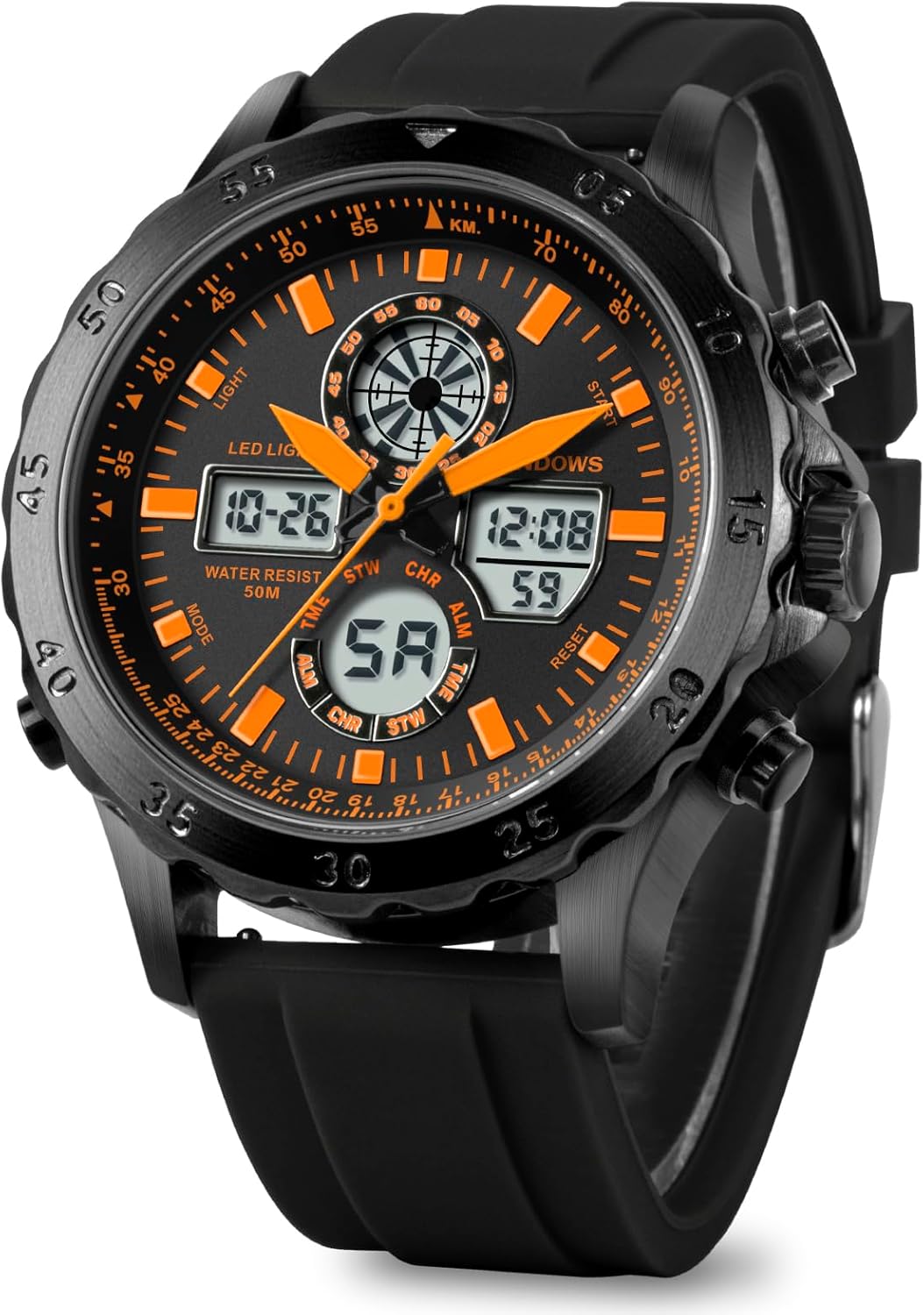
Figure 1: Front view of the PINDOWS PDS-643 watch. This image displays the watch face with both analog hands and digital readouts, highlighting the 'LIGHT', 'MODE', 'START', and 'RESET' buttons.
Watch Components
- A (Top Left): LIGHT Button - Activates the LED backlight.
- B (Bottom Left): MODE Button - Cycles through different modes (Time, Alarm, Stopwatch).
- C (Top Right): START/STOP Button - Used to start/stop functions in stopwatch mode or adjust settings.
- D (Bottom Right): RESET Button - Used to reset functions or confirm settings.
- E (Center Right): Crown - Used for setting analog time.

Figure 2: Side view of the PINDOWS PDS-643 watch. This image clearly shows the placement of the four control buttons and the crown on the side of the watch case.
Setup
Battery Information
The watch comes with one Lithium Metal battery pre-installed. No initial battery installation is required. If the display dims or functions become erratic, the battery may need replacement by a qualified technician.
Setting Analog Time
- Pull out the crown (E) located on the right side of the watch.
- Rotate the crown to adjust the analog hands to the desired time.
- Push the crown back in to start the analog timekeeping.
Setting Digital Time and Date
- From the normal time display mode, press the MODE button (B) repeatedly until the digital time display starts flashing, indicating it is in setting mode.
- Press the RESET button (D) to cycle through the setting options (seconds, hour, minute, month, date, day of week, 12/24 hour format).
- Use the START/STOP button (C) to increase the flashing value.
- Once all settings are adjusted, press the MODE button (B) to exit the setting mode and return to the normal time display.
Operating Instructions
LED Backlight
Press the LIGHT button (A) to illuminate the digital display for a few seconds, allowing for visibility in low-light conditions.
Alarm Function
- Press the MODE button (B) until the alarm time is displayed.
- Press the RESET button (D) to select the hour or minute setting.
- Use the START/STOP button (C) to adjust the flashing value.
- Press the MODE button (B) to exit the alarm setting mode.
- To turn the alarm ON/OFF, press the START/STOP button (C) while in alarm display mode. An alarm icon will appear/disappear.
Stopwatch Function
- Press the MODE button (B) until the stopwatch display appears (usually showing 00:00:00).
- Press the START/STOP button (C) to start the stopwatch.
- Press the START/STOP button (C) again to pause the stopwatch.
- Press the RESET button (D) to reset the stopwatch to zero.
- To resume from a paused state, press the START/STOP button (C).
Hourly Chime
While in normal time display, press the RESET button (D) and MODE button (B) simultaneously to toggle the hourly chime ON/OFF. An icon will indicate its status.
Pedometer and Calorie Counter
This watch includes a pedometer and calorie counter. Specific instructions for activation and usage are not detailed in this manual. Please refer to the digital display for step counts and estimated calorie burn.
Maintenance
Cleaning Your Watch
Wipe the watch case and strap regularly with a soft, dry cloth. For stubborn dirt, a slightly damp cloth can be used, followed by drying. Avoid using chemical cleaners or solvents, as these can damage the watch's finish and seals.
Water Resistance
The PINDOWS PDS-643 watch is 50M (5 ATM) water-resistant. This means it is suitable for everyday use, including splashes, rain, and brief immersion in water like swimming or cold bathing. Important: Do not press any buttons or operate the crown while the watch is submerged in water, as this can compromise the water resistance and lead to internal damage. Avoid hot water exposure (e.g., hot showers, saunas) as temperature changes can affect the seals.

Figure 3: Back view of the PINDOWS PDS-643 watch. The stainless steel case back is visible, engraved with the model number PDS-643 and 'WATER RESIST 50M'.
Troubleshooting
- Digital Display is Blank or Dim:
Check battery. If the battery is low, the display may become dim or disappear. Replace the battery if necessary. - Incorrect Time Display (Digital):
Re-enter the time setting mode and adjust the digital time as per the 'Setting Digital Time and Date' section. - Incorrect Time Display (Analog):
Pull out the crown and manually adjust the analog hands to the correct time. - Buttons Not Responding:
Ensure the watch is not in a locked mode (if applicable, though not specified for this model). If the issue persists, a battery reset or professional inspection may be required. - Water Inside the Watch:
If moisture appears inside the watch, stop using it immediately and seek professional service. This indicates a breach in the water resistance.
Specifications
| Model Number | PDS-643 |
| Brand | PINDOWS |
| Display Type | Analog-Digital |
| Movement | Japanese Quartz |
| Case Material | Alloy Steel |
| Band Material | Silicone |
| Crystal Type | Mineral Glass |
| Case Diameter | 46 Millimeters |
| Case Thickness | 16 Millimeters |
| Band Width | 0.78 Inches |
| Band Length | 8.4 Inches |
| Water Resistance Depth | 50 Meters (5 ATM) |
| Power Source | Battery Powered (1 Lithium Metal battery included) |
| Additional Features | LED Backlight, Alarm, Stopwatch, Calendar, Pedometer, Calorie Counter |
Warranty and Support
Warranty Information
This PINDOWS watch is covered by a 12-month warranty service from the date of purchase. This warranty covers manufacturing defects under normal use. It does not cover damage resulting from misuse, accidents, unauthorized repairs, or normal wear and tear.
Customer Support
Should you have any questions, concerns, or require assistance with your PINDOWS PDS-643 watch, please contact our customer service team. We are committed to providing the best products and services.
For support, please refer to the contact information provided with your purchase or visit the official PINDOWS website.