
SMARTRAVEL DK400
SMARTRAVEL DK400 Electric Bike User Manual
Model: DK400
1. Introduction
This manual provides essential information for the safe assembly, operation, and maintenance of your SMARTRAVEL DK400 Electric Bike. Please read this manual thoroughly before your first ride to ensure proper usage and to maximize your riding experience. Retain this manual for future reference.
Safety Warnings
- Always wear a helmet and appropriate safety gear when riding.
- Familiarize yourself with local traffic laws and regulations.
- Perform a pre-ride safety check before each use.
- Do not operate the e-bike under the influence of alcohol or drugs.
- The SMARTRAVEL DK400 is UL2849 Certified for electrical safety.
2. Product Overview
The SMARTRAVEL DK400 is a robust electric bike designed for commuting and cross-country use, featuring a powerful motor, long-range battery, and dual suspension for a comfortable ride.
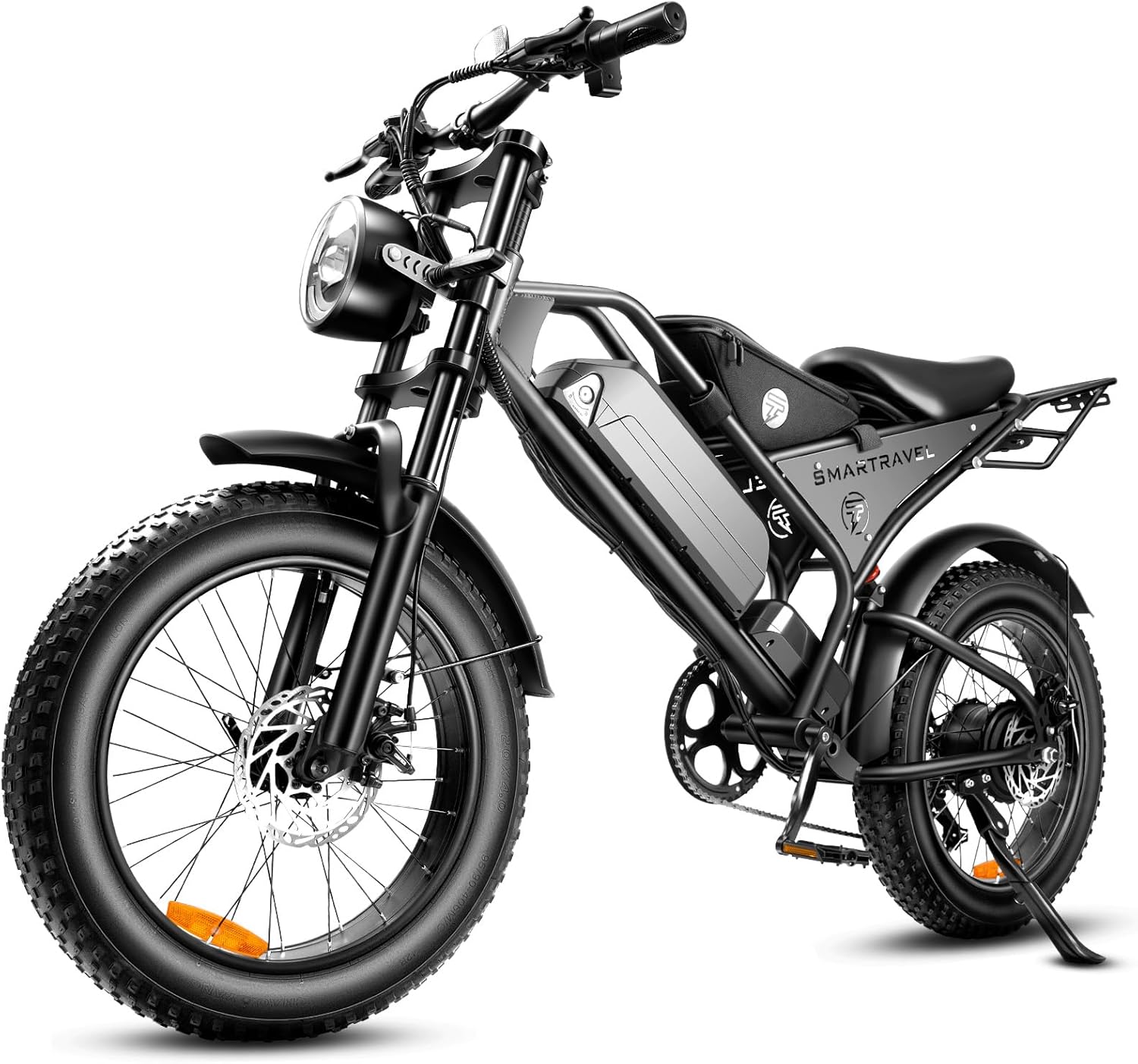
Figure 2.1: The SMARTRAVEL DK400 Electric Bike, showcasing its overall design with fat tires, front headlight, and integrated battery.
Key Components
- 1000W Brushless Motor: Provides powerful assistance for various terrains.
- 48V/15Ah Lithium-Ion Battery: Removable, offering extended range.
- Dual Mechanical Disc Brakes: Ensures reliable stopping power.
- Dual Suspension: Front and rear shock absorbers for improved comfort.
- Shimano 7-Speed Gear Shift: Allows for versatile pedaling.
- LCD Intelligent Display: Provides ride information and includes a USB charging port.
- 20-inch x 4.0 Fat Tires: Offers stability and traction on diverse surfaces.

Figure 2.2: Diagram highlighting key features such as the rear light, battery, display, headlight, front fork, motor, and brakes.
3. Setup and Assembly
Your SMARTRAVEL DK400 Electric Bike arrives approximately 85% pre-assembled. The following steps detail the final assembly required before your first ride.
Unboxing and Initial Inspection
- Carefully remove the bike and all components from the packaging.
- Check for any visible damage during transit.
- Verify all included components are present: Ebike, Rear Rack, Riding Bag, Battery Charger, Air Pump & Tools, Phone Holder.

Figure 3.1: Illustration of the components included in the SMARTRAVEL DK400 package: Ebike, Rear Rack, Riding Bag, Battery Charger, Air Pump & Tools, and Phone Holder.
Assembly Steps
- Install the Front Wheel: Securely attach the front wheel, ensuring the disc brake rotor is correctly aligned with the caliper.
- Attach the Front Fender: Mount the front fender above the front wheel.
- Install the Kickstand: Secure the kickstand to the designated mounting point.
- Mount the Handlebars: Position and tighten the handlebars, ensuring all controls are accessible and comfortable.
- Attach the Pedals: Note that pedals are typically marked 'L' for left and 'R' for right. Thread them carefully to avoid cross-threading.
- Install Rear Rack (Optional): If included, attach the rear rack according to the provided instructions.
Initial Battery Charging
Before your first ride, fully charge the battery. The battery can be charged while installed on the bike or removed for convenience.
- Connect the charger to the battery charging port.
- Plug the charger into a standard wall outlet.
- The charging indicator light on the charger will typically turn green when fully charged (5-8 hours).

Figure 3.2: The 48V/15Ah Lithium-Ion battery with BMS safety features, indicating its removable design and charging capabilities, offering 40-100 miles range and 4 hours fast charging.
Tire Pressure and Brake Adjustment
- Inflate tires to the recommended PSI (check sidewall of the tire for specific values).
- Pump the brake levers several times to ensure proper pressure and engagement of the mechanical disc brake system.
4. Operating Instructions
Understanding the various modes and controls of your DK400 will enhance your riding experience.
Controls Overview

Figure 4.1: Overview of the handlebar controls, including the LCD display, headlights, turn signals, horn, twist-grip throttle, and Shimano 7-speed shifter.
Powering On/Off
- To power on, press and hold the power button on the LCD display.
- To power off, press and hold the power button again.
Riding Modes
The DK400 offers three primary riding modes and five levels of pedal assistance:
- Pure Electric Mode (Throttle Only): Engage the twist-grip throttle for motor power without pedaling. Max speed up to 28+ MPH.
- Pedal Assist System (PAS) Mode: The motor provides assistance as you pedal. There are 5 levels of assistance, adjustable via the display. Higher levels provide more power. Range up to 45+ miles.
- Normal Bicycle Mode: Ride without any electrical assistance, using only pedal power.
- Walk Mode: Provides low-speed assistance for walking the bike.

Figure 4.2: Visual representation of the three riding modes and five electric modes, illustrating their application across various terrains.
Gear Shifting
Use the Shimano 7-speed gear shifter to adjust your pedaling effort according to terrain and desired speed. Shift gears smoothly while pedaling.
Braking
The DK400 is equipped with dual mechanical disc brakes. Apply both front and rear brakes simultaneously for effective and controlled stopping. The motor inhibitors will cut power to the motor when brakes are applied.

Figure 4.3: Diagram illustrating the effectiveness of 4-piston dual brakes compared to standard mechanical brakes, emphasizing sensitive braking and reduced hand fatigue.
Headlight and Turn Signals
Activate the powerful headlights for visibility during low-light conditions. Use the integrated turn signals to indicate your direction to others.
5. Maintenance
Regular maintenance ensures the longevity and safe operation of your SMARTRAVEL DK400 Electric Bike.
Battery Care
- Charge the battery fully after each ride, especially if it will be stored for an extended period.
- Avoid completely draining the battery.
- Store the battery in a cool, dry place, away from direct sunlight and extreme temperatures.
- If storing for long periods, charge the battery to 50-70% every 1-2 months.
Tire Maintenance
- Check tire pressure before each ride and inflate to the recommended PSI.
- Inspect tires for wear, cuts, or punctures regularly.
Brake System
- Regularly check brake pads for wear and replace them when necessary.
- Ensure brake levers provide firm and responsive braking. Adjust cables if braking feels spongy.
- Keep brake rotors clean and free of oil or grease.
General Cleaning and Inspection
- Clean the bike regularly with a damp cloth. Avoid high-pressure washing directly on electrical components.
- Inspect all bolts and fasteners for tightness.
- Lubricate the chain periodically.
- Check the suspension components for proper function and adjust as needed.

Figure 5.1: Close-up of the upgraded full suspension system, including the adjustable rear shock and lockable/adjustable front fork, designed to minimize bumps and enhance riding comfort.
6. Troubleshooting
This section addresses common issues you might encounter with your SMARTRAVEL DK400 Electric Bike.
| Problem | Possible Cause | Solution |
|---|---|---|
| Bike does not power on. | Battery not charged, battery not properly seated, power cable loose. | Ensure battery is fully charged and securely installed. Check all connections. |
| Motor not assisting or disengaging. | Low battery, brake levers engaged, sensor issue, loose motor connection. | Check battery level. Ensure brake levers are fully released. Inspect motor connections. |
| Brakes feel weak or spongy. | Worn brake pads, loose cables. | Inspect and replace brake pads. Adjust brake cables. |
| Unusual noises during operation. | Loose components, dry chain, brake rub, motor issue. | Check all fasteners. Lubricate chain. Inspect brake alignment. If motor noise persists, contact support. |
If you encounter issues not listed here or require further assistance, please contact SMARTRAVEL customer service.
7. Specifications
Detailed technical specifications for the SMARTRAVEL DK400 Electric Bike.
| Feature | Detail |
|---|---|
| Model Name | DK400 |
| Brand | SMARTRAVEL |
| Bike Type | Electric Bike, Cross Country Bike, Commuting Bike |
| Motor | 1000W (peak) Brushless Hub Motor |
| Battery | 48V/15Ah Li-Ion (720 Watt Hours) |
| Max Speed | 28+ MPH |
| Range (Pure Electric) | 26+ miles |
| Range (PAS Mode) | 45+ miles |
| Charging Time | 5-8 hours (with 7A Superfast Charger) |
| Frame Material | Carbon Steel |
| Wheel Size | 20 Inches |
| Tire Width | 4 Inches (Fat Tire) |
| Suspension Type | Dual (Front and Rear) |
| Brake Style | Dual Mechanical Disc Brakes |
| Gear Shifter | Shimano 7-Speed Trigger |
| Max Load Capacity | 330 Pounds |
| Item Weight | 68.2 pounds (31 Kilograms) |
| Product Dimensions | 72.05 x 25.2 x 40.55 inches |
| Special Features | Digital Display (with USB charging port), Dual Disc Brake, Dual Suspension, Headlight, Rechargeable, Front Turn Signal, Rear Rack |
| Certifications | UL2849 Certified |

Figure 7.1: Diagram illustrating the ergonomic design and key dimensions of the SMARTRAVEL DK400, including maximum load capacity and recommended rider height range.
8. Safety Guidelines
Adhering to these safety guidelines is crucial for your well-being and the proper functioning of your e-bike.
- Always wear a certified helmet and appropriate protective gear (gloves, eye protection).
- Perform a pre-ride check: inspect brakes, tires, battery, and all fasteners.
- Be aware of your surroundings and ride defensively.
- Do not exceed the maximum weight recommendation of 330 pounds.
- Avoid riding in adverse weather conditions or on excessively slippery surfaces.
- Ensure the battery is securely locked in place before riding.
- Do not modify the e-bike's electrical system or motor.
9. Warranty and Support
Warranty Information
The SMARTRAVEL DK400 Electric Bike comes with a limited warranty. Please refer to the warranty card included with your purchase for specific terms and conditions regarding coverage and duration. Keep your proof of purchase for warranty claims.
Customer Support
For any questions, technical assistance, or warranty claims, please contact SMARTRAVEL customer service. Our professional team members are available to assist you.
Contact information can typically be found on the SMARTRAVEL official website or on the packaging materials.
10. Official Product Videos
No official seller-created product videos were found with specific embedding instructions in the provided data. Please refer to the manufacturer's official channels for any available video guides or demonstrations.
Related documentsDK400


Ask a question about this manual
Ask about setup, troubleshooting, compatibility, parts, safety, or missing instructions. Manuals+ will review the question and use this page’s manual context to help answer it.