1. Introduction
The PATPET P Collar 920 is a professional-grade dog training collar designed for effective and humane training of dogs weighing 15 to 140 lbs. It features a 3/4 mile range, IPX7 waterproof rating, and supports training for up to two dogs simultaneously with its 2-channel system. The collar offers three distinct training modes: Tone, Vibration, and Static Shock, with adjustable intensity levels to suit your dog's temperament and training needs. Its long-lasting rechargeable battery ensures extended use for both indoor and outdoor training sessions.

Figure 1: PATPET P Collar 920 components including remote, collar, and storage case.
2. Setup Guide
2.1 Unboxing and Initial Charge
Upon receiving your PATPET P Collar 920, carefully unbox all components. Before first use, ensure both the remote transmitter and the receiver collar are fully charged. Use the provided charging cable and adapter. A full charge typically takes approximately two hours.

Figure 2: Remote and collar connected to the charger. Ensure full charge before first use.
2.2 Installing the Receiver
Attach the receiver unit to the collar strap. Ensure the contact points are securely fastened. For dogs with longer coats, longer contact points may be necessary to ensure proper skin contact.
Video 1: Detailed instructions on unboxing, initial charging, and installing the receiver collar. (Source: PATPET Seller)
3. Operating Modes
The PATPET P Collar 920 offers three primary training modes: Tone, Vibration, and Static Shock. Each mode can be activated via dedicated buttons on the remote transmitter.
- Tone Mode: Emits an audible beep. Ideal for initial warnings or positive reinforcement.
- Vibration Mode: Delivers a non-harmful vibration. Useful for getting your dog's attention or as a stronger warning.
- Static Shock Mode: Provides a static correction. This mode should be used responsibly and only when necessary, with the lowest effective level.
3.1 Adjusting Intensity Levels
The Vibration and Static Shock modes feature adjustable intensity levels (1-16) to customize the correction to your dog's sensitivity and the training situation. Use the '+' and '-' buttons on the remote to adjust the level displayed on the LCD screen.
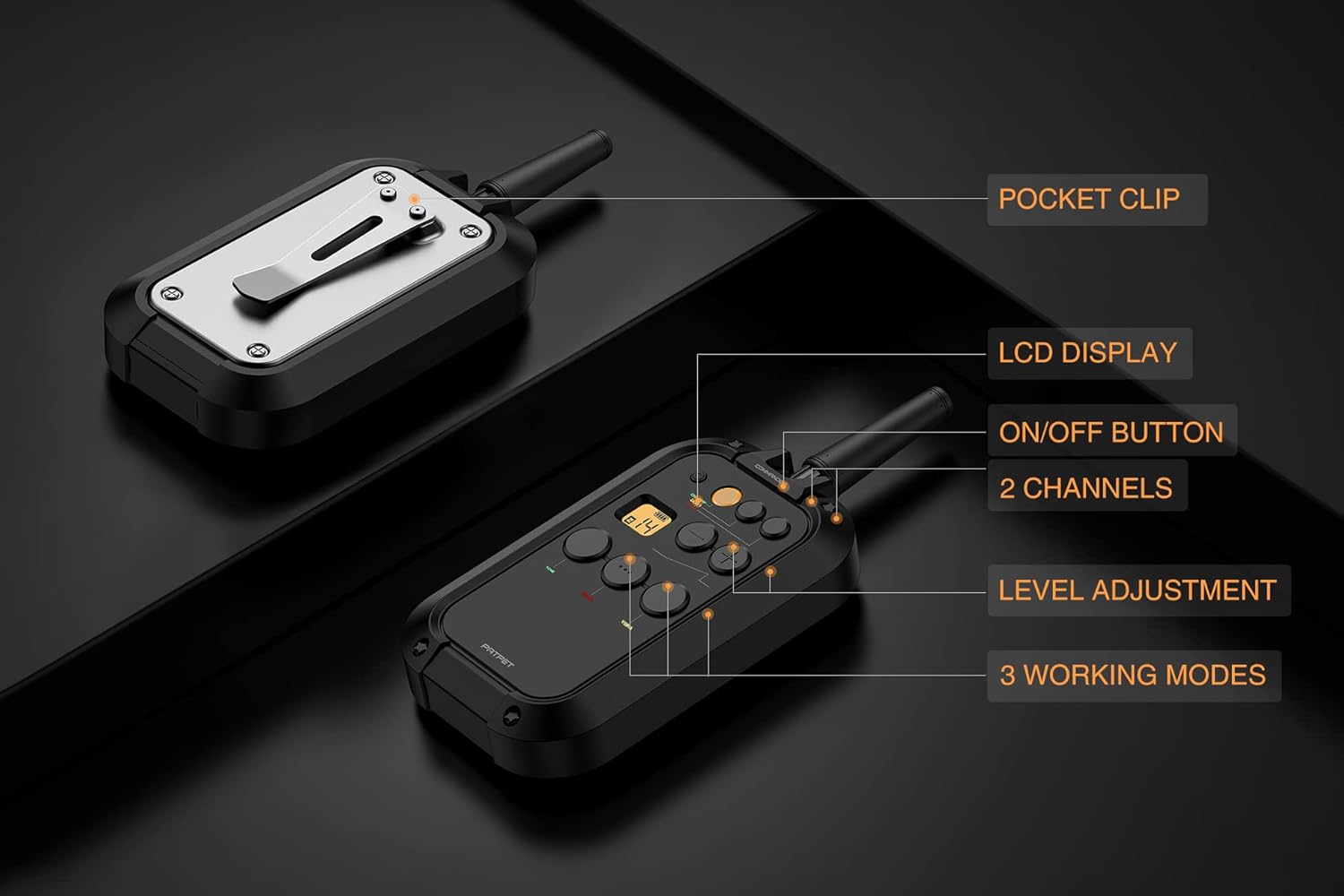
Figure 3: Remote control showing LCD display for level adjustment and mode buttons.
Video 2: Demonstration of Tone, Vibration, and Static Shock modes, and how to adjust intensity levels. (Source: PATPET Seller)
3.2 Pairing the Receiver
To ensure the remote and collar communicate effectively, they must be paired. The remote supports pairing with up to two collars (Dog 1 and Dog 2 channels). Follow the instructions in the video to pair your receiver(s).
Video 3: Instructions on how to pair the receiver collar with the remote transmitter. (Source: PATPET Seller)
4. Correct Collar Fit
Proper fit of the receiver collar is crucial for its effectiveness and your dog's comfort. The collar should be snug enough to ensure the contact points touch the dog's skin, but not so tight as to cause discomfort or restrict breathing. You should be able to fit two fingers snugly between the collar and your dog's neck.
- Adjust the position of the collar within 1-2 hours to prevent pressure sores.
- Do not leave the collar on your dog for more than 12 hours a day.
- Regularly check your dog's neck for any signs of irritation or redness.

Figure 4: Proper fit of the training collar on a dog. The adjustable belt fits dogs from 15 to 140 lbs.
Video 4: Guide on how to correctly wear the receiver collar for optimal contact and comfort. (Source: PATPET Seller)
5. Maintenance
To ensure the longevity and optimal performance of your PATPET P Collar 920, regular maintenance is recommended:
- Clean the collar and remote regularly with a damp cloth. Avoid harsh chemicals.
- Inspect the contact points and charging ports for any debris or damage.
- Ensure the charging port covers are securely closed when not charging to maintain IPX7 waterproof integrity.
- Store the device in a cool, dry place when not in use.

Figure 5: The IPX7 waterproof design allows for use in wet conditions, but proper drying and maintenance are still important.
6. Troubleshooting
If you encounter issues with your PATPET P Collar 920, please refer to the following common troubleshooting steps:
- Collar not responding: Ensure both the remote and collar are powered on and fully charged. Re-pair the devices if necessary (refer to Section 3.2). Check for proper contact point placement on your dog's skin.
- Short range: Ensure the remote's antenna is fully extended. Environmental factors (e.g., thick walls, dense foliage) can affect range. Try testing in an open area.
- Battery not holding charge: Ensure the charging cable and adapter are functioning correctly. Clean the charging ports. If the issue persists, contact customer support.
- No static correction: Verify the intensity level is set above 0. Ensure the contact points are making proper skin contact. Test the static function using the provided test light.
7. Product Specifications
| Feature | Detail |
|---|---|
| Model Name | P Collar 920 |
| Brand | PATPET |
| Range | 3/4 Mile (approx. 1200 yards) |
| Waterproof Rating | IPX7 (Receiver) |
| Training Modes | Tone, Vibration, Static Shock |
| Intensity Levels | 1-16 (Vibration & Shock) |
| Channels | 2 (for training 2 dogs) |
| Battery Life (Receiver) | Up to 11 days standby |
| Charging Time | Approx. 2 hours (fast charging) |
| Dog Weight Capacity | 15 to 140 lbs |
| Collar Belt Adjustment | 8.8 to 23.7 inches (TPU material) |
| Included Components | Remote Control, Receiver Collar, Charging Cable, Adapter, Test Light, Contact Points, User Manual, Storage Case |
8. Warranty and Customer Support
The PATPET P Collar 920 comes with a 24-month warranty from the date of purchase, covering manufacturing defects and malfunctions under normal use. Please retain your proof of purchase for warranty claims.
For technical assistance, troubleshooting, or warranty inquiries, please contact PATPET customer support. Refer to the contact information provided in your product packaging or visit the official PATPET website for the most up-to-date support details.


