
Important Safety Information
Before using the OTO Cyclone Multi-Workout Machine CN-1000, please read and understand all instructions. Retain this manual for future reference. Failure to follow these instructions may result in injury or damage to the equipment.
- Consult a physician before starting any new exercise program, especially if you have pre-existing health conditions.
- Ensure the machine is placed on a flat, stable surface with adequate clearance around it.
- Keep children and pets away from the machine during operation.
- The maximum user weight for this machine is 120 kg. Do not exceed this limit.
- Inspect the machine for loose or damaged parts before each use. Do not use if any components are compromised.
- Wear appropriate athletic footwear and clothing during exercise.
- Stop exercising immediately if you feel faint, dizzy, or experience pain.
Product Overview
The OTO Cyclone Multi-Workout Machine CN-1000 is a versatile fitness equipment designed for comprehensive home workouts. It integrates multiple exercise functions including pulling, lifting, cycling, rowing, and sit-ups, providing a full-body workout experience. Its compact, foldable design and quiet operation make it suitable for various living spaces.

Image: The OTO Cyclone Multi-Workout Machine in a home environment, showcasing its compact design.
Components List
The OTO Cyclone Multi-Workout Machine CN-1000 consists of the following main components:
- Main Frame with Resistance Unit
- Adjustable Seat and Rail
- Pedals with Straps
- Pulling Handle with Resistance Band
- LCD Display Console
- Stabilizer Bars
- Transport Wheels
Setup Instructions
The OTO Cyclone is designed for quick and easy setup. Follow these steps to prepare your machine for use:
- Unpack: Carefully remove all components from the packaging.
- Unfold the Frame: Gently unfold the main frame until it locks into its operational position. Ensure all locking pins or levers are securely engaged.
- Attach Stabilizer Bars: If detached, secure the front and rear stabilizer bars to the main frame using the provided hardware.
- Adjust Seat: Slide the seat along the rail to your desired position and secure it.
- Insert Batteries: Open the battery compartment on the LCD display console and insert the required batteries (Battery Powered).
Video: This video demonstrates the quick setup process of the OTO Cyclone Multi-Workout Machine, showing how to unfold and prepare it for use.

Image: A woman demonstrating the folding mechanism of the OTO Cyclone, highlighting its space-saving design.
Operating Instructions
The OTO Cyclone offers multiple exercise modes. Adjust the hydraulic resistance to suit your fitness level.
1. Rowing Exercise
Sit on the seat, place your feet in the pedals, and grasp the pulling handle. Push off with your legs, lean back slightly, and pull the handle towards your abdomen. Return to the starting position in a controlled manner.
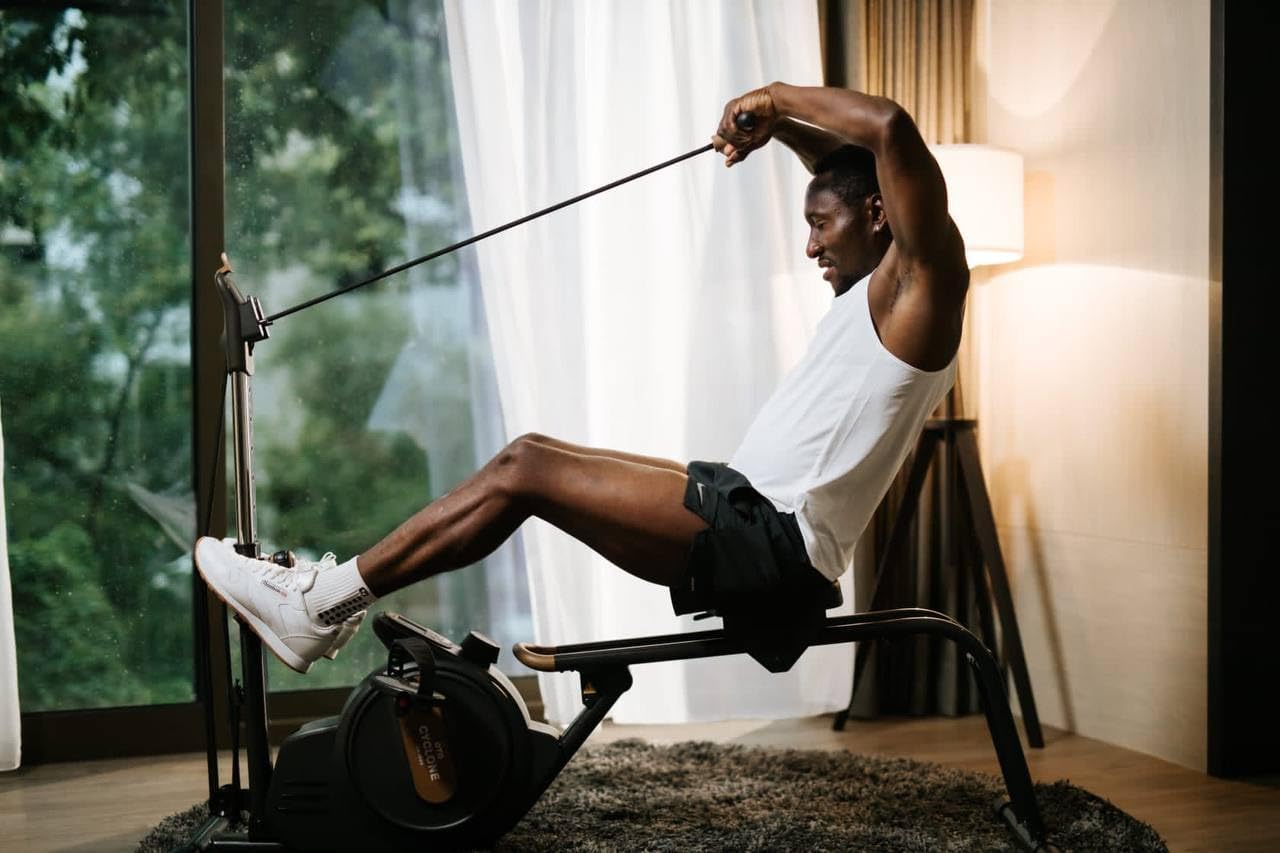
Image: A man demonstrating the proper form for rowing on the OTO Cyclone, engaging core and leg muscles.
2. Cycling Exercise
Adjust the seat for comfortable cycling. Place your feet on the pedals and begin pedaling. The hydraulic resistance will provide a smooth cycling experience.

Image: A woman cycling on the OTO Cyclone, illustrating the machine's function as an exercise bike.
3. Pulling and Lifting Exercises
Stand or sit as appropriate for the exercise. Grasp the pulling handle and perform various upper body exercises such as bicep curls, tricep extensions, or shoulder presses. The resistance band provides consistent tension.

Image: A man using the OTO Cyclone for bicep curls, demonstrating its pulling exercise capability.
4. Sit-Up Exercise
The machine can be configured to assist with sit-ups. Position yourself on the seat or floor with your feet secured, and use the machine's structure for support during sit-up movements.

Image: A man engaging his core muscles with the OTO Cyclone, illustrating its versatility for various exercises.
LCD Display Console
The integrated LCD display tracks your workout progress. It typically shows:
- Time: Duration of your workout.
- Distance: Estimated distance covered (for cycling/rowing).
- Calories: Estimated calories burned.
- Count: Number of strokes or repetitions.
Refer to the console's specific instructions for detailed operation and mode selection.
Maintenance
Regular maintenance ensures the longevity and safe operation of your OTO Cyclone Multi-Workout Machine.
- Cleaning: Wipe down the machine with a damp cloth after each use to remove sweat and dust. Avoid abrasive cleaners.
- Inspection: Periodically check all bolts, nuts, and moving parts for tightness and wear. Tighten any loose fasteners.
- Lubrication: The hydraulic resistance mechanism is generally maintenance-free. If any squeaking occurs from moving parts, apply a small amount of silicone-based lubricant.
- Storage: When not in use, the OTO Cyclone can be folded for compact storage. Ensure it is securely folded and placed in a safe, dry location away from direct sunlight and extreme temperatures.
Troubleshooting
If you encounter any issues with your OTO Cyclone, refer to the following common problems and solutions:
| Problem | Possible Cause | Solution |
|---|---|---|
| LCD Display not working | Dead batteries; Loose battery connection | Replace batteries; Check battery compartment for secure connection. |
| Unusual noise during operation | Loose components; Need for lubrication | Check and tighten all bolts and nuts; Apply silicone lubricant to moving joints. |
| Resistance feels inconsistent | Hydraulic system issue; Incorrect adjustment | Ensure resistance knob is correctly set; If problem persists, contact customer support. |
For issues not listed here or if troubleshooting steps do not resolve the problem, please contact OTO customer support.
Specifications
| Feature | Detail |
|---|---|
| Brand | OTO |
| Model Name | Cyclone |
| Model Number | CN-1000 |
| Color | Black |
| Product Dimensions (D x W x H) | 160D x 50W x 110H centimetres |
| Maximum Weight Recommendation | 120 Kilograms |
| Frame Material | Alloy Steel |
| Material Type | Q235 Hi-frequency welded tube |
| Resistance Mechanism | Hydraulic |
| Power Source | Battery Powered |
| Display | LCD |
| Special Features | Foldable |
Warranty and Support
For warranty information, product support, or to purchase replacement parts, please refer to the official OTO website or contact your authorized retailer. Keep your purchase receipt as proof of purchase for warranty claims.