Product Overview
The Mares Quad Ci Wrist Dive Computer is an advanced diving instrument designed for recreational and technical divers. It features a high-resolution 8-color MIP display, customizable algorithms, and integrated air integration capabilities.

This dive computer offers multiple dive modes including Air, Nitrox, and Trimix, providing versatility for various diving conditions. Its intuitive interface ensures easy navigation and data readability underwater.
Key Features
- Advanced Algorithm for Custom Dives: The Mares QUAD Ci wrist dive computer features the customizable Bühlmann ZH-L16C algorithm, allowing divers to adjust gradient factors for a personalized, safe diving experience tailored to your specific needs.
- Versatile Dive Modes: This Mares wrist dive computer supports air, nitrox, and trimix modes, offering flexibility for various diving profiles, while the high-resolution 8-color MIP display ensures clear, at-a-glance readability underwater.
- Integrated Digital Compass & Stopwatch: Navigate confidently with the full-tilt digital compass and integrated stopwatch, providing precise navigation and timing functions during your dive.
- Hoseless Tank Data Integration: Seamlessly connect up to five transmitters with this Mares wrist dive computer, giving you real-time tank pressure and saturation levels, color-coded for easy monitoring.
- Bluetooth Connectivity: Enjoy up to 20 hours of dive time per charge, with Bluetooth connectivity for real-time insights, firmware updates, and dive profile access via the Mares app.


Setup
Initial Charging
Before first use, fully charge the Mares Quad Ci. Connect the included USB charging cable to the dive computer and a compatible USB power source. The device features a rechargeable Lithium Polymer battery.
Basic Settings
Upon powering on, the device will guide you through initial setup. This typically includes:
- Language selection.
- Unit selection (metric/imperial).
- Time and date setting.
- Personal settings (e.g., conservative factor, gradient factors).
Pairing with Transmitters (Optional)
The Mares Quad Ci supports hoseless tank data integration with up to five transmitters. To pair a transmitter:
- Ensure the transmitter is active and within range.
- Navigate to the "Pairing" menu on the dive computer.
- Follow the on-screen prompts to detect and connect to the transmitter.
- Verify tank pressure readings are displayed correctly.
Operating the Dive Computer
Navigation
The Mares Quad Ci is operated using its four buttons: ENTER, UP, DOWN, and DISPLAY/BACK.
- ENTER: Confirms selections and enters menus.
- UP: Scrolls up through options or increases values.
- DOWN: Scrolls down through options or decreases values.
- DISPLAY/BACK: Cycles through display screens or returns to the previous menu.
Dive Modes
The computer supports Air, Nitrox, and Trimix modes. Select the appropriate mode before each dive based on your gas mixture.
Air Mode
For dives using standard air.
Nitrox Mode
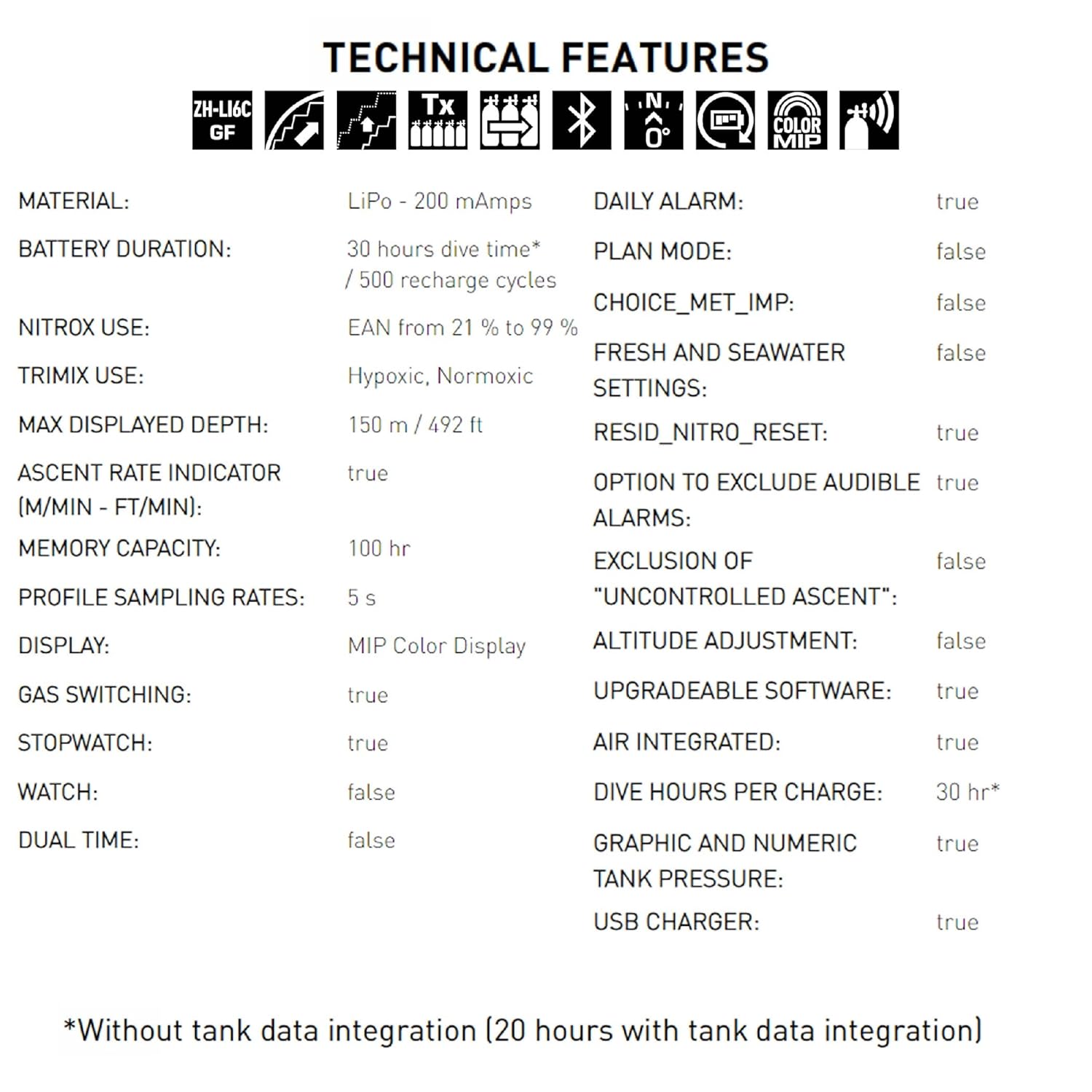
For dives using enriched air nitrox. Ensure the correct oxygen percentage (EAN from 21% to 99%) is set in the computer to avoid decompression sickness.
Trimix Mode
For technical dives using helium-based gas mixtures. Hypoxic and Normoxic trimix are supported.
In-Dive Information
During a dive, the display provides critical information such as:
- Current Depth
- Maximum Depth
- Dive Time
- No Decompression Limit (NDL)
- Ascent Rate Indicator
- Tank Pressure (if integrated)
- Temperature

Digital Compass
The full-tilt digital compass allows for precise underwater navigation. Activate the compass from the main menu and orient yourself using the bearing memory function.
Logbook
The Mares Quad Ci automatically records dive data. The logbook has a memory capacity of 100 hours. Dive profiles can be accessed and analyzed via the Mares app using Bluetooth connectivity.
This video demonstrates the key features and user interface of the Mares Quad Ci Wrist Dive Computer, highlighting its display and navigation.
Maintenance
Cleaning and Storage
After each dive, rinse the dive computer thoroughly with fresh water to remove salt, sand, and other debris. Allow it to air dry completely before storage. Store in a cool, dry place away from direct sunlight.
Battery Care
The device uses a Lithium Polymer battery. For optimal battery life, avoid fully discharging the battery regularly. Recharge as needed. The battery is designed for approximately 500 recharge cycles.
Firmware Updates
Periodically check for firmware updates via the Mares app. Updates can improve performance, add new features, and address potential issues.
Troubleshooting
Display Issues
- No display: Ensure the battery is charged. If charged, try a soft reset (refer to the full manual for specific instructions).
- Dim display: Adjust display brightness in settings. Ensure the protective film is removed.
Connectivity Problems
- Bluetooth not connecting: Ensure Bluetooth is enabled on both the dive computer and your mobile device. Restart both devices and try pairing again.
- Transmitter not pairing: Check transmitter battery. Ensure the transmitter is active and within close proximity to the dive computer during pairing.
Alarms
The Mares Quad Ci features various alarms, including deco alarms and ascent rate warnings. Pay attention to these warnings and follow safe diving practices.
Specifications
| Feature | Detail |
|---|---|
| Product Dimensions | 5.3 x 5.25 x 6.75 inches; 1.06 Pounds |
| Item Model Number | 414148BKSI |
| Batteries | 1 Lithium Polymer batteries required. |
| Manufacturer | Mares |
| Color | Silver |
| Sport | Diving |
| Age Range (Description) | Adult |
| UPC | 194151129090 |
Warranty and Support
For detailed warranty information and customer support, please refer to the official Mares website or contact Mares customer service directly. Keep your proof of purchase for warranty claims.
For additional resources and frequently asked questions, visit the Mares Store on Amazon.


