Product Overview
The BOSYTRO 12V 50A 600W DC Switching Power Supply is a robust and efficient AC to DC converter designed for a wide range of applications. It converts AC 110V or 220V input to a stable 12V DC output, making it suitable for powering LED strip lights, CCTV camera security systems, computer projects, and various other DC 12V home appliances and electronic devices.
This power supply features a high-quality aluminum enclosure with multiple ventilation holes and a built-in cooling fan to ensure efficient heat dissipation and extended service life. It incorporates multiple protection functions including overload, over-voltage, short-circuit, earth leakage, overcurrent, and overheat protection, ensuring safe and reliable operation.

Image: The BOSYTRO 12V 50A 600W DC Switching Power Supply, showcasing its metallic casing, fan, and terminal block.
Safety Information and Precautions
- Indoor Use Only: This power supply is designed for indoor use. Do not expose it to water, moisture, or high humidity environments.
- Proper Grounding: Ensure the power supply is properly grounded to prevent electrical shock. Connect the ground terminal to a reliable earth ground.
- Voltage Selection: Before connecting to AC power, verify the input voltage switch (115V/230V) is set correctly for your region's mains voltage. Incorrect voltage selection can damage the unit.
- Ventilation: Do not block the ventilation holes. Ensure adequate airflow around the unit to prevent overheating. The built-in fan operates continuously to maintain optimal temperature.
- Professional Installation Recommended: Installation and wiring should be performed by qualified personnel to ensure safety and proper operation.
- Protection Features: The unit includes built-in overload, over-voltage, short-circuit, earth leakage, overcurrent, and overheat protection. In case of a fault, the unit may shut down automatically. Disconnect power and troubleshoot before re-applying power.
- No User-Serviceable Parts: Do not open the casing. There are no user-serviceable parts inside. Refer all servicing to qualified service personnel.

Image: Diagram illustrating the multiple protection functions of the power supply, including short circuit, over-voltage, overload, earth leakage, overcurrent, and overheat protection.
Setup and Installation
1. Unpacking and Inspection
Carefully remove the power supply from its packaging. Inspect the unit for any signs of physical damage. If damage is found, do not proceed with installation and contact customer support.
2. Selecting Input Voltage (115V/230V)
Locate the red switch on the side of the power supply. This switch allows you to select the input voltage (AC). Ensure it is set to the correct voltage for your region (115V for USA/Canada, 230V for most European countries). Failure to set this correctly can cause severe damage to the unit and connected devices.

Image: Close-up of the red switch for selecting between 115V and 230V input voltage.
3. Wiring Connections
Refer to the wiring diagram below for proper connection. The terminal block is clearly labeled. Ensure all connections are secure and correct to avoid short circuits or damage.
- Input (AC):
- L (Live): Connect to the live wire of your AC mains.
- N (Neutral): Connect to the neutral wire of your AC mains.
- GND (Ground): Connect to a reliable earth ground.
- Output (DC 12V):
- +V: Positive DC output (connect to the positive terminal of your device).
- -V: Negative DC output (connect to the negative terminal of your device).
Note: Power cord and extension cord are not included in the package.

Image: Detailed wiring diagram showing input (AC) and output (DC) terminals, including Live, Neutral, Ground, and multiple Positive and Negative DC output ports.
4. Fine Voltage Adjustment (ADJ)
The power supply features an "ADJ" potentiometer, typically located near the output terminals. This allows for a slight adjustment of the output voltage (e.g., from 10.8V to 13.2V). Use a small screwdriver to carefully turn the potentiometer clockwise to increase voltage or counter-clockwise to decrease it. Only adjust if necessary and with a multimeter to monitor the output voltage.

Image: Close-up view of the potentiometer (ADJ) for fine-tuning the output voltage.
Operating Instructions
Once properly wired and the input voltage selected, connect the power supply to the AC mains. The built-in status indicator will illuminate, and the cooling fan will begin to operate. The fan is designed to run continuously after power-on to ensure optimal heat dissipation and efficiency. This continuous operation is normal and indicates proper functioning, not a fault.
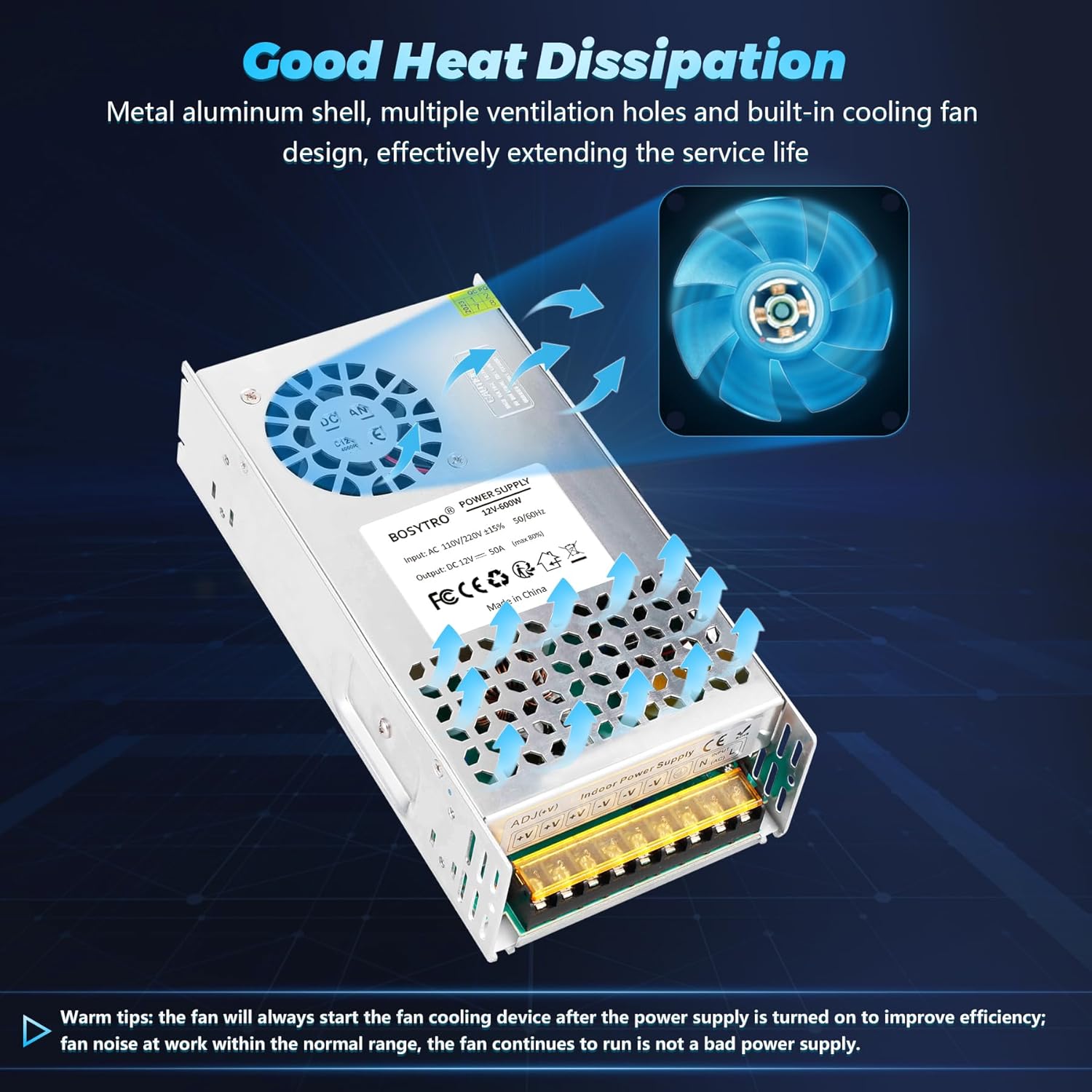
Image: Illustration showing the internal cooling fan and ventilation holes, emphasizing good heat dissipation.
Applications
This 12V 600W switching power supply is versatile and can be used in numerous applications requiring a stable 12V DC power source. Common applications include:
- LED Lighting (e.g., LED strip lights, LED advertising displays)
- CCTV Camera Security Systems
- Computer Projects
- Automation Devices
- Brushless Motors
- DC 12V Home Appliances
- Medical Equipment
- Car Audio Systems
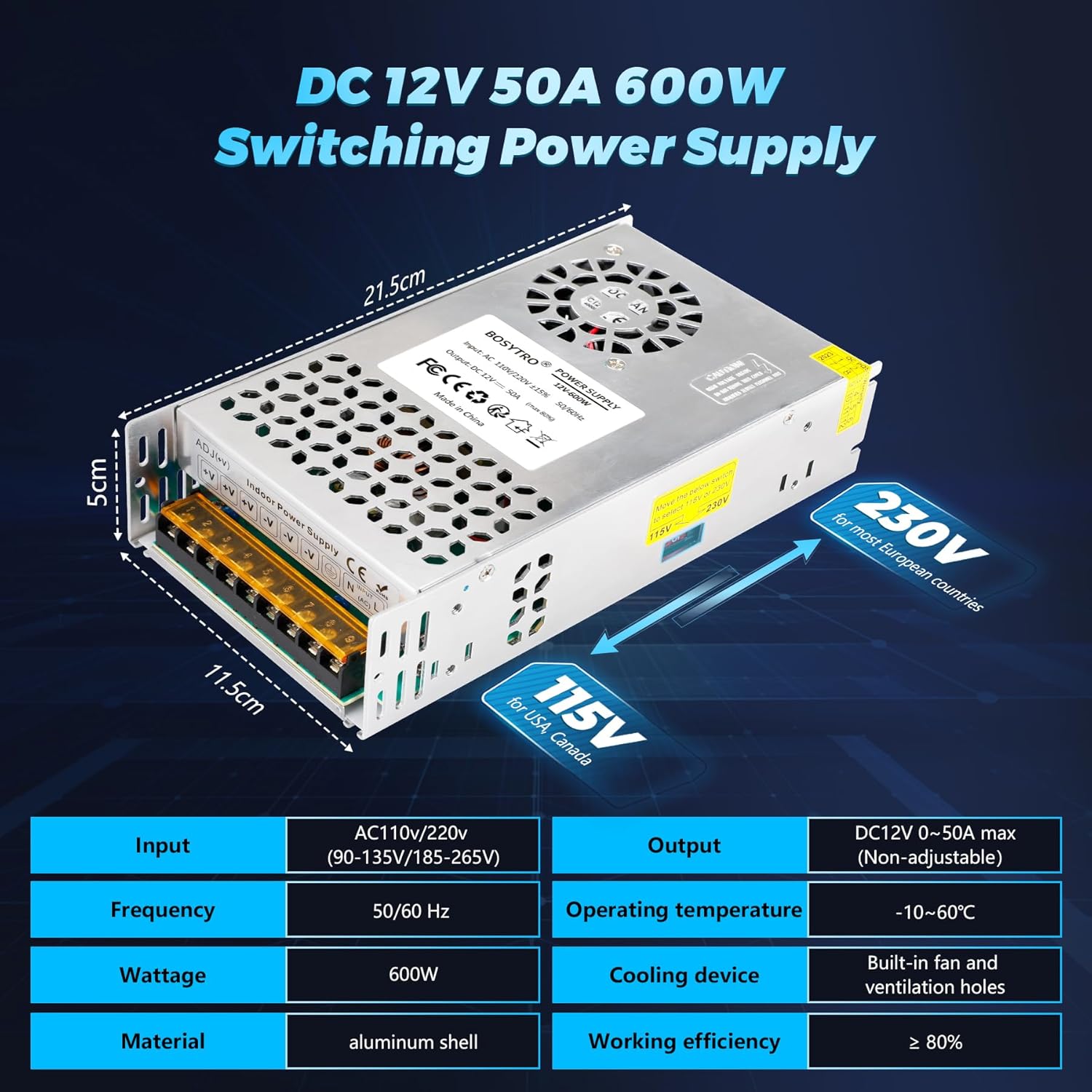
Image: Diagram showing the dimensions (21.5cm x 11.5cm x 5cm) and key specifications of the power supply.

Image: Visual representation of various applications including surveillance cameras, LED strips, 3D printers, car audio, medical equipment, and industrial automation.
Maintenance
- Keep Clean: Regularly clean the exterior of the power supply with a soft, dry cloth. Avoid using liquid cleaners or solvents.
- Ensure Ventilation: Periodically check that the ventilation holes and fan are free from dust and debris. Blocked vents can lead to overheating and reduced performance.
- Environmental Conditions: Operate the power supply within its specified operating temperature range (-10°C to 60°C) and avoid excessively dusty or humid environments.
Troubleshooting
Specifications
What's in the Box
- 1 x BOSYTRO 12V 50A 600W DC Switching Power Supply
Note: Power cord and extension cord are not included.
Warranty and Support
BOSYTRO is committed to providing high-quality products and excellent customer service. Every product purchased from BOSYTRO is entitled to a one-year long-term after-sales service.
If your product experiences any quality problems within the warranty period, you may be eligible for a brand new replacement product.
For any questions, valuable feedback, suggestions, or issues with your product, please do not hesitate to contact BOSYTRO customer support. We are glad to hear your voice and assist you.
You can typically find contact information on the product packaging, the seller's page on the platform where you purchased the product, or the official BOSYTRO website.