
1. Introduction
Thank you for choosing the CONBOLA Portable Fan Rechargeable. This versatile device combines a powerful fan, an LED lantern, and a portable power bank, making it ideal for various indoor and outdoor activities such as camping, travel, home use, and office environments. This manual provides detailed instructions for safe operation, maintenance, and troubleshooting to ensure optimal performance and longevity of your fan.
2. Important Safety Instructions
Please read all safety warnings and instructions carefully before using this product to prevent injury or damage.
- Do not insert fingers or any objects into the fan grille when the fan is operating.
- Keep the fan away from water or other liquids to avoid electric shock.
- Do not disassemble, repair, or modify the fan yourself. Contact qualified service personnel for assistance.
- Ensure the fan is placed on a stable, flat surface to prevent tipping over.
- Keep out of reach of children and pets.
- Use only the provided USB-C cable or a certified equivalent for charging.
- Do not expose the battery to extreme temperatures (above 60°C/140°F) or direct sunlight.
- Unplug the fan when not in use for extended periods or during cleaning.
3. Package Contents
Please check the package for the following items:
- CONBOLA Portable Fan Rechargeable (Model X23-PRO)
- USB-C Charging Cable
- User Manual (this document)
4. Product Overview
Familiarize yourself with the components of your CONBOLA Portable Fan.
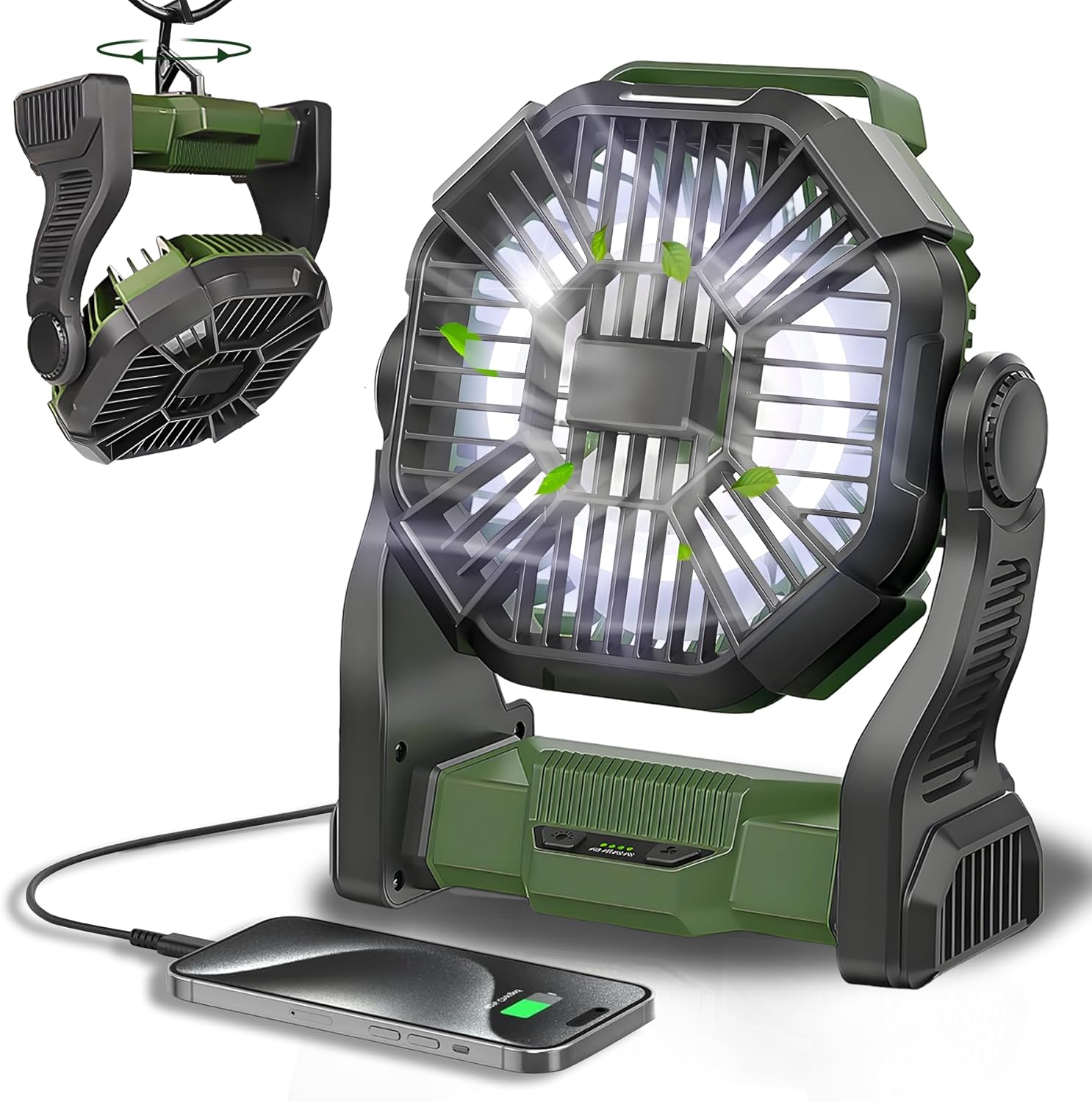
Figure 1: CONBOLA Portable Fan Rechargeable

Figure 2: Product Dimensions and Key Features (10 inches height, 8.2 inches width, 3.5 inches depth)
4.1 Component Identification
- Fan Grille: Protects the fan blades.
- Fan Blades: Generate airflow.
- LED Light Panel: Provides illumination.
- Control Panel: Contains buttons for fan speed and light brightness.
- Battery Indicator Lights: Show remaining battery level.
- USB-C Input Port: For charging the fan.
- USB-A Output Port: For charging external devices (power bank function).
- Adjustable Stand: Allows 270° rotation for directing airflow.
- Hanging Hook: Located at the bottom, allows the fan to be hung.
- Handle: For easy portability.

Figure 3: Control Panel and Battery Indicators

Figure 4: USB-A Output and USB-C Input Ports
5. Setup
5.1 Initial Charging
Before first use, fully charge the fan. Connect the USB-C charging cable to the fan's USB-C input port and the other end to a 5V-2A USB power adapter (not included) or a compatible power source. The battery indicator lights will illuminate to show charging progress. All four lights will be solid when fully charged.
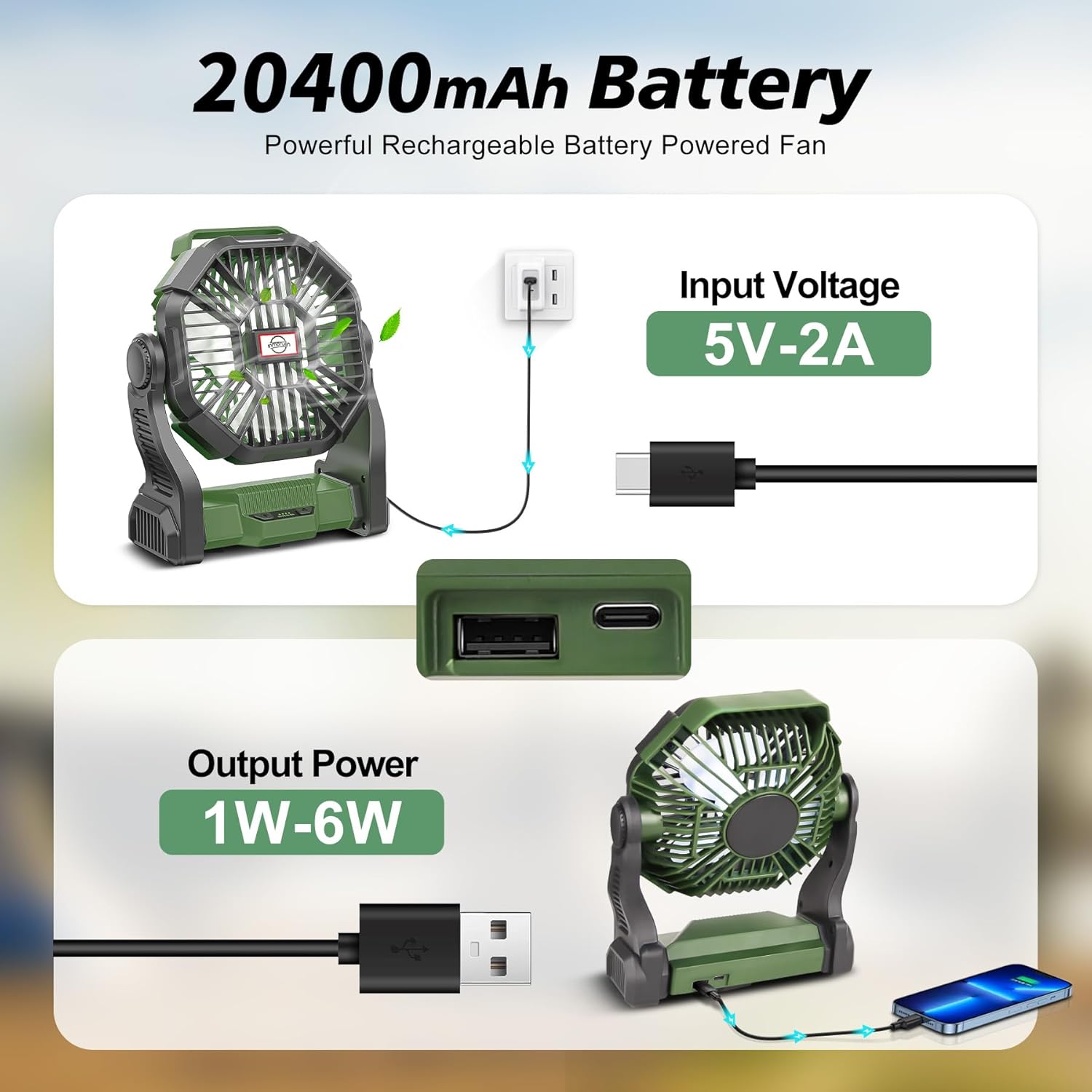
Figure 5: Charging the Fan and Using as a Power Bank
5.2 Positioning the Fan
The fan can be used in multiple positions:
- Standing: Place the fan on a flat, stable surface. Adjust the stand to achieve the desired angle (up to 270° rotation).
- Hanging: Utilize the integrated hook at the bottom of the fan. Rotate the hook out and hang the fan from a tent, umbrella, hammock, or other suitable structure.

Figure 8: Versatile Hanging Hook Design
6. Operating Instructions
6.1 Fan Operation
The fan features 4 adjustable speeds controlled by a push-button on the control panel.
- Press the fan button once to turn on the fan at Low Speed.
- Press again to cycle through Medium Speed, High Speed, and Super High Speed.
- Press a fifth time to turn off the fan.
The fan operates quietly, with noise levels less than 30dB on the lowest setting.

Figure 6: Fan Speed Settings and Quiet Operation
6.2 LED Light Operation
The integrated LED lantern has three adjustable brightness settings.
- Press the light button once to turn on the LED light at Low brightness.
- Press again to cycle through Medium brightness and High brightness.
- Press a fourth time to turn off the LED light.

Figure 7: LED Night Light with Adjustable Brightness
6.3 Power Bank Function
The fan can also serve as a power bank to charge your mobile devices.
- Connect your device's charging cable to the USB-A output port on the fan.
- The fan's 20400mAh battery can provide emergency power for your phone or other small electronics.
7. Charging the Fan
To charge the fan, use the provided USB-C cable. Connect one end to the fan's USB-C input port and the other end to a 5V-2A power adapter. The battery indicator lights will show the charging status. Each light represents approximately 25% of the battery capacity. When all four lights are solid, the fan is fully charged.
The fan supports working while charging, allowing continuous operation even when the battery is low.
8. Maintenance
8.1 Cleaning
- Ensure the fan is turned off and unplugged before cleaning.
- Wipe the exterior of the fan with a soft, dry cloth.
- Do not use abrasive cleaners, solvents, or immerse the fan in water.
- For dust accumulation on the fan blades, use a soft brush or compressed air to gently clean through the grille. Do not attempt to remove the grille.
8.2 Storage
When storing the fan for extended periods, ensure it is fully charged and stored in a cool, dry place away from direct sunlight and extreme temperatures. Recharge the fan every 3-6 months to maintain battery health.
9. Troubleshooting
| Problem | Possible Cause | Solution |
|---|---|---|
| Fan does not turn on. | Battery is depleted. | Charge the fan using the USB-C cable. |
| Fan is not charging. | Charging cable or adapter is faulty. | Try a different USB-C cable or power adapter. Ensure the adapter is 5V-2A. |
| LED light does not turn on. | Battery is depleted or light button not pressed correctly. | Charge the fan. Press the light button firmly to cycle through brightness settings. |
| Short battery life. | Operating at high speed/brightness, or battery degradation. | Reduce fan speed or light brightness. Ensure full charge before use. Battery life naturally decreases over time. |
| Fan makes unusual noise. | Obstruction in fan blades or internal issue. | Turn off and unplug the fan. Check for any obstructions in the grille. If the noise persists, discontinue use and contact support. |
10. Specifications
| Feature | Detail |
|---|---|
| Brand | CONBOLA |
| Model Name | X23-PRO |
| Color | Army Green |
| Power Source | Battery Powered |
| Battery Capacity | 20400mAh Lithium Ion (included) |
| Fan Speeds | 4 Levels |
| Noise Level | 30 dB (lowest setting) |
| LED Light Brightness | 3 Levels |
| Rotation Adjustment | 270° |
| Product Dimensions | 7"D x 3.9"W x 10"H |
| Item Weight | 1.4 pounds (22.4 Ounces) |
| Connector Type | USB Type-C (Input), USB Type-A (Output) |
| Voltage | 5 Volts |
| Wattage | 13.9 Milliwatts |
| Blade Material | Plastic |
11. Warranty and Support
CONBOLA products are designed and manufactured to the highest quality standards. For any questions, technical support, or warranty claims, please refer to the contact information provided with your purchase or visit the official CONBOLA website. Please retain your proof of purchase for warranty service.