
1. Introduction
Thank you for choosing surmen MOA Profile PBT Keycaps. This manual provides essential information for the proper installation, use, and maintenance of your new keycap set. These 141-key dye-sublimation PBT keycaps are designed to enhance your mechanical keyboard experience with their unique MOA profile and durable construction.
The set includes 104 standard keys and 37 supplementary keys, offering broad compatibility and customization options for various keyboard layouts.
2. Key Features
- MOA Profile: These keycaps feature a unique MOA profile, characterized by rounded edges, a stronger curvature, and a comfortable typing surface. This design aims to provide a refreshing and ergonomic typing experience.
- Dye-Sublimation PBT Material: Constructed from thick PBT plastic, these keycaps offer a premium texture and enhanced durability. The legends are applied using dye-sublimation technology, ensuring the patterns and characters will not fade over time.
- Extensive Compatibility: The 141-key set is compatible with ANSI layout mechanical keyboards, supporting various sizes including 60%, 65%, 75%, 80%, and 100% (61/64/68/82/84/87/100/104/108 keys). They are designed to fit any key switches with cross-shaped stems, such as Cherry MX switches.
- Personalized Complement Keys: The set includes a variety of supplementary keys, allowing users to customize their keyboard's aesthetic and functionality.
3. Compatibility
The surmen MOA Profile Keycaps are designed for broad compatibility with mechanical keyboards. Please verify your keyboard's layout and switch type before installation.
Supported Keyboard Layouts:
- 60% Keyboards (e.g., 61 keys)
- 65% Keyboards (e.g., 64, 68 keys)
- 75% Keyboards (e.g., 82, 84, 87 keys)
- 80% Keyboards (e.g., 100 keys)
- 100% Keyboards (e.g., 104, 108 keys)
Switch Compatibility: These keycaps are compatible with all mechanical switches featuring a cross-shaped stem, such as Cherry MX, Gateron, Kailh, and similar switches.
Note: Large keys of non-standard layouts and certain stabilizers may not be compatible. This set includes 141 keycaps only; a keyboard is not included.

Image: Diagram showing the wide compatibility of the keycap set with various keyboard sizes.

Image: Comparison of MOA, XDA, Cherry, and OEM keycap profiles, highlighting the unique MOA shape and height.
4. Installation and Setup
Follow these steps to install your new surmen MOA Profile Keycaps:
- Prepare Your Keyboard: Disconnect your keyboard from your computer. If your keyboard has backlighting, turn it off.
- Remove Existing Keycaps: Use a keycap puller (not included) to carefully remove your current keycaps. Grip the keycap firmly and pull straight up to avoid damaging the switch stem.
- Organize New Keycaps: Refer to the included layout diagram (if applicable) or the image below to identify the correct placement for each keycap. The set includes standard and supplementary keys for various layouts.
- Install New Keycaps: Align each new keycap with the corresponding switch stem. Press down gently but firmly until the keycap is seated securely. Ensure the keycap is level and does not wobble.
- Test Functionality: Once all keycaps are installed, reconnect your keyboard and test each key to ensure proper function.
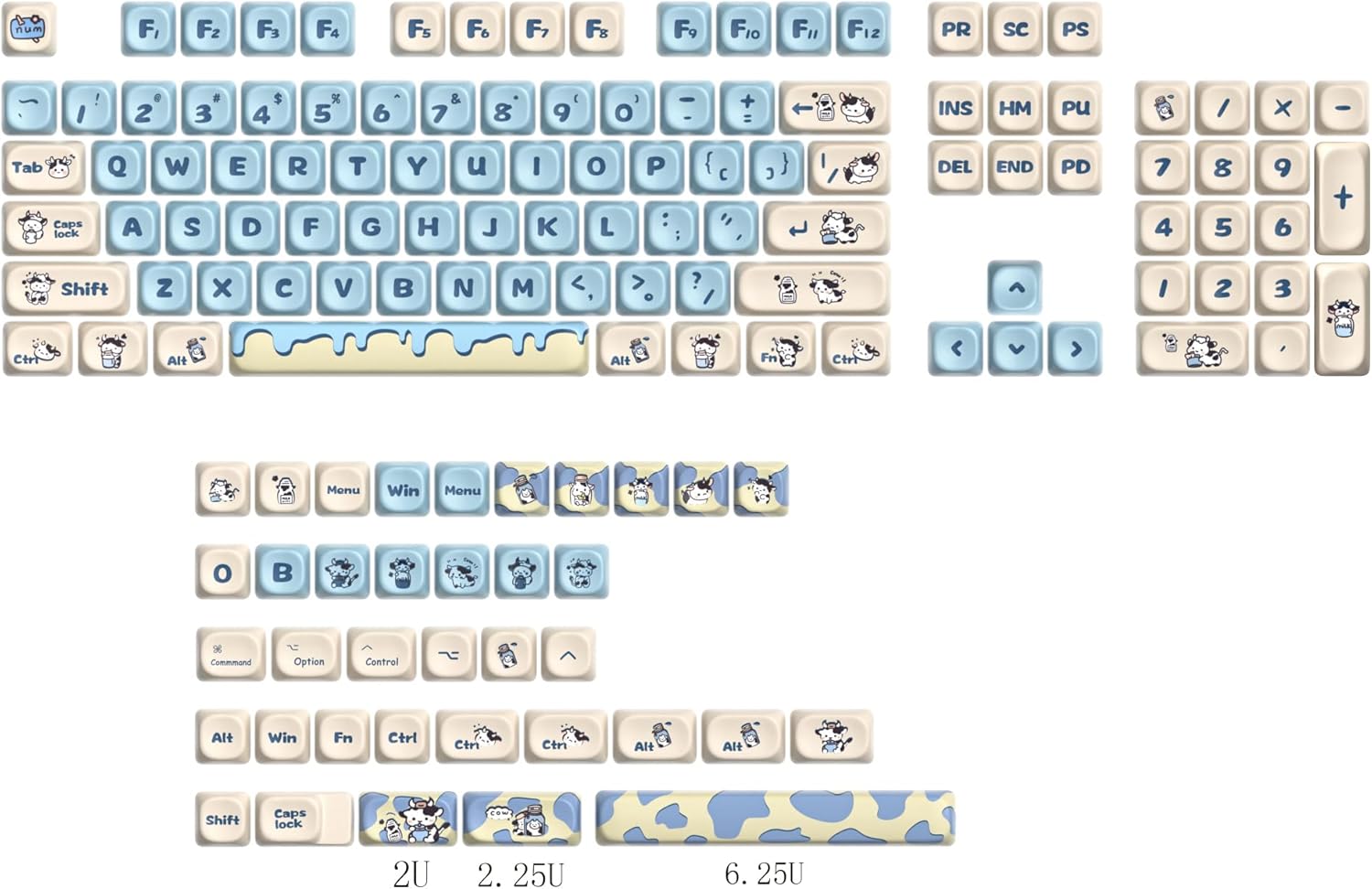
Image: Full layout of the 141-key surmen MOA profile keycap set, useful for identifying keycap positions.

Image: Close-up of keycaps and switch stems, demonstrating how to align and press keycaps onto switches.
Video: A demonstration of the Milk Cow MOA Profile Keycaps, showcasing their design and appearance on a keyboard. This video can assist in visualizing the installation process and final look.
5. Usage
The MOA profile is designed for a comfortable and unique typing experience. Its uniform height across all rows, combined with the rounded, sculpted tops, aims to reduce finger fatigue and provide a distinct feel compared to traditional profiles like Cherry or OEM.
The thick PBT material contributes to a satisfying typing sound and feel, often described as more 'thocky' than thinner ABS keycaps. The dye-sublimated legends ensure long-lasting clarity and resistance to wear.

Image: surmen MOA profile keycaps installed on a keyboard, showcasing the ergonomic design.
Video: A general overview of the 141-key PBT dye-sublimation keycaps, demonstrating their appearance and potential use on a keyboard.
6. Maintenance
To ensure the longevity and appearance of your surmen keycaps, follow these maintenance guidelines:
- Regular Cleaning: Dust and debris can accumulate between keycaps. Use a soft brush or compressed air to remove loose particles regularly.
- Deep Cleaning: For a more thorough clean, remove the keycaps using a keycap puller. Wash them in lukewarm water with a mild soap. Avoid harsh chemicals or abrasive materials, as these can damage the PBT plastic and dye-sublimated legends. Rinse thoroughly and allow them to air dry completely before re-installing.
- Avoid Excessive Force: When removing or installing keycaps, use gentle, even pressure. Excessive force can damage the keycap stems or the keyboard switches.
7. Troubleshooting
If you encounter any issues with your keycaps, consider the following:
- Keycaps Not Fitting: Ensure your keyboard uses cross-shaped switch stems (e.g., Cherry MX compatible). Some non-standard layouts or stabilizers may not be compatible with the provided keycap sizes. Double-check the layout diagram for correct keycap placement.
- Wobbly Keycaps: Ensure the keycap is fully pressed down onto the switch stem. If a keycap still wobbles excessively, inspect the switch stem for damage or manufacturing inconsistencies.
- Missing or Defective Keycaps: While quality control is maintained, occasional manufacturing defects can occur. If you receive a set with missing or visibly defective keycaps, please contact customer support for assistance.
- Legends Not Lighting Up (Shine-Through): These keycaps are PBT dye-sublimated, and while the material itself is thick, the legends are not designed for shine-through backlighting. The primary illumination will be around the keycaps, not through the characters themselves.
8. Specifications
| Feature | Detail |
|---|---|
| Keycap Profile | MOA Profile |
| Material | Thick PBT Plastic |
| Legends Process | Dye-Sublimation |
| Number of Keys | 141 (104 standard + 37 supplementary) |
| Compatible Switches | Cherry MX and compatible cross-shaped stems |
| Compatible Layouts | ANSI (60%, 65%, 75%, 80%, 100%) |
| Color | Milk Cow |
| Item Weight | 1.04 pounds |
| Package Dimensions | 14.65 x 5.98 x 1.06 inches |
9. Warranty and Support
surmen products are manufactured with quality and customer satisfaction in mind. For any questions, concerns, or issues regarding your keycap set, please contact the retailer or manufacturer's customer support.
Please retain your proof of purchase for any warranty claims. Specific warranty terms and conditions may vary by region and retailer.