1. Introduction
This manual provides instructions for the VINABTY RM-U303 RM-U305 replacement remote control. This remote is designed to function as a direct replacement for original Sony AV System and FM Stereo/FM-AM Receiver remote controls, offering full functionality without the need for programming.
2. Setup
2.1 Battery Installation
- Locate the battery compartment on the back of the remote control.
- Slide the battery cover downwards to open it.
- Insert two (2) AAA batteries, ensuring the positive (+) and negative (-) terminals align with the markings inside the compartment.
- Slide the battery cover back into place until it clicks securely.
Note: This remote control does not require any programming. It is ready for use once batteries are installed.

Image: Back of the remote control with the battery compartment. Insert two AAA batteries as indicated.
3. Operating Instructions
The VINABTY RM-U303 RM-U305 remote control provides access to all standard functions of your compatible Sony AV System or Receiver. Point the remote directly at the infrared sensor on your device.

Image: Front view of the remote control, displaying all function buttons.
3.1 Key Functions Overview
- AV I/O / SYSTEM STANDBY / I/O: Power on/off and input/output selection for the system.
- FUNCTION Buttons (VIDEO1, VIDEO2, MD/TAPE, CD/SACD, TUNER, 5.1CH, etc.): Select the desired audio/video input source.
- Number Buttons (1-9, 0): For direct input selection or channel tuning.
- MENU / ENTER: Access and confirm menu selections.
- LEVEL / MASTER VOL: Adjust overall system volume.
- Muting: Mute or unmute audio output.
- Navigation (Arrow Keys): Navigate through menus and settings.
- SOUND FIELD: Cycle through various sound field modes.
- SLEEP: Set a timer for the system to automatically power off.
- DISC / CH +/-: Control disc playback or change channels.
- A.F.D. / MODE: Adjust audio format decoding or sound modes.
4. Compatibility
This VINABTY RM-U303 RM-U305 replacement remote control is compatible with the following Sony AV System and FM Stereo/FM-AM Receiver models:
- STR-SE391
- STR-DE345
- STR-DE335
- STR-DE675
- STR-DE575
- STR-DE475
- STR-K502P
- STR-K502
- HT-DDW830
- HT-5100D
- DAV-L8100
- STR-DB870
- STR-DB1070

Image: The VINABTY remote shown with original Sony remotes, illustrating its compatibility.
5. Troubleshooting
5.1 Remote Not Responding
- Check Batteries: Ensure batteries are inserted correctly with the correct polarity (+/-) and are not depleted. Replace with fresh AAA batteries if necessary.
- Line of Sight: Make sure there is a clear line of sight between the remote control and the infrared sensor on your Sony AV System or Receiver. Obstructions can block the signal.
- Distance: Ensure you are within the effective operating range of the remote control.
- Interference: Strong light sources or other infrared devices can sometimes interfere with the remote's signal. Try operating the remote in a different environment.
6. Specifications
| Feature | Detail |
|---|---|
| Model Number | RM-U303 RM-U305 |
| Brand | VINABTY |
| Compatible Devices | Sony AV Systems, FM Stereo/FM-AM Receivers |
| Battery Type | 2 x AAA batteries (not included) |
| Dimensions (L x W x H) | 5 x 1.9 x 0.5 inches (approximately 12.7 x 4.8 x 1.3 cm) |
| Item Weight | 3 ounces (approximately 85 grams) |
| Programming Required | No |
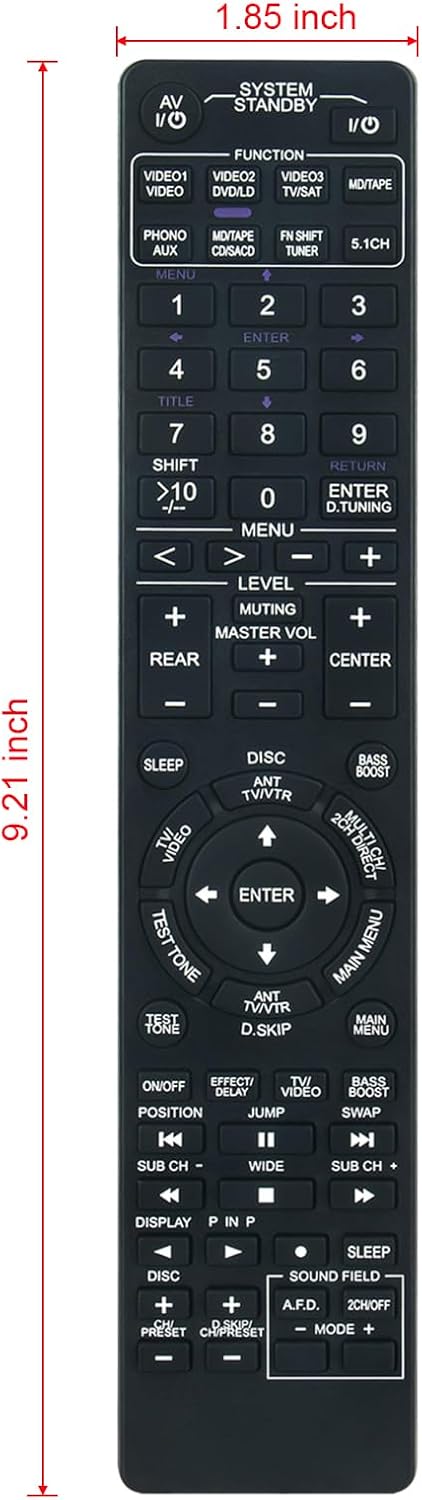
Image: Remote control with indicated dimensions of 9.21 inches (length) and 1.85 inches (width).
7. Maintenance
- Cleaning: Wipe the remote control with a soft, dry cloth. Do not use liquid cleaners or abrasive materials.
- Storage: Store the remote control in a cool, dry place away from direct sunlight and extreme temperatures.
- Battery Replacement: If the remote will not be used for an extended period, remove the batteries to prevent leakage and potential damage.
8. Warranty and Support
As a replacement remote control, specific warranty details may vary. Please refer to the seller or your purchase documentation for information regarding warranty coverage and customer support. For any operational issues not covered in this manual, contact the seller for assistance.


