
SANODESK 160x75cm White Frame + White Top (ASIN: B0CRDLJ32T)
SANODESK Electric Standing Desk User Manual
Model: 160x75cm White Frame + White Top (ASIN: B0CRDLJ32T)
1. Introduction
Thank you for choosing the SANODESK Electric Standing Desk. This manual provides essential information for the safe and efficient operation, assembly, and maintenance of your new desk. Please read it thoroughly before use and retain it for future reference.
This electric standing desk is designed to promote a healthier work environment by allowing seamless transitions between sitting and standing positions. Its robust construction and intelligent features ensure comfort and productivity.
2. Safety Information
Please observe the following safety precautions to prevent injury or damage to the product:
- This desk has a maximum load capacity of 60 kg (132 lbs). Do not exceed this weight limit.
- Assembly should ideally be performed by two people to ensure stability and safety during the process.
- Ensure all cables are properly managed and secured to prevent tripping hazards or damage during height adjustments.
- Keep hands and objects clear of moving parts (legs, frame) during operation to avoid pinching or crushing.
- Do not allow children or pets near the desk during operation.
- Only use the desk on a flat, stable surface.
- Unplug the desk from the power outlet before cleaning or performing any maintenance.
- If the desk malfunctions or makes unusual noises, discontinue use immediately and contact customer support.
Always follow the assembly instructions carefully and adjust the height as needed for a comfortable and safe working environment.
3. Package Contents
Before beginning assembly, please verify that all components are present and undamaged. If any parts are missing or damaged, contact SANODESK customer service immediately.
| Component | Quantity | Description |
|---|---|---|
| Desktop Panel | 1 | 160x75cm White desktop with elegant curved design. |
| Leg Frames | 2 | White steel leg frames with integrated motors. |
| Control Panel | 1 | Digital display with memory presets and up/down buttons. |
| Power Adapter | 1 | Connects the desk to a power outlet. |
| Cable Management Tray | 1 | For organizing power and data cables. |
| Accessory Kit | 1 | Includes screws, Allen wrenches, and other small parts. |
| Cup Holder | 1 | Attachable cup holder for convenience. |
| Headphone Hook | 1 | Attachable hook for headphones. |
4. Setup and Assembly
The assembly process is designed to be straightforward, typically taking around 30 minutes. While one person can assemble it, two people are recommended for easier handling of the desktop and frame.
- Unpack Components: Carefully remove all parts from the packaging and lay them out on a clean, soft surface to prevent scratches.
- Attach Leg Frames: Secure the two leg frames to the underside of the desktop using the provided screws and tools. Ensure they are aligned correctly with the pre-drilled holes.

Image: Fully assembled SANODESK Electric Standing Desk, showcasing its clean design and ample workspace. Note the integrated control panel and accessories like the cup holder and headphone hook. - Install Control Panel: Mount the control panel to the designated location on the front edge of the desk. Connect its cable to the motor unit.

Image: Detailed view of the multifunction control panel, featuring a digital display, memory function, timer, sit/stand toggle, and up/down buttons for precise height adjustment. - Connect Power: Connect the power adapter to the desk's motor unit and then plug it into a standard electrical outlet.
- Attach Accessories: Secure the cup holder and headphone hook to the desired locations on the desk frame.

Image: A close-up showing the elegant curved edge of the desk and the attached cup holder, highlighting the thoughtful design for user convenience. - Cable Management: Use the provided cable management tray and ties to organize and secure all cables, ensuring they do not interfere with the desk's movement.
5. Operating Instructions
5.1. Initial Setup and Reset
Upon first use or after a power interruption, you may need to reset the desk. Refer to the control panel instructions for the specific reset procedure, usually involving holding down a designated button until the desk reaches its lowest point and slightly rises.
5.2. Adjusting Height
- Use the Up (⌃) and Down (⌄) buttons on the control panel to manually adjust the desk height. The digital display will show the current height.
- The desk offers a wide height range from 73 cm to 118 cm, allowing for comfortable sitting and standing positions.

Image: Two SANODESK desks, one white and one black, illustrating the smooth height adjustment from 71cm to 116cm, accommodating both sitting and standing preferences.
5.3. Memory Presets
The control panel allows you to save your preferred sitting and standing heights for quick adjustments.
- Adjust the desk to your desired height.
- Press the "M" or "Set" button (refer to your specific control panel layout).
- Press one of the numbered preset buttons (e.g., 1, 2, 3) to save the current height to that memory slot.
- To recall a saved height, simply press the corresponding numbered preset button. The desk will automatically move to that position.

5.4. Sedentary Reminder Function
The desk features a sedentary reminder to encourage movement. You can set a timer on the control panel (e.g., 45 minutes). Once the timer expires, the desk will prompt you to change your position.
5.5. Quiet Operation
The desk operates with an ultra-quiet motor, producing less than 50 dB of noise, ensuring a distraction-free work environment.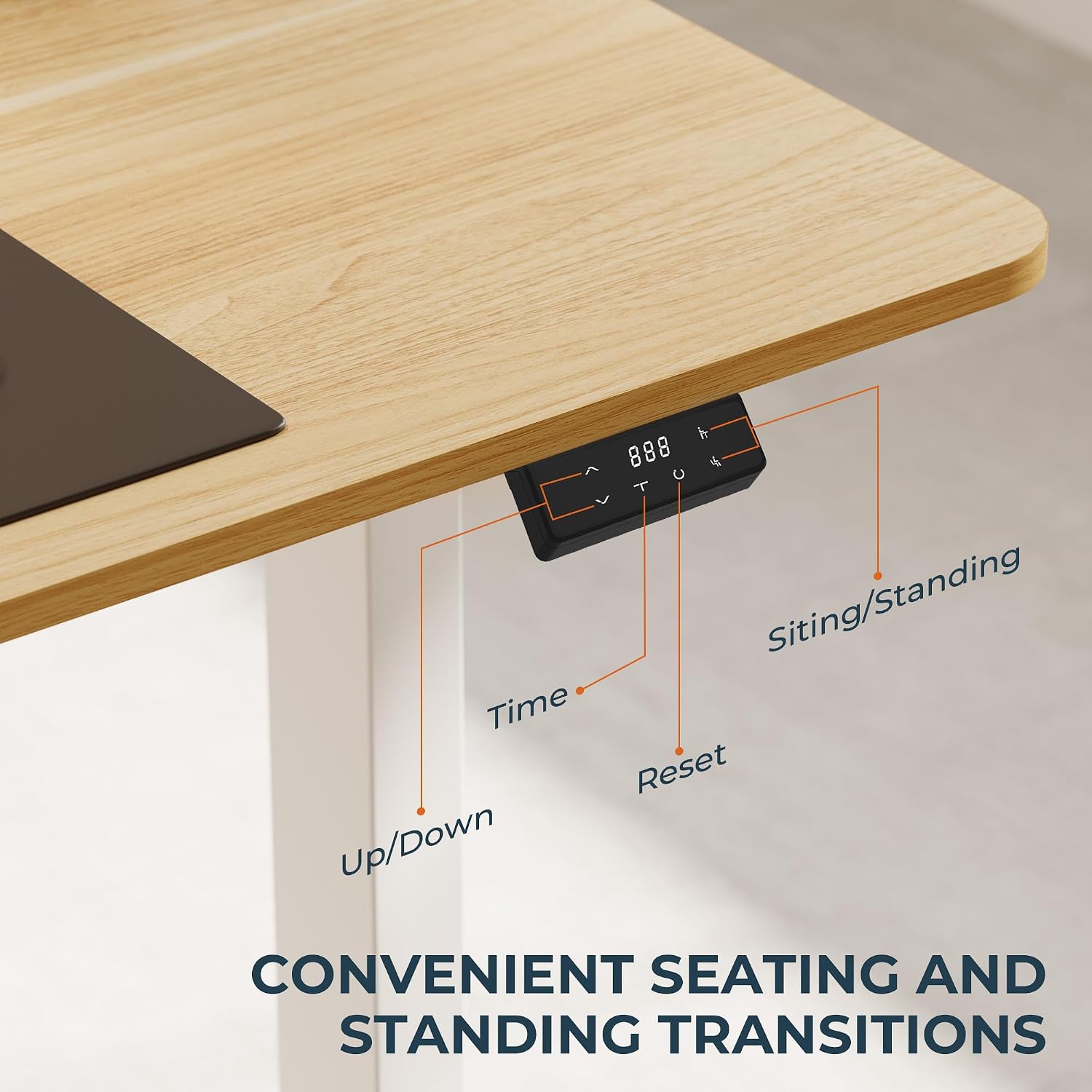
6. Maintenance and Care
- Cleaning: Wipe the desktop and frame with a soft, damp cloth. Avoid abrasive cleaners or harsh chemicals that could damage the finish.
- Inspection: Periodically check all screws and connections to ensure they are tight. Retighten if necessary.
- Cable Management: Regularly inspect cables for any signs of wear or damage. Ensure they remain neatly organized to prevent interference with desk movement.
- Load Capacity: Always adhere to the 60 kg load capacity. Overloading can damage the motor and frame.

Image: A graphic demonstrating the desk's robust 60kg load capacity, indicating its strength and reliability for supporting various office equipment.
7. Troubleshooting
If you encounter any issues with your SANODESK Electric Standing Desk, please refer to the following common problems and solutions:
| Problem | Possible Cause | Solution |
|---|---|---|
| Desk does not move. | Power cable disconnected, motor error, overload. | Check power connections. Perform a reset (refer to control panel manual). Reduce weight on desk. |
| Desk moves unevenly. | Unbalanced load, loose connections. | Distribute weight evenly. Check and tighten all screws on the frame. |
| Error code on display. | Specific system malfunction. | Refer to the control panel's specific error code guide (usually in a separate small manual or quick start guide). Often requires a reset. |
| Desk stops mid-movement. | Overheat protection, anti-collision activated. | Allow motor to cool down for 20 minutes. Check for obstructions under or around the desk. |
If the problem persists after attempting these solutions, please contact SANODESK customer support for further assistance.
8. Product Specifications
- Brand: SANODESK
- Model: Electric Standing Desk (160x75cm White Frame + White Top)
- Dimensions (L x W x H): 160 x 75 x 73-118 cm (63 x 29.5 x 28.7-46.5 inches)
- Height Adjustment Range: 73 cm - 118 cm (28.7 inches - 46.5 inches)
- Material: Aluminum and Alloy Steel frame, Wood desktop
- Color: White Frame + White Top
- Weight Capacity: 60 kg (132 lbs)
- Noise Level: < 50 dB
- Special Features: Ergonomic, Electric Height Adjustment, Memory Function, Sedentary Reminder, Quiet Operation, Cup Holder, Headphone Hook.
9. Warranty and Support
SANODESK is committed to providing high-quality products and excellent customer service. If you have any questions, concerns, or require warranty assistance, please do not hesitate to contact us.
We offer 24-hour online service. For any questions or warranty issues during assembly and use, please contact us at any time.
For more information and support, please visit the official SANODESK store: SANODESK Store
Related documents160x75cm White Frame + White Top (ASIN: B0CRDLJ32T)


Ask a question about this manual
Ask about setup, troubleshooting, compatibility, parts, safety, or missing instructions. Manuals+ will review the question and use this page’s manual context to help answer it.