1. Introduction
Thank you for choosing the MYPLUS Under Cabinet Lights with Hand Wave. This LED light bar is designed to provide versatile and convenient lighting for various indoor spaces such as kitchens, workbenches, and study areas. Featuring hand wave activation, dimmable brightness, and adjustable color temperatures, this product enhances your lighting experience with ease of use and modern functionality.
2. Safety Information
- Ensure the product is installed in a dry, indoor environment. It is not water resistant.
- The hand wave sensor is effective from a distance of approximately 1-3 inches.
- To activate or deactivate the light, wave your palm horizontally under the sensor once. Avoid waving multiple times quickly or covering the sensor, as this may interfere with its operation.
- Always unplug the light from the power source before cleaning or performing any maintenance.
- Do not attempt to disassemble or modify the light bar. This may void the warranty and pose a safety risk.
3. Package Contents
Please verify that all items are present in the package:
- LED Light Bar (1 unit)
- Installation Buckles and Adhesive (for mounting)
- Screws (for mounting)
- User Manual

Image 3.1: Contents of the MYPLUS Under Cabinet Lights package.
4. Product Features
- Hand Wave Activation: Turn the light on or off with a simple wave of your hand, ideal for situations where your hands are occupied or soiled.
- Dimmable Brightness: Offers 10 levels of brightness adjustment, from 8% to 100%, to suit various lighting needs.
- 5 Color Temperatures: Choose from 2700K (Warm White), 3500K (Soft White), 4000K (Neutral White), 5000K (Cool White), and 6500K (Daylight White).
- High Brightness: Equipped with 80 high-brightness LEDs, delivering up to 450 lumens of illumination.
- Memory Function: The light remembers the last brightness and color temperature settings used, providing a consistent experience upon reactivation.
- Easy Installation: Can be installed using either adhesive pads or screws, offering flexible mounting options.
- Wide Application: Suitable for under cabinets, workbenches, desks, laundry rooms, and other indoor areas requiring auxiliary lighting.

Image 4.1: Product features and dimensions overview.
5. Specifications
| Brand | MYPLUS |
| Model Name | Hand Wave Cabinet Lights Color Temperature |
| Item Model Number | MYPLUSGG121 |
| Product Dimensions | 16"L x 1.77"W x 1.57"H |
| Item Weight | 0.317 ounces |
| Material | Acrylonitrile Butadiene Styrene, Polycarbonate |
| Color | White |
| Power Source | Corded Electric |
| Voltage | 120 Volts |
| Wattage | 7 Watts |
| Brightness | 450 Lumens |
| Light Source Type | LED |
| Control Method | Hand Wave Sensor, Touch |
| Special Features | 16 Inch, 6.5W, Dimmable, Tunable White, Hand Wave Activation |
| Indoor/Outdoor Usage | Indoor |
| Water Resistance Level | Not Water Resistant |
6. Setup and Installation
The MYPLUS Under Cabinet Light offers two installation methods: adhesive mounting or screw mounting.
6.1 Choose Your Mounting Location
Select a clean, dry, and flat surface under your cabinet or desired location. Ensure the power outlet is within reach of the light's cord.
6.2 Adhesive Mounting (Recommended for smooth surfaces)
- Clean the mounting surface thoroughly to ensure it is free of dust, grease, and moisture.
- Attach the 3M adhesive pads to the back of the fixing clips.
- Position the clips on the desired mounting surface, ensuring they are evenly spaced and aligned with the light bar. Press firmly for 30 seconds to secure the adhesive.
- Slide the LED light bar into the installed fixing clips until it clicks securely into place.
6.3 Screw Mounting (Recommended for uneven or porous surfaces)
- Mark the desired screw positions on the mounting surface using the fixing clips as a template.
- Drill pilot holes if necessary, appropriate for the provided screws.
- Secure the fixing clips to the surface using the provided screws.
- Slide the LED light bar into the installed fixing clips until it clicks securely into place.
6.4 Power Connection
Once the light bar is securely mounted, plug the power cord into a standard 120V electrical outlet.
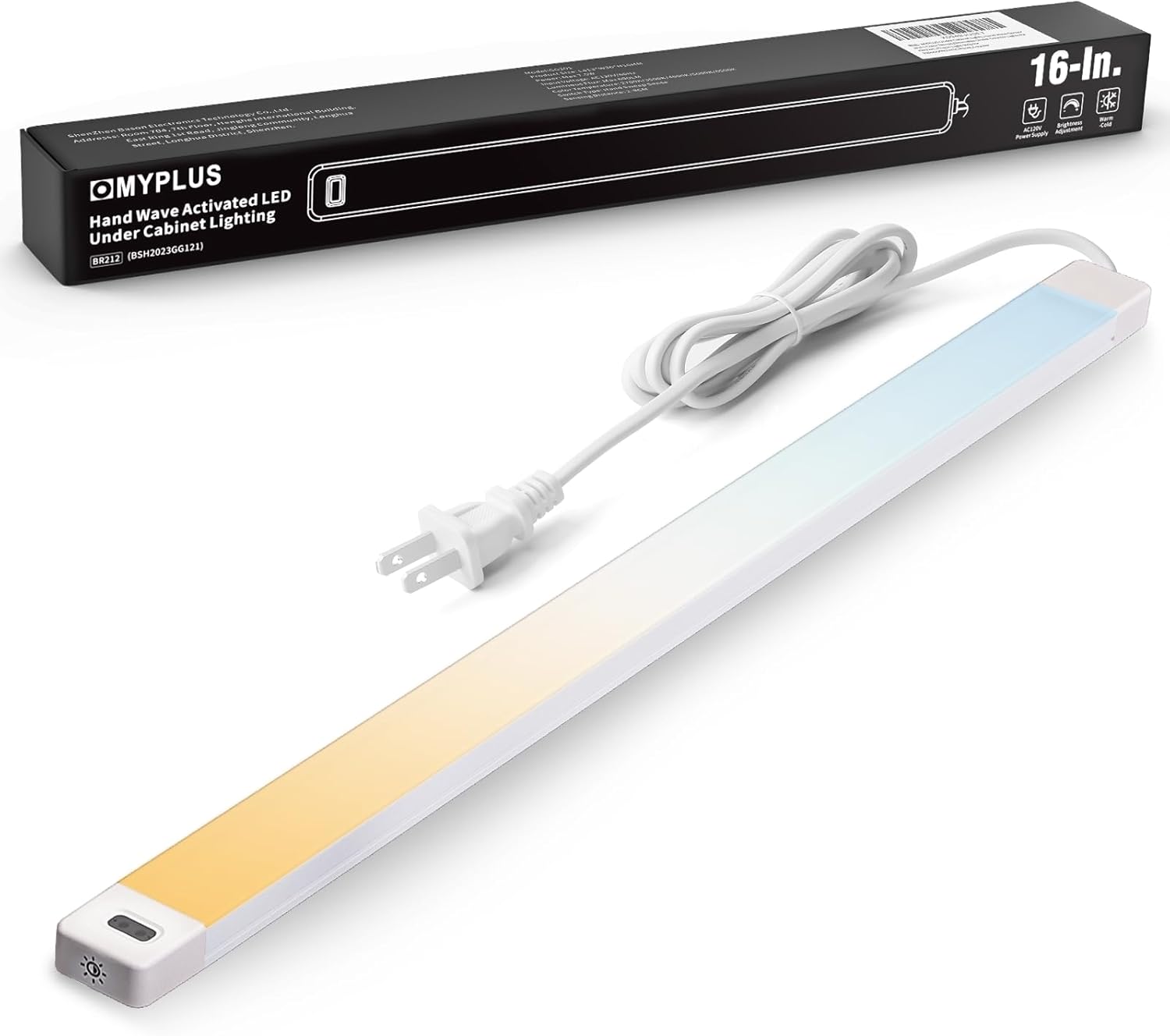
Image 6.1: MYPLUS Under Cabinet Light ready for installation.
7. Operating Instructions
The MYPLUS Under Cabinet Light features intuitive controls for easy operation.
7.1 Power On/Off (Hand Wave Activation)
To turn the light on or off, simply wave your hand horizontally under the sensor once. The sensor is located on one end of the light bar.

Image 7.1: Hand wave activation of the light.
7.2 Adjusting Color Temperature (Touch Control)
To change the color temperature, locate the touch switch icon on the light bar. Briefly touch this icon to cycle through the 5 available color temperatures: 2700K, 3500K, 4000K, 5000K, and 6500K.

Image 7.2: Touch control for changing color temperature.
7.3 Adjusting Brightness (Hand Wave Dimming)
To adjust the brightness, place your hand below the sensor for a few seconds. The light will gradually dim or brighten. Remove your hand when the desired brightness level is reached. The light will remember the last brightness setting.
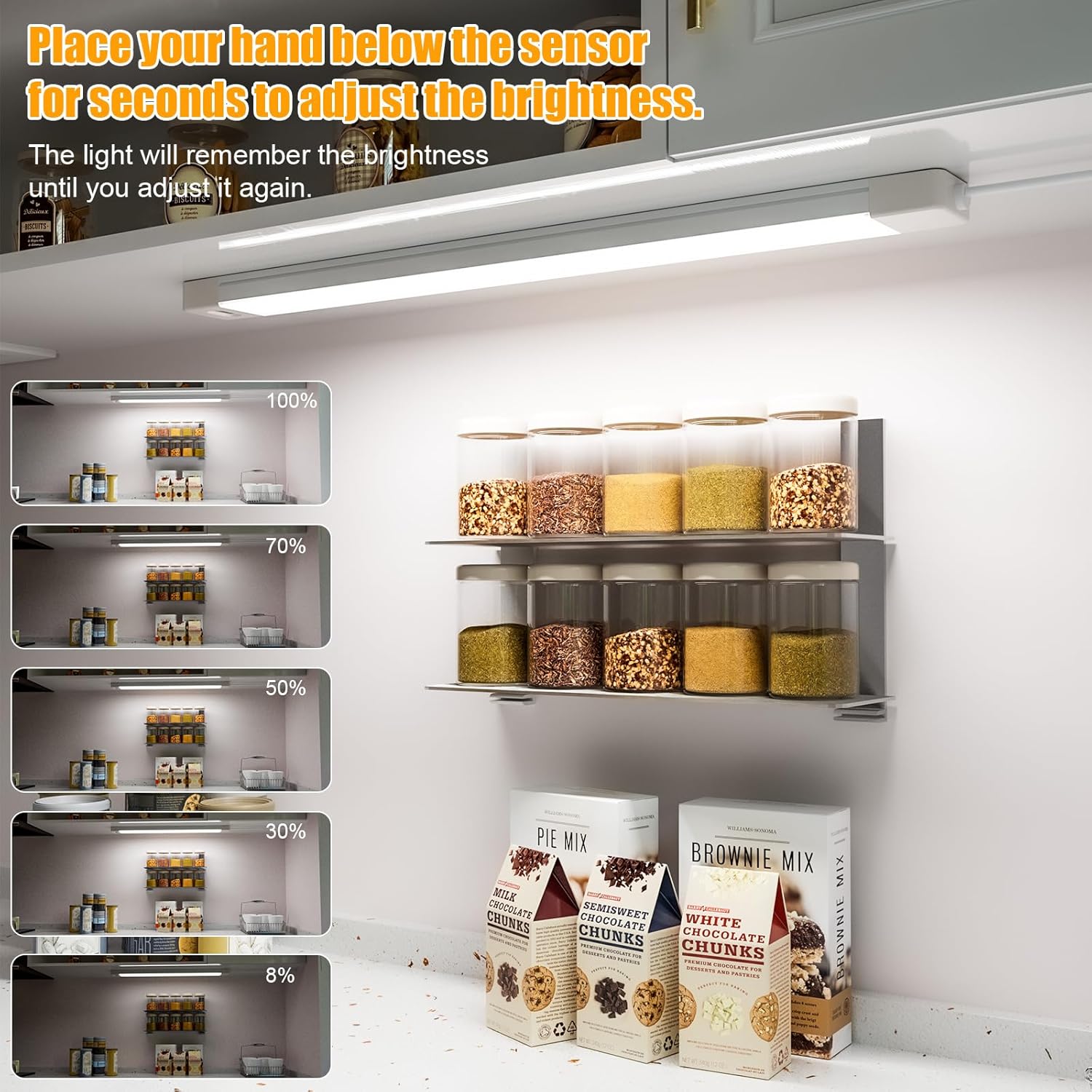
Image 7.3: Adjusting brightness using the hand wave sensor.
8. Maintenance
To ensure the longevity and optimal performance of your MYPLUS Under Cabinet Light, follow these simple maintenance guidelines:
- Cleaning: Disconnect the power before cleaning. Use a soft, dry cloth to wipe the surface of the light bar. Do not use abrasive cleaners, solvents, or harsh chemicals, as these can damage the finish or electronic components.
- Sensor Care: Keep the hand wave sensor area clean and unobstructed for proper functionality.
- Storage: If storing the light for an extended period, ensure it is clean and dry, and store it in a cool, dry place away from direct sunlight.
9. Troubleshooting
If you encounter any issues with your MYPLUS Under Cabinet Light, please refer to the following troubleshooting steps:
| Problem | Possible Cause | Solution |
|---|---|---|
| Light does not turn on. | No power, loose connection, or sensor obstruction. | Ensure the power cord is securely plugged into a working outlet. Check for any obstructions near the sensor. Try waving your hand once directly under the sensor. |
| Hand wave activation is inconsistent or unresponsive. | Sensor obstructed, incorrect waving motion, or sensor interference. | Ensure the sensor area is clean and clear. Wave your hand horizontally once, approximately 1-3 inches from the sensor. Avoid rapid, multiple waves or covering the sensor. Ensure no other objects are constantly within the sensor's range. |
| Cannot change color temperature. | Touch sensor not activated correctly. | Ensure you are touching the designated touch switch icon on the light bar. A brief, firm touch is usually sufficient. |
| Cannot adjust brightness. | Incorrect dimming gesture. | Place your hand below the sensor and hold it there for a few seconds. The brightness will cycle. Remove your hand when the desired level is reached. |
| Light flickers or behaves erratically. | Unstable power supply or internal fault. | Try plugging the light into a different outlet. If the issue persists, discontinue use and contact customer support. |
10. Warranty and Support
MYPLUS provides a warranty for this product. If you experience any issues or have questions regarding your Under Cabinet Light, please do not hesitate to contact us. We are committed to providing a satisfactory solution within 24 hours.
For support, please refer to the contact information provided on the product packaging or the official MYPLUS website.


